It is currently Sat Sep 04, 2010 5:24 am

All times are UTC - 5 hours [ DST ]


Post new topic Reply to topic  [ 4 posts ] 
Author Message
 Post subject: Make Opals with Plasma
PostPosted: Sun Apr 11, 2010 11:26 pm 
Offline
Administrator
User avatar

Joined: May 22, 2008
Posts: 780
Location: Somewhere in GIMP
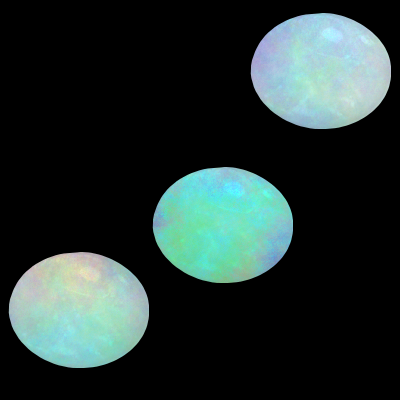
This is a quick and easy tutorial. The hardest part is deciding which plasma render to use and that is a personal choice.

Get the gems brushes here. Unzip the brushes into a new folder on your hard drive. The brush used in this tutorial is Gems_31.gbr. Copy it and paste it into your /.gimp/brushes folder.

Image

  1. Open a new image. I started with a 400x400 transparent image and renamed the Background layer, plasma.
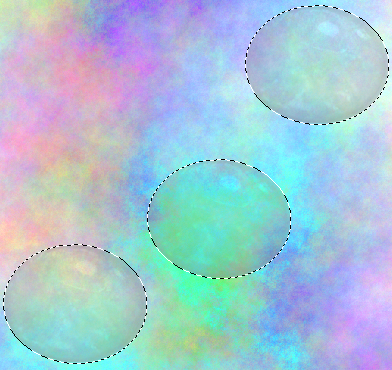
  2. Filters > Render > Clouds > Plasma. Click the New Seed button until you get plasma with colors you like. I increased the turbulence to 1.3.
  3. Colors > Hue and Saturation. Slide the Lightness slider all the way to the right (100). I increased the Saturation to 59 on this particular Plasma rendering. It is a judgement call though because every plasma is different. Play with the control to come up with what you like.
  4. Make a new transparent layer and name it gem.
  5. Set your FG color to 8b8b8b (medium gray).
  6. Click the Paintbrush tool and find the Gems_31 brush. I resized it to 0.5. Paint over areas in the plasma that you think would make pretty opals.
  7. After you have your opals in place, use the Fuzzy select tool and select the transparent area around the brushes.

    Image

  8. Select the plasma layer and press the Delete key.
  9. Merge the gem layer down to the plasma layer.
  10. *** The brush is a bit rough. Do this to smooth your opals. Right-click the layer and choose Alpha to Selection.
  11. In the Paths dialog click the Selection to Path button.
  12. Unselect.
  13. Click the Path to Selection button.
  14. Invert the selection.
  15. Select > Grow > 1 pixel.
  16. Press the Delete key, unselect, and you are done.
*** Steps 10 through 16 are a bit tedious but Path to Selection is smoother than doing Alpha to Selection.

_________________
Image
Embrace the Zen of Undo. While you're at it, give Wilber a hug.

Image


Share on Facebook Share on Twitter Share on Orkut Share on Digg Share on MySpace Share on Delicious Share on Technorati
Top
 Profile  
 
 Post subject: Re: Make Opals with Plasma
PostPosted: Mon Apr 12, 2010 5:03 pm 
Offline
GimpChat Member

Joined: Apr 12, 2010
Posts: 234
:jumpclap
:clap :clap :clap

_________________
Main gallery http://www.flickriver.com/photos/photocomix-mandala/
Mandala and simmetry http://www.flickriver.com/photos/photocomix_mandala/

Image

Mrs Wilbress


Top
 Profile  
 
 Post subject: Re: Make Opals with Plasma
PostPosted: Tue Apr 13, 2010 4:52 pm 
Offline
GimpChat Member
User avatar

Joined: Apr 07, 2010
Posts: 340
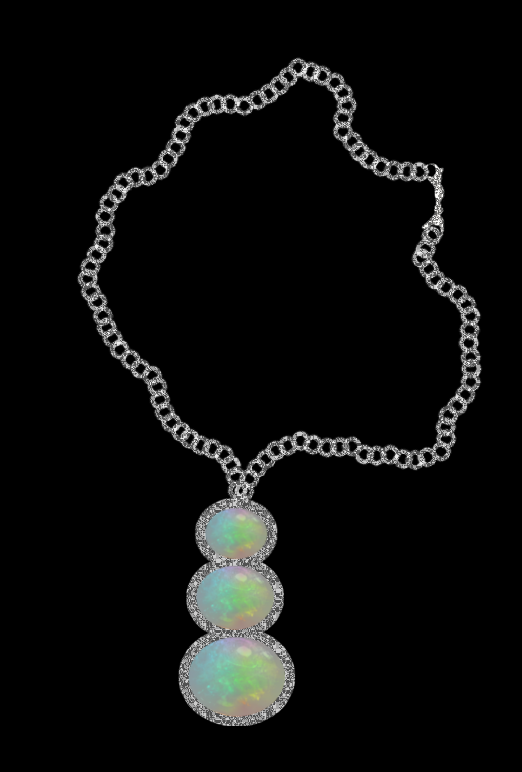
This is an opal pendant I made using the opal plasma tute by Oregonian.
I made the opal resized it twice to make the trio.
I used Oregonion's silversparkle to make the borders around the opals.
I then made the chain on a transparent layer, filled with the same silversparkle then found a clasp on the internet and filled with silvesparkle also on a separate layer.
Image

_________________
Image


Top
 Profile  
 
 Post subject: Re: Make Opals with Plasma
PostPosted: Tue Apr 13, 2010 5:20 pm 
Offline
Administrator
User avatar

Joined: May 22, 2008
Posts: 780
Location: Somewhere in GIMP
Those look so real, Molly. I'd love to have a necklace like that. Thanks for trying my tutorial.

_________________
Image
Embrace the Zen of Undo. While you're at it, give Wilber a hug.

Image


Top
 Profile  
 
Display posts from previous:  Sort by  
Post new topic Reply to topic  [ 4 posts ] 

All times are UTC - 5 hours [ DST ]


Who is online

Yahoo [Bot]


You cannot post new topics in this forum
You cannot reply to topics in this forum
You cannot edit your posts in this forum
You cannot delete your posts in this forum
You cannot post attachments in this forum

Search for:
Jump to:  

* Login  

Powered by phpBB © 2000, 2002, 2005, 2007 phpBB Group