It is currently Sat Aug 29, 2026 1:04 pm


All times are UTC - 5 hours [ DST ]


Post new topic Reply to topic  [ 34 posts ]  Go to page 1, 2  Next
Author Message
 Post subject: Re: Cran-Tau
PostPosted: Sat Sep 25, 2010 7:18 pm  (#11) 
Offline
GimpChat Member
User avatar

Joined: Sep 24, 2010
Posts: 12838
I call this one Arcimboldo's Planet. Used Rob's Script-fu and then applied lens distortion to curve it some. :)


Attachments:
arcim_planet.jpg
arcim_planet.jpg [ 613.38 KiB | Viewed 2946 times ]

_________________
Lyle

Psalm 109:8

Image
Top
 Post subject: Re: Cran-Tau
PostPosted: Sat Sep 25, 2010 7:44 pm  (#12) 
Offline
Retired Staff
User avatar

Joined: May 22, 2008
Posts: 6946
Location: Somewhere in GIMP
I wanted to see what those other settings did. On a transparent layer I made a 6-sided polygon and filled it with a pattern. Then made a new transparent layer for brushing.

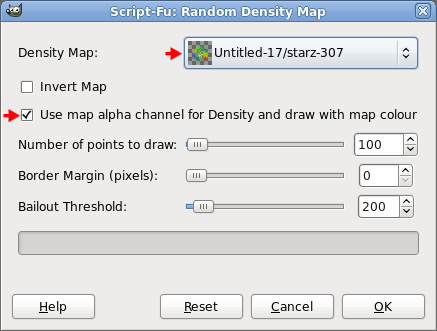
I used the pattern-filled shape as the density map and checked the box where it says Use map alpha channel for Density and draw with map colour.

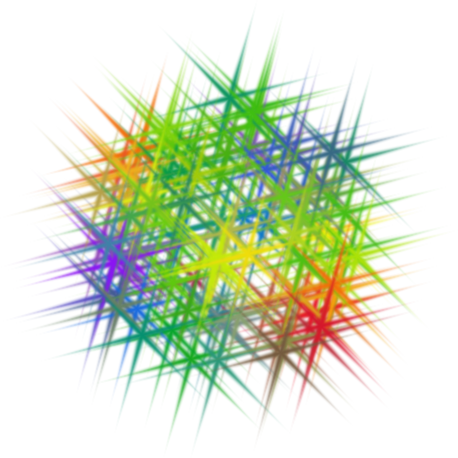
I have a grayscale spiky brush I used for painting. If you check Invert Map, the brush fills in the area around the shape - that's just a side note to explain what happens.

Anyway, the brush gets colored from the colors in the pattern on the map. It's a delightful, versatile script.

Image

These are my results.
Image


Top
 Post subject: Re: Cran-Tau
PostPosted: Sat Sep 25, 2010 7:48 pm  (#13) 
Offline
Retired Staff
User avatar

Joined: May 22, 2008
Posts: 6946
Location: Somewhere in GIMP
lylejk wrote:
I call this one Arcimboldo's Planet. Used Rob's Script-fu and then applied lens distortion to curve it some. :)

I love it!!!! :clap :gimp

_________________
Image
World War IV will be fought with sticks and stones. - Albert Einstein


Top
 Post subject: Re: Cran-Tau
PostPosted: Sat Sep 25, 2010 7:51 pm  (#14) 
Offline
Global Moderator
User avatar

Joined: May 16, 2010
Posts: 16168
In case it go's down again here is the script code
Just save it as a SCM extension in your scripts folder, find it in /Filters/Map/Random Density Map
in the program menu.

Nice script ill have to try this out later. thanks btw. =)

; random_density_map.scm
; by Rob Antonishen
; http://silent9.com

; Version 1.0 (20080408)

; Description
;
; Script to draw a specified number of random points with the currently
; selected brush, using a density mask.
; Will appear in Filters->Map Menu
;

; based on random.scm
; by Charles Cave <[email protected]>
; http://members.optusnet.com.au/~charles57/GIMP

; License:
;
; This program is free software; you can redistribute it and/or modify
; it under the terms of the GNU General Public License as published by
; the Free Software Foundation; either version 2 of the License, or
; (at your option) any later version.
;
; This program is distributed in the hope that it will be useful,
; but WITHOUT ANY WARRANTY; without even the implied warranty of
; MERCHANTABILITY or FITNESS FOR A PARTICULAR PURPOSE.  See the
; GNU General Public License for more details.
;
; The GNU Public License is available at
; http://www.gnu.org/copyleft/gpl.html
(define (script-fu-random-density-map img inLayer inDensityMap inInvertMap inUseAlpha inIterations inMargin inBailout)

  (let* (
        (x1 0)
        (y1 0)
        (ctr 0)
        (x2 (car (gimp-drawable-width inLayer)))
        (y2 (car (gimp-drawable-height inLayer)))
        (xMap (car (gimp-drawable-width inDensityMap)))
        (yMap (car (gimp-drawable-height inDensityMap)))
        (x 0)
        (y 0)
        (map-type 0)
        (get-val 0)
        (test 0)
        (thresh 0)
        (*randompoint* (cons-array 2 'double))
        (drw-width 0)
        (drw-height 0)
      (lc 0)
        )

  ; define drawable area for the algorithm
  (set! x1 (+ x1 inMargin))
  (set! x2 (- x2 inMargin))
  (set! y1 (+ y1 inMargin))
  (set! y2 (- y2 inMargin))  (set! drw-width  (- x2 x1))
  (set! drw-height (- y2 y1))

  ;get map type:  RGB-IMAGE (0), RGBA-IMAGE (1), GRAY-IMAGE (2), GRAYA-IMAGE (3), INDEXED-IMAGE (4), INDEXEDA-IMAGE (5)
  (set! map-type (car (gimp-drawable-type inDensityMap)))

  ; make sure maps isn't indexed
  (if (or (= map-type INDEXED-IMAGE) (= map-type INDEXEDA-IMAGE))
    (gimp-message "Density Map can not be indexed!") ; error
   (if (or (not (= x2 xMap)) (not (= y2 yMap)))
      (gimp-message "Density Map must be the same size as the active layer!") ; error
       ;it begins here
      (begin
       (gimp-context-push)
       (gimp-image-undo-group-start img)
     
       ; set up progress bar
       (gimp-progress-set-text _"Rendering Random masked Image")
     
       (while (and (< ctr inIterations) (< lc inBailout))
     
         ; get a random location
         (set! x (+ x1 (random drw-width )))
         (set! y (+ y1 (random drw-height)))

         ; get the pixel value at that spot
         (set! get-val (cadr (gimp-drawable-get-pixel inDensityMap x y)))
         
         ; pick a number, any number
         (set! thresh (random 255))

         (if (and (= inUseAlpha TRUE) (= (car (gimp-drawable-has-alpha inDensityMap)) TRUE))   ; if using alpha
          (begin
            (set! test (aref get-val 3))   ; test threshold against alpha ( index 3)
            (gimp-context-set-foreground (list (aref get-val 0) (aref get-val 1) (aref get-val 2)))  ;set brush colour
          )
          (if (or (= map-type GRAY-IMAGE) (= map-type GRAYA-IMAGE))  ;  else if greyscale
            (set! test (aref get-val 0))  ; test threshold against colour ( index 0)
            (if (or (= map-type RGB-IMAGE) (= map-type RGBA-IMAGE))  ; else if colour
             (set! test (/ (+ (aref get-val 0) (aref get-val 1) (aref get-val 2)) 3)) ; test threshold against average of r g and b
             (set! test 255) ;  else threshold to full value (always draw)
            )
          )
         )           
         (if (= inInvertMap TRUE)  ; reverse the map if invert option
          (set! test (- 255 test))
         )
         (if (< thresh test)    ; compare threshold against random value
          (begin
            (set! ctr (+ ctr 1))       ; increment counter
            (set! lc 0)
            (aset *randompoint* 0 x)   ; set the paint array
            (aset *randompoint* 1 y)
            (gimp-paintbrush-default inLayer 2 *randompoint*) ; paint point
            (gimp-progress-update (/ ctr inIterations))  ;update progress bar
          )
         )
         (set! lc (+ lc 1))
       )
     
       (if (>= lc inBailout)
         (gimp-message "Bailout Parameter Exceeded - Aborted!") ; error     
       )
     
       (gimp-progress-end)
       (gimp-image-undo-group-end img)
       (gimp-displays-flush)
       (gimp-context-pop)
      )
    )
    )
  )
)

(script-fu-register "script-fu-random-density-map"
                    "<Image>/Filters/Map/Random Density Map..."
                    "Draw a specified number of random points with the currently selected brush, using a density mask."
                    "Rob Antonishen"
                    "Rob Antonishen"
                    "April 2008"
                    "RGB*, GRAY*"
                    SF-IMAGE       "Image"         0
                    SF-DRAWABLE    "Drawable"      0
                    SF-DRAWABLE    "Density Map"   -1
                SF-TOGGLE      "Invert Map"    FALSE
               SF-TOGGLE      "Use map alpha channel for Density and draw with map colour"  FALSE
                    SF-ADJUSTMENT  "Number of points to draw"     '(10 1 10000 10 100 0 0)
                    SF-ADJUSTMENT  "Border Margin (pixels)"       '(0 0 100 1 6 0 0)
                    SF-ADJUSTMENT  "Bailout Threshold"            '(200 100 2000 10 100 0 0)
                    )

_________________
Image


Top
 Post subject: Re: Cran-Tau
PostPosted: Sat Sep 25, 2010 8:09 pm  (#15) 
Offline
GimpChat Member
User avatar

Joined: Sep 24, 2010
Posts: 12838
Haven't played with that feature yet O, but your result does look cool. Good idea Rod; didn't want to step on Rob's shoe so just linked it earlier. It definitely needs a better host. Maybe Rob will officially release it to the registry. I'll ask him at GIMPTalk. :)

_________________
Lyle

Psalm 109:8

Image


Top
 Post subject: Re: Cran-Tau
PostPosted: Sat Sep 25, 2010 8:35 pm  (#16) 
Offline
Global Moderator
User avatar

Joined: May 16, 2010
Posts: 16168
lylejk wrote:
Haven't played with that feature yet O, but your result does look cool. Good idea Rod; didn't want to step on Rob's shoe so just linked it earlier. It definitely needs a better host. Maybe Rob will officially release it to the registry. I'll ask him at GIMPTalk. :)


If Rob see's it here and asks me to remove it i will.I do not think he will mind as long as it's not being sold or copyright abuse isn't going on.

Thanks Rob in advance for the script. =)

Question though:
Can someone explain exactly how to use this script?
Every time i run it no matter what setting i use i get an integer error.
I created a black canvas, created another layer with a white blurred circle,created another white layer to run the filter on, painted (on the white layer) with a red brush (size 10), tried the filter with default settings and got the error still.

Any help?

_________________
Image


Top
 Post subject: Re: Cran-Tau
PostPosted: Sat Sep 25, 2010 8:47 pm  (#17) 
Offline
Retired Staff
User avatar

Joined: May 22, 2008
Posts: 6946
Location: Somewhere in GIMP
Rod wrote:
I created a black canvas, created another layer with a white blurred circle,created another white layer to run the filter on, painted (on the white layer) with a red brush (size 10), tried the filter with default settings and got the error still.

Any help?
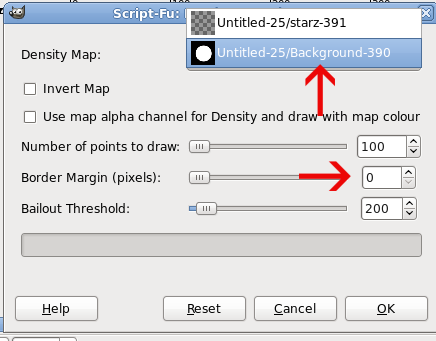
The white blurred circle should be merged down to the black canvas. Then be sure that black and white layer is selected in the Density Map dropdown.

You can also make the additional white layer a transparent layer if you want. Select the white or transparent layer before starting the script.

Image

_________________
Image
World War IV will be fought with sticks and stones. - Albert Einstein


Top
 Post subject: Re: Cran-Tau
PostPosted: Sat Sep 25, 2010 10:57 pm  (#18) 
Offline
Script Coder
User avatar

Joined: Jul 14, 2010
Posts: 697
Hi-

Glad you found a good use! As pointed out I rewrote the script to "fill" from the top down in a (optionally jittered) grid. This is because the main use I have for the script is in my map making.

For example this: http://fc01.deviantart.net/fs70/i/2010/ ... _ffaat.jpg

Where I don't want completely random trees, but want the ones "in front" to over-paint the ones "behind" when running the script.

The random one you posted here could use some speedup (I should try it in python which would be much faster to sample the canvas).

-Rob A>

_________________
Image
Fantasy Cartography and Mapping by RobA


Top
 Post subject: Re: Cran-Tau
PostPosted: Sat Sep 25, 2010 11:08 pm  (#19) 
Offline
GimpChat Member
User avatar

Joined: Sep 24, 2010
Posts: 12838
I know your are a map guy Rob; cool use of your Grid version for laying out the trees. Not sure if you ever heard of Jigsaw Image Mosaics, but I think I can coax your grid version to get a better result to approximate these (haven't tried yet; need to create a gih set with the object that will fill an arbitrary container (selection island) and see. :)

_________________
Lyle

Psalm 109:8

Image


Top
 Post subject: Re: Cran-Tau
PostPosted: Sat Sep 25, 2010 11:13 pm  (#20) 
Offline
Global Moderator
User avatar

Joined: May 16, 2010
Posts: 16168
lol ... now it keeps telling me the density map has to be the same size as the layer?

_________________
Image


Top
 Post subject: Re: Cran-Tau
PostPosted: Sat Sep 25, 2010 11:29 pm  (#21) 
Offline
GimpChat Member
User avatar

Joined: Sep 24, 2010
Posts: 12838
To Rod; you can dooo ittt. lol

:)

_________________
Lyle

Psalm 109:8

Image


Top
 Post subject: Re: Cran-Tau
PostPosted: Sat Sep 25, 2010 11:36 pm  (#22) 
Offline
GimpChat Member
User avatar

Joined: Apr 08, 2010
Posts: 5420
Location: Northwest Ohio
Image


Top
 Post subject: Re: Cran-Tau
PostPosted: Sun Sep 26, 2010 1:12 am  (#23) 
Offline
Retired Staff
User avatar

Joined: May 22, 2008
Posts: 6946
Location: Somewhere in GIMP
Rod wrote:
lol ... now it keeps telling me the density map has to be the same size as the layer?
I get that message if I change the Border Margin setting to something other than zero.

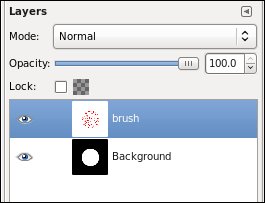
You should have two layers.

The top layer is either white or transparent. Make sure you have the top layer selected before you start the filter.

The bottom layer is the density map - black bg and white shape. Make sure you have it selected in the Density Map dropdown (what is the 'official' name for that dropdown?).

Image

_________________
Image
World War IV will be fought with sticks and stones. - Albert Einstein


Top
 Post subject: Re: Cran-Tau
PostPosted: Sun Sep 26, 2010 11:48 am  (#24) 
Offline
Global Moderator
User avatar

Joined: May 16, 2010
Posts: 16168
Ahh must be the border margin thing then, although i think the default settings has 0 for border.Not sure though.Ill try again. =)

Thanks O!

_________________
Image


Top
 Post subject: Re: Cran-Tau
PostPosted: Sun Sep 26, 2010 8:26 pm  (#25) 
Offline
GimpChat Member
User avatar

Joined: Apr 08, 2010
Posts: 5420
Location: Northwest Ohio
what is bailout threshold?


Top
 Post subject: Re: Cran-Tau
PostPosted: Sun Sep 26, 2010 8:34 pm  (#26) 
Offline
GimpChat Member
User avatar

Joined: Jul 04, 2010
Posts: 2253
Location: Retired Moderator Slowly Returning to the Living.
Here is two of my many experiments with it.
Attachment:
Wow.jpg
Wow.jpg [ 466.05 KiB | Viewed 1946 times ]


And


Attachments:
Kisses.jpg
Kisses.jpg [ 1.28 MiB | Viewed 1946 times ]

_________________
Artists aren't crazy! We're eccentric! ~G.M. Ross

Image

My Sigs = My Photos
Check out my work at http://www.flickr.com/photos/photomastergreg.
Top
 Post subject: Re: Cran-Tau
PostPosted: Sun Sep 26, 2010 8:46 pm  (#27) 
Offline
GimpChat Member
User avatar

Joined: Apr 08, 2010
Posts: 5420
Location: Northwest Ohio
those are very cool...how about a quick run-through?


Top
 Post subject: Re: Cran-Tau
PostPosted: Sun Sep 26, 2010 10:21 pm  (#28) 
Offline
GimpChat Member
User avatar

Joined: Jul 04, 2010
Posts: 2253
Location: Retired Moderator Slowly Returning to the Living.
I created a 800x600 blank white image.
I created a large black text layer that said wow.
I created a new transparent layer.
I selected a brush called Jelly_violet_lg.
I ran RobA's Random Density map on the transparent layer, using the text layer as the source.
I created a new transparent layer.
I selected a brush called Jelly_gunmetalblue_lg.
I ran RobA's Random Density map on the transparent layer, using the text layer as the source and inverted map.
I added a drop shadow to purple text layer.
I linked the shadow and the purple text layer and moved them slightly.
That was it for the first one.

The second one I did with a brush I created from a model's lips and added a gradient background.
Then I did the shadow on the lips layer, skewed it and shrunk the height

I can give more detail if needed.

_________________
Artists aren't crazy! We're eccentric! ~G.M. Ross

Image

My Sigs = My Photos
Check out my work at http://www.flickr.com/photos/photomastergreg.


Top
 Post subject: Re: Cran-Tau
PostPosted: Sun Sep 26, 2010 10:46 pm  (#29) 
Offline
GimpChat Member
User avatar

Joined: Sep 24, 2010
Posts: 12838
I like these PM. Man what cool toy this Script-fu is. :)

_________________
Lyle

Psalm 109:8

Image


Top
 Post subject: Re: Cran-Tau
PostPosted: Mon Sep 27, 2010 5:42 am  (#30) 
Offline
Global Moderator
User avatar

Joined: May 16, 2010
Posts: 16168
I hope to get it to work someday. lol

_________________
Image


Top
Post new topic Reply to topic  [ 34 posts ]  Go to page 1, 2  Next

All times are UTC - 5 hours [ DST ]


* Login  


Powered by phpBB3 © phpBB Group