It is currently Sun May 19, 2013 12:29 am


Latest GIMP Scripts & Plug-ins

All times are UTC - 5 hours [ DST ]


Post new topic Reply to topic  [ 12 posts ]  Go to page 1, 2  Next
Author Message
 Post subject: Fake Doyle Spiral.
PostPosted: Sat Mar 24, 2012 9:30 pm  (#1) 
Offline
GimpChat Member
User avatar

Joined: Sep 24, 2010
Posts: 4992
I knew I should be able to do this with Droste, but the solution eluded me until I saw a sunflower droste spiral then it hit me like a sledge hammer. Stroke a large circle with a target brush (in this case my ball bearing) and then run Droste playing with all kinds of other sliders (an eyeball situation unfortunately) and voila. This too, me months (ashamed to admit) since nobody ever wants to share their code at Flickr; only show their results. Still, my wacky mind never gives up (trust me; some problems that I've solved in the past literally took me years on and off; lol). I'm no coder; only a user, so my abilities are limited. :)

Click here for tut: viewtopic.php?f=10&t=3941


Attachments:
drost_sphere-Doyle-spiral.png
drost_sphere-Doyle-spiral.png [ 1.85 MiB | Viewed 599 times ]

_________________
Lyle

Psalm 109:8

Image
Share on Facebook Share on Twitter Share on Orkut Share on Digg Share on MySpace Share on Delicious Share on Technorati
Top
 Profile  
 

 Post subject: Re: Fake Doyle Spiral.
PostPosted: Sat Mar 24, 2012 10:06 pm  (#2) 
Offline
Global Moderator
User avatar

Joined: May 16, 2010
Posts: 8931
Location: "Looking for my eraser" =P
This effect would make some really nice oriental type art. :)
Nicely done Lyle, and congrats!

_________________
Image
Gimp Rocks Blog
Simply Gimp Tutorials
"Once your in the cloud, you're in the net"
____________
OK, . . . . so what's the speed of dark?


Top
 Profile  
 
 Post subject: Re: Fake Doyle Spiral.
PostPosted: Sat Mar 24, 2012 10:53 pm  (#3) 
Offline
GimpChat Member
User avatar

Joined: Sep 24, 2010
Posts: 4992
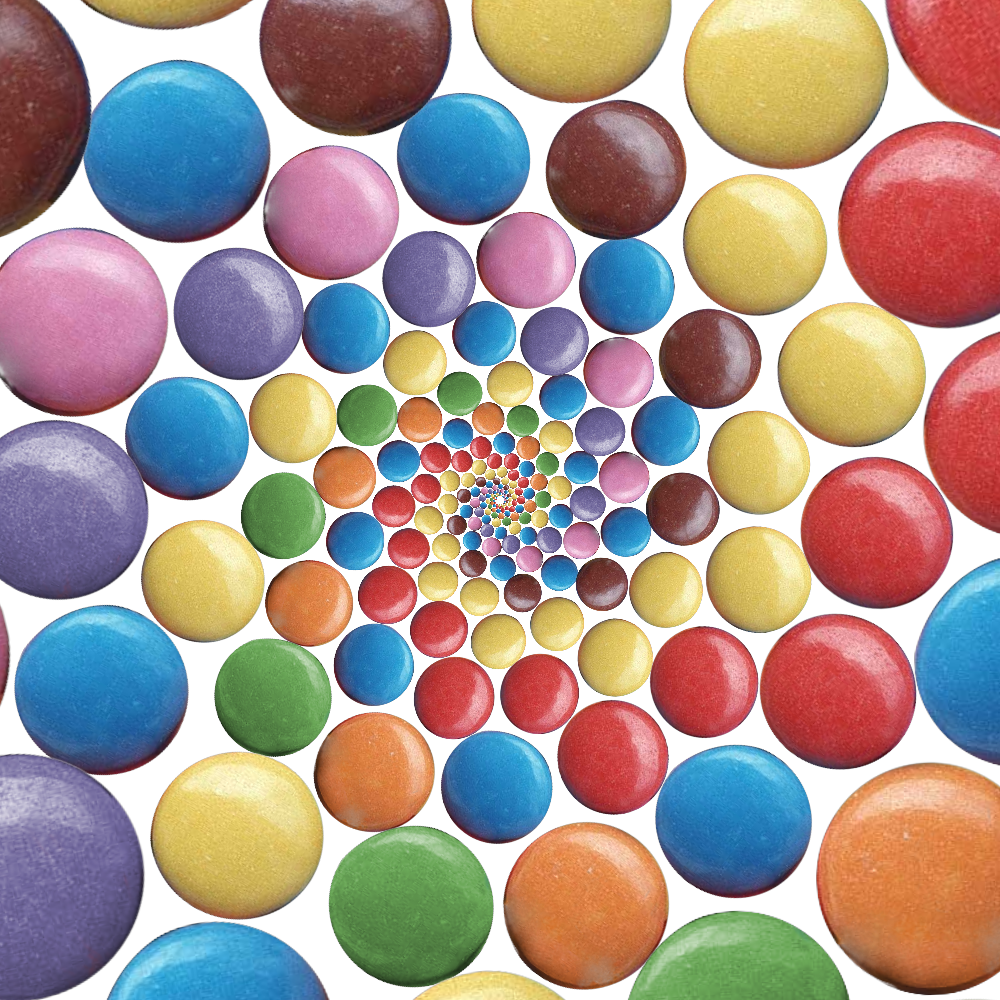
One weakness that I've yet to figure out with Droste is the center fill problem. Still, here's another one with skittles; I'll try not to make this a binge. lol

:)


Attachments:
skittles.jpg
skittles.jpg [ 745.07 KiB | Viewed 571 times ]

_________________
Lyle

Psalm 109:8

Image
Top
 Profile  
 
 Post subject: Re: Fake Doyle Spiral.
PostPosted: Sat Mar 24, 2012 11:27 pm  (#4) 
Offline
Global Moderator
User avatar

Joined: May 16, 2010
Posts: 8931
Location: "Looking for my eraser" =P
That is absolutely amazing work Lyle! :)

_________________
Image
Gimp Rocks Blog
Simply Gimp Tutorials
"Once your in the cloud, you're in the net"
____________
OK, . . . . so what's the speed of dark?


Top
 Profile  
 
 Post subject: Re: Fake Doyle Spiral.
PostPosted: Sat Mar 24, 2012 11:34 pm  (#5) 
Offline
GimpChat Member
User avatar

Joined: Sep 24, 2010
Posts: 4992
Thanks Rod; one way to help with the center hole is to start out with bigger skittles. Won't waste anymore of Tux's storage space (and want to share this one on other sites too; lol). Click on the image for a higher rez. :)

Image

_________________
Lyle

Psalm 109:8

Image


Top
 Profile  
 
 Post subject: Re: Fake Doyle Spiral.
PostPosted: Sat Mar 24, 2012 11:37 pm  (#6) 
Offline
Global Moderator
User avatar

Joined: May 16, 2010
Posts: 8931
Location: "Looking for my eraser" =P
Oh yes, that worked nicely. :)

_________________
Image
Gimp Rocks Blog
Simply Gimp Tutorials
"Once your in the cloud, you're in the net"
____________
OK, . . . . so what's the speed of dark?


Top
 Profile  
 
 Post subject: Re: Fake Doyle Spiral.
PostPosted: Sun Mar 25, 2012 1:38 am  (#7) 
Offline
GimpChat Member
User avatar

Joined: Sep 24, 2010
Posts: 4992
I think I know how to keep the center hole to a minimum size. The loop target needs to be no bigger then 50% of the canvas size. Does cause the outer Wilbers to be a little blurred though. lol

Yes, I might be on a binge now. lol

:)


Attachments:
wilber_doyle.png
wilber_doyle.png [ 1.18 MiB | Viewed 544 times ]

_________________
Lyle

Psalm 109:8

Image
Top
 Profile  
 

 Post subject: Re: Fake Doyle Spiral.
PostPosted: Sun Mar 25, 2012 2:27 am  (#8) 
Offline
GimpChat Member
User avatar

Joined: Sep 24, 2010
Posts: 4992
If you adjust Peridocity to 2.X instead of 1.X, the outer blur/aliasing is much reduced. Re-did the bearings with this in mind. I also did cheat some; use LqR to squeeze the bearings a little closer together. :)


Attachments:
bearings_second-try.jpg
bearings_second-try.jpg [ 713.87 KiB | Viewed 539 times ]

_________________
Lyle

Psalm 109:8

Image
Top
 Profile  
 
 Post subject: Re: Fake Doyle Spiral.
PostPosted: Sun Mar 25, 2012 7:58 am  (#9) 
Offline
GimpChat Member

Joined: Apr 12, 2010
Posts: 4957
very nice Doyle

_________________
My 3D Gallery on Deviantart http://photocomix2.deviantart.com/
Main gallery http://www.flickriver.com/photos/photocomix-mandala/
Mandala and simmetry http://www.flickriver.com/photos/photocomix_mandala/

Image

Mrs Wilbress


Top
 Profile  
 
 Post subject: Re: Fake Doyle Spiral.
PostPosted: Sun Mar 25, 2012 8:08 am  (#10) 
Offline
Global Moderator
User avatar

Joined: Apr 07, 2010
Posts: 6941
Very sweeeet Lyle. Can I make a brooch out of the one with the glass?

_________________
Image


Top
 Profile  
 
Display posts from previous:  Sort by  
Post new topic Reply to topic  [ 12 posts ]  Go to page 1, 2  Next

All times are UTC - 5 hours [ DST ]


Who is online

Users browsing this forum: No registered users and 1 guest


You cannot post new topics in this forum
You cannot reply to topics in this forum
You cannot edit your posts in this forum
You cannot delete your posts in this forum
You cannot post attachments in this forum

Search for:
Jump to:  

* Login   * Subscribe to RSS Feed


Powered by phpBB © 2000, 2002, 2005, 2007 phpBB Group