It is currently Sat Aug 08, 2026 1:30 am


All times are UTC - 5 hours [ DST ]


Post new topic Reply to topic  [ 11 posts ] 
Author Message
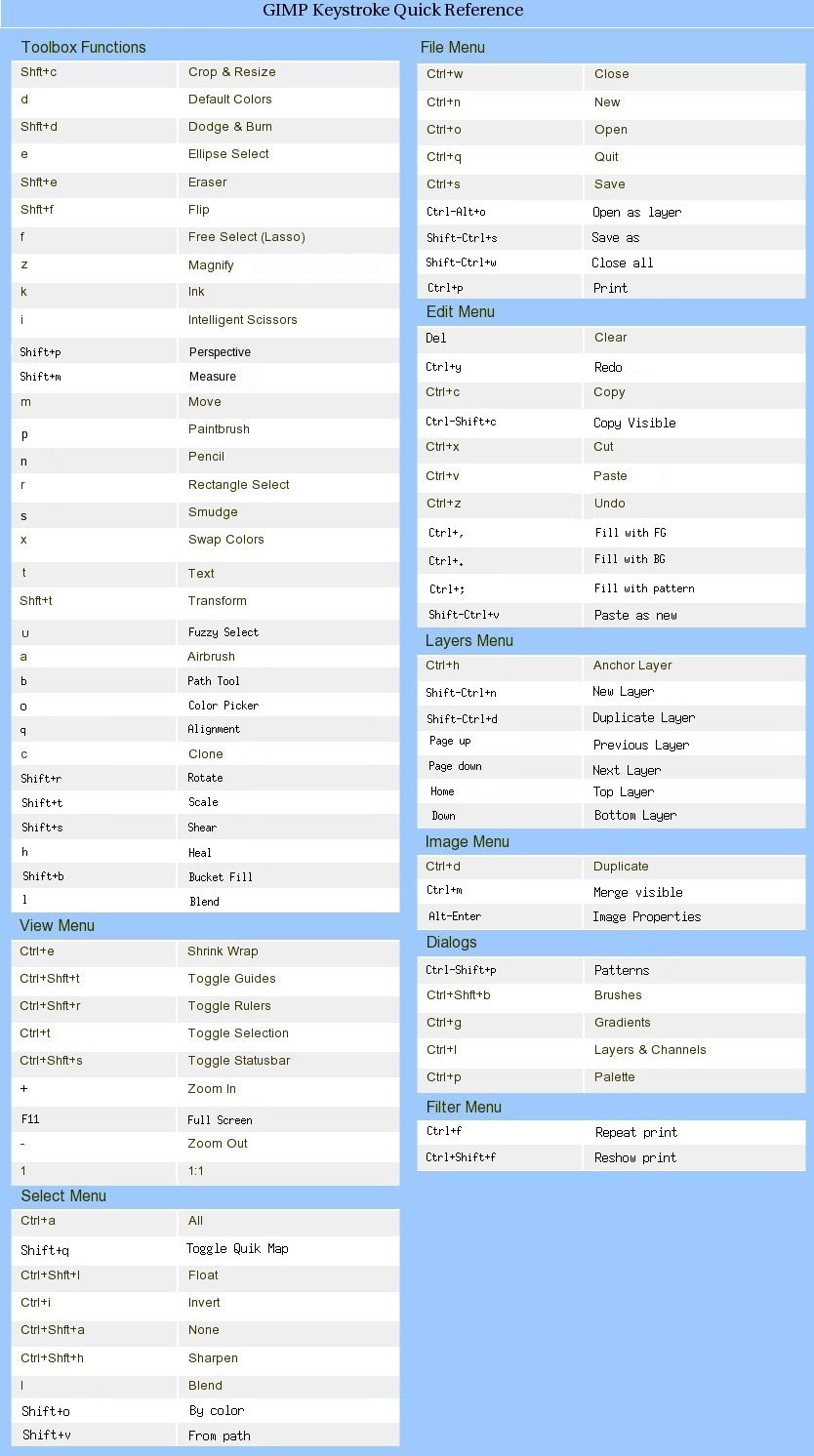
 Post subject: GIMP 2.6 Keystroke Quick Reference Chart
PostPosted: Thu May 06, 2010 12:10 pm  (#1) 
Offline
GimpChat Founder
User avatar

Joined: May 22, 2008
Posts: 5241
Location: Gimpville
GIMP 2.6 Quick Reference

Image


Attachments:
File comment: GIMP 2.6 Keystroke Quik Ref (Two Column Format)
gimp26-keystroke-quikref.pdf [163.82 KiB]
Downloaded 524 times
File comment: GIMP 2.6 Keystroke Quik Ref (Single Column Format)
gimp26-keys-quikref.pdf [155.69 KiB]
Downloaded 415 times

_________________
“If you reach for the stars, you just might land on a decently sized hill.” - Stuart Hill
Share on Facebook Share on Twitter Share on Orkut Share on Digg Share on MySpace Share on Delicious Share on Technorati
Top
 Post subject: Re: GIMP Keystroke Quick Reference Chart
PostPosted: Thu May 06, 2010 12:32 pm  (#2) 
Offline
GimpChat Member
User avatar

Joined: Apr 07, 2010
Posts: 14182
Very nice GTux.... I am going to print that up and put it where it is handy....

thanx

_________________
Image


Top
 Post subject: Re: GIMP Keystroke Quick Reference Chart
PostPosted: Thu May 06, 2010 1:00 pm  (#3) 
Offline
GimpChat Member

Joined: Apr 11, 2010
Posts: 545
Location: In the mini-chat, saying silly things
What is XinputAirbrush?

I thought "shift - a" wasn't a keyboards shortcut. I use it for something else.

_________________
Image


Top
 Post subject: Re: GIMP Keystroke Quick Reference Chart
PostPosted: Thu May 06, 2010 1:28 pm  (#4) 
Offline
GimpChat Founder
User avatar

Joined: May 22, 2008
Posts: 5241
Location: Gimpville
We may have to update some of these. I know ctrl-p brings up the print dialog for me, not pallet.

There also might be some other shortcuts we could add to the list.

Anyone see anything else?

molly wrote:
Very nice GTux.... I am going to print that up and put it where it is handy....

thanx

Have you noticed the "Print View" link in the top banner of each topic? It makes printing posts cleaner.

_________________
“If you reach for the stars, you just might land on a decently sized hill.” - Stuart Hill


Top
 Post subject: Re: GIMP Keystroke Quick Reference Chart
PostPosted: Thu May 06, 2010 1:33 pm  (#5) 
Offline
Retired Staff
User avatar

Joined: May 22, 2008
Posts: 6946
Location: Somewhere in GIMP
I have a bunch of keystrokes I made for things I use a lot. Did you know that Alt + 1 on the keyboard and Alt + 1 on the number pad can be used for two different things? I was happily surprised when I found that out.

I have close to 20 keystrokes I made for things I use a lot. Know most by heart but have them on a list on my wall, too. :)

_________________
Image
World War IV will be fought with sticks and stones. - Albert Einstein


Top
 Post subject: Re: GIMP Keystroke Quick Reference Chart
PostPosted: Thu May 06, 2010 1:41 pm  (#6) 
Offline
GimpChat Founder
User avatar

Joined: May 22, 2008
Posts: 5241
Location: Gimpville
The control files for shortcuts are located in the hidden .gimp-2.6 folder: menurc & controllerrc

An updated list of the latest keystrokes and shortcuts would come in handy, especially for the neophyte.

_________________
“If you reach for the stars, you just might land on a decently sized hill.” - Stuart Hill


Top
 Post subject: Re: GIMP Keystroke Quick Reference Chart
PostPosted: Thu May 06, 2010 1:55 pm  (#7) 
Offline
GimpChat Member

Joined: Apr 11, 2010
Posts: 545
Location: In the mini-chat, saying silly things
But + on the number pad zooms in just like shift + on the keyboard. I always use the number pad + :bigthup

I've swapped keystrokes around myself.

edit-

Ctrl K (Edit - clear) has been changed to the delete key in 2.4 or 2.6.
Alt F (repeat last filter) is now Crtl F
Reshow last is now Ctrl Shift F

_________________
Image


Top
 Post subject: Re: GIMP Keystroke Quick Reference Chart
PostPosted: Thu May 06, 2010 2:09 pm  (#8) 
Offline
Retired Staff
User avatar

Joined: May 22, 2008
Posts: 6946
Location: Somewhere in GIMP
Jolie wrote:
But + on the number pad zooms in just like shift + on the keyboard. I always use the number pad + :bigthup
I didn't know that about + on the numpad, also the - zooms out. Wow, I really like that! :wh

_________________
Image
World War IV will be fought with sticks and stones. - Albert Einstein


Top
 Post subject: Re: GIMP Keystroke Quick Reference Chart
PostPosted: Thu May 06, 2010 6:24 pm  (#9) 
Offline
GimpChat Member
User avatar

Joined: Apr 17, 2010
Posts: 12
Location: Upstate New York
:tyspin This is going to come in VERY handy - thanks for posting!


Top
 Post subject: Re: GIMP Keystroke Quick Reference Chart
PostPosted: Thu May 06, 2010 7:27 pm  (#10) 
Offline
GimpChat Member
User avatar

Joined: Apr 08, 2010
Posts: 5420
Location: Northwest Ohio
I should print that out, but I must confess that I never use keyboard shortcuts! So much to remember, so I just use the menu methods since it is somewhat intuitive.


Top
 Post subject: Re: GIMP Keystroke Quick Reference Chart
PostPosted: Tue May 11, 2010 9:59 am  (#11) 
Offline
GimpChat Founder
User avatar

Joined: May 22, 2008
Posts: 5241
Location: Gimpville
I've updated this thread to the latest GIMP V2.6.8 Quick Reference.

_________________
“If you reach for the stars, you just might land on a decently sized hill.” - Stuart Hill


Top
Post new topic Reply to topic  [ 11 posts ] 

All times are UTC - 5 hours [ DST ]


* Login  


Powered by phpBB3 © phpBB Group