It is currently Tue Jun 09, 2026 5:48 pm


All times are UTC - 5 hours [ DST ]


Post new topic Reply to topic  [ 53 posts ]  Go to page 1, 2, 3  Next
Author Message
 Post subject: Re: Make Awesome Gold, Silver, Brass, or Copper Text
PostPosted: Sun Apr 17, 2011 11:05 am  (#11) 
Offline
Script Coder
User avatar

Joined: Jul 14, 2010
Posts: 697
Nice adaptation!

-Rob A>

_________________
Image
Fantasy Cartography and Mapping by RobA


Top
 Post subject: Re: Make Awesome Gold, Silver, Brass, or Copper Text
PostPosted: Sun Apr 17, 2011 11:25 am  (#12) 
Offline
GimpChat Member
User avatar

Joined: Apr 08, 2010
Posts: 5420
Location: Northwest Ohio
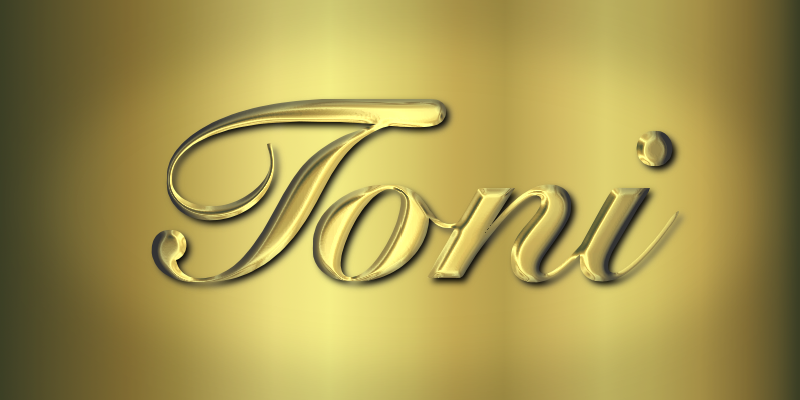
Finally got time to try this out....gold using the environment on gold gradient
Image


Top
 Post subject: Re: Make Awesome Gold, Silver, Brass, or Copper Text
PostPosted: Sun Apr 17, 2011 11:44 am  (#13) 
Offline
Global Moderator
User avatar

Joined: May 16, 2010
Posts: 16023
A little sparkle at the brightest spot would really set that off 2-ton. :)

_________________
Image


Top
 Post subject: Re: Make Awesome Gold, Silver, Brass, or Copper Text
PostPosted: Sun Apr 17, 2011 11:46 am  (#14) 
Offline
GimpChat Member
User avatar

Joined: Apr 08, 2010
Posts: 5420
Location: Northwest Ohio
I am so bad at using the sparkle filter. I can never manage to get it the way I want it, and can't seem to figure out what the settings will produce.


Top
 Post subject: Re: Make Awesome Gold, Silver, Brass, or Copper Text
PostPosted: Sun Apr 17, 2011 12:10 pm  (#15) 
Offline
Global Moderator
User avatar

Joined: May 16, 2010
Posts: 16023
You can make your own sparkle brush. :)
Here you go just make sure you paint with both foreground and background colors white.
Paint the sparkles on a new layer so you can set the opacity.
Image

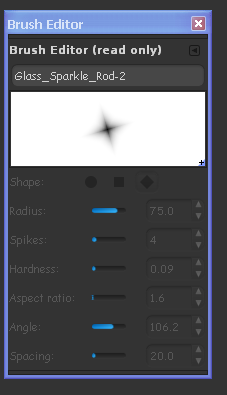
Here are the brush settings
Image

Just in case you can not read that the settings are
Radius - 75.0
Spikes - 4
Hardness - 0.09
Aspect Ratio - 1.6
Angle - 106.2
Spacing - 20

_________________
Image


Top
 Post subject: Re: Make Awesome Gold, Silver, Brass, or Copper Text
PostPosted: Sun Apr 17, 2011 12:57 pm  (#16) 
Offline
GimpChat Member
User avatar

Joined: Apr 08, 2010
Posts: 5420
Location: Northwest Ohio
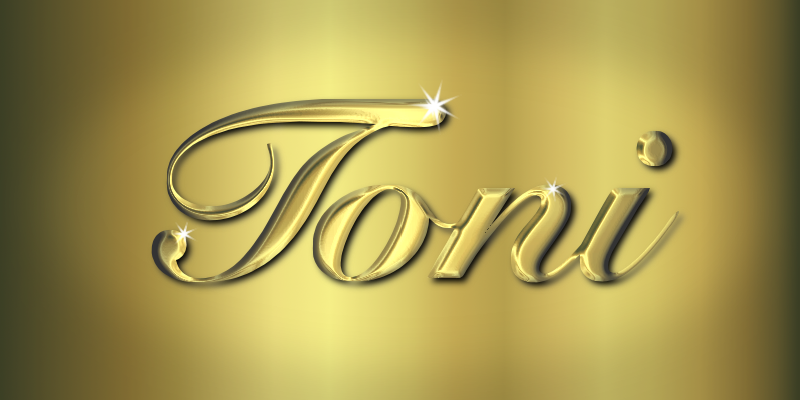
OK, gold with sparkle...made mine a bit different.
Image
I still would like to figure out how to use sparkle better...sometimes I want my sparkle to have really long spikes but not be too bright.


Top
 Post subject: Re: Make Awesome Gold, Silver, Brass, or Copper Text
PostPosted: Sun Apr 17, 2011 2:16 pm  (#17) 
Offline
GimpChat Member
User avatar

Joined: Oct 06, 2010
Posts: 4050
Awesome! Looks like actual gold laying on a sheet of gold. :)

_________________
"In order to attain the impossible, one must attempt the absurd."
~ Miguel de Cervantes


Top
 Post subject: Re: Make Awesome Gold, Silver, Brass, or Copper Text
PostPosted: Sun Apr 17, 2011 2:44 pm  (#18) 
Offline
Retired Staff
User avatar

Joined: May 22, 2008
Posts: 6946
Location: Somewhere in GIMP
2-ton wrote:
I still would like to figure out how to use sparkle better...sometimes I want my sparkle to have really long spikes but not be too bright.
You can make the radius larger or increase the brush size then put the sparkle on a separate layer and lower the opacity.

Actually, the brighter star is four layers merged together and the lighter one is a single star at regular opacity in this image. I included the brush editor image so you can see the settings I used.

Image

_________________
Image
World War IV will be fought with sticks and stones. - Albert Einstein


Top
 Post subject: Re: Make Awesome Gold, Silver, Brass, or Copper Text
PostPosted: Sun Apr 17, 2011 4:42 pm  (#19) 
Offline
GimpChat Member
User avatar

Joined: Apr 08, 2010
Posts: 5420
Location: Northwest Ohio
oh, yeah, lightbulb! I can make one with longer spikes, then make one skinnier and with shorter spikes and put it on top for that "neon glow" look. I should have thought of that. I also see that the 4 spike is actually better than my 7 spike. so radius is the size from center to end of spike and the aspect ratio is how fat or thin the spikes are?


Top
 Post subject: Re: Make Awesome Gold, Silver, Brass, or Copper Text
PostPosted: Sun Apr 17, 2011 4:56 pm  (#20) 
Offline
GimpChat Member
User avatar

Joined: Oct 06, 2010
Posts: 4050
Quote:
so radius is the size from center to end of spike and the aspect ratio is how fat or thin the spikes are?


Yes and Yes.

You can also angle the smaller spikes/star at 45 degrees and use it centered on top of the longer spikes/star to create twinkling effects.

_________________
"In order to attain the impossible, one must attempt the absurd."
~ Miguel de Cervantes


Top
 Post subject: Re: Make Awesome Gold, Silver, Brass, or Copper Text
PostPosted: Sun Apr 17, 2011 6:47 pm  (#21) 
Offline
GimpChat Member
User avatar

Joined: Apr 08, 2010
Posts: 5420
Location: Northwest Ohio
well now I understand how to make my sparkles by hand, and it seems much easier than trying to use the sparkle filter for most instances.


Top
 Post subject: Re: Make Awesome Gold, Silver, Brass, or Copper Text
PostPosted: Mon Apr 18, 2011 12:26 am  (#22) 
Offline
GimpChat Member
User avatar

Joined: Oct 06, 2010
Posts: 4050
OK, a couple of things:

1. This script does what my tutorial explains, and I've "Americanized" the French menu options.

2. Unless you speak and read French, you can use Google Translate to view this description page for the script. Just to help you out, I've included the Google Translate URL, as well:

http://abcdugimp.free.fr/gimp/telecharg ... golden.php (Original site)

http://translate.google.com/translate?j ... hp&act=url

The description page gives you an idea of how certain settings look. Remember your text needs to be on a transparent layer in order for the script to work.

Script is added below:


Attachments:
golden.scm.zip [2.58 KiB]
Downloaded 296 times

_________________
"In order to attain the impossible, one must attempt the absurd."
~ Miguel de Cervantes
Top
 Post subject: Re: Make Awesome Gold, Silver, Brass, or Copper Text
PostPosted: Mon Apr 18, 2011 3:10 am  (#23) 
Offline
Global Moderator
User avatar

Joined: May 16, 2010
Posts: 16023
Image

Excellent script. :)

_________________
Image


Top
 Post subject: Re: Make Awesome Gold, Silver, Brass, or Copper Text
PostPosted: Mon Apr 18, 2011 5:32 am  (#24) 
Offline
GimpChat Member
User avatar

Joined: Apr 09, 2011
Posts: 1764
PhotoComix wrote:
ofnuts wrote:
Anyway, it's time e stop faking hard materials and start doing something organic. How about faking the texture of the flesh of an apple?


Before that i will like to see good emulations of not existing metals (i.e."Superman" Kriptonite,"Ka Zar" Vibramium, more to be found in old Flash Gordon and Micky Mouse comix..)


Add Unobtainium (Avatar) to that list!


Top
 Post subject: Re: Make Awesome Gold, Silver, Brass, or Copper Text
PostPosted: Mon Apr 18, 2011 11:23 am  (#25) 
Offline
Retired Staff
User avatar

Joined: May 22, 2008
Posts: 6946
Location: Somewhere in GIMP
mahvin wrote:
OK, a couple of things:

1. This script does what my tutorial explains, and I've "Americanized" the French menu options.

It does a nice job. Here is mine. I smoothed up the edges a little by using the original text, alpha to selection, grow by 3, invert the selection and save to path. Unselected, then From Path, Delete.

Image

_________________
Image
World War IV will be fought with sticks and stones. - Albert Einstein


Top
 Post subject: Re: Make Awesome Gold, Silver, Brass, or Copper Text
PostPosted: Mon Apr 18, 2011 3:15 pm  (#26) 
Offline
GimpChat Member
User avatar

Joined: Mar 02, 2011
Posts: 1850
Location: Michigan
Run on Fractal


Attachments:
Golden Fractal.png
Golden Fractal.png [ 142.56 KiB | Viewed 3925 times ]

_________________
Image
I'm back I think
Top
 Post subject: Re: Make Awesome Gold, Silver, Brass, or Copper Text
PostPosted: Sat May 21, 2011 11:33 pm  (#27) 
Offline
GimpChat Member
User avatar

Joined: Apr 09, 2011
Posts: 1764
Well I know I have done this in the past but today for the love of me I just cannot get that tutorial to happen for me Mahvin...when I get to Step 3. the
Light and Shadow/Lighting Effects/Bump Map Its only giving me the view of the environment map and not of the text layers at all..I've been battling with this for hours and restarted GIMP a gazillion times today trying to figure what I am doing wrong..and getting nowhere


Top
 Post subject: Re: Make Awesome Gold, Silver, Brass, or Copper Text
PostPosted: Sat May 21, 2011 11:38 pm  (#28) 
Offline
GimpChat Member
User avatar

Joined: Oct 06, 2010
Posts: 4050
If you don't make the text layer the same size as the image, it won't show up in the bump map tab in Lighting Effects.

_________________
"In order to attain the impossible, one must attempt the absurd."
~ Miguel de Cervantes


Top
 Post subject: Re: Make Awesome Gold, Silver, Brass, or Copper Text
PostPosted: Sat May 21, 2011 11:55 pm  (#29) 
Offline
GimpChat Member
User avatar

Joined: Apr 09, 2011
Posts: 1764
ok thanks...that might be what I am doing wrong thank you...back to the drawing board!!


Top
 Post subject: Re: Make Awesome Gold, Silver, Brass, or Copper Text
PostPosted: Sun May 22, 2011 12:17 am  (#30) 
Offline
GimpChat Member
User avatar

Joined: Apr 09, 2011
Posts: 1764
Well its got me stumped!! I dont think I am doing anything other than what is in the instructions...I can see the layers when I click on the environment tab but not when I click on bump map


Top
Post new topic Reply to topic  [ 53 posts ]  Go to page 1, 2, 3  Next

All times are UTC - 5 hours [ DST ]


* Login  


Powered by phpBB3 © phpBB Group