It is currently Fri Jul 17, 2026 6:25 pm


All times are UTC - 5 hours [ DST ]


Post new topic Reply to topic  [ 12 posts ] 
Author Message
 Post subject: The Offset Menu
PostPosted: Sat Mar 02, 2013 9:31 pm  (#1) 
Offline
GimpChat Member
User avatar

Joined: Jul 17, 2012
Posts: 2769
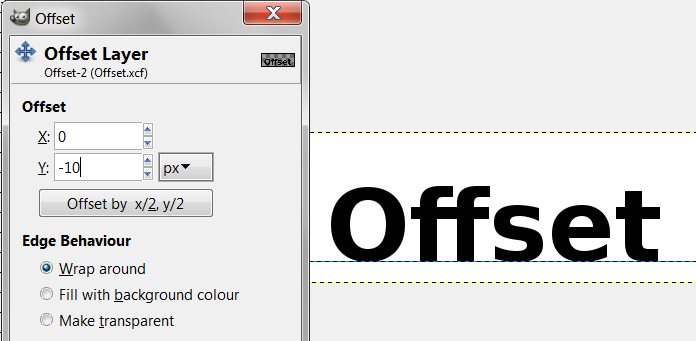
when you use the Offset Menu in Gimp you have to put in values for the x-axis and the y-axis
Layer → Transform → Offset
Image

i learned in school, that in a coordinate system, the x-axis is horizontical and the y-axis vertical
positive and negative values are like this
Image

but in Gimp, the negative y-axis is on top - so the other way round
Image

this is confusing me
is this a bug ??


Share on Facebook Share on Twitter Share on Orkut Share on Digg Share on MySpace Share on Delicious Share on Technorati
Top
 Post subject: Re: The Offset Menu
PostPosted: Sat Mar 02, 2013 10:11 pm  (#2) 
Offline
GimpChat Member
User avatar

Joined: Sep 22, 2012
Posts: 2089
Location: US
It's not a bug. It was decided once by the dev's that the positive values move the layer to the right and downward.
Guess, western right to left style of writing had prevailed.
http://docs.gimp.org/2.8/en/gimp-layer-offset.html


Edit. *left to right, of course


Last edited by K1TesseraEna on Sat Mar 02, 2013 10:18 pm, edited 1 time in total.

Top
 Post subject: Re: The Offset Menu
PostPosted: Sat Mar 02, 2013 10:13 pm  (#3) 
Offline
GimpChat Member
User avatar

Joined: Jul 17, 2012
Posts: 2769
how odd

thanks K1te


Top
 Post subject: Re: The Offset Menu
PostPosted: Sat Mar 02, 2013 10:26 pm  (#4) 
Offline
GimpChat Member
User avatar

Joined: Sep 22, 2012
Posts: 2089
Location: US
Esper wrote:
how odd

thanks K1te


No problem, Esper.
Maybe it has more to do with clockwise (more intuitive) movement rather than the writing style. Me guessing here, lol
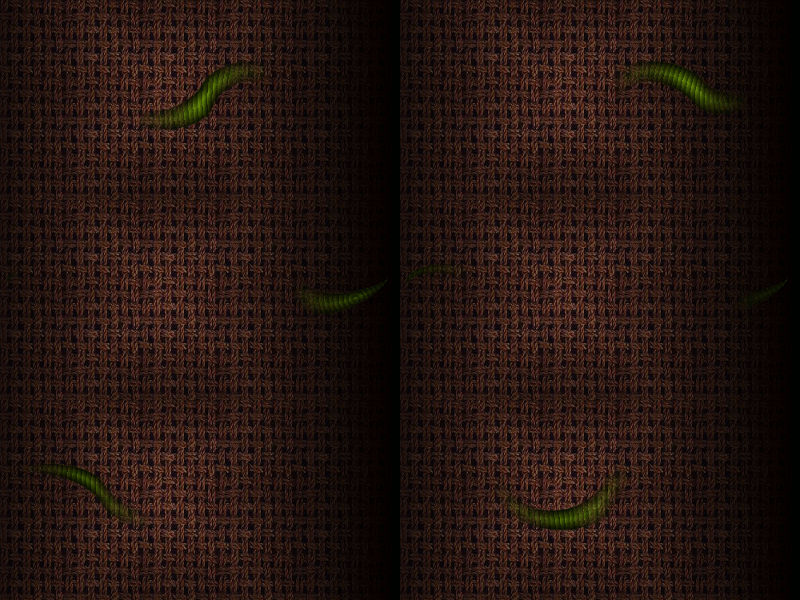
BTW, did you know that you can offset layer masks as well, not just the layers?
I wrote a tutorial on that, but never published it here. Made an interesting animation based on layer masks offset.


Top
 Post subject: Re: The Offset Menu
PostPosted: Sat Mar 02, 2013 10:33 pm  (#5) 
Offline
GimpChat Member
User avatar

Joined: Jul 17, 2012
Posts: 2769
it doesnt surprise me as you can offset saved channels too

what would be the use of offsetting a layermask ?


Top
 Post subject: Re: The Offset Menu
PostPosted: Sat Mar 02, 2013 10:38 pm  (#6) 
Offline
GimpChat Member
User avatar

Joined: Sep 22, 2012
Posts: 2089
Location: US
Esper wrote:
what would be the use off offsetting a layermask ?


hmm..... an animation...

Like this one

Image


Top
 Post subject: Re: The Offset Menu
PostPosted: Sun Mar 03, 2013 1:39 am  (#7) 
Offline
Script Coder
User avatar

Joined: Apr 23, 2010
Posts: 1553
Location: not from Guildford after all
The logic is based upon the coordinates of the upper left corner of the image being x=0,y=0.

_________________
Any sufficiently primitive technology is indistinguishable from a rock.


Top
 Post subject: Re: The Offset Menu
PostPosted: Sun Mar 03, 2013 2:05 am  (#8) 
Offline
GimpChat Member
User avatar

Joined: Jul 17, 2012
Posts: 2769
saulgoode wrote:
The logic is based upon the coordinates of the upper left corner of the image being x=0,y=0.

i see !

well thats a good way to memorize it too


Top
 Post subject: Re: The Offset Menu
PostPosted: Sun Mar 03, 2013 4:34 am  (#9) 
Offline
GimpChat Member
User avatar

Joined: Apr 07, 2010
Posts: 14182
K1TesseraEna wrote:
Esper wrote:
what would be the use off offsetting a layermask ?


hmm..... an animation...

Like this one

Image

Wow! there is a big green worm going across my screen first thing I saw before I finished my first coffee.
That is cool Kit...as long as it stays inside the monitor. :jumpclap

_________________
Image


Top
 Post subject: Re: The Offset Menu
PostPosted: Sun Mar 03, 2013 8:50 am  (#10) 
Offline
Script Coder
User avatar

Joined: Oct 25, 2010
Posts: 4812
saulgoode wrote:
The logic is based upon the coordinates of the upper left corner of the image being x=0,y=0.

Which itself stems from the coordinates system used in the various graphics APIs, which in turn use downward rows to be coherent with the top->down scan in CRT displays...

_________________
Image


Top
 Post subject: Re: The Offset Menu
PostPosted: Sun Mar 03, 2013 11:14 pm  (#11) 
Offline
GimpChat Member
User avatar

Joined: Aug 30, 2012
Posts: 2174
Must be honest never found the offset that confusing as the minus movement is taking away from my pixel position so it just feels natural for the layer to then be moved up.

_________________
Image


Top
 Post subject: Re: The Offset Menu
PostPosted: Mon Mar 04, 2013 5:52 am  (#12) 
Offline
GimpChat Member
User avatar

Joined: Mar 23, 2012
Posts: 7388
Location: Göteborg at last!
That's cleared it up for me too. Thanks for asking this Esper.

Lovely worm Kite. The animation is incredibly smooth. I'm always impressed with what you do.


Top
Post new topic Reply to topic  [ 12 posts ] 

All times are UTC - 5 hours [ DST ]


* Login  


Powered by phpBB3 © phpBB Group