It is currently Sat May 25, 2013 4:59 am


Latest GIMP Scripts & Plug-ins

All times are UTC - 5 hours [ DST ]


Post new topic Reply to topic  [ 41 posts ]  Go to page Previous  1, 2, 3, 4, 5  Next
Author Message
 Post subject: Re: Gel/Water Effect Experiment
PostPosted: Wed Mar 06, 2013 10:11 am  (#31) 
Offline
Administrator
User avatar

Joined: May 22, 2008
Posts: 5508
Location: Somewhere in GIMP
Excellent video, Xgeous! I don't know how you did all that in a video without messing up but you sure did. I learned a few really good tricks from it, too.

I was particularly fascinated with the way you made the second layer much larger and then all the steps you took to take it down to image size. I'm going to play with that.

Thanks!

_________________
Image
Law of Gravity - Any tool, nut, bolt, screw, when dropped, will roll to the least accessible place.
Image


Top
 Profile  
 

 Post subject: Re: Gel/Water Effect Experiment
PostPosted: Wed Mar 06, 2013 11:33 am  (#32) 
Offline
Administrator
User avatar

Joined: May 22, 2008
Posts: 5508
Location: Somewhere in GIMP
Xgeous wrote:
OK, i am having problems with my screen recorder but i finally created a video with tips on how to create something like the Gel/water effect. Maybe later I'm going to upload it to Youtube, for now I only uploaded it to MediaFire, the name of the video is GelText.mov. Here is the link http://www.mediafire.com/?de7ealzm25wvljp .


Xgeous, I don't have the stripes pattern. Can you share it with us?

_________________
Image
Law of Gravity - Any tool, nut, bolt, screw, when dropped, will roll to the least accessible place.
Image


Top
 Profile  
 
 Post subject: Re: Gel/Water Effect Experiment
PostPosted: Wed Mar 06, 2013 11:39 am  (#33) 
Offline
GimpChat Member
User avatar

Joined: Aug 30, 2012
Posts: 1036
Excellent video and can I reitterate what others have said certainly learnt a new thing or two.

_________________
Image


Top
 Profile  
 
 Post subject: Re: Gel/Water Effect Experiment
PostPosted: Wed Mar 06, 2013 11:55 am  (#34) 
Offline
GimpChat Member
User avatar

Joined: Jul 17, 2012
Posts: 1797
Location: Germany - NRW
Oregonian wrote:
Xgeous, I don't have the stripes pattern. Can you share it with us?
google search for scanlines
i think i got mine from deviantart, Oregonian


i was really surprised the blur for the bumpmap made by xgeous was only as small as 3
interesting fact !
mostly i go for 10-12

Attachment:
xgeous vs ESP.png
xgeous vs ESP.png [ 1.37 MiB | Viewed 57 times ]

_________________
Image
gimp-science-labs


Last edited by Esper on Wed Mar 06, 2013 2:50 pm, edited 1 time in total.

Top
 Profile  
 
 Post subject: Re: Gel/Water Effect Experiment
PostPosted: Wed Mar 06, 2013 12:29 pm  (#35) 
Offline
GimpChat Member
User avatar

Joined: Jul 17, 2012
Posts: 1797
Location: Germany - NRW
transcript of xgeous video-tutorial:

Code:
Create a new file 600 x400 in #2079c4 as your background

create a new transparent layer on top of your BG but make it 1000x1000px
zoom out
fill this layer with a scanlines-pattern
rotate the layer by 45°, then move it so it overlaps your BG perfectly
layer to image size and turn down opacity to about 30%

for a vignette effect, create a new transparent layer
make an elliptical selection, invert and fill with black
blur by 200
change mode to Multiply and turn down opacity to 60%

type your text and center with the align tool
then turn it off

for a bumpmap duplicate text layer
create a new white layer below
merge them together
blur by 3
turn off

create new layer 65 grey
apply bumpmap:
Invert Bumpmap
Azimuth: 132
Elevation: 37
Depth: 9
Ambient: max

apply Color to alpha with the 65 grey so that you are left with the white highlights

alpha select your text
invert selection
and cut highlights

on a new transparent layer stroke selection by 6
then deselect
blur the stroke by 20
alpha select text again
invert
cut blurred stroke

invert selection again
apply Dropshadow with default values but lower opacity to 88%

create new transparent layer on top of text layer
grow selection by 1
fill with black
shrink selection by 1
cut

create new transparent layer on top of text layer
fill selection with pattern
add white layermask
stroke on layermask gradient from black to white, to make the pattern partly translucent

_________________
Image
gimp-science-labs


Top
 Profile  
 
 Post subject: Re: Gel/Water Effect Experiment
PostPosted: Wed Mar 06, 2013 2:47 pm  (#36) 
Offline
GimpChat Member
User avatar

Joined: Aug 04, 2012
Posts: 19
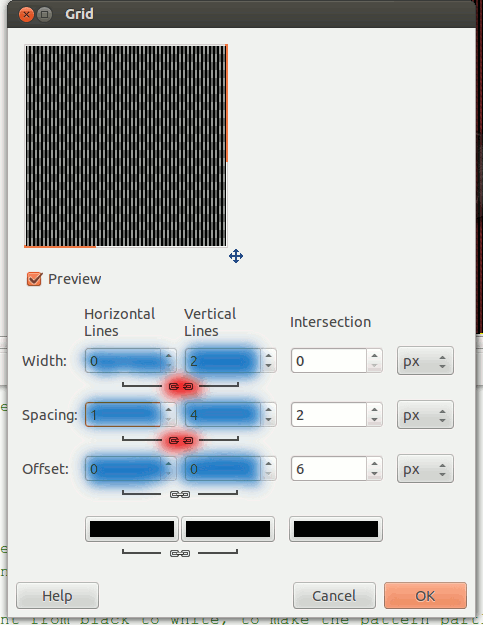
First of all, thanks guys for you comments, that really keeps me motivated. For Oregonian, creating the stripes is simple, all you have to do is go to Filters>>Render>>Pattern>>Grid... and change the setting to something like the image below or something that you like, just play with the settings.
Image

I would like to thank Esper for doing a really good job writing the tutorial and I would like to explain 1 of those steps.
Quote:
create new transparent layer on top of text layer
grow selection by 1
fill with black
shrink selection by 1
cut


I like to use the "Grow/Shrink Method" for my strokes, that gives me a better result than going to Select>>Stroke Selection. To prove it, here is the comparison. Of course, if you have the Layer Effect plugin, just use it instead and you should get a good result as well.
Image

_________________
In a world without walls and fences, who needs Windows and Gates


Top
 Profile  
 
 Post subject: Re: Gel/Water Effect Experiment
PostPosted: Wed Mar 06, 2013 2:51 pm  (#37) 
Offline
GimpChat Member
User avatar

Joined: Aug 16, 2012
Posts: 1973
Location: Göteborg, Sweden
xgeous: that's really interesting. i didn't think the difference would be that big!
esper: very nice, looks cool with the glossy black.

_________________
Image


Top
 Profile  
 

 Post subject: Re: Gel/Water Effect Experiment
PostPosted: Wed Mar 06, 2013 3:06 pm  (#38) 
Offline
GimpChat Member
User avatar

Joined: Jul 17, 2012
Posts: 1797
Location: Germany - NRW
Esper wrote:

Code:
for a bumpmap duplicate text layer
create a new white layer below
merge them together
blur by 3
turn off
there a two alternative ways of making the bumpmap

1. teached by saulgoode:
just fill the selection with white on a new transparent layer and then blur (no black BG needed)

2. save the alpha selected text to a channel and blur the channel - then use it as your bumpmap

_________________
Image
gimp-science-labs


Top
 Profile  
 
 Post subject: Re: Gel/Water Effect Experiment
PostPosted: Wed Mar 06, 2013 3:44 pm  (#39) 
Offline
Global Moderator
User avatar

Joined: Apr 07, 2010
Posts: 6978
Xgeous wrote:
First of all, thanks guys for you comments, that really keeps me motivated. For Oregonian, creating the stripes is simple, all you have to do is go to Filters>>Render>>Pattern>>Grid... and change the setting to something like the image below or something that you like, just play with the settings.
Image

I would like to thank Esper for doing a really good job writing the tutorial and I would like to explain 1 of those steps.
Quote:
create new transparent layer on top of text layer
grow selection by 1
fill with black
shrink selection by 1
cut


I like to use the "Grow/Shrink Method" for my strokes, that gives me a better result than going to Select>>Stroke Selection. To prove it, here is the comparison. Of course, if you have the Layer Effect plugin, just use it instead and you should get a good result as well.
Image


I just made a couple of grids if anyone wants them.


Attachments:
grids.7z [1.42 KiB]
Downloaded 9 times

_________________
Image
Top
 Profile  
 
 Post subject: Re: Gel / Water / Translucent Text-Effect
PostPosted: Wed Mar 06, 2013 3:51 pm  (#40) 
Offline
GimpChat Member
User avatar

Joined: Feb 20, 2013
Posts: 1191
Thank you for the grids...I want to try this too...just can't keep up now.


Top
 Profile  
 
Display posts from previous:  Sort by  
Post new topic Reply to topic  [ 41 posts ]  Go to page Previous  1, 2, 3, 4, 5  Next

All times are UTC - 5 hours [ DST ]


Who is online

Users browsing this forum: No registered users and 1 guest


You cannot post new topics in this forum
You cannot reply to topics in this forum
You cannot edit your posts in this forum
You cannot delete your posts in this forum
You cannot post attachments in this forum

Search for:
Jump to:  

* Login   * Subscribe to RSS Feed


Powered by phpBB © 2000, 2002, 2005, 2007 phpBB Group