It is currently Tue Jun 09, 2026 1:10 am


All times are UTC - 5 hours [ DST ]


Post new topic Reply to topic  [ 17 posts ] 
Author Message
 Post subject: Re: GIMP Scratchpad
PostPosted: Tue May 15, 2012 6:58 pm  (#11) 
Offline
GimpChat Member
User avatar

Joined: Oct 07, 2011
Posts: 180
Rod wrote:
ZWard117 wrote:
Would be relativity easy wouldn't you think? They already have something that would be easy to alter. The text popup would be an easy jump off point.


Some type of notepad you could add topics to like this.
Image


Image


Yes... this is what I had in mind. Great mockup Rod!

GO TO: Help > Scratchpad (or Notes)

ALso Add these tabs:

TAB: Keyboard shortcuts (sometimes I forget)
TAB: Find (example: how to find where Drop shadow is)
TAB: Instructions
TAB: Scripts info
TAB: Best Settings (like the best settings for Drop shadow-offset-3,blur radius-5 etc)

● Include autosave to folder like in Flashnote.
● Can add as many Tabs as you want and name/rename them
● Would be nice to have (bold and red color) like in compose email.

● Any Gimp version updates, the info will be stored in folder and not lost.


Top
 Post subject: Re: GIMP Scratchpad
PostPosted: Tue May 15, 2012 9:59 pm  (#12) 
Offline
GimpChat Member
User avatar

Joined: Nov 16, 2011
Posts: 5127
Location: Metro Vancouver, BC
This little Win program doesn't solve the Gimp issue but I've been using it for years and find it very handy. If you right-click on a file and choose FileNote from context-menu, a new text file with the same name is created. Great for notes on any media file.

FileNote
http://www.moonsoftware.com

_________________
Image
Gimp 2.8.18, Linux, median user
Gimp Chat Tutorials Index
Spirit Bear (Kermode)


Top
 Post subject: Re: GIMP Scratchpad
PostPosted: Tue May 15, 2012 10:12 pm  (#13) 
Offline
GimpChat Member
User avatar

Joined: Nov 16, 2011
Posts: 5127
Location: Metro Vancouver, BC
Right now in Gimp the Image Properties , Comments tab is handy.

_________________
Image
Gimp 2.8.18, Linux, median user
Gimp Chat Tutorials Index
Spirit Bear (Kermode)


Top
 Post subject: Re: GIMP Scratchpad
PostPosted: Tue May 15, 2012 10:42 pm  (#14) 
Offline
GimpChat Member

Joined: Mar 29, 2011
Posts: 346
Location: Wisconsin
Odinbc wrote:
Right now in Gimp the Image Properties , Comments tab is handy.

I never thought of that... never really looked at Image Properties for that matter.

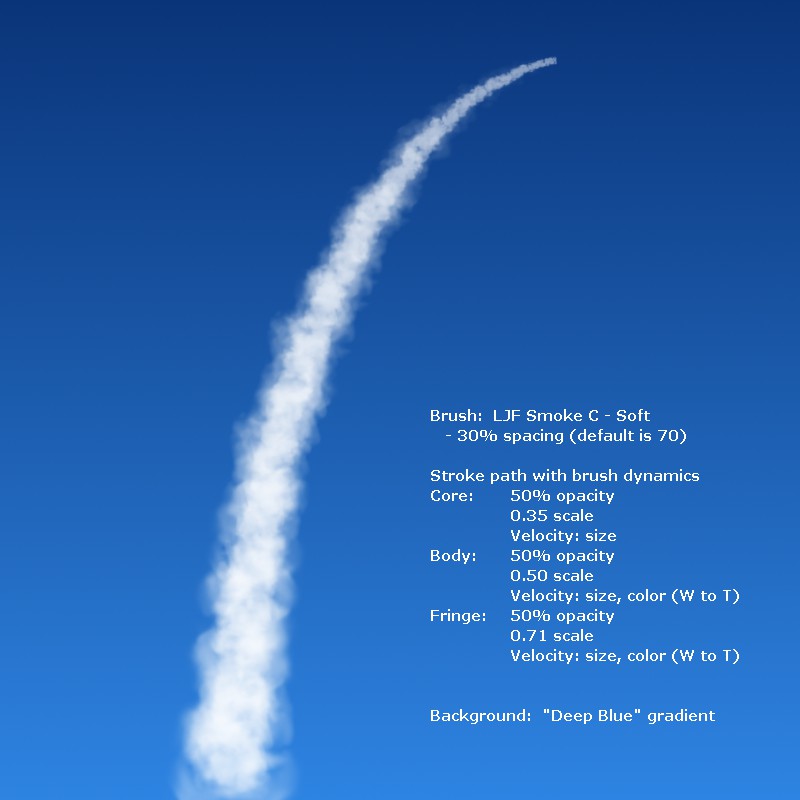
I simply create a text layer and write all my comments on that. That way it is always associated with the file.

For most files, I leave the text layer invisible. However, the text becomes an important part of the image when I'm making a crib sheet.
Image

_________________
Image


Top
 Post subject: Re: GIMP Scratchpad
PostPosted: Wed May 16, 2012 9:17 am  (#15) 
Offline
GimpChat Member
User avatar

Joined: Aug 24, 2011
Posts: 1785
Location: Dallas, TX
bkh1914 wrote:
Odinbc wrote:
Right now in Gimp the Image Properties , Comments tab is handy.

I never thought of that... never really looked at Image Properties for that matter.

I simply create a text layer and write all my comments on that. That way it is always associated with the file.

For most files, I leave the text layer invisible. However, the text becomes an important part of the image when I'm making a crib sheet.
Image


Really cool applicaton of brush dynamics with the smoke brush BKH1914. Looks just like a rocket trail.
I wish someone would do a tut on brush dynamics. My skills could definitely stand improvement in that department. I've got some scratch brushes I would like to be able to do some similar things with but not sure how to do it.

_________________
Image


Top
 Post subject: Re: GIMP Scratchpad
PostPosted: Wed May 16, 2012 12:40 pm  (#16) 
Offline
GimpChat Member

Joined: Mar 29, 2011
Posts: 346
Location: Wisconsin
Draconian wrote:
Looks just like a rocket trail.

You guessed it. That's my crib sheet for making rocket trails. :)

Brush dynamics isn't that difficult to figure out. I just played around with it and made a crib sheet with the important examples. I posted it a while ago in the middle of a thread. Maybe I should post it again in a new topic...

_________________
Image


Top
 Post subject: Re: GIMP Scratchpad
PostPosted: Wed May 16, 2012 9:39 pm  (#17) 
Offline
Global Moderator
User avatar

Joined: May 16, 2010
Posts: 16021
bkh1914 wrote:
Draconian wrote:
Looks just like a rocket trail.

You guessed it. That's my crib sheet for making rocket trails. :)

Brush dynamics isn't that difficult to figure out. I just played around with it and made a crib sheet with the important examples. I posted it a while ago in the middle of a thread. Maybe I should post it again in a new topic...


Please do and i will sticky it in Gimp Help. :)

_________________
Image


Top
Post new topic Reply to topic  [ 17 posts ] 

All times are UTC - 5 hours [ DST ]


* Login  


Powered by phpBB3 © phpBB Group