It is currently Thu Jul 02, 2026 6:49 pm


All times are UTC - 5 hours [ DST ]


Post new topic Reply to topic  [ 21 posts ]  Go to page 1, 2  Next
Author Message
 Post subject: GIMP 3 now has GEGL automation in python console
PostPosted: Wed Dec 18, 2024 9:26 pm  (#1) 
Offline
GimpChat Member
User avatar

Joined: Oct 31, 2020
Posts: 2012
The latest commits made by GIMP's lead dev Jehan made it possible to add GEGL filters non-destructively in GIMP 3 using python console.

This is a new interested feat for plugins and automation, many good things will come out of it. I expect the community to go far with it but there is one disappointment, It isn't capable of using multiple GEGL filters in composers (without writing GEGL syntax) like GEGL syntax is. So don't expect this strategy to replace my plugins that rely on that tactic. So remember, its not an alternative to my plugins but it is a new way to incorporate GEGL.


Share on Facebook Share on Twitter Share on Orkut Share on Digg Share on MySpace Share on Delicious Share on Technorati
Top
 Post subject: Re: GIMP 3 now has GEGL automation in python console
PostPosted: Thu Dec 19, 2024 9:37 am  (#2) 
Offline
Administrator
User avatar

Joined: Aug 10, 2012
Posts: 14109
Location: Native to NYC living in Arizona, Gimp 2.8 - 3.0, Win 11 PC.
contrast_ wrote:
The latest commits made by GIMP's lead dev Jehan made it possible to add GEGL filters non-destructively in GIMP 3 using python console.

This is a new interested feat for plugins and automation, many good things will come out of it. I expect the community to go far with it but there is one disappointment, It isn't capable of using multiple GEGL filters in composers (without writing GEGL syntax) like GEGL syntax is. So don't expect this strategy to replace my plugins that rely on that tactic. So remember, its not an alternative to my plugins but it is a new way to incorporate GEGL.

Non-destructive GEGL filters open up a lot of possibilities.
it’s a valuable tool.
Your plugins and GEGL clearly serve a unique purpose and fill a gap.
It’s great to see how this is evolving.

_________________
Image
"A wise man learns more from a foolish question than a fool can learn from a wise answer"
Image


Top
 Post subject: Re: GIMP 3 now has GEGL automation in python console
PostPosted: Fri Dec 20, 2024 2:36 pm  (#3) 
Offline
GimpChat Member
User avatar

Joined: Oct 31, 2020
Posts: 2012
Entering this command applies gaussian blur as a filter from python console

This only works in current master builds of GIMP 3 RC1 + Git from yesterday (dec 19 2024) onward.

img = Gimp.get_images()[0]; l = img.get_layers()[0]
f = Gimp.DrawableFilter.new(l, "gegl:gaussian-blur", "")
c = f.get_config()
c.set_property("std-dev-x", 12.0)
c.set_property("std-dev-y", 12.0)
c.set_property("clip-extent", 0)
f.update()
l.append_filter(f)


Top
 Post subject: Re: GIMP 3 now has GEGL automation in python console
PostPosted: Fri Dec 20, 2024 5:43 pm  (#4) 
Offline
GimpChat Member
User avatar

Joined: Oct 31, 2020
Posts: 2012
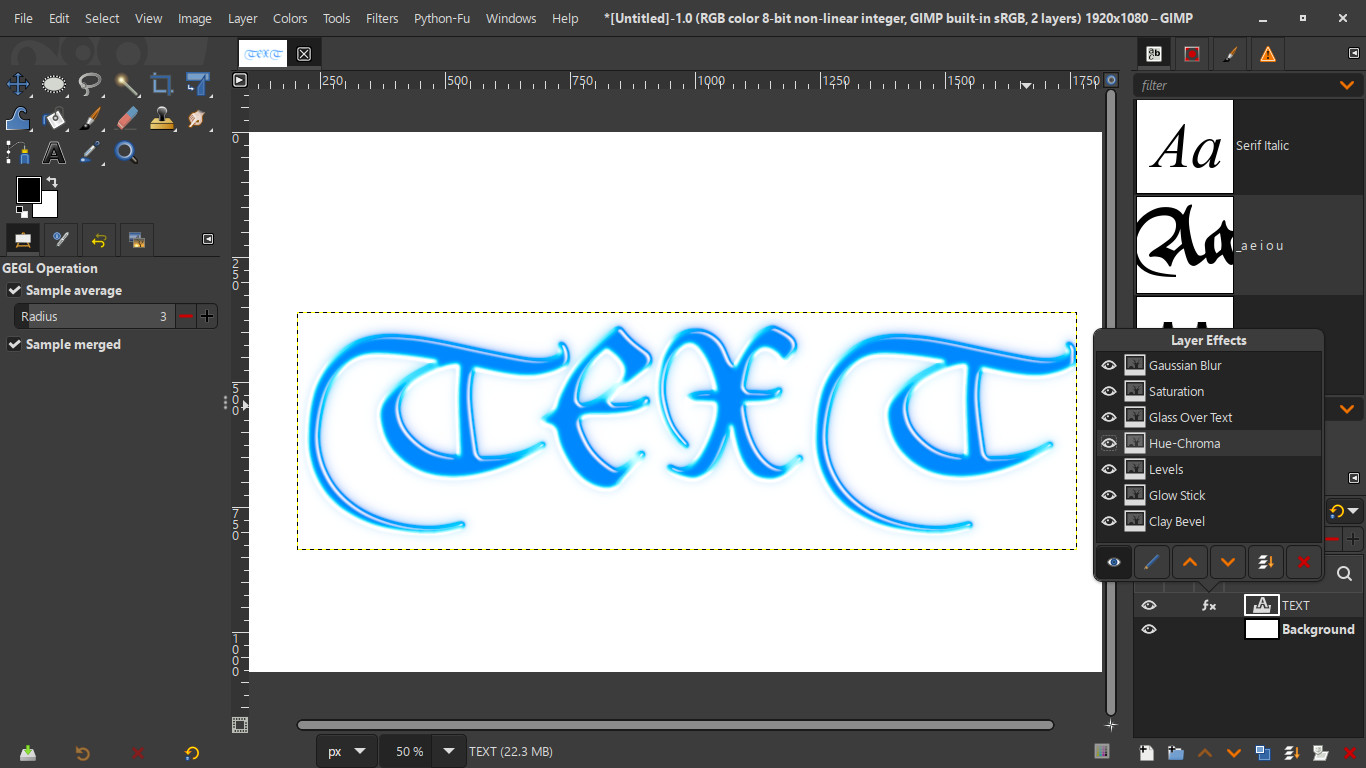
I made the first GEGL based python script using my plugins. It requires many of my plugins to work but the point is the layer effects are applied as GIMP filters as opposed to a GEGL graph.

img = Gimp.get_images()[0]; l = img.get_layers()[0]
f = Gimp.DrawableFilter.new(l, "lb:clay", "")
c = f.get_config()
c.set_property("elevation", 52.0)
f.update()
l.append_filter(f)


img = Gimp.get_images()[0]; l = img.get_layers()[0]
f = Gimp.DrawableFilter.new(l, "lb:glowstick", "")
c = f.get_config()
f.update()
l.append_filter(f)


img = Gimp.get_images()[0]; l = img.get_layers()[0]
f = Gimp.DrawableFilter.new(l, "gegl:levels", "")
c = f.get_config()
c.set_property("in-high", 0.6)
f.update()
l.append_filter(f)


img = Gimp.get_images()[0]; l = img.get_layers()[0]
f = Gimp.DrawableFilter.new(l, "gegl:hue-chroma", "")
c = f.get_config()
c.set_property("hue", 180.0)
c.set_property("chroma", 20.0) 
f.update()
l.append_filter(f)


img = Gimp.get_images()[0]; l = img.get_layers()[0]
f = Gimp.DrawableFilter.new(l, "lb:glassovertext", "")
c = f.get_config()
f.set_blend_mode(Gimp.LayerMode.NORMAL);
f.update()
l.append_filter(f)

img = Gimp.get_images()[0]; l = img.get_layers()[0]
f = Gimp.DrawableFilter.new(l, "gegl:saturation", "")
c = f.get_config()
c.set_property("scale", 2.1)
f.update()
l.append_filter(f)

img = Gimp.get_images()[0]; l = img.get_layers()[0]
f = Gimp.DrawableFilter.new(l, "gegl:gaussian-blur", "")
c = f.get_config()
c.set_property("std-dev-x", 10.0)
c.set_property("std-dev-y", 10.0)
c.set_property("clip-extent", 0)
f.set_blend_mode(Gimp.LayerMode.BEHIND);
f.update()
l.append_filter(f)

img = Gimp.get_images()[0]; l = img.get_layers()[0]
f = Gimp.DrawableFilter.new(l, "gegl:saturation", "")
c = f.get_config()
c.set_property("scale", 1.0)
f.update()
l.append_filter(f)


Attachment:
image.png
image.png [ 382.23 KiB | Viewed 9491 times ]


Top
 Post subject: Re: GIMP 3 now has GEGL automation in python console
PostPosted: Fri Dec 20, 2024 6:10 pm  (#5) 
Offline
GimpChat Member
User avatar

Joined: Jul 04, 2019
Posts: 280
Location: Lake Havasu City, Arizona, USA
This is great news! Thanks for pointing this out and for all your hard work. Cheers. :coolthup

_________________
Charles


Top
 Post subject: Re: GIMP 3 now has GEGL automation in python console
PostPosted: Fri Dec 20, 2024 7:26 pm  (#6) 
Offline
GimpChat Member
User avatar

Joined: Oct 31, 2020
Posts: 2012
Personally, I'd rather just apply layer effects on a layer group and send the .xcf of the layer group to people so they can just type text inside a layer group to get a text style.

but I can see how this alternative would be really cool because it can make new layers and interact with GIMP directly.


Top
 Post subject: Re: GIMP 3 now has GEGL automation in python console
PostPosted: Fri Dec 20, 2024 8:24 pm  (#7) 
Offline
Global Moderator
User avatar

Joined: May 16, 2010
Posts: 16075
This is a great 1st GEGL Python cosole filter to create new ones. Thanks for sharing Contrast.

_________________
Image


Top
 Post subject: Re: GIMP 3 now has GEGL automation in python console
PostPosted: Sat Dec 21, 2024 3:36 am  (#8) 
Offline
GimpChat Member
User avatar

Joined: Jul 04, 2019
Posts: 280
Location: Lake Havasu City, Arizona, USA
contrast_ wrote:
Personally, I'd rather just apply layer effects on a layer group and send the .xcf of the layer group to people so they can just type text inside a layer group to get a text style.

but I can see how this alternative would be really cool because it can make new layers and interact with GIMP directly.

Yeah, I expect Python to offer a lot of possibilities when combined with Gegl.

I'm still in the dark about DrawableFilter. I'm going to wait for RC 2 to check out the documentation. Do you know if we will have access to an existing Gegl layer group filter via the DrawableFilter?

_________________
Charles


Last edited by gasMask on Sat Dec 21, 2024 12:11 pm, edited 1 time in total.

Top
 Post subject: Re: GIMP 3 now has GEGL automation in python console
PostPosted: Sat Dec 21, 2024 7:45 am  (#9) 
Offline
GimpChat Member

Joined: Dec 28, 2023
Posts: 67
gasMask: It should be possible, since a LayerGroup is a type of Layer (that's why implementing filters on layer groups was fairly simple when we first did it).


Top
 Post subject: Re: GIMP 3 now has GEGL automation in python console
PostPosted: Sat Dec 21, 2024 12:10 pm  (#10) 
Offline
GimpChat Member
User avatar

Joined: Jul 04, 2019
Posts: 280
Location: Lake Havasu City, Arizona, USA
CmykStudent wrote:
gasMask: It should be possible, since a LayerGroup is a type of Layer (that's why implementing filters on layer groups was fairly simple when we first did it).

That's interesting and good to know. I was using contrast_ terminology, where he has created a complex filter with a group of effects and alters a single layer. I'm wondering if the DrawableFilter has been set up to access his filters that are built into Gimp 3.

_________________
Charles


Top
 Post subject: Re: GIMP 3 now has GEGL automation in python console
PostPosted: Sat Dec 21, 2024 2:34 pm  (#11) 
Offline
GimpChat Member

Joined: Dec 28, 2023
Posts: 67
gasMask: GimpDrawableFilter should be able to use any GEGL operation that you have installed on your version of GIMP - both the built-in ones and any plug-ins you have. You can add multiple filters to a layer as well, to create combined effects.


Top
 Post subject: Re: GIMP 3 now has GEGL automation in python console
PostPosted: Sat Dec 21, 2024 4:28 pm  (#12) 
Offline
GimpChat Member
User avatar

Joined: Oct 31, 2020
Posts: 2012
How do I make a new layer in python 3 console?


Top
 Post subject: Re: GIMP 3 now has GEGL automation in python console
PostPosted: Sat Dec 21, 2024 7:17 pm  (#13) 
Offline
Global Moderator
User avatar

Joined: May 16, 2010
Posts: 16075
Contrast do you have to have an existing text layer for the python-GEGL console effect to work?

Never mind. Stupid question. :lol

Image

_________________
Image


Top
 Post subject: Re: GIMP 3 now has GEGL automation in python console
PostPosted: Sat Dec 21, 2024 9:07 pm  (#14) 
Offline
GimpChat Member
User avatar

Joined: Jul 04, 2019
Posts: 280
Location: Lake Havasu City, Arizona, USA
contrast_ wrote:
How do I make a new layer in python 3 console?

Copy and paste this function:
def add_layer(image, parent=None, position=0, layer_name="Base"):
    layer = Gimp.Layer.new(
        image,
        layer_name,
        image.get_width(),
        image.get_height(),
        Gimp.ImageType.RGBA_IMAGE,
        100,
        Gimp.LayerMode.NORMAL
    )
    image.insert_layer(layer, parent, position)
    return layer

Get a list of open images:
Quote:
images = Gimp.get_images()

Get the first open image:
Quote:
image = images[0]

Create a layer:
layer = add_layer(image)

_________________
Charles


Top
 Post subject: Re: GIMP 3 now has GEGL automation in python console
PostPosted: Sat Dec 21, 2024 9:35 pm  (#15) 
Offline
GimpChat Member
User avatar

Joined: Oct 31, 2020
Posts: 2012
gasMask wrote:
contrast_ wrote:
How do I make a new layer in python 3 console?

Copy and paste this function:
def add_layer(image, parent=None, position=0, layer_name="Base"):
    layer = Gimp.Layer.new(
        image,
        layer_name,
        image.get_width(),
        image.get_height(),
        Gimp.ImageType.RGBA_IMAGE,
        100,
        Gimp.LayerMode.NORMAL
    )
    image.insert_layer(layer, parent, position)
    return layer

Get a list of open images:
Quote:
images = Gimp.get_images()

Get the first open image:
Quote:
image = images[0]

Create a layer:
layer = add_layer(image)


Its not working in GIMP 3


Top
 Post subject: Re: GIMP 3 now has GEGL automation in python console
PostPosted: Sun Dec 22, 2024 2:36 am  (#16) 
Offline
GimpChat Member
User avatar

Joined: Jul 04, 2019
Posts: 280
Location: Lake Havasu City, Arizona, USA
Did the console spit out an error? It could be a problem caused by a newer Gimp version.
Attachment:
File comment: It works here. I created an image first.
capture_001_22122024_003326.png
capture_001_22122024_003326.png [ 30.88 KiB | Viewed 9354 times ]

_________________
Charles


Top
 Post subject: Re: GIMP 3 now has GEGL automation in python console
PostPosted: Sun Dec 22, 2024 4:24 am  (#17) 
Offline
GimpChat Member
User avatar

Joined: Jan 13, 2011
Posts: 2644
Location: Poland
Writing Python plugins in Gimp-3.0 was supposed to be very easy. :hehe :flirt :tantrum
However, the real improvement would be adding GEGL filters to PDB :bowdown

_________________
Image


Top
 Post subject: Re: GIMP 3 now has GEGL automation in python console
PostPosted: Sun Dec 22, 2024 4:27 am  (#18) 
Offline
GimpChat Member
User avatar

Joined: Jul 04, 2019
Posts: 280
Location: Lake Havasu City, Arizona, USA
MareroQ wrote:
Writing Python plugins in Gimp-3.0 was supposed to be very easy. :hehe :flirt :tantrum
However, the real improvement would be adding GEGL filters to PDB :bowdown

The DrawableFilter could be easier than PDB, IDK, but it really depends on the documentation of a Gegl DrawableFilter.

I think that Python 3.11 is easier to program than Python 2.7 especially with VSCode. When the documentation of Gimp, GimpUi, Babl, etc. modules is done, it should be easier.

_________________
Charles


Top
 Post subject: Re: GIMP 3 now has GEGL automation in python console
PostPosted: Mon Dec 23, 2024 12:44 pm  (#19) 
Offline
GimpChat Member
User avatar

Joined: Oct 31, 2020
Posts: 2012
Paste this in the latest build of GIMP 3's python console. Its an awesome text style that doesn't require my plugins


img = Gimp.get_images()[0]; l = img.get_layers()[0]
f = Gimp.DrawableFilter.new(l, "gegl:color-overlay", "")
c = f.get_config()
g = Gegl.Color.new("#ff0800")
c.set_property("value", g)
f.set_blend_mode(Gimp.LayerMode.REPLACE);
f.update()
l.append_filter(f)


img = Gimp.get_images()[0]; l = img.get_layers()[0]
f = Gimp.DrawableFilter.new(l, "gegl:bevel", "")
c = f.get_config()
c.set_property("type", "bump")
c.set_property("radius", 6)
c.set_property("blendmode", "lighten")
f.set_blend_mode(Gimp.LayerMode.REPLACE);
f.update()
l.append_filter(f)


img = Gimp.get_images()[0]; l = img.get_layers()[0]
f = Gimp.DrawableFilter.new(l, "gegl:inner-glow", "")
c = f.get_config()
g = Gegl.Color.new("#006cff")
c.set_property("value", g)
f.set_blend_mode(Gimp.LayerMode.OVERLAY);
f.update()
l.append_filter(f)

img = Gimp.get_images()[0]; l = img.get_layers()[0]
f = Gimp.DrawableFilter.new(l, "gegl:dropshadow", "")
c = f.get_config()
f.set_blend_mode(Gimp.LayerMode.REPLACE);
g = Gegl.Color.new("#ffffff")
c.set_property("color", g)
c.set_property("x", 0.0)
c.set_property("y", 0.0)
c.set_property("grow-radius", 7)
c.set_property("radius", 1.0)
c.set_property("opacity", 1.0)   
f.update()
l.append_filter(f)

img = Gimp.get_images()[0]; l = img.get_layers()[0]
f = Gimp.DrawableFilter.new(l, "gegl:dropshadow", "")
c = f.get_config()
f.set_blend_mode(Gimp.LayerMode.REPLACE);
g = Gegl.Color.new("#000000")
c.set_property("color", g)
c.set_property("x", 0.0)
c.set_property("y", 0.0)
c.set_property("grow-radius", 7)
c.set_property("radius", 1.0)
c.set_property("opacity", 1.0)   
f.update()
l.append_filter(f)

img = Gimp.get_images()[0]; l = img.get_layers()[0]
f = Gimp.DrawableFilter.new(l, "gegl:dropshadow", "")
c = f.get_config()
f.set_blend_mode(Gimp.LayerMode.REPLACE);
g = Gegl.Color.new("#000000")
c.set_property("color", g)
c.set_property("x", 4.0)
c.set_property("y", 4.0)
c.set_property("grow-radius", 3)
c.set_property("radius", 9.0)
c.set_property("opacity", 0.9)   
f.update()
l.append_filter(f)


Top
 Post subject: Re: GIMP 3 now has GEGL automation in python console
PostPosted: Thu Jun 12, 2025 6:20 am  (#20) 
Offline
New Member

Joined: Jun 12, 2025
Posts: 1
gasMask wrote:
MareroQ wrote:
Writing Python plugins in Gimp-3.0 was supposed to be very easy. :hehe :flirt :tantrum
However, the real improvement would be adding GEGL filters to PDB :bowdown

The DrawableFilter could be easier than PDB, IDK, but it really depends on the documentation of a Gegl DrawableFilter.

I think that Python 3.11 is easier to program than Python 2.7 especially with VSCode. When the documentation of Gimp, GimpUi, Babl, etc. modules is done, it should be easier.


@contrast_ @gasMask Thanks a lot for sharing your examples, there are not a lot of it yet and it helps to start :bigthup

I am currently using Visual Studio Code to write my Python scripts for Gimp. It works quite well, but what I do not get to work is to get the typings of "Gimp". I import the namespace with `from gi.repository import Gimp`, but there is no autocomplete.

With `from gi.repository import GLib, Gio` this works for GLib and Gio, probably because I added the typings with `pip install PyGObject-stubs`.

Is there any dependency I can install to get the Gimp bindings/types?


Top
Post new topic Reply to topic  [ 21 posts ]  Go to page 1, 2  Next

All times are UTC - 5 hours [ DST ]


cron

* Login  


Powered by phpBB3 © phpBB Group