It is currently Sun May 19, 2013 11:58 pm


Latest GIMP Scripts & Plug-ins

All times are UTC - 5 hours [ DST ]


Post new topic Reply to topic  [ 100 posts ]  Go to page 1, 2, 3, 4, 5 ... 10  Next
Author Message
 Post subject: NEW- Gimp-2.8_Windows-Friendly_64bit ready for testing
PostPosted: Tue May 08, 2012 1:46 pm  (#1) 
Offline
GimpChat Member

Joined: Apr 12, 2010
Posts: 4957

EDIT
New version,thank to Samj everything

http://sourceforge.net/projects/gimp-pa ... z/download

A very important change, is how to start gimp:
Unzip
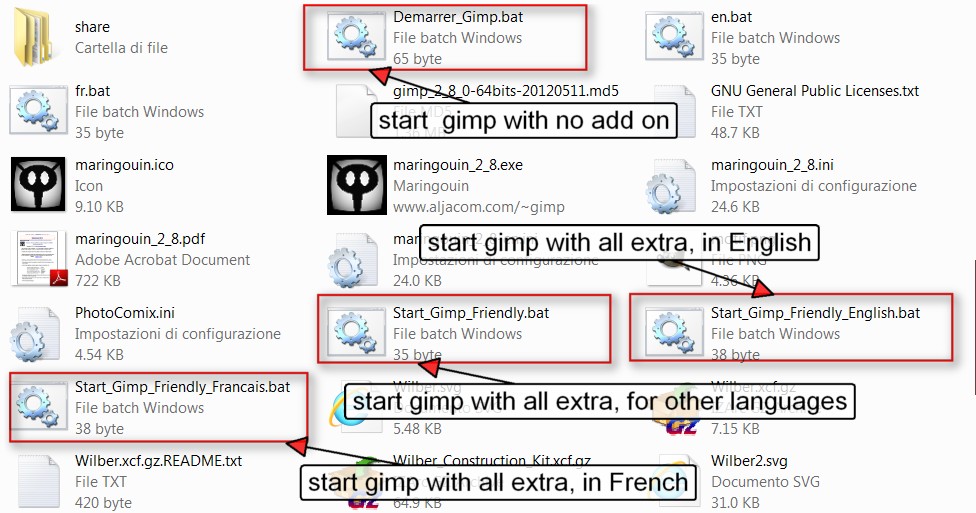
Open the program folder, and see the screenshot below that show the possible configuration you may chose for start

(
Image

Start the standard version (almost standard, include also , gmic Ufraw and the Help)
Demarrer_gimp.bat

[b]Start "Gimp-Windows friendly in English
(so will full extra as mathmap , gap, userfilter, and so on)
Start_gimp_friendly_english.bat

Start "Gimp-Windows friendly in French (so will full extra as mathmap , gap, userfilter, and so on)
Start_gimp_friendly french.bat

Start "Gimp-Windows friendly for other languages (so will full extra as mathmap , gap, userfilter, and so on)
Start_gimp_friendly french.bat


Mind that since it include also the Help, Python, and a bunch of useful plugin (UFraw, GMIC, MathMap, the UserFilter with all existing FilterFactory filter converted in its own format, Resynthesizer, Liquid Rescale, GAP and much more) its file size is quite huge (about 185 MB...) even if is minimal if compared to the 1.8GB of last Photoshop

So..Main differences from standard version

1) it doesn't force unistall of previous version and may run alongside gimp 2.6
2) include python support out of the box
3) may be used ALSO from external drive as a portable version
4) the gimp Help is preinstalled
5) the most useful extra plugin a script for commune use are preinstalled, list is long anyway the main are

GMIC
UFraw
MathMap
LensFun
Liquid rescale
Resynthesizer
LensFun
GAP (the gimp animation package)
Filter factory Converter (aka UserFilter)
Gurm
Shell Out
Layer Effect
Much More

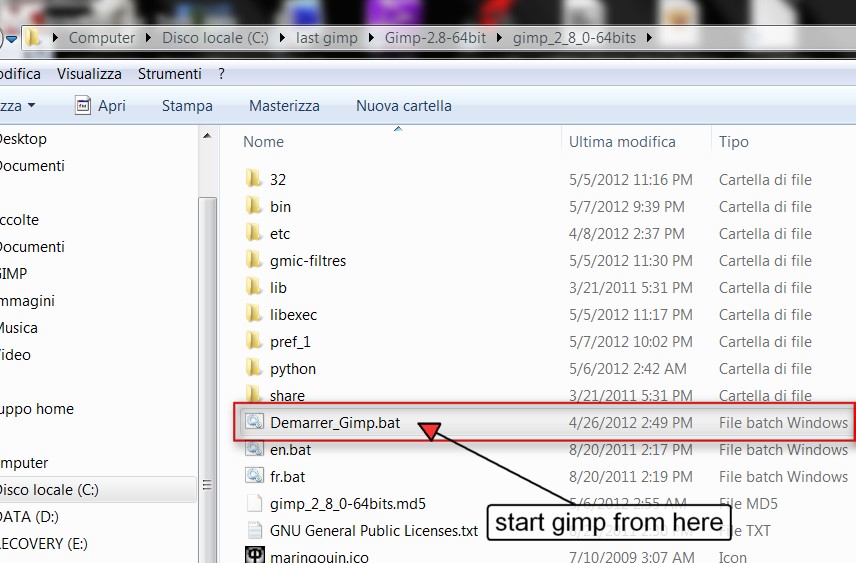
VERY IMPORTANT
do not start gimp clicking on gimp.exe but how explained in the beginning
Image


[size=150]Now something important if you want add your favorite plugin script brush,etc or remove something there (ie GAP if you are not interested to animation)


1) as far for plugin and script it is very probable what you want add is already included and in a more recent version so, check that first

2) the Place for all user add on depend also from the configuration you used to start:
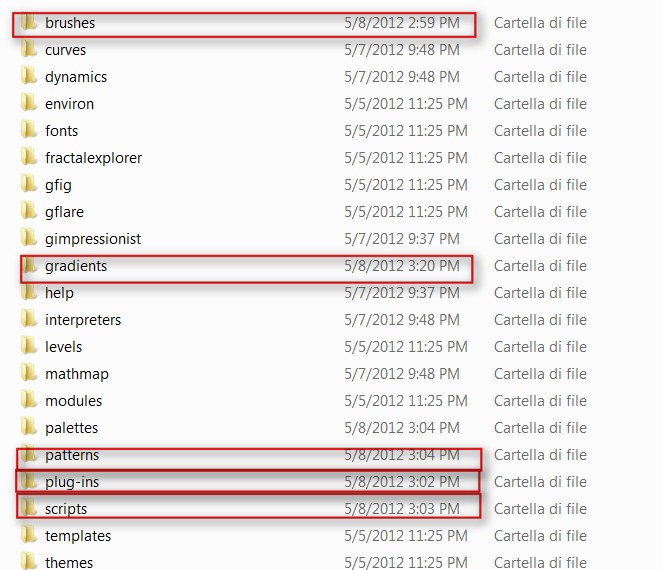
supposing you have chosen "Gimp Friendly" then is PhotoComix, that were i place all the extra and organized space for more


More exactly look in the subfolders of , as brushes , scripts plug-ins ..
: see below

Image

There also EVERYTHING i added that was not part of the gimp core
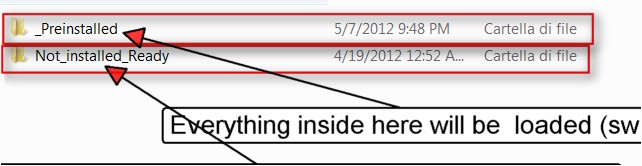
Now please look how is organized each of the folder marked in red, i use as example the "scripts"folder

Image

everything inside the "_Preinstalled" subfolder a, will be loaded, let say everything there is switched ON

On the contrary everything inside the Not_installed_Ready folder will be NOT loaded so switched off

So if you want temporary unistall some script , plugin or whatelse, you may move in that Not-Installed_ready folder
..and vice versa
(if instead you want definitively unistall...just delete the file(s) :hehe )

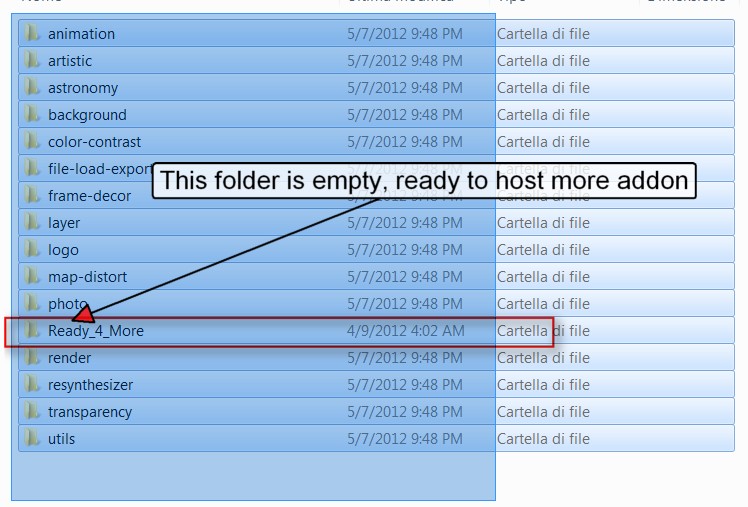
In _Preinstalled there is also a empty folder called "Ready_for_more":
in case you want add something, in the example i am doing some script that doesn't fit any other category, that is a empty container ready for you
Image

This version was build on top of Samj 64bit Portable http://samjcreations.blogspot.it/ (again ALSO portable work very well from the main HD )

Its portability derive from a very powerful and flexible utility from Samj called Maringouin, to use this gimp version you don't need to know more about Maringouin

But if you are a power user (or as example you want set up GMIC to be fully portable) you may wish have a look to samj blog (again http://samjcreations.blogspot.it/ ) to see how to use it at full power

LAST ,IMPORTANT FOR 7 And VISTA USERS:
Unzip Gimp where you wish ...just C:,or Document, or even Pictures, or what else, everywhere BUT NOT IN PROGRAM FILES
(even less in Program Files (x86) )


that's all folk..happy gimping

If any problem do NOT disturb the developers but post here below

Happy gimping

PS

32bit version coming soon

_________________
My 3D Gallery on Deviantart http://photocomix2.deviantart.com/
Main gallery http://www.flickriver.com/photos/photocomix-mandala/
Mandala and simmetry http://www.flickriver.com/photos/photocomix_mandala/

Image

Mrs Wilbress


Last edited by PhotoComix on Sat May 19, 2012 11:51 am, edited 5 times in total.

Share on Facebook Share on Twitter Share on Orkut Share on Digg Share on MySpace Share on Delicious Share on Technorati
Top
 Profile  
 

 Post subject: Re: NEW- Gimp-2.8_Windows-Friendly_64bit ready for testing
PostPosted: Tue May 08, 2012 3:27 pm  (#2) 
Offline
GimpChat Member
User avatar

Joined: Jan 20, 2012
Posts: 582
Location: Heading to Montana
NICE! definitly gonna use this as my new Portable. But why the demarre_gimp.bat instead of Gimp.exe ?

_________________


"In the face of adversity, there's three things: fly, freeze or fight; We're choosing to fight..."- Guy Boucher, Tampa Bay Lighting Head Coach

BE THE THUNDER!
Image


Top
 Profile  
 
 Post subject: Re: NEW- Gimp-2.8_Windows-Friendly_64bit ready for testing
PostPosted: Tue May 08, 2012 4:12 pm  (#3) 
Offline
GimpChat Member

Joined: Apr 12, 2010
Posts: 4957
because portability.
Directly called gimp.exe would not find python and its own filters, script etc

demarrer-gimp is the french equivalent of "start gimp" , i used a build from Samj, ( that is French )

b

_________________
My 3D Gallery on Deviantart http://photocomix2.deviantart.com/
Main gallery http://www.flickriver.com/photos/photocomix-mandala/
Mandala and simmetry http://www.flickriver.com/photos/photocomix_mandala/

Image

Mrs Wilbress


Top
 Profile  
 
 Post subject: Re: NEW- Gimp-2.8_Windows-Friendly_64bit ready for testing
PostPosted: Tue May 08, 2012 4:19 pm  (#4) 
Offline
Global Moderator
User avatar

Joined: Apr 07, 2010
Posts: 6948
PC I extracted your Gimp 64 over in Windows but I don't know how to put the scripts, plug-ins, gradients, patterns and all the rest of the stuff into the menu's. I see they are all there in the files I extracted but I don't know how to put them in Gimp.

I read your page over several times but still didn't figure it out. :oops: :oops: :oops:

_________________
Image


Top
 Profile  
 
 Post subject: Re: NEW- Gimp-2.8_Windows-Friendly_64bit ready for testing
PostPosted: Tue May 08, 2012 4:25 pm  (#5) 
Offline
Global Moderator
User avatar

Joined: May 16, 2010
Posts: 8952
Location: "Looking for my eraser" =P
Waiting for the 32 bit version please. :)

_________________
Image
Gimp Rocks Blog
Simply Gimp Tutorials
"Once your in the cloud, you're in the net"
____________
OK, . . . . so what's the speed of dark?


Top
 Profile  
 
 Post subject: Re: NEW- Gimp-2.8_Windows-Friendly_64bit ready for testing
PostPosted: Tue May 08, 2012 5:28 pm  (#6) 
Offline
GimpChat Member

Joined: Dec 07, 2011
Posts: 102
I extracted the file to a separate hard drive and started it by clicking Demarrer_Gimp.bat as you specified in the instructions. However, the problem from the last build of yours that I tested is still there in that it will not open .jpg files. It says it's an unknown file type.


Top
 Profile  
 
 Post subject: Re: NEW- Gimp-2.8_Windows-Friendly_64bit ready for testing
PostPosted: Tue May 08, 2012 5:44 pm  (#7) 
Offline
GimpChat Member

Joined: Apr 12, 2010
Posts: 4957
Molly they should go there automatically at soon you start gimp as i advised, the files are already where they should be

@Lacertile
i hope is not a problem with locale (with the languages) i am looking to a alternative just in case

Anyway , could you have a look to the menu ... there are filters in the filter menu ?
There is a "video" menu ?

_________________
My 3D Gallery on Deviantart http://photocomix2.deviantart.com/
Main gallery http://www.flickriver.com/photos/photocomix-mandala/
Mandala and simmetry http://www.flickriver.com/photos/photocomix_mandala/

Image

Mrs Wilbress


Top
 Profile  
 

 Post subject: Re: NEW- Gimp-2.8_Windows-Friendly_64bit ready for testing
PostPosted: Tue May 08, 2012 5:57 pm  (#8) 
Offline
GimpChat Member

Joined: Dec 07, 2011
Posts: 102
PhotoComix wrote:
@Lacertile
i hope is not a problem with locale (with the languages) i am looking to a alternative just in case

Anyway , could you have a look to the menu ... there are filters in the filter menu ?
There is a "video" menu ?


When I click on filters, there are no filters listed at all.


Top
 Profile  
 
 Post subject: Re: NEW- Gimp-2.8_Windows-Friendly_64bit ready for testing
PostPosted: Tue May 08, 2012 7:58 pm  (#9) 
Offline
Global Moderator
User avatar

Joined: Apr 07, 2010
Posts: 6948
PC, None of the files are where they should be, Everything is empty, brushes, scripts, patterns, gradients, plug-ins, Script-Fu isn't there. I can't use paths, it throws an error. There is something in your directions about turning them on but I don't see anywhere to do that. All the scripts and files are in the extracted folder but they don't show up in Gimp.

_________________
Image


Top
 Profile  
 
 Post subject: Re: NEW- Gimp-2.8_Windows-Friendly_64bit ready for testing
PostPosted: Wed May 09, 2012 12:18 am  (#10) 
Offline
GimpChat Member

Joined: Apr 12, 2010
Posts: 4957
too bad, i may imagine what happened, as i wrote i used Samj build and samj adapted her own utility called called Maringouin, to allow portability

the problem is that the utility is quite complex and documented only in French that is not a language i know (i used a google translation but is now evident that google translation did not help me much ) and is evident that mereinguin was overzelous and noticed also the Italian locale of my computer adapting its inner path to that locale

at least this my guess i can't imagine any other reason for that (EXCEPT LOAD GIMP CLICKING ON gimp.exe, but Lacertile say he didn't)

Well i am looking for a fix, and in the while testing a alternative solution...so please a bit of patience as i said was ready for testing

(if you read french maybe you may help, the samj portable version that i used and her Maringouin utility that she used to kept the pieces togheter are documented here http://samjcreations.blogspot.it/ and in the linked pages

i will be back at soon i find a solution

_________________
My 3D Gallery on Deviantart http://photocomix2.deviantart.com/
Main gallery http://www.flickriver.com/photos/photocomix-mandala/
Mandala and simmetry http://www.flickriver.com/photos/photocomix_mandala/

Image

Mrs Wilbress


Top
 Profile  
 
Display posts from previous:  Sort by  
Post new topic Reply to topic  [ 100 posts ]  Go to page 1, 2, 3, 4, 5 ... 10  Next

All times are UTC - 5 hours [ DST ]


Who is online

Users browsing this forum: No registered users and 1 guest


You cannot post new topics in this forum
You cannot reply to topics in this forum
You cannot edit your posts in this forum
You cannot delete your posts in this forum
You cannot post attachments in this forum

Search for:
Jump to:  

* Login   * Subscribe to RSS Feed


Powered by phpBB © 2000, 2002, 2005, 2007 phpBB Group