It is currently Mon May 20, 2013 9:31 pm


Latest GIMP Scripts & Plug-ins

All times are UTC - 5 hours [ DST ]


Post new topic Reply to topic  [ 12 posts ]  Go to page 1, 2  Next
Author Message
 Post subject: How can I make this photoshop button in Gimp?
PostPosted: Thu Jul 12, 2012 1:05 am  (#1) 
Offline
New Member

Joined: Jul 11, 2012
Posts: 3
GIMP Version: 2.6.11
Operating System: Windows
OS Version: XP - SP3
GIMP Experience: Beginner Level


Hi,

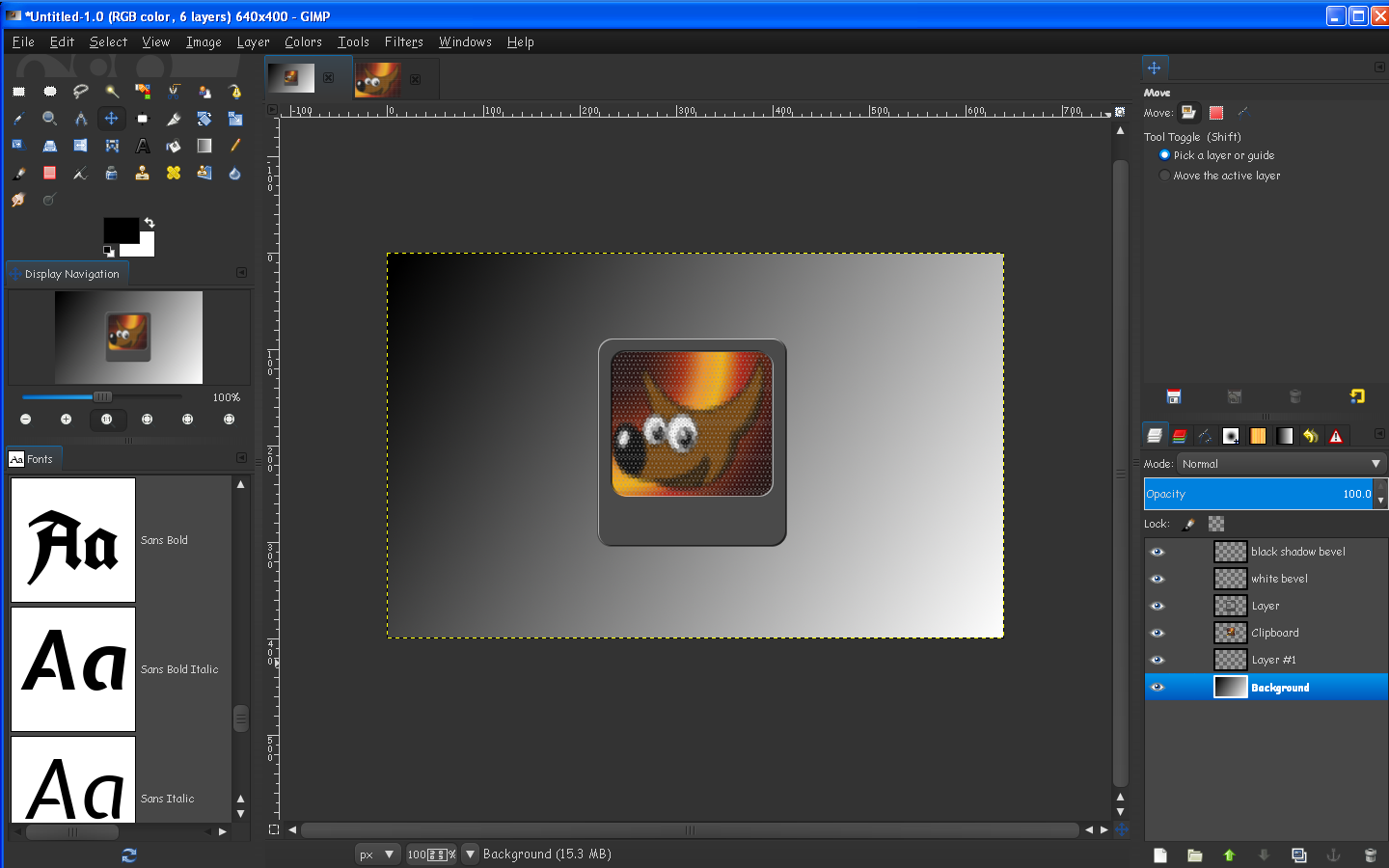
How can I create this bevelled clear button in Gimp?

I cant seem to find any examples with Google, needs to be transparent with a bevel..

Thanks


Attachments:
File comment: Button example
button.jpg
button.jpg [ 6.77 KiB | Viewed 447 times ]
Share on Facebook Share on Twitter Share on Orkut Share on Digg Share on MySpace Share on Delicious Share on Technorati
Top
 Profile  
 

 Post subject: Re: How can I make this photoshop button in Gimp?
PostPosted: Thu Jul 12, 2012 2:11 am  (#2) 
Offline
GimpChat Member
User avatar

Joined: Apr 23, 2010
Posts: 818
Location: not from Guildford after all
Start with a new image
Fill the background layer with a light gray
Add an alpha channel to the BG layer
Create a rectangular selection with rounded corners
"Edit->Clear"
Attachment:
SSbutton1.png
SSbutton1.png [ 10.42 KiB | Viewed 418 times ]


Create a new layer filled with white
Bucket fill the selection with black
"Select->None"
Gaussian blur the new layer
Attachment:
SSbutton2.png
SSbutton2.png [ 9.45 KiB | Viewed 418 times ]

Hide the FG layer
Make the BG layer active (either by using the Page Down key or by clicking on the BG layer's thumbnail preview in the Layers Dialog)
Use the Bump Map filter with the following settings (or somesuch)
Attachment:
SSbutton3.png
SSbutton3.png [ 14.96 KiB | Viewed 415 times ]

_________________
Any sufficiently primitive technology is indistinguishable from a rock.


Top
 Profile  
 
 Post subject: Re: How can I make this photoshop button in Gimp?
PostPosted: Thu Jul 12, 2012 5:03 am  (#3) 
Online
Global Moderator
User avatar

Joined: May 16, 2010
Posts: 8975
Location: "Looking for my eraser" =P
If you want one less subtle i made this one with 4 layers.
XCF workspace file is attached.So you can color it or size it however you like.

Image

Image

Attachment:
BevelTransButton_RD.xcf [707.48 KiB]
Downloaded 27 times

_________________
Image
Gimp Rocks Blog
Simply Gimp Tutorials
"Once your in the cloud, you're in the net"
____________
OK, . . . . so what's the speed of dark?


Top
 Profile  
 
 Post subject: Re: How can I make this photoshop button in Gimp?
PostPosted: Thu Jul 12, 2012 7:52 am  (#4) 
Offline
GimpChat Member
User avatar

Joined: Nov 09, 2011
Posts: 405
Play with Filters > Light and Shadow > Xach-Effect. It's great whenever you want to do something low relief or relief.
Rectangular Selection with rounded corners. Fill with gray.Duplicate Layer.
On the top layer make a new Rectangular selection for the button and cut selección. Keep the selection. Duplicate this cropped new layer and rename the top layer to "Top Layer". Apply the Xach-Effect on the second layer. Move "Top layer" to top.
To make the pushed button, follow the same steps but after you cut the selection invert the selection (Select - Invert)
You can add noise or textures to gray. Experience for yourself ... :gimp
Image

_________________
Image
Be patient, English is not my language.


Top
 Profile  
 
 Post subject: Re: How can I make this photoshop button in Gimp?
PostPosted: Thu Jul 12, 2012 8:10 am  (#5) 
Online
Global Moderator
User avatar

Joined: May 16, 2010
Posts: 8975
Location: "Looking for my eraser" =P
I think it was Kevin that created a filter for this also.I can not remember the name of it though. :)

_________________
Image
Gimp Rocks Blog
Simply Gimp Tutorials
"Once your in the cloud, you're in the net"
____________
OK, . . . . so what's the speed of dark?


Top
 Profile  
 
 Post subject: Re: How can I make this photoshop button in Gimp?
PostPosted: Thu Jul 12, 2012 11:17 am  (#6) 
Offline
Gimp Scripts Editor
User avatar

Joined: Feb 18, 2011
Posts: 1556
Location: Australia
Was that the Xach Blurry thing, by Kevin Payne "just for a laugh".

here is the link Xach Blurry thing

_________________
Image


Top
 Profile  
 
 Post subject: Re: How can I make this photoshop button in Gimp?
PostPosted: Thu Jul 12, 2012 12:44 pm  (#7) 
Offline
GimpChat Member
User avatar

Joined: Nov 09, 2011
Posts: 405
Yes, excellent Xach Blurry thing! It adds blur option to Xach-effect.

_________________
Image
Be patient, English is not my language.


Top
 Profile  
 

 Post subject: Re: How can I make this photoshop button in Gimp?
PostPosted: Thu Jul 12, 2012 1:48 pm  (#8) 
Online
Global Moderator
User avatar

Joined: May 16, 2010
Posts: 8975
Location: "Looking for my eraser" =P
Graechan wrote:
Was that the Xach Blurry thing, by Kevin Payne "just for a laugh".

here is the link Xach Blurry thing


Yes that's it! Thanks Graechan. :) :bigthup

_________________
Image
Gimp Rocks Blog
Simply Gimp Tutorials
"Once your in the cloud, you're in the net"
____________
OK, . . . . so what's the speed of dark?


Top
 Profile  
 
 Post subject: Re: How can I make this photoshop button in Gimp?
PostPosted: Thu Jul 12, 2012 2:18 pm  (#9) 
Online
Global Moderator
User avatar

Joined: May 16, 2010
Posts: 8975
Location: "Looking for my eraser" =P
You can create some cool effects with this filter (Xach blurry thing). :)

Image

_________________
Image
Gimp Rocks Blog
Simply Gimp Tutorials
"Once your in the cloud, you're in the net"
____________
OK, . . . . so what's the speed of dark?


Top
 Profile  
 
 Post subject: Re: How can I make this photoshop button in Gimp?
PostPosted: Fri Jul 13, 2012 3:36 am  (#10) 
Offline
New Member

Joined: Jul 11, 2012
Posts: 3
A BIG thanks for all your posts...!

Was what I was after...will try a few and experiment...really glad about this...

Thanks again everyone...!


Top
 Profile  
 
Display posts from previous:  Sort by  
Post new topic Reply to topic  [ 12 posts ]  Go to page 1, 2  Next

All times are UTC - 5 hours [ DST ]


Who is online

Users browsing this forum: No registered users and 2 guests


You cannot post new topics in this forum
You cannot reply to topics in this forum
You cannot edit your posts in this forum
You cannot delete your posts in this forum
You cannot post attachments in this forum

Search for:
Jump to:  

* Login   * Subscribe to RSS Feed


Powered by phpBB © 2000, 2002, 2005, 2007 phpBB Group