It is currently Tue May 21, 2013 7:46 pm


Latest GIMP Scripts & Plug-ins

All times are UTC - 5 hours [ DST ]


Post new topic Reply to topic  [ 13 posts ]  Go to page 1, 2  Next
Author Message
 Post subject: Clone tool with different angles. Is that possible?
PostPosted: Sun Jul 08, 2012 11:29 pm  (#1) 
Offline
GimpChat Member
User avatar

Joined: Nov 09, 2011
Posts: 405
GIMP Version: 2.8
Operating System: Linux
OS Version: Kubuntu
GIMP Experience: Basic Level


Hi all.
I'm trying to change the angle of cloning but by changing the property "angle" has no effect. This is what I try to do:
Image
I think if would be possible to choose different angles for the Clone tool and Perspective Clone Tool, it might be useful for reflections or mirror images. For examples, the mirror of an object over a surface (or the reflection of the surface on the object)
Thanks.

_________________
Image
Be patient, English is not my language.


Share on Facebook Share on Twitter Share on Orkut Share on Digg Share on MySpace Share on Delicious Share on Technorati
Top
 Profile  
 

 Post subject: Re: Clone tool with different angles. Is that possible?
PostPosted: Mon Jul 09, 2012 2:41 am  (#2) 
Offline
GimpChat Member
User avatar

Joined: Oct 25, 2010
Posts: 1296
YAFU wrote:
GIMP Version: 2.8
Operating System: Linux
OS Version: Kubuntu
GIMP Experience: Basic Level


Hi all.
I'm trying to change the angle of cloning but by changing the property "angle" has no effect. This is what I try to do:
Image
I think if would be possible to choose different angles for the Clone tool and Perspective Clone Tool, it might be useful for reflections or mirror images. For examples, the mirror of an object over a surface (or the reflection of the surface on the object)
Thanks.

What don't you duplicate the image/layer, rotate it, and then use that as a clone (or heal) source? Cloning can be done from any layer (or even from another image...)

_________________
Image


Top
 Profile  
 
 Post subject: Re: Clone tool with different angles. Is that possible?
PostPosted: Mon Jul 09, 2012 5:51 am  (#3) 
Offline
GimpChat Member
User avatar

Joined: Mar 23, 2012
Posts: 3087
Location: UK
I used to have Picture Publisher 8 and I seem to remember it having mirrored cloning. Gimp is far superior so it's a wonder it hasn't been included.

_________________
Image


Top
 Profile  
 
 Post subject: Re: Clone tool with different angles. Is that possible?
PostPosted: Mon Jul 09, 2012 6:41 am  (#4) 
Offline
GimpChat Member
User avatar

Joined: Nov 09, 2011
Posts: 405
@Erisian, It would be nice to include that feature in GIMP. I suppose if all the brushes support setting different angles would not be difficult to apply in the Clone tool.
@ofnuts, In this picture I show and assuming that the gray area may reflect images like a mirror:
Image
Download Reflection.xcf
how do you emulate the reflection from the surface over the object?

_________________
Image
Be patient, English is not my language.


Top
 Profile  
 
 Post subject: Re: Clone tool with different angles. Is that possible?
PostPosted: Mon Jul 09, 2012 6:50 am  (#5) 
Offline
Global Moderator
User avatar

Joined: Apr 07, 2010
Posts: 6960
You many find that very difficult. It has been tried before a while back to reflect the under side of a car and it wasn't very profitable.

_________________
Image


Top
 Profile  
 
 Post subject: Re: Clone tool with different angles. Is that possible?
PostPosted: Mon Jul 09, 2012 7:07 am  (#6) 
Offline
GimpChat Member
User avatar

Joined: Nov 09, 2011
Posts: 405
Hello molly.
The case of the car reflection is different. There you are missing data. For example you do not know how the bottom surface of the car is.
In the example I show all the necessary data are available. Just have to find a technique to make the emulation of reflection easily.

_________________
Image
Be patient, English is not my language.


Top
 Profile  
 
 Post subject: Re: Clone tool with different angles. Is that possible?
PostPosted: Mon Jul 09, 2012 8:05 am  (#7) 
Offline
GimpChat Member
User avatar

Joined: Oct 25, 2010
Posts: 1296
YAFU wrote:
@ofnuts, In this picture I show and assuming that the gray area may reflect images like a mirror:
how do you emulate the reflection from the surface over the object?

For a complex surface like this, I don't think there is a simple process with Gimp that gives a correct result (the two triangles at the bottom center have three reflections), and I don't see how rotating brushes would help with that. 3D rendering software would do it...

Attachment:
Reflections.png
Reflections.png [ 75.17 KiB | Viewed 630 times ]

_________________
Image


Top
 Profile  
 

 Post subject: Re: Clone tool with different angles. Is that possible?
PostPosted: Mon Jul 09, 2012 4:27 pm  (#8) 
Offline
GimpChat Member
User avatar

Joined: Nov 09, 2011
Posts: 405
I think being able to choose the angle of the Clone tool, you could quickly get something like this picture (I did it manually):
Image

And then work from that image to achieve the "fake reflection":
Image

Ok, I know the result was not very good and it would lack some reflections caused by the curvatures, but hopefully I can illustrate what I pretend.

_________________
Image
Be patient, English is not my language.


Top
 Profile  
 
 Post subject: Re: Clone tool with different angles. Is that possible?
PostPosted: Mon Jul 09, 2012 10:58 pm  (#9) 
Online
GimpChat Member
User avatar

Joined: Apr 08, 2010
Posts: 2941
Location: Northwest Ohio
actually that is really good, and a top highlight/shadow layer would make it look almost perfect.


Top
 Profile  
 
 Post subject: Re: Clone tool with different angles. Is that possible?
PostPosted: Tue Jul 10, 2012 1:20 am  (#10) 
Offline
Global Moderator
User avatar

Joined: May 16, 2010
Posts: 8997
Location: "Looking for my eraser" =P
Interesting.
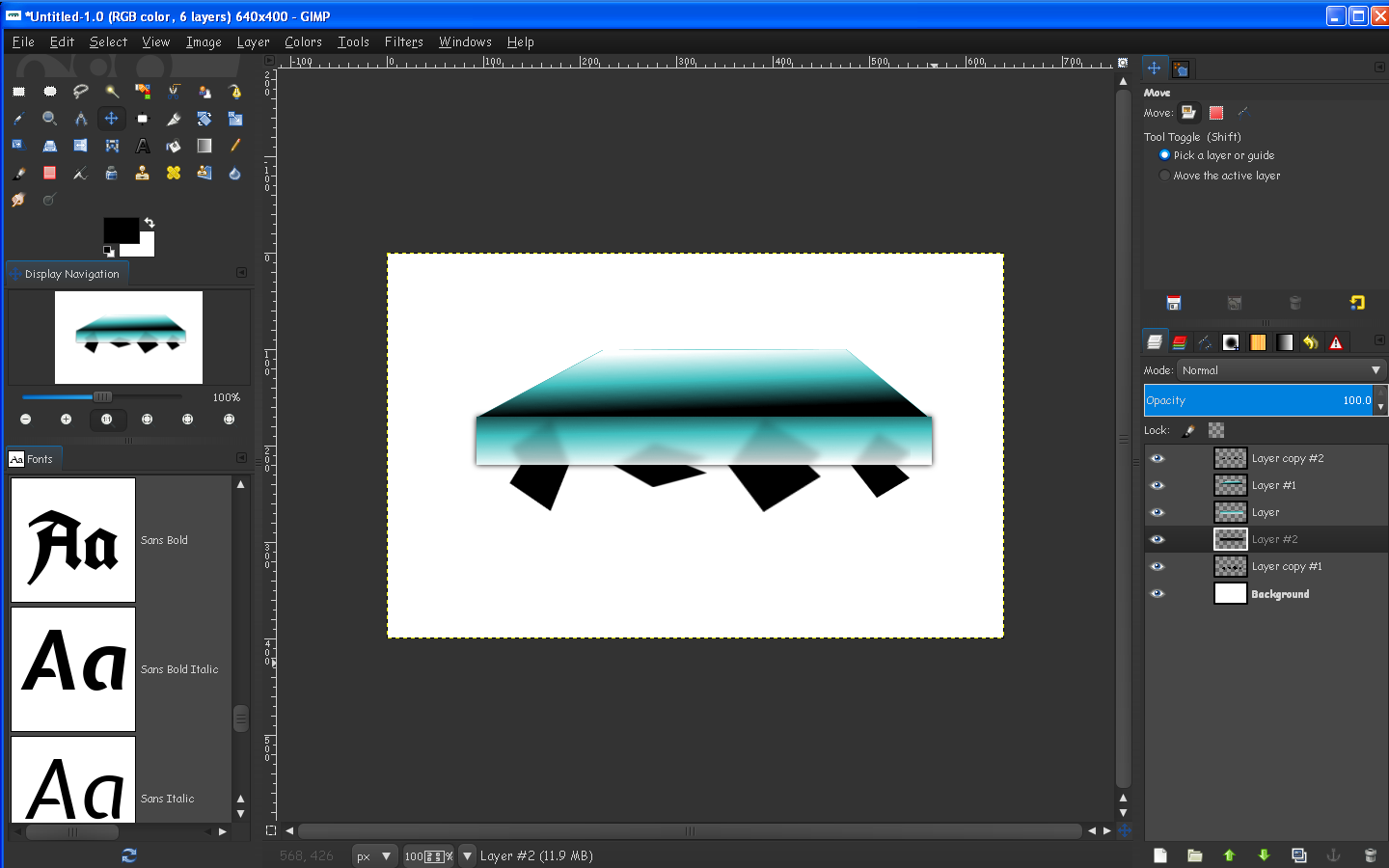
You could start with 3 layers
1) the top surface layer (no script activity)
2) the reflected layer (shapes layer)
3) the reflection surface layer (3-D effect layer) with gradient already added.
So all you would really need is a script that would flip the reflected layer vertical, or horizontal.
Move it to the top of the 3-D layer and clip it to the 3-D layer, and then blurred, and opacity set, or mode set.
Then the top surface layer would be placed on top.
Image
That would pretty much give you your effect.

_________________
Image
Gimp Rocks Blog
Simply Gimp Tutorials
"Once your in the cloud, you're in the net"
____________
OK, . . . . so what's the speed of dark?


Top
 Profile  
 
Display posts from previous:  Sort by  
Post new topic Reply to topic  [ 13 posts ]  Go to page 1, 2  Next

All times are UTC - 5 hours [ DST ]


Who is online

Users browsing this forum: No registered users and 7 guests


You cannot post new topics in this forum
You cannot reply to topics in this forum
You cannot edit your posts in this forum
You cannot delete your posts in this forum
You cannot post attachments in this forum

Search for:
Jump to:  

* Login   * Subscribe to RSS Feed


Powered by phpBB © 2000, 2002, 2005, 2007 phpBB Group