It is currently Sun Oct 11, 2026 6:36 pm


All times are UTC - 5 hours [ DST ]


Post new topic Reply to topic  [ 9 posts ] 
Author Message
 Post subject: Black and white with color.
PostPosted: Tue Nov 16, 2010 12:09 am  (#1) 
Offline
New Member

Joined: Nov 15, 2010
Posts: 4
How would I make my background images black and white, while keeping my main imagine in color? I have a pic of a motorcycle and I would like to keep the vibrant colors of the bike on the pic, while making everything else black and white or a gray tone.


Share on Facebook Share on Twitter Share on Orkut Share on Digg Share on MySpace Share on Delicious Share on Technorati
Top
 Post subject: Re: Black and white with color.
PostPosted: Tue Nov 16, 2010 12:22 am  (#2) 
Offline
GimpChat Founder
User avatar

Joined: May 22, 2008
Posts: 5241
Location: Gimpville
You could place the background and foreground images on separate layers, raising foreground layer above the background layer, then desaturate the background layer to black and white.

_________________
“If you reach for the stars, you just might land on a decently sized hill.” - Stuart Hill


Top
 Post subject: Re: Black and white with color.
PostPosted: Tue Nov 16, 2010 12:57 am  (#3) 
Offline
Global Moderator
User avatar

Joined: May 16, 2010
Posts: 16200
Yes, or you can select the bike with the paths tool, turn that into a selection, and select/invert
That inverts the selection and selects all but the bike
then go to - Color/desaturate
That will desaturate everything but the bike. =)

There are many ways to do things in Gimp.


Top
 Post subject: Re: Black and white with color.
PostPosted: Tue Nov 16, 2010 1:10 am  (#4) 
Offline
Retired Staff
User avatar

Joined: May 22, 2008
Posts: 6946
Location: Somewhere in GIMP
LOL. Rod, ya ninja posted me, but I'm leaving my post because mine has a pretty picture with it.

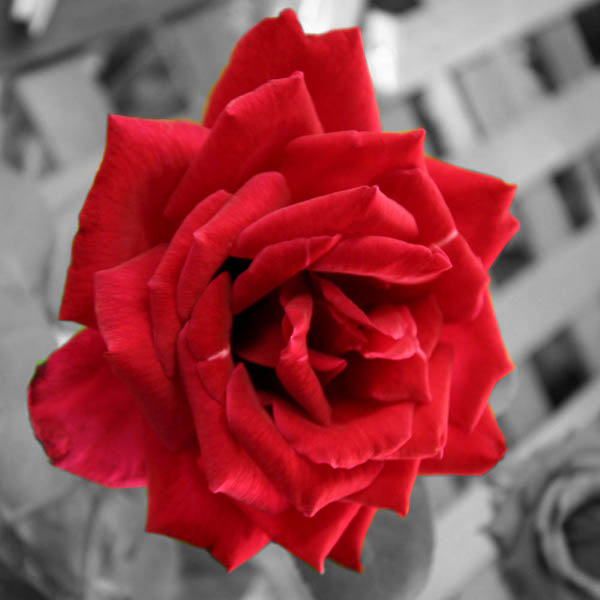
Another way you can do it is use the Paths tool :pathtool to select around your motorcycle, then Path to selection, invert the selection (Ctrl + I), Colors > Desaturate. I chose the luminosity setting in desaturate for this one.

Image

_________________
Image
World War IV will be fought with sticks and stones. - Albert Einstein


Top
 Post subject: Re: Black and white with color.
PostPosted: Tue Nov 16, 2010 1:27 am  (#5) 
Offline
Global Moderator
User avatar

Joined: May 16, 2010
Posts: 16200
lol - sorry O
That is a very pretty picture though. =)


Top
 Post subject: Re: Black and white with color.
PostPosted: Tue Nov 16, 2010 1:29 am  (#6) 
Offline
Retired Staff
User avatar

Joined: May 22, 2008
Posts: 6946
Location: Somewhere in GIMP
Yeah, I see how sorry you are. :hehe

Glad you like my picture. :curtsey

_________________
Image
World War IV will be fought with sticks and stones. - Albert Einstein


Top
 Post subject: Re: Black and white with color.
PostPosted: Tue Nov 16, 2010 9:08 am  (#7) 
Offline
Script Coder
User avatar

Joined: Jun 22, 2010
Posts: 1171
Location: Here and there
It's a technique that's sometimes known as selective desaturation

Image

I can't remember exactly how I did it but it's possible I used the Hue-Saturation dialog, reducing the saturation of all the colours except red (works best if the colour of your subject doesn't exist in the background)

_________________
Kevin


Top
 Post subject: Re: Black and white with color.
PostPosted: Tue Nov 16, 2010 10:15 am  (#8) 
Offline
Retired Staff
User avatar

Joined: May 22, 2008
Posts: 6946
Location: Somewhere in GIMP
paynekj wrote:
It's a technique that's sometimes known as selective desaturation

I can't remember exactly how I did it but it's possible I used the Hue-Saturation dialog, reducing the saturation of all the colours except red (works best if the colour of your subject doesn't exist in the background)
Paynekj, I went into hue and saturation and selected each color (have to go back each time to H&S) except red and slid the Saturation slider all the way to the left (-100). It desaturated all of the colors (except red). When I was finished with that part of it there were some left-over reds that I selected loosely around using the lasso tool and in some places the rectangle select tool (no need to worry about the bg as it's already desaturated), then went back to H&S and selected red and desaturated those.

I like your method. GIMP has so many cool ways to do things. :yes

Here is my result.
Image

This is after just desaturating all colors except red ... it shows the leftover reds. As you can see, there are two places where they touch the big rose; those places may be better done with the paths tool, but I zoomed in and used the lasso tool.
Image

_________________
Image
World War IV will be fought with sticks and stones. - Albert Einstein


Top
 Post subject: Re: Black and white with color.
PostPosted: Tue Nov 16, 2010 10:19 am  (#9) 
Offline
Global Moderator
User avatar

Joined: May 16, 2010
Posts: 16200
Very nice O. =)


Top
Post new topic Reply to topic  [ 9 posts ] 

All times are UTC - 5 hours [ DST ]


* Login  


Powered by phpBB3 © phpBB Group