It is currently Sun Jun 07, 2026 6:50 pm


All times are UTC - 5 hours [ DST ]


Post new topic Reply to topic  [ 31 posts ]  Go to page 1, 2  Next
Author Message
 Post subject: AI Remove image background(use rembg) for Gimp 3.0 RC1
PostPosted: Sat Nov 09, 2024 8:46 pm  (#1) 
Offline
GimpChat Member
User avatar

Joined: Apr 25, 2011
Posts: 121
Location: Taiwan
This version is updated for Gimp 3.0

First you need to successful install rembg

Download the zip file, open RemoveBG.py with text editor, find
aiExe = "C:\\Users\\USER\\AppData\\Local\\Programs\\Python\\Python310\\Scripts\\rembg.exe"
Replace with your own rembg path

note:All the GIMP 3.0 plugins need to put into folder

Python-fu->AI移除影像背景(AI Remove background) ...
Image

Image

Windows user
RemoveBG3.zip

for linux flatpak gimp
RemoveBG-Flatpak3.zip
find
aiExe = "/home/james/.local/bin/rembg"
Replace with your own rembg path

then run gimp like below
flatpak run --socket=session-bus org.gimp.GIMP//beta

Test successful on ubuntu 24.04

for linux AppImage gimp
RemoveBG-AppImage3.zip

_________________
Sorry for my poor English, I use Google Translate.
There may be something wrong, Please understand.

GIMP 2.10.38 rev1 portable+GAP+G'MIC+nufraw+Beautify+MathMap+...


Last edited by JamesH on Sun Nov 17, 2024 10:41 pm, edited 1 time in total.

Share on Facebook Share on Twitter Share on Orkut Share on Digg Share on MySpace Share on Delicious Share on Technorati
Top
 Post subject: Re: AI Remove image background(use rembg) for Gimp 3.0 RC1
PostPosted: Sat Nov 09, 2024 10:32 pm  (#2) 
Offline
GimpChat Member
User avatar

Joined: Oct 31, 2020
Posts: 2010
awesome, thank you for getting this working on rc1.


Top
 Post subject: Re: AI Remove image background(use rembg) for Gimp 3.0 RC1
PostPosted: Mon Nov 11, 2024 4:41 am  (#3) 
Offline
Global Moderator
User avatar

Joined: May 16, 2010
Posts: 16018
Here is my path set in the windows variable and the python file in the plug-ins folder.
    aiExe = "C:\\Program Files (x86)\\Rembg\\rembg.exe"

I can not get this to work in my Windows -x64-Gimp-3.0 Development version.
EDIT
I Had to place the python file in its own folder named RemoveBG, and it works great now. :)

My Windows x64 directory for the RemoveBG.py file.
Users/Rod/AppData/Roaming/Gimp/3.0/Plug-ins/RemoveBG/RemoveBG.py

_________________
Image


Top
 Post subject: Re: AI Remove image background(use rembg) for Gimp 3.0 RC1
PostPosted: Sun Nov 17, 2024 3:59 am  (#4) 
Offline
GimpChat Member
User avatar

Joined: Jan 13, 2011
Posts: 2638
Location: Poland
Hello James.
You know I am very happy when you appear on the site (but definitely too rarely). :yes
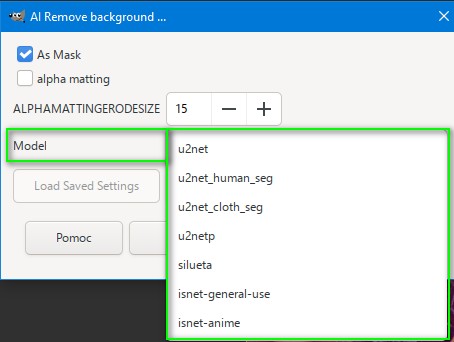
Is it possible to have a version for Gimp-2.10 extended with model selection? (I tried but quickly gave up).

Image

_________________
Image


Top
 Post subject: Re: AI Remove image background(use rembg) for Gimp 3.0 RC1
PostPosted: Sun Nov 17, 2024 8:48 pm  (#5) 
Offline
GimpChat Member
User avatar

Joined: Apr 25, 2011
Posts: 121
Location: Taiwan
MareroQ wrote:
Hello James.
You know I am very happy when you appear on the site (but definitely too rarely). :yes
Is it possible to have a version for Gimp-2.10 extended with model selection? (I tried but quickly gave up).

[ Image ]


You can download here for Gimp-2.10
RemoveBG.zip

You can modify this line to add or delete model
tupleModel = ("u2net","u2net_human_seg", ... )
It won't work if the model need extra parameters, like sam model

_________________
Sorry for my poor English, I use Google Translate.
There may be something wrong, Please understand.

GIMP 2.10.38 rev1 portable+GAP+G'MIC+nufraw+Beautify+MathMap+...


Last edited by JamesH on Sun Nov 17, 2024 10:48 pm, edited 1 time in total.

Top
 Post subject: Re: AI Remove image background(use rembg) for Gimp 3.0 RC1
PostPosted: Sun Nov 17, 2024 9:55 pm  (#6) 
Offline
GimpChat Member
User avatar

Joined: Sep 24, 2010
Posts: 12775
Impressive, James. I remember when rembg was posted a while back but could never get this one to work. Used the default u2net algorithm and below's a reduced sized result (reduce to keep the file size down). Not perfect, but for the speed, I'm really impressed. Not sure what all the algorithms do; might have to do some more research for them later. Thanks for sharing. :)


Attachments:
Dalia.png
Dalia.png [ 990.11 KiB | Viewed 43630 times ]

_________________
Lyle

Psalm 109:8

Image
Top
 Post subject: Re: AI Remove image background(use rembg) for Gimp 3.0 RC1
PostPosted: Sun Nov 17, 2024 9:58 pm  (#7) 
Offline
GimpChat Member
User avatar

Joined: Sep 24, 2010
Posts: 12775
Rod wrote:
Here is my path set in the windows variable and the python file in the plug-ins folder.
    aiExe = "C:\\Program Files (x86)\\Rembg\\rembg.exe"

I can not get this to work in my Windows -x64-Gimp-3.0 Development version.
EDIT
I Had to place the python file in its own folder named RemoveBG, and it works great now. :)

My Windows x64 directory for the RemoveBG.py file.
Users/Rod/AppData/Roaming/Gimp/3.0/Plug-ins/RemoveBG/RemoveBG.py


And have to thank Rod for sharing that as well; should have read the fine print. lol

:)

_________________
Lyle

Psalm 109:8

Image


Top
 Post subject: Re: AI Remove image background(use rembg) for Gimp 3.0 RC1
PostPosted: Sun Nov 17, 2024 11:59 pm  (#8) 
Offline
GimpChat Member
User avatar

Joined: Jan 13, 2011
Posts: 2638
Location: Poland
@James

It's very nice of You to fulfill my request so quickly.

_________________
Image


Top
 Post subject: Re: AI Remove image background(use rembg) for Gimp 3.0 RC1
PostPosted: Sun Jan 05, 2025 3:08 pm  (#9) 
Offline
GimpChat Member
User avatar

Joined: Oct 31, 2020
Posts: 2010
i can't get it working on Linux. Terminal gives me this error


Procedure 'plug-in-RemoveBG-python': no mnemonic for property asMask
Procedure 'plug-in-RemoveBG-python': no mnemonic for property AlphaMatting
Procedure 'plug-in-RemoveBG-python': no mnemonic for property selModel

** (plug-in-RemoveBG-python:555255): WARNING **: 15:04:35.286: AT-SPI: Could not obtain desktop path or name


** (plug-in-RemoveBG-python:555255): WARNING **: 15:04:35.288: atk-bridge: GetRegisteredEvents returned message with unknown signature

** (plug-in-RemoveBG-python:555255): WARNING **: 15:04:35.288: atk-bridge: get_device_events_reply: unknown signature


Top
 Post subject: Re: AI Remove image background(use rembg) for Gimp 3.0 RC1
PostPosted: Sun Jan 05, 2025 9:47 pm  (#10) 
Offline
GimpChat Member
User avatar

Joined: Apr 15, 2017
Posts: 1837
contrast_ wrote:
i can't get it working on Linux. Terminal gives me this error


It works fine here. I'm using the PPA installed version of Gimp 3.0 RC2.


Top
 Post subject: Re: AI Remove image background(use rembg) for Gimp 3.0 RC1
PostPosted: Sun Jan 05, 2025 11:12 pm  (#11) 
Offline
GimpChat Member
User avatar

Joined: Apr 25, 2011
Posts: 121
Location: Taiwan
Most common problem is wrong path of the rembg
So check your rembg path whether correct or not

_________________
Sorry for my poor English, I use Google Translate.
There may be something wrong, Please understand.

GIMP 2.10.38 rev1 portable+GAP+G'MIC+nufraw+Beautify+MathMap+...


Top
 Post subject: Re: AI Remove image background(use rembg) for Gimp 3.0 RC1
PostPosted: Mon Jan 06, 2025 4:19 pm  (#12) 
Offline
GimpChat Member
User avatar

Joined: Oct 31, 2020
Posts: 2010
I got it working. I just needed the latest rembg and its models


Top
 Post subject: Re: AI Remove image background(use rembg) for Gimp 3.0 RC1
PostPosted: Fri Jan 17, 2025 12:19 pm  (#13) 
Offline
New Member

Joined: Jan 17, 2025
Posts: 1
Hi guys,

I can't download the RemoveBG3.zip file from the link in "app[dot]box[dot]com"

I would be grateful if anybody could attach it in this thread.

Many Thanks
Mariano


Top
 Post subject: Re: AI Remove image background(use rembg) for Gimp 3.0 RC1
PostPosted: Sat Jan 18, 2025 8:18 pm  (#14) 
Offline
GimpChat Member
User avatar

Joined: Apr 25, 2011
Posts: 121
Location: Taiwan
km73 wrote:
Hi guys,

I can't download the RemoveBG3.zip file from the link in "app[dot]box[dot]com"

I would be grateful if anybody could attach it in this thread.

Many Thanks
Mariano


Attachments:
RemoveBG3.zip [3.17 KiB]
Downloaded 1049 times

_________________
Sorry for my poor English, I use Google Translate.
There may be something wrong, Please understand.

GIMP 2.10.38 rev1 portable+GAP+G'MIC+nufraw+Beautify+MathMap+...
Top
 Post subject: Re: AI Remove image background(use rembg) for Gimp 3.0 RC1
PostPosted: Sun Jan 19, 2025 8:35 pm  (#15) 
Offline
GimpChat Member
User avatar

Joined: Jun 02, 2013
Posts: 2090
MareroQ wrote:
Is it possible to have a version for Gimp-2.10 extended with model selection? (I tried but quickly gave up).

I still use ver. 2.8, haha.

_________________
Image


Top
 Post subject: Re: AI Remove image background(use rembg) for Gimp 3.0 RC1
PostPosted: Mon Jan 20, 2025 4:06 am  (#16) 
Offline
GimpChat Member
User avatar

Joined: Apr 25, 2011
Posts: 121
Location: Taiwan
The Warrior wrote:
MareroQ wrote:
Is it possible to have a version for Gimp-2.10 extended with model selection? (I tried but quickly gave up).

I still use ver. 2.8, haha.


Gimp-2.10 RemoveBG.py version also work on Gimp 2.8

_________________
Sorry for my poor English, I use Google Translate.
There may be something wrong, Please understand.

GIMP 2.10.38 rev1 portable+GAP+G'MIC+nufraw+Beautify+MathMap+...


Top
 Post subject: Re: AI Remove image background(use rembg) for Gimp 3.0 RC1
PostPosted: Tue Jan 21, 2025 9:16 am  (#17) 
Offline
GimpChat Member
User avatar

Joined: Jun 02, 2013
Posts: 2090
In the OP, you posted a link for the rembg download, but when I click on the link, I don't see the download for the .exe? Sorry, not overly familiar with github. Thanks.

_________________
Image


Top
 Post subject: Re: AI Remove image background(use rembg) for Gimp 3.0 RC1
PostPosted: Tue Jan 21, 2025 9:51 am  (#18) 
Offline
GimpChat Member
User avatar

Joined: Jun 02, 2013
Posts: 2090
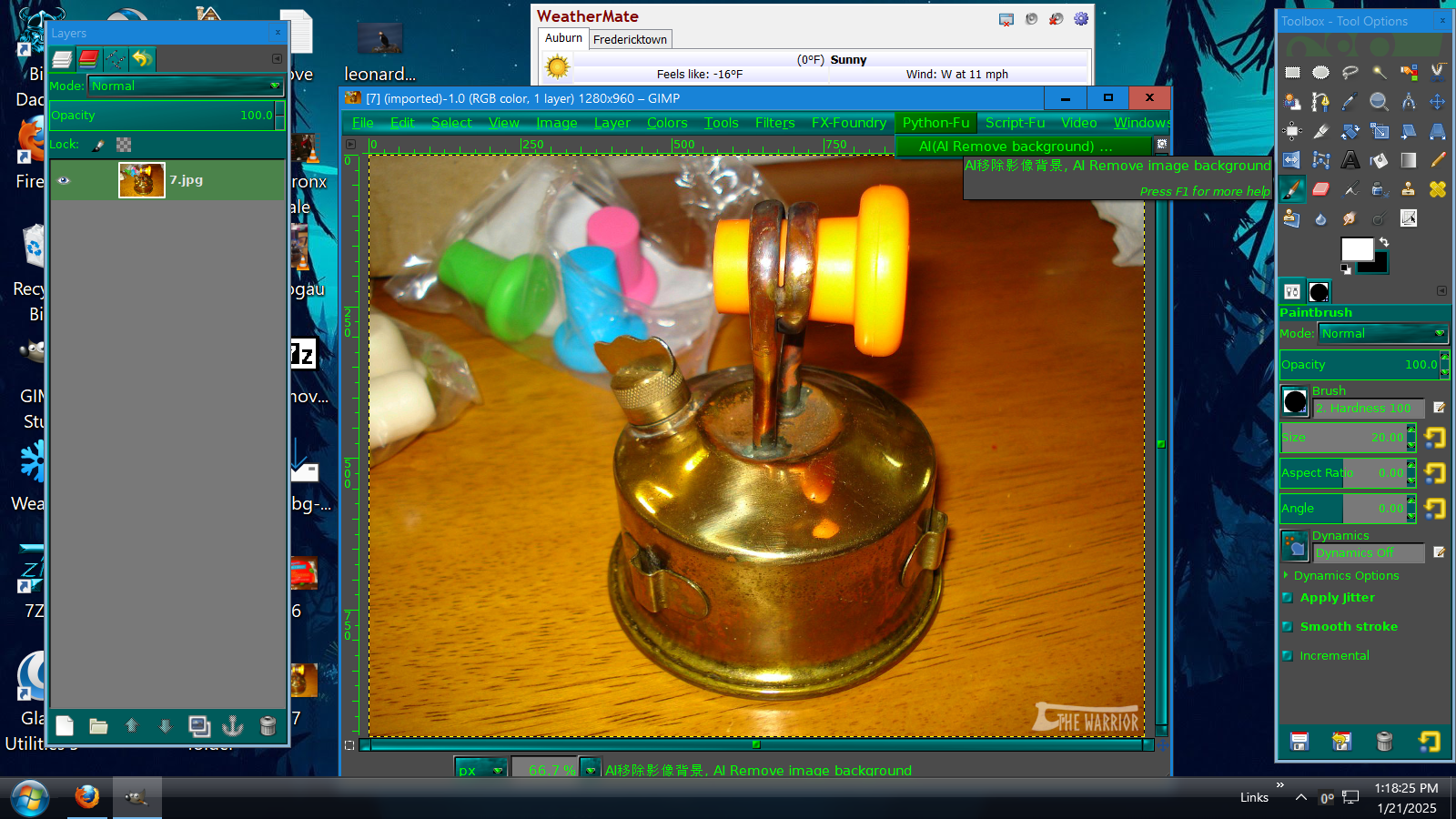
I figured it out. Downloaded the .exe, installed it. Downloaded the RemoveBG.py for 2.10, opened it up in notepad, had to change it to: "C:\\Users\\bdwoowoo\\gimp-2.8\\plug-ins\\RemoveBG.py" , placed it in the plugins folder, open up GIMP, clicked on python-fu in the header, voila!

_________________
Image


Last edited by The Warrior on Tue Jan 21, 2025 2:07 pm, edited 1 time in total.

Top
 Post subject: Re: AI Remove image background(use rembg) for Gimp 3.0 RC1
PostPosted: Tue Jan 21, 2025 10:04 am  (#19) 
Offline
GimpChat Member
User avatar

Joined: Jun 02, 2013
Posts: 2090
Now, making it work, that's another story...

_________________
Image


Top
 Post subject: Re: AI Remove image background(use rembg) for Gimp 3.0 RC1
PostPosted: Tue Jan 21, 2025 2:09 pm  (#20) 
Offline
GimpChat Member
User avatar

Joined: Jun 02, 2013
Posts: 2090
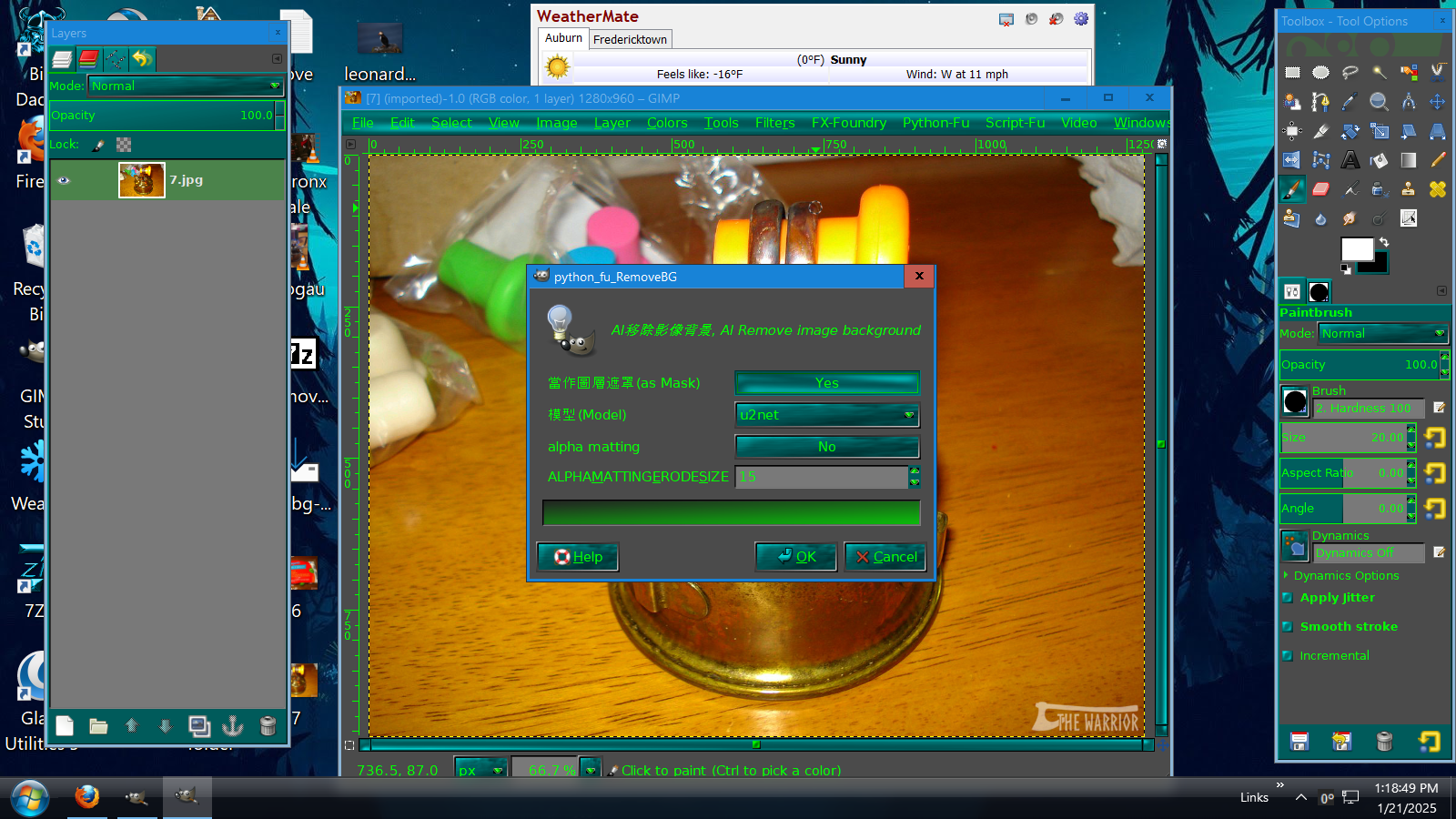
Well, it shows up in the header, and when I click on it the box shows up, but doesn't seem to do anything no matter what settings I use. Hmmm...

Image

Image

_________________
Image


Top
Post new topic Reply to topic  [ 31 posts ]  Go to page 1, 2  Next

All times are UTC - 5 hours [ DST ]


* Login  


Powered by phpBB3 © phpBB Group