It is currently Mon May 20, 2013 9:04 am


Latest GIMP Scripts & Plug-ins

All times are UTC - 5 hours [ DST ]


Post new topic Reply to topic  [ 167 posts ]  Go to page Previous  1 ... 7, 8, 9, 10, 11, 12, 13 ... 17  Next
Author Message
 Post subject: Re: Iccii Layer Effects updated with new bug fixes
PostPosted: Wed Mar 06, 2013 12:24 pm  (#91) 
Offline
GimpChat Member
User avatar

Joined: Apr 22, 2010
Posts: 86
Esper wrote:
Graechan wrote:
Esper did this happen on the version of the iccii files I posted dated march 6th
it happened with all versions so far

Quote:
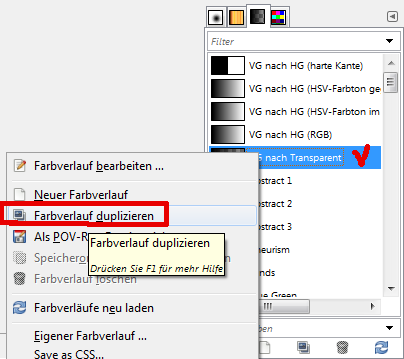
@Esper Copy the gradient and change its name to English -> FG to Transparent


i dont understand what this means


simply duplicate the gradient VG nach Transparent

Image


and change the name of the "VG nach Transparent-Kopie" to FG-to-Transparent

_________________
Image


Top
 Profile  
 

 Post subject: Re: Iccii Layer Effects updated with new bug fixes
PostPosted: Wed Mar 06, 2013 6:21 pm  (#92) 
Offline
Gimp Scripts Editor
User avatar

Joined: Feb 18, 2011
Posts: 1556
Location: Australia
Gramg when you say you can't do any thing with 'Style sample 2' do you mean you have a text layer active and and you select 'Style sample 2' from the icci menu a menu appears and then when you click on OK nothing happens

_________________
Image


Top
 Profile  
 
 Post subject: Re: Iccii Layer Effects updated with new bug fixes
PostPosted: Wed Mar 06, 2013 6:32 pm  (#93) 
Offline
GimpChat Member
User avatar

Joined: Feb 20, 2013
Posts: 1131
Hi Graechan,

Exactly as you say...except I can not click on OK....it is down below my task bar and I can not make the window the OK is in any smaller...it will not resize.


Top
 Profile  
 
 Post subject: Re: Iccii Layer Effects updated with new bug fixes
PostPosted: Wed Mar 06, 2013 7:18 pm  (#94) 
Offline
Gimp Scripts Editor
User avatar

Joined: Feb 18, 2011
Posts: 1556
Location: Australia
Gramg either right click in your task bar and select properties and then check auto hide task bar
or as I did because I also only use a laptop set my task bar to the side.

_________________
Image


Top
 Profile  
 
 Post subject: Re: Iccii Layer Effects updated with new bug fixes
PostPosted: Wed Mar 06, 2013 7:35 pm  (#95) 
Offline
Gimp Scripts Editor
User avatar

Joined: Feb 18, 2011
Posts: 1556
Location: Australia
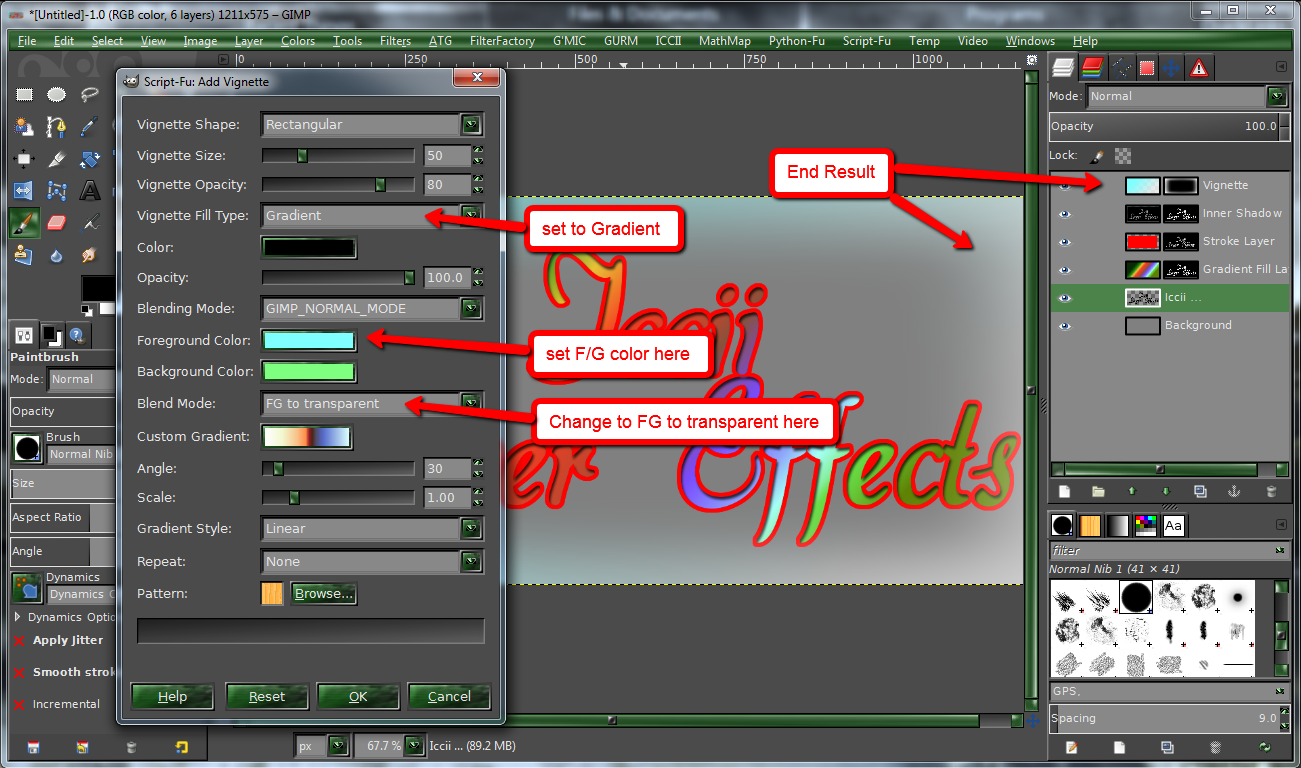
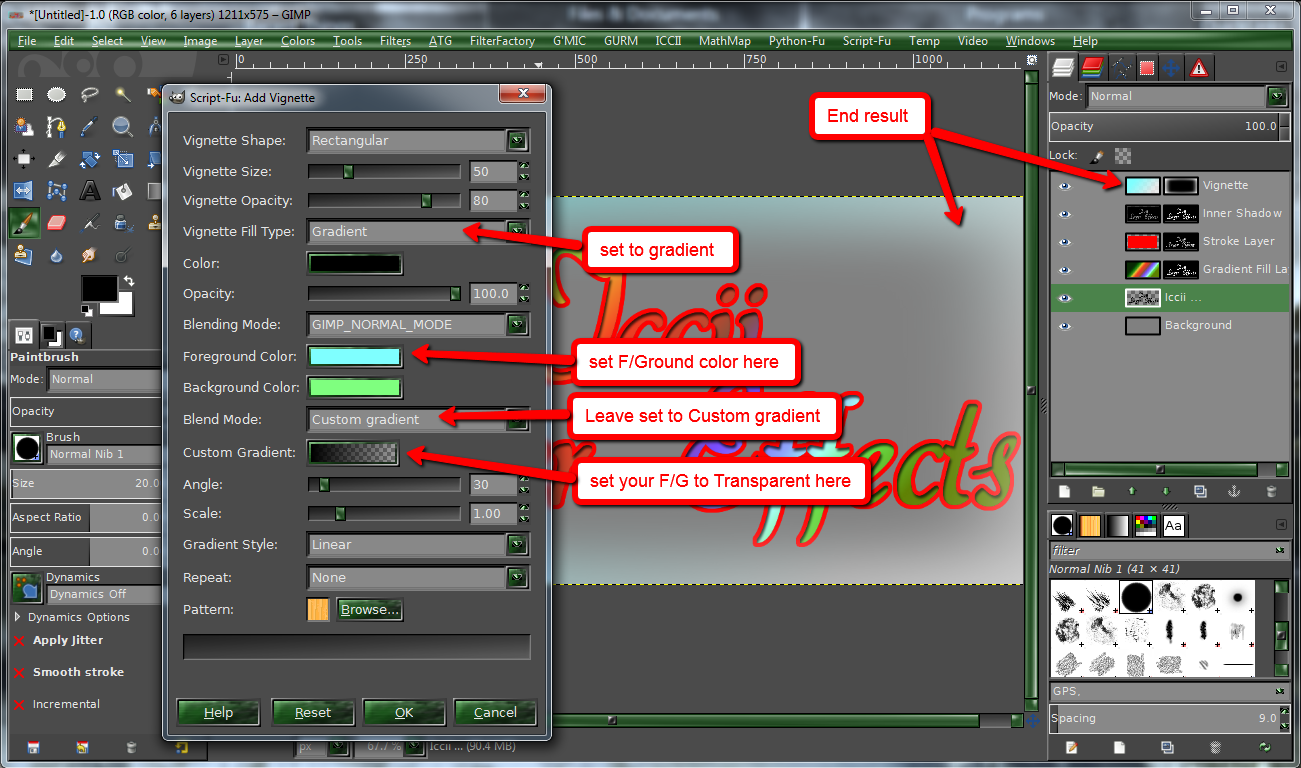
Esper there are 2 ways to set the vignette menu for a 'F/G to transparent gradient' I'll show both below
because I used an enum for blend mode I hope It's not a gimp language problem

Image

Image

_________________
Image


Top
 Profile  
 
 Post subject: Re: Iccii Layer Effects updated with new bug fixes
PostPosted: Wed Mar 06, 2013 10:00 pm  (#96) 
Offline
GimpChat Member

Joined: May 28, 2011
Posts: 326
hi Graechan
HI Everybody :)

I tried Iccii on gimp 6.2 and for the vignette i keep getting the same message,even after I tried both screen shots you have.I am not sure,but I also d/l the scrip in gimp script,I hope that it is where it goes
Image


Top
 Profile  
 
 Post subject: Re: Iccii Layer Effects updated with new bug fixes
PostPosted: Wed Mar 06, 2013 11:22 pm  (#97) 
Offline
Gimp Scripts Editor
User avatar

Joined: Feb 18, 2011
Posts: 1556
Location: Australia
Pirate541 no your error is different but easy to fix none the less. I had inadvertantly used a proceedure for 2.8 upwards only,

could you please download an update I just posted Dated March 7th, replace your current script and retry, please let me know how it went

_________________
Image


Top
 Profile  
 

 Post subject: Re: Iccii Layer Effects updated with new bug fixes
PostPosted: Thu Mar 07, 2013 6:09 am  (#98) 
Offline
Global Moderator
User avatar

Joined: Apr 07, 2010
Posts: 6949
I just tried all the ICCII options again and vignette and stroke crash every time I click the gradient button. When I choose a different gradient, I get no errors or warnings, it just closes down.

The vignette works very well as long as I don't try to change the gradient.

Image

_________________
Image


Top
 Profile  
 
 Post subject: Re: Iccii Layer Effects updated with new bug fixes
PostPosted: Thu Mar 07, 2013 8:39 am  (#99) 
Offline
GimpChat Member
User avatar

Joined: Feb 20, 2013
Posts: 1131
Molly, what gimp version do you have? Perhaps you need to change this, also. I am not sure.
The new file is found on pg9


Last edited by gramg on Sat Apr 20, 2013 12:58 am, edited 1 time in total.

Top
 Profile  
 
 Post subject: Re: Iccii Layer Effects updated with new bug fixes
PostPosted: Thu Mar 07, 2013 8:50 am  (#100) 
Offline
Global Moderator
User avatar

Joined: Apr 07, 2010
Posts: 6949
I am using Gimp-2.8.2 x64bit also Linux Fedora17 x64bit.
I downloaded the newest iccii this morning.

_________________
Image


Top
 Profile  
 
Display posts from previous:  Sort by  
Post new topic Reply to topic  [ 167 posts ]  Go to page Previous  1 ... 7, 8, 9, 10, 11, 12, 13 ... 17  Next

All times are UTC - 5 hours [ DST ]


Who is online

Users browsing this forum: No registered users and 8 guests


You cannot post new topics in this forum
You cannot reply to topics in this forum
You cannot edit your posts in this forum
You cannot delete your posts in this forum
You cannot post attachments in this forum

Search for:
Jump to:  

* Login   * Subscribe to RSS Feed


Powered by phpBB © 2000, 2002, 2005, 2007 phpBB Group