It is currently Sat May 18, 2013 7:51 am


Latest GIMP Scripts & Plug-ins

All times are UTC - 5 hours [ DST ]


Post new topic Reply to topic  [ 168 posts ]  Go to page 1, 2, 3, 4, 5 ... 17  Next
Author Message
 Post subject: Beautify Plugin Win32 - beautify-v0.5.3.7 *Aug-15th
PostPosted: Thu Jul 26, 2012 1:28 pm  (#1) 
Offline
Global Moderator
User avatar

Joined: May 16, 2010
Posts: 8913
Location: "Looking for my eraser" =P
I compiled the UPDATED filters for Windows 32 bit for those who are interested.
This is for the GIMP-2.8 version!
***************************************************
You can find the compiled version for Gimp-2.6 here
viewtopic.php?f=9&t=4913
***************************************************
Here is an example image. The filters are now located in the "Filters" menu item ie..."Filters>Beautify">

Image

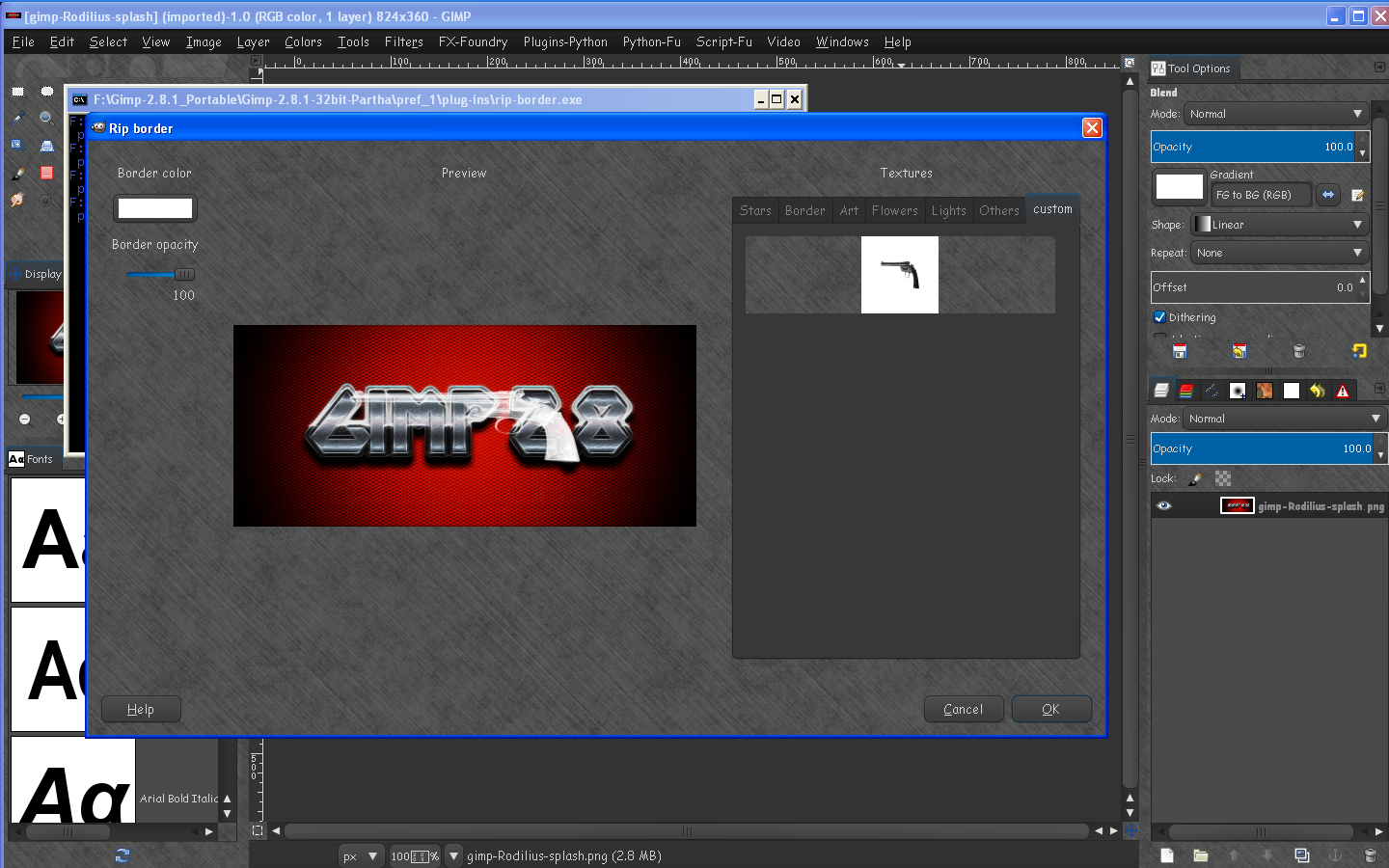
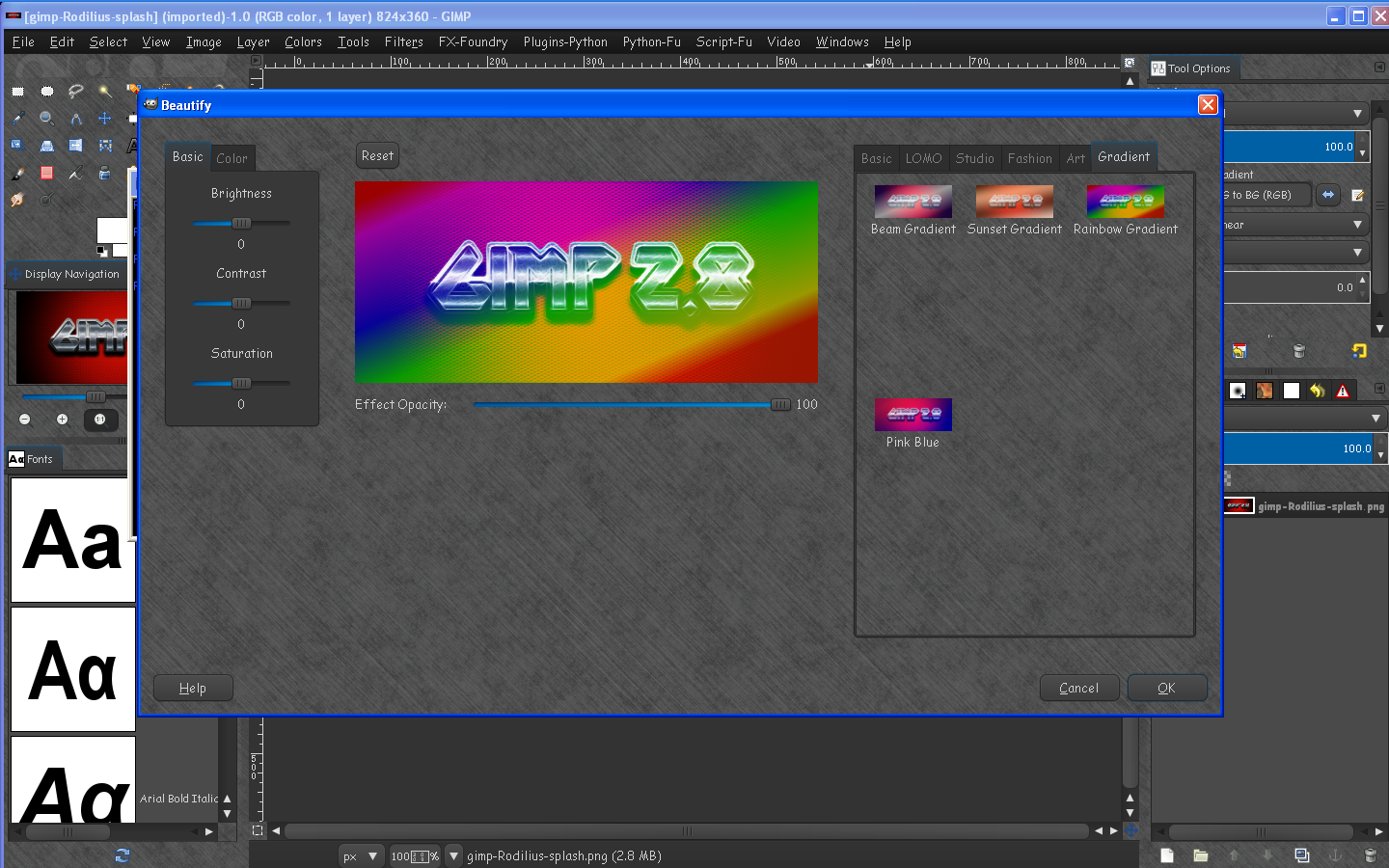
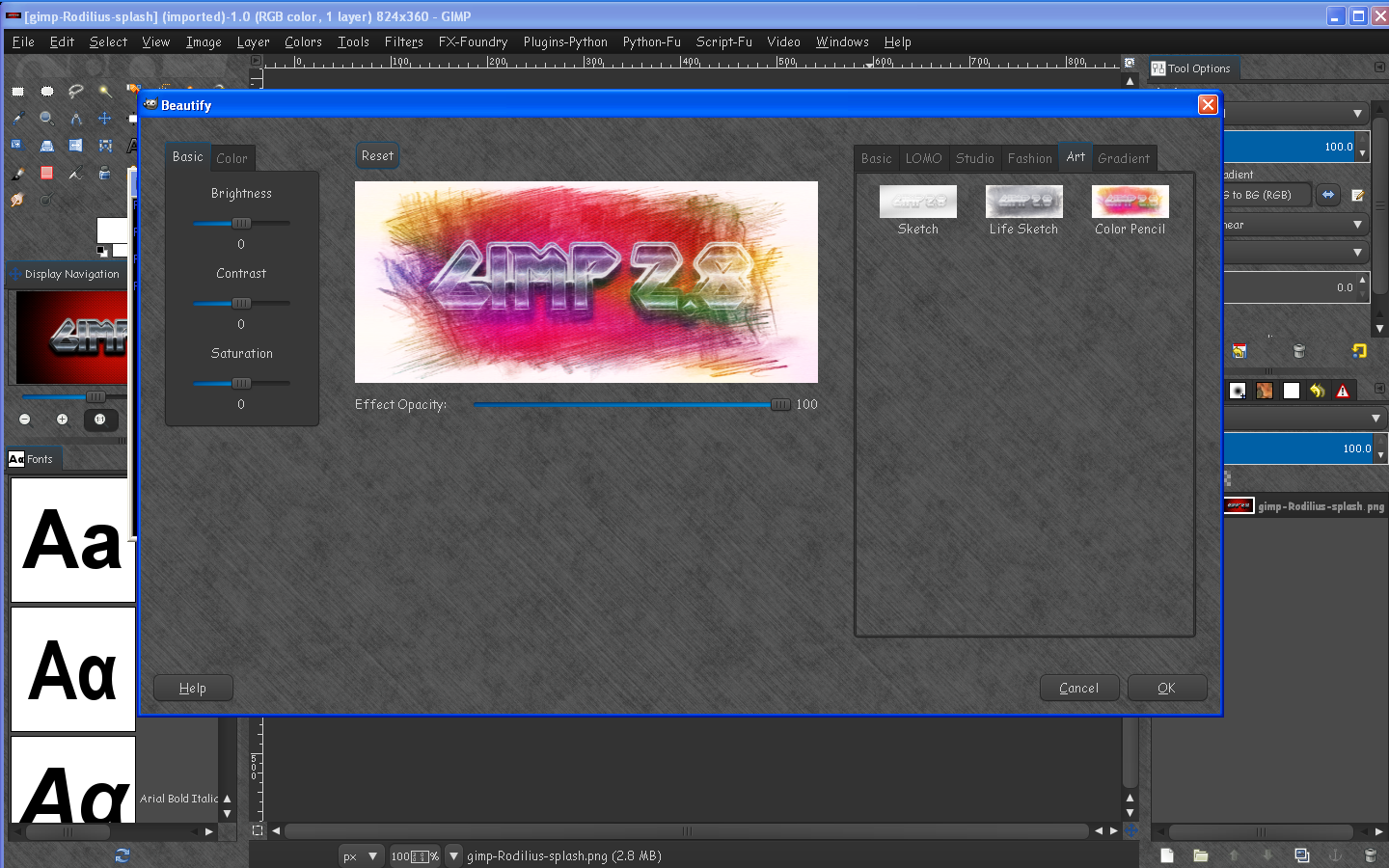
Here are several images of new effects
rip-border-custom-files
Image

rainbow gradient
Image


colored pencil
Image

I particularly like the colored pencil effect. :) :bigthup

Image

Here are the latest compiled Win32 bit version of Beautify plug-ins.
Change Log -
filters now listed in Filters>Beautify>
texture-border and rip-border combined into border plug-in.
thank you added
Smaller files
more textures
more effects
scroll bars added to texture-border and rip-border dialogs.
custom texture adding for rip and texture border plug-ins
PD Browser functionality for script writers.
downloadable texture files for rip , simple, and texture border folders.

Install-
1) create the texture-border\custom AND rip-border\custom directories in the UserFolder\.gimp-2.8 folder. (simple-borders will unzip to its own folder already so there is no need to create it.)
2) rip-border-folders.zip - unzip folder to your UserFolder\.gimp-2.8\rip-border folder
3) texture-border-folder.zip - unzip folder to your UserFolder\.gimp-2.8\texture-border folder
4) BeautifyWin32_Gimp-2.8_v0.5.3.7_RD.zip - unzip folder to your UserFolder\.gimp-2.8\plug-ins folder
5) simple-border.zip - unzip to your UserFolder\.gimp-2.8\ folder

Restart Gimp - The filters will be found in Filters>Beautify

That's it.

Downloads -
BeautifyWin32_Gimp-2.8_v0.5.3.7_RD.zip - 27.6 MB
Texture-border-folders - 12.2 MB
Rip-border-folders - 7.20 MB

Simple-Border Folder - 300 kb

Compiled by
Rod Detmer - August-15th - 2012

Created by

hejian July - 2012

More information -

http://simplygimp.com/downloads/beautif ... NSTALL.txt
viewtopic.php?f=9&t=4811
http://registry.gimp.org/node/26835
https://github.com/hejiann/beautify/commits/master
https://github.com/hejiann/beautify/wiki

Thanks!

I will also post this link to the registry.


Just the VERY FIRST version of beautify and skin whitener here - For those who need a smaller download.
Attachment:
beautify_Win32_RD.zip [1.89 MiB]
Downloaded 490 times


If you need more information PM me here at Gimp Chat. :bigthup

Enjoy! :)

_________________
Image
Gimp Rocks Blog
Simply Gimp Tutorials
"Once your in the cloud, you're in the net"
____________
OK, . . . . so what's the speed of dark?


Share on Facebook Share on Twitter Share on Orkut Share on Digg Share on MySpace Share on Delicious Share on Technorati
Top
 Profile  
 

 Post subject: Re: Beautify Plugin Win32
PostPosted: Thu Jul 26, 2012 1:45 pm  (#2) 
Offline
GimpChat Member
User avatar

Joined: Jan 20, 2012
Posts: 582
Location: Heading to Montana
Just waiting for a 64bit version, but looks good rod, Thanks!

_________________


"In the face of adversity, there's three things: fly, freeze or fight; We're choosing to fight..."- Guy Boucher, Tampa Bay Lighting Head Coach

BE THE THUNDER!
Image


Top
 Profile  
 
 Post subject: Re: Beautify Plugin Win32
PostPosted: Thu Jul 26, 2012 1:55 pm  (#3) 
Offline
GimpChat Member

Joined: Jun 22, 2012
Posts: 107
Thanks for that Rod and taking the time to post example image:)


Top
 Profile  
 
 Post subject: Re: Beautify Plugin Win32
PostPosted: Thu Jul 26, 2012 2:08 pm  (#4) 
Online
Global Moderator
User avatar

Joined: Apr 07, 2010
Posts: 6938
will that be coming out for Linux 32 and 64? or just windoze?

_________________
Image


Top
 Profile  
 
 Post subject: Re: Beautify Plugin Win32
PostPosted: Thu Jul 26, 2012 2:19 pm  (#5) 
Offline
Global Moderator
User avatar

Joined: May 16, 2010
Posts: 8913
Location: "Looking for my eraser" =P
molly wrote:
will that be coming out for Linux 32 and 64? or just windoze?

You should be able to compile it already Molly.
I am not sure how Fedora works with git.
GIT Download (ZIP and Tarball)- https://github.com/hejiann/beautify/downloads
GIT Files - https://github.com/hejiann/beautify

_________________
Image
Gimp Rocks Blog
Simply Gimp Tutorials
"Once your in the cloud, you're in the net"
____________
OK, . . . . so what's the speed of dark?


Top
 Profile  
 
 Post subject: Re: Beautify Plugin Win32
PostPosted: Thu Jul 26, 2012 2:26 pm  (#6) 
Online
Global Moderator
User avatar

Joined: Apr 07, 2010
Posts: 6938
Thanks Rod, I don't know how but maybe one of the Linux guys will help. :teeth
Got it downloaded

_________________
Image


Top
 Profile  
 
 Post subject: Re: Beautify Plugin Win32
PostPosted: Thu Jul 26, 2012 2:39 pm  (#7) 
Offline
GimpChat Member
User avatar

Joined: Sep 24, 2010
Posts: 4991
ZWard117 wrote:
Just waiting for a 64bit version, but looks good rod, Thanks!


I believe 32-bit plugins will work in 64-bit GIMP, but I do know that that's not the case for G'MIC unfortunately. Still, waiting to see a need before even trying Rod's compile if it as big as he says it is. :)

_________________
Lyle

Psalm 109:8

Image


Top
 Profile  
 

 Post subject: Re: Beautify Plugin Win32
PostPosted: Thu Jul 26, 2012 3:02 pm  (#8) 
Offline
GimpChat Member
User avatar

Joined: Jan 20, 2012
Posts: 582
Location: Heading to Montana
I know, but 64 bit working in 64 bit is still much faster, (at least that's what I've seen).

_________________


"In the face of adversity, there's three things: fly, freeze or fight; We're choosing to fight..."- Guy Boucher, Tampa Bay Lighting Head Coach

BE THE THUNDER!
Image


Top
 Profile  
 
 Post subject: Re: Beautify Plugin Win32
PostPosted: Thu Jul 26, 2012 3:22 pm  (#9) 
Offline
Global Moderator
User avatar

Joined: May 16, 2010
Posts: 8913
Location: "Looking for my eraser" =P
lylejk wrote:
ZWard117 wrote:
Just waiting for a 64bit version, but looks good rod, Thanks!


I believe 32-bit plugins will work in 64-bit GIMP, but I do know that that's not the case for G'MIC unfortunately. Still, waiting to see a need before even trying Rod's compile if it as big as he says it is. :)


The Beautify.exe weighs in at 10.2 MB and the skin whitening.exe at about 250 kb so yeah it's big.
There is also a Rip-Border.exe, and a Texture-Border.exe (weighing in at a whopping 128 MB each) but i didn't include them. - Also i did NOT strip any of these so they could probably be made smaller that way. Partha knows how to do that not me.

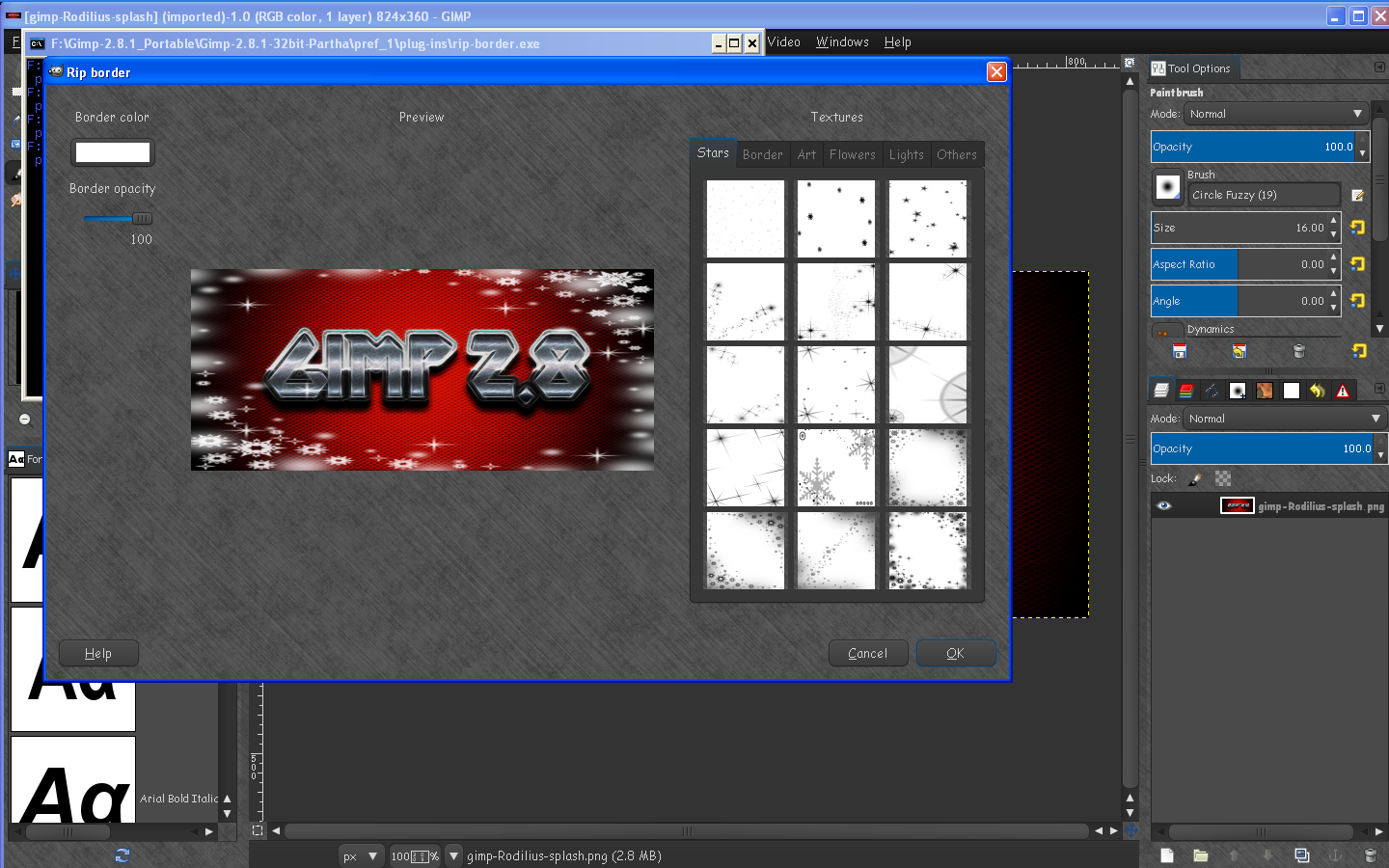
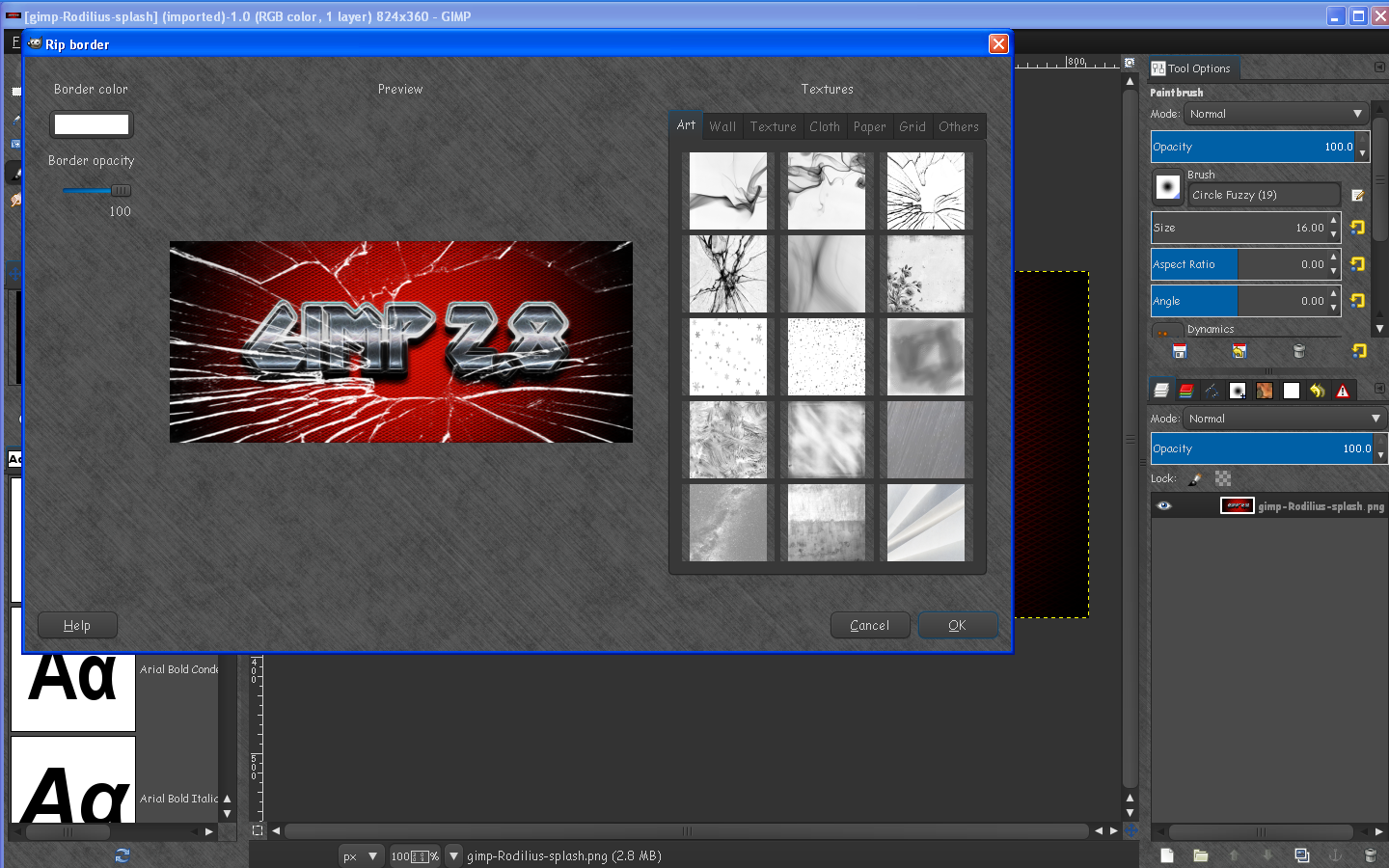
Screenshot of Rip-Border plug-in (also found in Tools>Beautify)
Image

Results
Image
I am still compiling Texture-Border.exe and will have a screenshot when i do.

If you want a copy of the execute files let me know.I will upload them both to my Tutorial website.

_________________
Image
Gimp Rocks Blog
Simply Gimp Tutorials
"Once your in the cloud, you're in the net"
____________
OK, . . . . so what's the speed of dark?


Top
 Profile  
 
 Post subject: Re: Beautify Plugin Win32
PostPosted: Thu Jul 26, 2012 3:55 pm  (#10) 
Offline
GimpChat Member
User avatar

Joined: Nov 09, 2011
Posts: 404
molly wrote:
Thanks Rod, I don't know how but maybe one of the Linux guys will help. :teeth
Got it downloaded

Hello molly.
Compiling GIMP Beautify Plug-in on GNU/Linux: :pengy

Make sure you have at least 2 GB of free space on /home.
Install "git" in your distribution. Also install the development libraries for the GIMP (libgimp2.0-dev on Ubuntu). I guess you also need the headers and basic build tools for your distribution.
Open the terminal and download the sources from GitHub:
Code:
git clone https://github.com/hejiann/beautify

When the download is complete enter to the directory:
Code:
cd beautify

Run make:
Code:
make

On my computer (and Kubuntu 64bits) this has overloaded my CPU and that it took a while.
Install on your /home/USER/.gimp-2.8/plug-ins/:
Code:
make userinstall

You must have these binary files in your /home/USER/.gimp-2.8/plug-ins/:
beautify
skin-whitening
rip-border
texture-border

and verify that each one is executable.
You can find the plugin in "Filters" > "Beautify".

Thanks Rod for notice about this plug-in :tyspin

_________________
Image
Be patient, English is not my language.


Last edited by YAFU on Sat Aug 04, 2012 10:31 pm, edited 4 times in total.

Top
 Profile  
 
Display posts from previous:  Sort by  
Post new topic Reply to topic  [ 168 posts ]  Go to page 1, 2, 3, 4, 5 ... 17  Next

All times are UTC - 5 hours [ DST ]


Who is online

Users browsing this forum: Google [Bot] and 5 guests


You cannot post new topics in this forum
You cannot reply to topics in this forum
You cannot edit your posts in this forum
You cannot delete your posts in this forum
You cannot post attachments in this forum

Search for:
Jump to:  

* Login   * Subscribe to RSS Feed


Powered by phpBB © 2000, 2002, 2005, 2007 phpBB Group