It is currently Sun May 19, 2013 6:33 am


Latest GIMP Scripts & Plug-ins

All times are UTC - 5 hours [ DST ]


Post new topic Reply to topic  [ 21 posts ]  Go to page Previous  1, 2, 3  Next
Author Message
 Post subject: Re: Location of scripts in filter lists
PostPosted: Wed Jul 06, 2011 3:32 pm  (#11) 
Offline
GimpChat Member

Joined: Apr 13, 2010
Posts: 85
O, it's actually not that difficult to set up your own menu locations. I had a friend ask me to write all my scripts so that they would appear in a "fencepost" menu. I declined because not everyone wants a fencepost menu (hell, most people don't want a fencepost -- but I digress!) :hehe At any rate, I showed him how to do it himself and he liked being able to organize things to fit his needs. There are minor downsides to doing this, but if you're interested, let me know.


Top
 Profile  
 

 Post subject: Re: Location of scripts in filter lists
PostPosted: Wed Jul 06, 2011 3:36 pm  (#12) 
Offline
GimpChat Member
User avatar

Joined: Apr 23, 2010
Posts: 817
Location: not from Guildford after all
saulgoode wrote:
... or 2) have been added after starting GIMP (these will be sorted alphabetically after restarting GIMP).

To be a little more precise, the menus will also be re-sorted alphabetically if a new view is created (by opening/creating a second image or by creating a new view for the current one).

_________________
Any sufficiently primitive technology is indistinguishable from a rock.


Top
 Profile  
 
 Post subject: Re: Location of scripts in filter lists
PostPosted: Wed Jul 06, 2011 3:39 pm  (#13) 
Offline
Administrator
User avatar

Joined: May 22, 2008
Posts: 5465
Location: Somewhere in GIMP
fencepost wrote:
O, it's actually not that difficult to set up your own menu locations.

Thank you, I do believe I know how to do that. Put a folder name between the menu name and the name of the script in the script.
This: <Image>/Filters/Decor/Grungy Photo...
Could become this: <Image>/Filters/Decor/fencepost/Grungy Photo...

_________________
Image
Law of Gravity - Any tool, nut, bolt, screw, when dropped, will roll to the least accessible place.
Image


Top
 Profile  
 
 Post subject: Re: Location of scripts in filter lists
PostPosted: Wed Jul 06, 2011 3:41 pm  (#14) 
Offline
GimpChat Member

Joined: Apr 13, 2010
Posts: 85
Yeppers, that's it!


Top
 Profile  
 
 Post subject: Re: Location of scripts in filter lists
PostPosted: Wed Jul 06, 2011 3:53 pm  (#15) 
Offline
GimpChat Founder
User avatar

Joined: May 22, 2008
Posts: 2070
Location: Gimpville
saulgoode wrote:
Doing so would not be trivial. In fact, figuring out a way of doing so would not be trivial.

Yes, but usually nothing worthwhile ever is.

saulgoode wrote:
The difficulty is that GIMP's plug-in system is dynamic and as plug-ins are added to the menus, there is no way of knowing what other plug-ins will be added to the menus (as subsequent plug-ins get registered). Or even to make any assumptions about which plug-ins have already been added to menus.

I am aware of GIMP's current approach to registering plug-ins. I chose to place my logo scripts under the File/Create/Logos (gimpchat.com), just under the default logos menu in 2.6.1.1. That just seemed to be the logical place for them, plus it gives this site a little free advertising.

The concept I envision would be a GUI that displays all the addon scripts with the ability to drag and drop them to menus other than the default. Would it mean a rewrite of the menu handling system? Yep, but C'est la vie. The way it stands now, there is no telling where the scripts will end up, as it's at the discretion of the author. I always end up having to mod scripts to place them in the menu locations I want. Certainly, there should be much more convenient way of doing that, especially for non-coders.

_________________
Image


Top
 Profile  
 
 Post subject: Re: Location of scripts in filter lists
PostPosted: Wed Jul 06, 2011 4:01 pm  (#16) 
Offline
Global Moderator
User avatar

Joined: May 16, 2010
Posts: 8936
Location: "Looking for my eraser" =P
I almost always move mine somewhere else.
This was the exact reason i added the script name to my scm and python scripts.So when i open them i know which script does what and where i want them to be located. :)

_________________
Image
Gimp Rocks Blog
Simply Gimp Tutorials
"Once your in the cloud, you're in the net"
____________
OK, . . . . so what's the speed of dark?


Top
 Profile  
 
 Post subject: Re: Location of scripts in filter lists
PostPosted: Wed Jul 06, 2011 4:53 pm  (#17) 
Offline
GimpChat Member

Joined: Apr 12, 2010
Posts: 4957
@ O, ROD
if you want modify the position of your scripts ( could be done for plugin too but is not pratical because will require recompile )
the most simple way may be add a numeric prefix before their name... as "00-animation setting"

Use of number bigger of 9 may be confusing , because in alphabetic order 10 come just after 1 and BEFORE 2 (since 10 "first letter" is 1 .and 1 came before 2 ) but to avoid confusion you may use progressive numbers starting from 00

_________________
My 3D Gallery on Deviantart http://photocomix2.deviantart.com/
Main gallery http://www.flickriver.com/photos/photocomix-mandala/
Mandala and simmetry http://www.flickriver.com/photos/photocomix_mandala/

Image

Mrs Wilbress


Top
 Profile  
 

 Post subject: Re: Location of scripts in filter lists
PostPosted: Wed Jul 06, 2011 9:05 pm  (#18) 
Offline
Global Moderator
User avatar

Joined: May 16, 2010
Posts: 8936
Location: "Looking for my eraser" =P
I like to locate my scripts according to use not alphabetical or numerical order.For instance if its a logo or text script it gets placed there in create/logos. :)

_________________
Image
Gimp Rocks Blog
Simply Gimp Tutorials
"Once your in the cloud, you're in the net"
____________
OK, . . . . so what's the speed of dark?


Top
 Profile  
 
 Post subject: Re: Location of scripts in filter lists
PostPosted: Wed Jul 06, 2011 9:46 pm  (#19) 
Offline
GimpChat Member
User avatar

Joined: Oct 07, 2010
Posts: 351
Location: home/Nixnine/.gimp-2.0/scripts/nixnine.scm
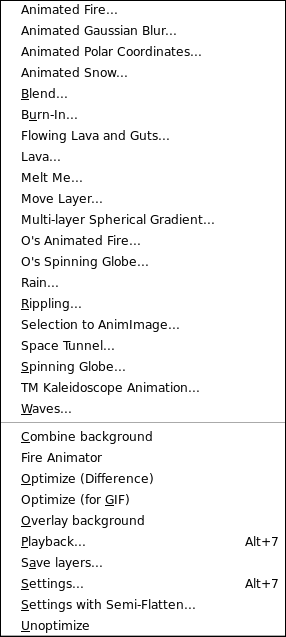
Well, mine are not alphabetically arranged.


Attachments:
screen1.png
screen1.png [ 545.77 KiB | Viewed 322 times ]

_________________
Image

I refuse to be confused, but am often confused at this refusal.
Top
 Profile  
 
 Post subject: Re: Location of scripts in filter lists
PostPosted: Wed Jul 06, 2011 10:14 pm  (#20) 
Offline
GimpChat Member

Joined: Apr 12, 2010
Posts: 4957
They ARE in alphabetic order BUT divided in 3 groups by 2 divisory lines:
the first line is the most visible, is between Urban Acid and Android Icon, the second is between
Water Reflection and 3D screenshoot.

But no idea of what created that divisory lines

_________________
My 3D Gallery on Deviantart http://photocomix2.deviantart.com/
Main gallery http://www.flickriver.com/photos/photocomix-mandala/
Mandala and simmetry http://www.flickriver.com/photos/photocomix_mandala/

Image

Mrs Wilbress


Top
 Profile  
 
Display posts from previous:  Sort by  
Post new topic Reply to topic  [ 21 posts ]  Go to page Previous  1, 2, 3  Next

All times are UTC - 5 hours [ DST ]


Who is online

Users browsing this forum: No registered users and 1 guest


You cannot post new topics in this forum
You cannot reply to topics in this forum
You cannot edit your posts in this forum
You cannot delete your posts in this forum
You cannot post attachments in this forum

Search for:
Jump to:  

* Login   * Subscribe to RSS Feed


Powered by phpBB © 2000, 2002, 2005, 2007 phpBB Group