It is currently Sat Aug 08, 2026 4:47 pm


All times are UTC - 5 hours [ DST ]


Post new topic Reply to topic  [ 72 posts ]  Go to page Previous  1, 2, 3, 4  Next
Author Message
 Post subject: Re: Spinning cube???
PostPosted: Sat Jul 23, 2011 9:30 am  (#41) 
Offline
Retired Staff
User avatar

Joined: May 22, 2008
Posts: 6946
Location: Somewhere in GIMP
pogogogo wrote:
I did it in GIMP-GAP 2.2 Portable. In GIMP 2.4, 2.6 and 2.7 of Map Object filter works with errors. :gaah
Map Object has been cranky since I've been using it. If you use it more than one time in the same gimp session, it will throw out error messages, but works anyway.

It needs a complete revamp with a larger preview window with an auto refresh among other things.

_________________
Image
World War IV will be fought with sticks and stones. - Albert Einstein


Top
 Post subject: Re: Spinning cube???
PostPosted: Sat Jul 23, 2011 11:37 am  (#42) 
Offline
Global Moderator
User avatar

Joined: May 16, 2010
Posts: 16152
I could have swore PC did a revamp of the large preview for MapObject filter.Just for Linux though.

_________________
Image


Top
 Post subject: Re: Spinning cube???
PostPosted: Sat Jul 23, 2011 2:37 pm  (#43) 
Offline
GimpChat Member
User avatar

Joined: Apr 08, 2010
Posts: 5420
Location: Northwest Ohio
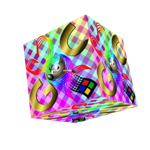
very cool kaleidoscope spinning box!


Top
 Post subject: Re: Spinning cube???
PostPosted: Sun Jul 24, 2011 1:06 pm  (#44) 
Offline
GimpChat Member
User avatar

Joined: Jul 08, 2011
Posts: 285
i still don't get it how to do spinning cube with gimp gap :( please..i need help!!!!

_________________
Image

My Flickr
http://anaplus.deviantart.com/


Top
 Post subject: Re: Spinning cube???
PostPosted: Sun Jul 24, 2011 1:23 pm  (#45) 
Offline
Retired Staff
User avatar

Joined: May 22, 2008
Posts: 6946
Location: Somewhere in GIMP
Ana, look at this tutorial. It's the one I got the idea for spinning the cube. Instead of choosing cylinder in the dropdown, choose box.
viewtopic.php?p=29374#p29374

_________________
Image
World War IV will be fought with sticks and stones. - Albert Einstein


Top
 Post subject: Re: Spinning cube???
PostPosted: Sun Jul 24, 2011 1:53 pm  (#46) 
Offline
GimpChat Member
User avatar

Joined: Jul 08, 2011
Posts: 285
yes I did that ,and it didn't work so i don't know what i'm doing wrong.:(
i did that tutorial with cilinder and it turned out good.

_________________
Image

My Flickr
http://anaplus.deviantart.com/


Top
 Post subject: Re: Spinning cube???
PostPosted: Sun Jul 24, 2011 2:01 pm  (#47) 
Offline
Retired Staff
User avatar

Joined: May 22, 2008
Posts: 6946
Location: Somewhere in GIMP
Ana wrote:
yes I did that ,and it didn't work so i don't know what i'm doing wrong.:(
i did that tutorial with cilinder and it turned out good.
It's nothing you're doing wrong. It didn't work for me either. See the ones I posted here

viewtopic.php?p=29211#p29211

and here.

viewtopic.php?p=29229#p29229

I'm thinking that it needs to be much smaller in order to work. Map Object is a really cranky filter.

_________________
Image
World War IV will be fought with sticks and stones. - Albert Einstein


Top
 Post subject: Re: Spinning cube???
PostPosted: Sun Jul 24, 2011 2:09 pm  (#48) 
Offline
GimpChat Member
User avatar

Joined: Jul 08, 2011
Posts: 285
Oregonian wrote:
Ana wrote:
yes I did that ,and it didn't work so i don't know what i'm doing wrong.:(
i did that tutorial with cilinder and it turned out good.
It's nothing you're doing wrong. It didn't work for me either. See the ones I posted here

viewtopic.php?p=29211#p29211

and here.

viewtopic.php?p=29229#p29229

I'm thinking that it needs to be much smaller in order to work. Map Object is a really cranky filter.

my cube is the same like yours in this second link ...... so you think that i must create smaller cube?????maybe 200x200
I just tried with 200x200 and it still didn't work :(((((((

_________________
Image

My Flickr
http://anaplus.deviantart.com/


Top
 Post subject: Re: Spinning cube???
PostPosted: Sun Jul 24, 2011 2:22 pm  (#49) 
Offline
GimpChat Member
User avatar

Joined: Apr 07, 2010
Posts: 14182
fun and frustrating huh ana. I am in the same boat..... When thingys work, they are great, when they don't it sucks.

_________________
Image


Top
 Post subject: Re: Spinning cube???
PostPosted: Sun Jul 24, 2011 2:26 pm  (#50) 
Offline
Retired Staff
User avatar

Joined: May 22, 2008
Posts: 6946
Location: Somewhere in GIMP
Ana wrote:
I just tried with 200x200 and it still didn't work :(((((((
So did I and it didn't work for me either. Broke up the box.

_________________
Image
World War IV will be fought with sticks and stones. - Albert Einstein


Top
 Post subject: Re: Spinning cube???
PostPosted: Sun Jul 24, 2011 2:38 pm  (#51) 
Offline
GimpChat Member
User avatar

Joined: Jul 08, 2011
Posts: 285
this is so frustrating...but you know what....i don't give up so easily :)

_________________
Image

My Flickr
http://anaplus.deviantart.com/


Top
 Post subject: Re: Spinning cube???
PostPosted: Sun Jul 24, 2011 3:02 pm  (#52) 
Offline
Retired Staff
User avatar

Joined: May 22, 2008
Posts: 6946
Location: Somewhere in GIMP
Ana wrote:
this is so frustrating...but you know what....i don't give up so easily :)
I hear your frustration, Ana, but I think it's the Map Object filter that is messing up, not you.

When I'm trying to make it work with the tutorial, it has my cpu's cranked WAY up when it's mapping to the cube.

_________________
Image
World War IV will be fought with sticks and stones. - Albert Einstein


Top
 Post subject: Re: Spinning cube???
PostPosted: Sun Jul 24, 2011 3:08 pm  (#53) 
Offline
GimpChat Member
User avatar

Joined: Jul 08, 2011
Posts: 285
Oregonian wrote:
Ana wrote:
this is so frustrating...but you know what....i don't give up so easily :)
I hear your frustration, Ana, but I think it's the Map Object filter that is messing up, not you.

When I'm trying to make it work with the tutorial, it has my cpu's cranked WAY up when it's mapping to the cube.

so...is there any other way to do it,did you find some solution for this???

Image

_________________
Image

My Flickr
http://anaplus.deviantart.com/


Top
 Post subject: Re: Spinning cube???
PostPosted: Sun Jul 24, 2011 3:24 pm  (#54) 
Offline
GimpChat Member
User avatar

Joined: Jul 08, 2011
Posts: 285
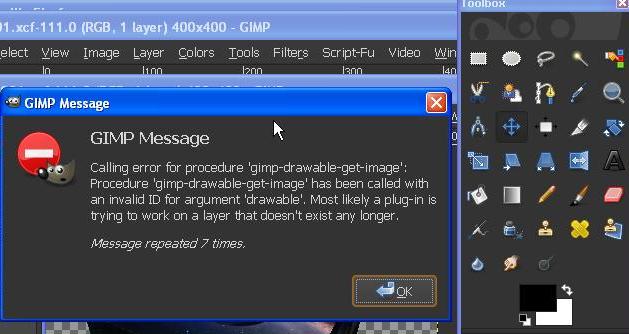
can anyone tell me what is this.....why am getting this message
Image

_________________
Image

My Flickr
http://anaplus.deviantart.com/


Top
 Post subject: Re: Spinning cube???
PostPosted: Sun Jul 24, 2011 3:31 pm  (#55) 
Offline
Retired Staff
User avatar

Joined: May 22, 2008
Posts: 6946
Location: Somewhere in GIMP
That almost always comes up when you run the Map Object filter. Just close that window. I've had map object work anyway even when that message comes up.

Map Object really needs to be re-written so that it functions properly.

_________________
Image
World War IV will be fought with sticks and stones. - Albert Einstein


Top
 Post subject: Re: Spinning cube???
PostPosted: Sun Jul 24, 2011 5:14 pm  (#56) 
Offline
Retired Staff
User avatar

Joined: May 22, 2008
Posts: 6946
Location: Somewhere in GIMP
I thought I'd try doing it manually, changing the Y-axis 12 degrees with 30 layers. The first layer came out fine with a cube, the second layer came out in chunks so the work-around did not work.

Image

_________________
Image
World War IV will be fought with sticks and stones. - Albert Einstein


Top
 Post subject: Re: Spinning cube???
PostPosted: Sun Jul 24, 2011 11:59 pm  (#57) 
Offline
Global Moderator
User avatar

Joined: May 16, 2010
Posts: 16152
I have to admit as much as i love Fenceposts scripts i would rather use GMICs sequencer here because it's so much faster. :)

Image

Although with maybe more than 10 frames :lol

_________________
Image


Top
 Post subject: Re: Spinning cube???
PostPosted: Mon Jul 25, 2011 8:35 pm  (#58) 
Offline
GimpChat Member
User avatar

Joined: Apr 08, 2010
Posts: 5420
Location: Northwest Ohio
Oooooh, I think I'm gonna be seasick!


Top
 Post subject: Re: Spinning cube???
PostPosted: Mon Jul 25, 2011 10:12 pm  (#59) 
Offline
Former Member
User avatar

Joined: Nov 17, 2010
Posts: 618
Location: Rockford, IL
Well I read your question, but not any of the comments so idk if anyone mentioned this or not, but fencepost has made a script for this as well as many others. Dude's got talent you should check his stuff out.

I don't know how you'd do this in GAP, but it is possible.

However I personally recommend using the script or doing it manually so make sure your projects dimensions are the exact same say 400x400. Then duplicate your layer a couple times, then select the bottom layer, and go to Filters/Map/Map Object and change Map to, to from Plane to Box, check transparent background, and click on the Orientation tab and choose how you want the cube to look when it starts out, and apply the filter. Apply the same for all the other filters, but move it on the x axis via orientation tab in the map object filter until you get to where you started. I recommend going by 5's or 2's so you get a nice smooth animation.


Top
 Post subject: Re: Spinning cube???
PostPosted: Mon Jul 25, 2011 10:19 pm  (#60) 
Offline
Retired Staff
User avatar

Joined: May 22, 2008
Posts: 6946
Location: Somewhere in GIMP
I tried it that way and the second layer came out in pieces.

viewtopic.php?p=29453#p29453

_________________
Image
World War IV will be fought with sticks and stones. - Albert Einstein


Top
Post new topic Reply to topic  [ 72 posts ]  Go to page Previous  1, 2, 3, 4  Next

All times are UTC - 5 hours [ DST ]


* Login  


Powered by phpBB3 © phpBB Group