It is currently Tue May 21, 2013 10:50 am


Latest GIMP Scripts & Plug-ins

All times are UTC - 5 hours [ DST ]


Post new topic Reply to topic  [ 25 posts ]  Go to page 1, 2, 3  Next
Author Message
 Post subject: GMIC won't refresh
PostPosted: Mon Sep 26, 2011 8:59 am  (#1) 
Offline
GimpChat Member
User avatar

Joined: Aug 24, 2011
Posts: 1776
Location: Dallas, TX
GIMP Version: 2.6.11
Operating System: Windows
OS Version: XP - SP3
GIMP Experience: Beginner Level

List any relevant plug-ins or scripts:
GMIC

List any ERROR messages you received:
"Refresh failed"


When I hit the refresh button I get several cascading windows (too fast to see) and finally an error message stating that the refresh has failed. The internet button is checked.

_________________
Image


Share on Facebook Share on Twitter Share on Orkut Share on Digg Share on MySpace Share on Delicious Share on Technorati
Top
 Profile  
 

 Post subject: Re: GMIC won't refresh
PostPosted: Mon Sep 26, 2011 10:34 am  (#2) 
Offline
GimpChat Member
User avatar

Joined: Sep 24, 2010
Posts: 4999
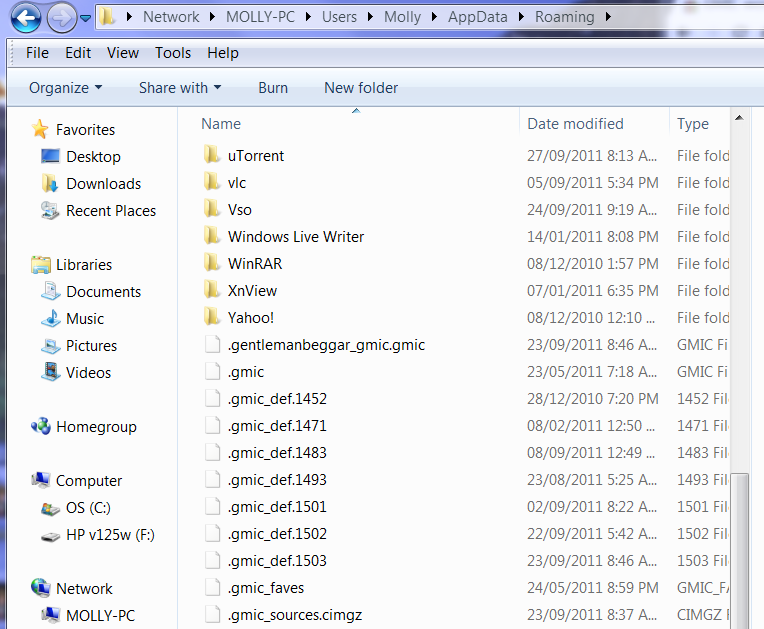
I've had to sometimes delete the G'MIC def file(s) (more then likely you will have several; lol) periodically or I get this type of error Drac. The file is really located in an obscure location too (for Win7 it's located at C:\Users\{your user account}\AppData\Roaming ). Hope that works for you. :)

_________________
Lyle

Psalm 109:8

Image


Top
 Profile  
 
 Post subject: Re: GMIC won't refresh
PostPosted: Mon Sep 26, 2011 12:02 pm  (#3) 
Offline
GimpChat Member

Joined: Oct 06, 2010
Posts: 2688
Not sure if you know what the def files are, so just in case, they'll look like .gmic_def.xxxx

You can delete all the def files and leave the current.

_________________
You cannot do a kindness too soon because you never know how soon it will be too late.

~Ralph Waldo Emerson


Top
 Profile  
 
 Post subject: Re: GMIC won't refresh
PostPosted: Mon Sep 26, 2011 5:33 pm  (#4) 
Offline
GimpChat Member
User avatar

Joined: Aug 24, 2011
Posts: 1776
Location: Dallas, TX
Thanks guys. Sounds kinda like getting rid of cookies or clearing your cache. I'm running xp sp3 so where are those puppies hiding.

Also its not just the error that bothers me but this cascading set of about six or eight windows that come up one after another for about a half a second or so, then they all dissapear before the error message pops up. Is this normal?

_________________
Image


Top
 Profile  
 
 Post subject: Re: GMIC won't refresh
PostPosted: Mon Sep 26, 2011 6:09 pm  (#5) 
Offline
GimpChat Member

Joined: Apr 12, 2010
Posts: 4957
[b]
When I hit the refresh button I get several cascading windows (too fast to see)[/quote]
nothing to worry each i

Draconian wrote:
and finally an error message stating that the refresh has failed. The internet button is checked.


Maybe the refresh didn't fails, just one of the external source has or had a problem (as a slightly changed link or went offline ) but the refresh was done for all other sources

Disable ALL external sources and try again, if it goes well, enable 1 only of the additional sources and try again till you didn't find that giving you the error

_________________
My 3D Gallery on Deviantart http://photocomix2.deviantart.com/
Main gallery http://www.flickriver.com/photos/photocomix-mandala/
Mandala and simmetry http://www.flickriver.com/photos/photocomix_mandala/

Image

Mrs Wilbress


Top
 Profile  
 
 Post subject: Re: GMIC won't refresh
PostPosted: Mon Sep 26, 2011 6:15 pm  (#6) 
Offline
GimpChat Member
User avatar

Joined: Aug 24, 2011
Posts: 1776
Location: Dallas, TX
Disable ALL external sources and try again, if it goes well, enable 1 only of the additional sources and try again till you didn't find that giving you the error[/quote]


Just one question....What is an "external source"?

_________________
Image


Top
 Profile  
 
 Post subject: Re: GMIC won't refresh
PostPosted: Mon Sep 26, 2011 6:24 pm  (#7) 
Offline
GimpChat Member
User avatar

Joined: Sep 24, 2010
Posts: 4999
It's under Additional Filters option Drac. Best to uncheck all, refresh and then recheck all and do the same. :)


Attachments:
additionalf.png
additionalf.png [ 223.01 KiB | Viewed 290 times ]

_________________
Lyle

Psalm 109:8

Image
Top
 Profile  
 

 Post subject: Re: GMIC won't refresh
PostPosted: Mon Sep 26, 2011 6:36 pm  (#8) 
Offline
GimpChat Member
User avatar

Joined: Aug 24, 2011
Posts: 1776
Location: Dallas, TX
lylejk wrote:
It's under Additional Filters option Drac. Best to uncheck all, refresh and then recheck all and do the same. :)


AAAAAAAAHHHHHHHH! :tyspin

OK I'll try that. Now....How do I find those def files on XP?

_________________
Image


Top
 Profile  
 
 Post subject: Re: GMIC won't refresh
PostPosted: Mon Sep 26, 2011 6:52 pm  (#9) 
Offline
GimpChat Member
User avatar

Joined: Sep 24, 2010
Posts: 4999
That's a good question. G'MIC didn't exist when I was using XP and now I'm using Win7. lol

:)

_________________
Lyle

Psalm 109:8

Image


Top
 Profile  
 
 Post subject: Re: GMIC won't refresh
PostPosted: Mon Sep 26, 2011 7:11 pm  (#10) 
Offline
GimpChat Member
User avatar

Joined: Aug 24, 2011
Posts: 1776
Location: Dallas, TX
No problem, I can dig around and see if I can find them. I have Win 7 on my laptop but with all the issues I have had with gmic, mathmap and python installs I'm just plain scared to even try to get gimp installed and start over. I'm still struggling with mathmap....but that's another thread.

_________________
Image


Top
 Profile  
 
Display posts from previous:  Sort by  
Post new topic Reply to topic  [ 25 posts ]  Go to page 1, 2, 3  Next

All times are UTC - 5 hours [ DST ]


Who is online

Users browsing this forum: No registered users and 6 guests


You cannot post new topics in this forum
You cannot reply to topics in this forum
You cannot edit your posts in this forum
You cannot delete your posts in this forum
You cannot post attachments in this forum

Search for:
Jump to:  

* Login   * Subscribe to RSS Feed


Powered by phpBB © 2000, 2002, 2005, 2007 phpBB Group