It is currently Wed Jun 19, 2013 4:29 pm


Latest GIMP Scripts & Plug-ins

All times are UTC - 5 hours [ DST ]


Post new topic Reply to topic  [ 44 posts ]  Go to page Previous  1, 2, 3, 4, 5  Next
Author Message
 Post subject: Re: GMIC Circlism Artwork
PostPosted: Fri Oct 14, 2011 4:19 pm  (#11) 
Offline
GimpChat Member

Joined: Apr 12, 2010
Posts: 4960
Quote:
@MareQ

Since no preview after changes settings - which is better (according to basic settings):
long rendering time (Old-18 min) - or rapid effect (New-3 min) ?
According to the first set gave me the best effect.
Therefore, (first time) I do not want to upgrade GMIC (old settings before saving-choice).


MareQ you may well update but preserve the filter you like
This doesn't require knoweledge of coding just a bit of patience...it should take about 10 minutes
well better if i explain in a new topic i start now should apper in the tut board...soon

_________________
My 3D Gallery on Deviantart http://photocomix2.deviantart.com/
Main gallery http://www.flickriver.com/photos/photocomix-mandala/
Mandala and simmetry http://www.flickriver.com/photos/photocomix_mandala/

Image

Mrs Wilbress


Top
 Profile  
 

 Post subject: Re: GMIC Circlism Artwork
PostPosted: Fri Oct 14, 2011 4:28 pm  (#12) 
Offline
Global Moderator
User avatar

Joined: May 16, 2010
Posts: 9354
Location: "Looking for my eraser" =P
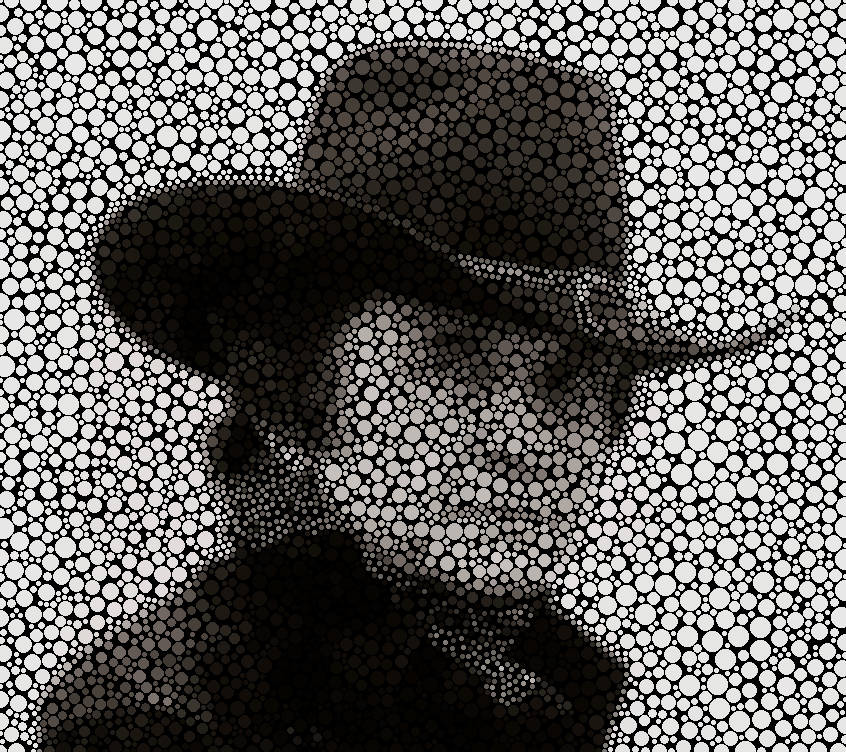
John Cash blue toned with hue and curves. :)
I like this result much better i think.

Image

_________________
Image
Gimp Rocks Blog
Simply Gimp Tutorials
"Once your in the cloud, you're in the net"
____________
OK, . . . . so what's the speed of dark?


Top
 Profile  
 
 Post subject: Re: GMIC Circlism Artwork
PostPosted: Fri Oct 14, 2011 5:01 pm  (#13) 
Offline
GimpChat Member

Joined: Apr 12, 2010
Posts: 4960
cool!!

_________________
My 3D Gallery on Deviantart http://photocomix2.deviantart.com/
Main gallery http://www.flickriver.com/photos/photocomix-mandala/
Mandala and simmetry http://www.flickriver.com/photos/photocomix_mandala/

Image

Mrs Wilbress


Top
 Profile  
 
 Post subject: Re: GMIC Circlism Artwork
PostPosted: Fri Oct 14, 2011 5:31 pm  (#14) 
Offline
GimpChat Member

Joined: Jan 13, 2011
Posts: 542
Location: Poland
As a beginner:
- The initial settings (although for a long time to achieve the effect) - they are beautiful,
- After update GMIC - OK-filter run faster - but as for me, the worse the effect.
OK, you can save every setting - just ask - with what parameters?


Top
 Profile  
 
 Post subject: Re: GMIC Circlism Artwork
PostPosted: Fri Oct 14, 2011 6:17 pm  (#15) 
Offline
Global Moderator
User avatar

Joined: Apr 07, 2010
Posts: 7124
Rod, how did you get the small dots to go around the brim of the hat and bow? Did you select them separately? Also, it looks transparent, Did you remove any white before you ran the script?

_________________
Image


Top
 Profile  
 
 Post subject: Re: GMIC Circlism Artwork
PostPosted: Fri Oct 14, 2011 6:33 pm  (#16) 
Offline
GimpChat Member
User avatar

Joined: Sep 24, 2010
Posts: 5194
Believe I figured out how to get the dots to better follow a subjects contours (i.e., more sharper looking results). I used G'MIC's Pen and Ink preset prior to running Circlism. I suspect that its the resulting haloing that forces the dots to follow the contour details of the subject. I've not tried to make an intentional highpass filter create haloing (an apostasy with respect to photo editing not to mention noise; lol), but may later. This one took ove an hour to render so, well, you know why I'm not going to do one any time soon. lol

Maybe someone else here will try to do a severe halo process then feed that result into Circlism to see what result they would get. :)

ref: http://www.fontplay.com/freephotos/sixt ... 06-018.jpg


Attachments:
fp091706-018.png
fp091706-018.png [ 271.79 KiB | Viewed 277 times ]

_________________
Lyle

Psalm 109:8

Image
Top
 Profile  
 
 Post subject: Re: GMIC Circlism Artwork
PostPosted: Fri Oct 14, 2011 7:13 pm  (#17) 
Offline
Global Moderator
User avatar

Joined: Apr 07, 2010
Posts: 7124
Lyle, I can't find pen and ink in GMIC.

_________________
Image


Top
 Profile  
 

 Post subject: Re: GMIC Circlism Artwork
PostPosted: Fri Oct 14, 2011 8:02 pm  (#18) 
Offline
GimpChat Member
User avatar

Joined: Sep 24, 2010
Posts: 5194
Sorry Molly; it's called Pen Drawing. :)

_________________
Lyle

Psalm 109:8

Image


Top
 Profile  
 
 Post subject: Re: GMIC Circlism Artwork
PostPosted: Fri Oct 14, 2011 8:18 pm  (#19) 
Offline
Global Moderator
User avatar

Joined: Apr 07, 2010
Posts: 7124
lol, a senior moment huh Thanks Lyle

_________________
Image


Top
 Profile  
 
 Post subject: Re: GMIC Circlism Artwork
PostPosted: Fri Oct 14, 2011 8:23 pm  (#20) 
Offline
GimpChat Member

Joined: Apr 12, 2010
Posts: 4960
Quote:
As a beginner:
- The initial settings (although for a long time to achieve the effect) - they are beautiful,
- After update GMIC - OK-filter run faster - but as for me, the worse the effect.
OK, you can save every setting - just ask - with what parameters?


No MareQ i was not saying to save preset, also because in this case presets would be broken by the filter update,

I was saying to resurrect the previous version of the filter , it is not difficult but in this case you should find and copy your
.gmic_def.xxxx file BEFORE click for the filter update

I explain how to find that file and how to extract and modify the filter code that you want preserve in this TUT
viewtopic.php?f=10&t=2820
that i wrote thinking to you and lylejk (that often too miss old version of filters)

As result you would have both new and older version of the filter running without conflict

And done that you may also resurrect older presets broken by filter update using the same find & replace trick
But i don't want go too much OT here ...if you want reply on
viewtopic.php?f=10&t=2820

_________________
My 3D Gallery on Deviantart http://photocomix2.deviantart.com/
Main gallery http://www.flickriver.com/photos/photocomix-mandala/
Mandala and simmetry http://www.flickriver.com/photos/photocomix_mandala/

Image

Mrs Wilbress


Top
 Profile  
 
Display posts from previous:  Sort by  
Post new topic Reply to topic  [ 44 posts ]  Go to page Previous  1, 2, 3, 4, 5  Next

All times are UTC - 5 hours [ DST ]


Who is online

Users browsing this forum: No registered users and 2 guests


You cannot post new topics in this forum
You cannot reply to topics in this forum
You cannot edit your posts in this forum
You cannot delete your posts in this forum
You cannot post attachments in this forum

Search for:
Jump to:  

* Login  

* Subscribe to Gimp Chat's RSS Feed    * Subscribe to Gimp Chat's Tutorial RSS Feed


Powered by phpBB © 2000, 2002, 2005, 2007 phpBB Group