It is currently Thu May 23, 2013 1:28 pm


Latest GIMP Scripts & Plug-ins

All times are UTC - 5 hours [ DST ]


Post new topic Reply to topic  [ 43 posts ]  Go to page 1, 2, 3, 4, 5  Next
Author Message
 Post subject: Photofont Start/PHF Photofont installer 2.0 (PSPPI-2.0)
PostPosted: Wed Mar 07, 2012 1:06 pm  (#1) 
Offline
Global Moderator
User avatar

Joined: May 16, 2010
Posts: 9012
Location: "Looking for my eraser" =P
Here it is folks. :) - no need to buy any expensive software this is FREE!
Be sure to read the README and the CCL_README included.
One is the creative commons and the other is instructions on how to use everything and install it.I also include some helpful tips on not having to edit the glyph blocks in the PHF file.There are some looks into the code itself also, and what each block contains. I suggest you look into that if you want to play with the code.

SYSTEM REQUIREMENTS
As far as i know this plugin only works for Windows and MAC.I include links in the README to download the plugin for using the phf fonts you create. - http://www.fontlab.com/photofont/photofont-start/

Whats in the file
1) the readmes - instructions and important information on Creative Commons license
2) the xcf template - all letters (CAPS only) - numbers 0 - 9 and a few common symbols like exclamation point, question mark, period, comma. You can add to this yourself.
I included almost all unicodes in the PHF code so for dollar just create a new layer with the text tool to make a dollar sign and create a path for it. Then name that layer dollar.png.Then place that dollar.png file in the
C:\Documents and Settings\YourUserNameFolder\My Documents\Photofonts\images folder.
3) the complete phf file - with all map id unicodes. If you decide to add unicodes remember to place them in correct order in the glyph blocks.For instance if you place a new unicode for a symbol after a in the map id, make sure its placed after the a in the glyph blocks. :)
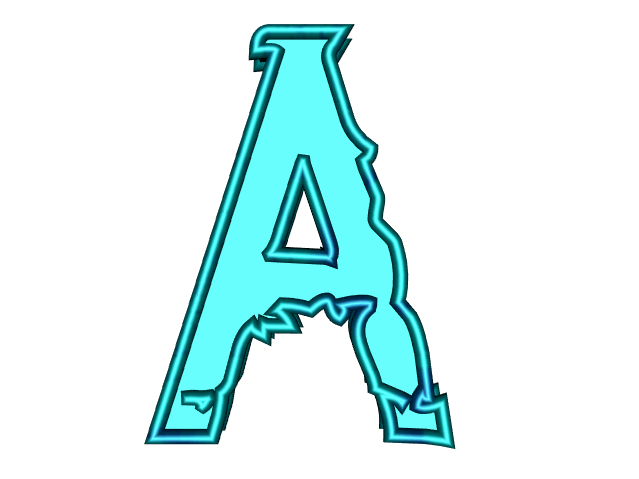
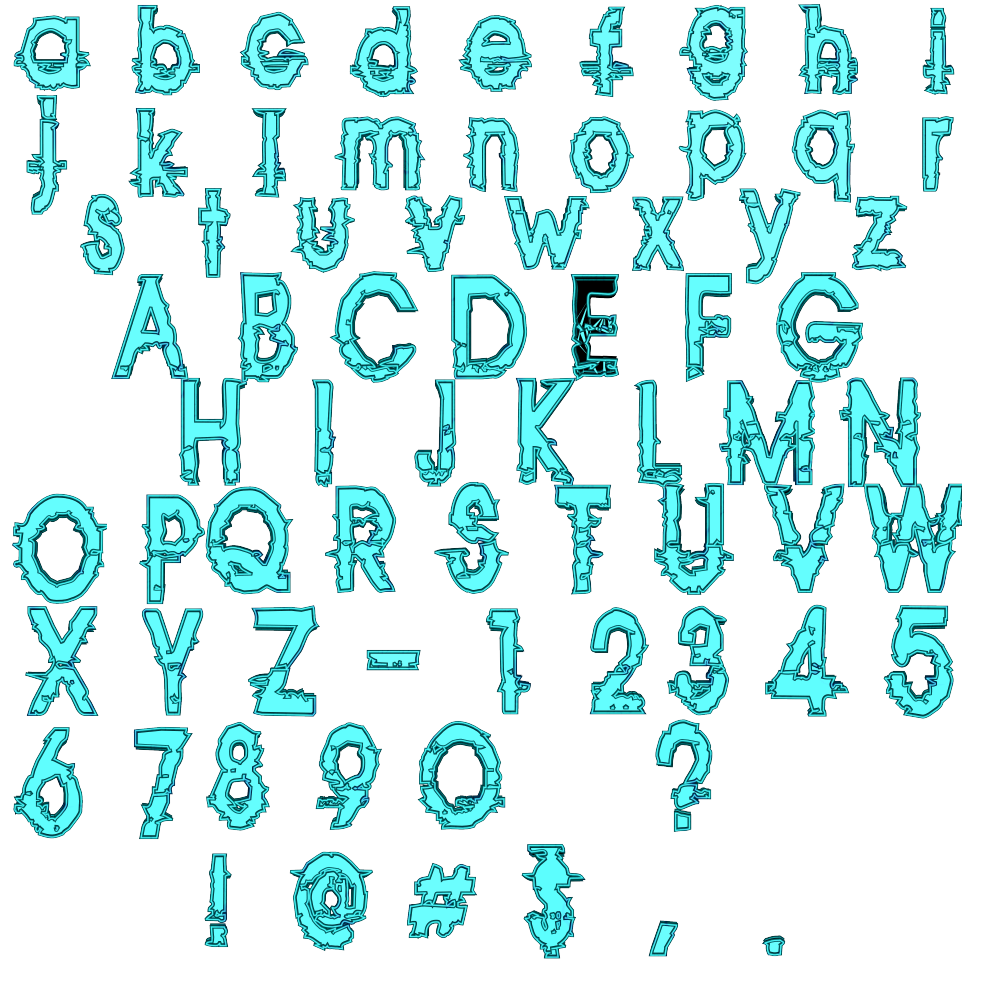
4) Broken Blue Bevel glyphs. Created by me so use them however you wish.

TO INSTALL-Gimp (if not for Gimp there is no need to install PSPI)
1) Download - PSPI (photoshop plugin for Gimp) - http://tml.pp.fi/gimp/pspi.html
http://www.instructables.com/id/Photosh ... g-In-PSPI/
2) Download the Photofont Start plugin - install it where you install your Photo Shop plugins.
http://www.fontlab.com/photofont/photofont-start/ - open Gimp and create the PSPI path.Close Gimp.
3) Now go to C:\Documents and Settings\YourUserNameFolder\My Documents\Photofonts folder and place the PHF file in there.
4) Create another folder in the Photofonts folder. Name it - images
Create another folder inside images name it - nonCaps.
5) Download the export layers as png script here - http://registry.gimp.org/node/18440 (python is needed for this script) - http://registry.gimp.org/node/25394 for SCM - Install the Python file in your plugins folder.Install the SCM in your scripts folder.
6) Open the xcf file in Gimp and create your font/glyphs - its important that you name them correctly so name them A, B, C, - name the number layers zero, one, two and so on.I included a id map in the README so check that out for correct image naming.

Once you save those images in the Photofonts/images folder they are auto installed, and there is no need to restart Gimp. :) - so now just go to Filters>Fontlab>Photofont Start and look for the installed font in the drop down list.
The name is Non_Embedded_PHF.
Type your text and there you go. :)


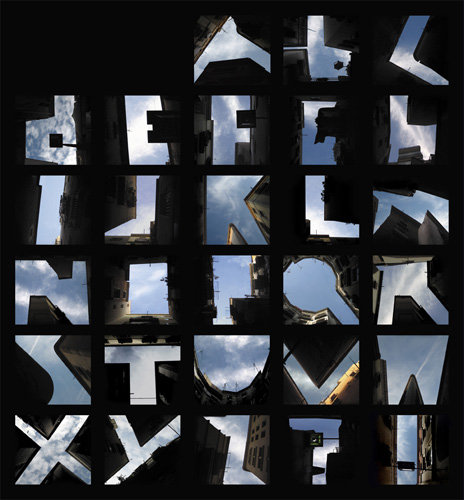
I found this website image today - very cool! :)
Image
Website and story of image can be found here.Just an example of what you can create with phf.
http://www.slanted.de/node/1361

Any problems holler at me. If anything in the zip is missing holler at me. :)

Thanks for all your support and help folks.This wouldn't have been possible without you.
The stuff -
Updated to 1.5 March 9th - added 3 new unicodes - updated the code - added Broken Blue Bevel font glyphs!
Updated to 2.0 March 9th - fixed kerning and baseline alignment.
Attachment:
File comment: Kerning and baseline alignment update
Non_Embedded_PHF-v2.0.zip [2.38 MiB]
Downloaded 118 times

_________________
Image
Gimp Rocks Blog
Simply Gimp Tutorials
"Once your in the cloud, you're in the net"
____________
OK, . . . . so what's the speed of dark?


Share on Facebook Share on Twitter Share on Orkut Share on Digg Share on MySpace Share on Delicious Share on Technorati
Top
 Profile  
 

 Post subject: Re: Photofont Start/PHF Photofont installer 1.0 (PSPPI-1.0)
PostPosted: Wed Mar 07, 2012 1:19 pm  (#2) 
Offline
GimpChat Member
User avatar

Joined: Sep 24, 2010
Posts: 5012
Thanks Rod. Haven't installed the python image exporter yet, but I thought GIMP had this feature built in for some reason; I know you can take a lot of images and import them as a layered file. Anyway, again, appreciate your effort. :)

_________________
Lyle

Psalm 109:8

Image


Top
 Profile  
 
 Post subject: Re: Photofont Start/PHF Photofont installer 1.0 (PSPPI-1.0)
PostPosted: Wed Mar 07, 2012 1:29 pm  (#3) 
Offline
GimpChat Member
User avatar

Joined: Sep 24, 2010
Posts: 5012
Don't see naming convention in your readme for all the glyphs Rod. I do see map ids in the PHP file you including. Can the glyphs be png or jpg or either?

edit:

ahh; pngs. :)

_________________
Lyle

Psalm 109:8

Image


Top
 Profile  
 
 Post subject: Re: Photofont Start/PHF Photofont installer 1.0 (PSPPI-1.0)
PostPosted: Wed Mar 07, 2012 2:07 pm  (#4) 
Offline
GimpChat Member
User avatar

Joined: Sep 24, 2010
Posts: 5012
Looks like you are missing unicode 64 (at symbol) in your PHP file too. Had to do some digging to find a unicode table. :)

_________________
Lyle

Psalm 109:8

Image


Top
 Profile  
 
 Post subject: Re: Photofont Start/PHF Photofont installer 1.0 (PSPPI-1.0)
PostPosted: Wed Mar 07, 2012 2:10 pm  (#5) 
Offline
Global Moderator
User avatar

Joined: May 16, 2010
Posts: 9012
Location: "Looking for my eraser" =P
Yes the @ file is in the XCF but i didnt know the unicode.
This should be in the readme file - bottom

IMAGE NAME GUIDE - MAP ID IS ALSO IMAGE NAME - just add the png extension.
For instance
map id="A" means this images name is A.png (it IS case sensitive!)
map id="bracketright" means this images name is bracketright.png

<map id="A" unc="65" />
<map id="B" unc="66" />
<map id="C" unc="67" />
<map id="D" unc="68" />
<map id="E" unc="69" />
<map id="F" unc="70" />
<map id="G" unc="71" />
<map id="H" unc="72" />
<map id="I" unc="73" />
<map id="J" unc="74" />
<map id="K" unc="75" />
<map id="L" unc="76" />
<map id="M" unc="77" />
<map id="N" unc="78" />
<map id="O" unc="79" />
<map id="P" unc="80" />
<map id="Q" unc="81" />
<map id="R" unc="82" />
<map id="S" unc="83" />
<map id="T" unc="84" />
<map id="U" unc="85" />
<map id="V" unc="86" />
<map id="W" unc="87" />
<map id="X" unc="88" />
<map id="Y" unc="89" />
<map id="Z" unc="90" />
<map id="a" unc="97" />
<map id="ampersand" unc="38" />
<map id="b" unc="98" />
<map id="braceleft" unc="123" />
<map id="braceright" unc="125" />
<map id="bracketleft" unc="91" />
<map id="bracketright" unc="93" />
<map id="c" unc="99" />
<map id="colon" unc="58" />
<map id="comma" unc="44" />
<map id="d" unc="100" />
<map id="degree" unc="176" />
<map id="dollar" unc="36" />
<map id="e" unc="101" />
<map id="eight" unc="56" />
<map id="equal" unc="61" />
<map id="exclam" unc="33" />
<map id="f" unc="102" />
<map id="five" unc="53" />
<map id="four" unc="52" />
<map id="g" unc="103" />
<map id="greater" unc="62" />
<map id="h" unc="104" />
<map id="hyphen" unc="45" />
<map id="i" unc="105" />
<map id="j" unc="106" />
<map id="k" unc="107" />
<map id="l" unc="108" />
<map id="less" unc="60" />
<map id="m" unc="109" />
<map id="multiply" unc="215" />
<map id="n" unc="110" />
<map id="nine" unc="57" />
<map id="o" unc="111" />
<map id="one" unc="49" />
<map id="p" unc="112" />
<map id="parenleft" unc="40" />
<map id="parenright" unc="41" />
<map id="percent" unc="37" />
<map id="period" unc="46" />
<map id="plus" unc="43" />
<map id="q" unc="113" />
<map id="question" unc="63" />
<map id="quoteleft" unc="8216" />
<map id="quoteright" unc="8217" />
<map id="quotesingle" unc="39" />
<map id="r" unc="114" />
<map id="s" unc="115" />
<map id="semicolon" unc="59" />
<map id="seven" unc="55" />
<map id="six" unc="54" />
<map id="slash" unc="47" />
<map id="space" unc="32" />
<map id="t" unc="116" />
<map id="three" unc="51" />
<map id="two" unc="50" />
<map id="u" unc="117" />
<map id="v" unc="118" />
<map id="w" unc="119" />
<map id="x" unc="120" />
<map id="y" unc="121" />
<map id="z" unc="122" />
<map id="zero" unc="48" />

As i said i haven't tested everything so you may want to try different extensions.You have to change every block though and there are over 70. :)
I have heard that even vectors will work.Agreeably creating the fonts in Inkscape and saving them as PNG that way would be ideal, but i have heard that the xml code will except SVG although i didn't test that either.

Further versions i guess.

Try some different things let me know how they work and the next release i will include them.

_________________
Image
Gimp Rocks Blog
Simply Gimp Tutorials
"Once your in the cloud, you're in the net"
____________
OK, . . . . so what's the speed of dark?


Top
 Profile  
 
 Post subject: Re: Photofont Start/PHF Photofont installer 1.0 (PSPPI-1.0)
PostPosted: Wed Mar 07, 2012 2:14 pm  (#6) 
Offline
Global Moderator
User avatar

Joined: May 16, 2010
Posts: 9012
Location: "Looking for my eraser" =P
Remember you will also have to add a new glyph block if you add a unicode and it needs to be placed above the cap A glyph.I have no idea what the unicode id is either.

_________________
Image
Gimp Rocks Blog
Simply Gimp Tutorials
"Once your in the cloud, you're in the net"
____________
OK, . . . . so what's the speed of dark?


Top
 Profile  
 
 Post subject: Re: Photofont Start/PHF Photofont installer 1.0 (PSPPI-1.0)
PostPosted: Wed Mar 07, 2012 2:28 pm  (#7) 
Offline
GimpChat Member
User avatar

Joined: Sep 24, 2010
Posts: 5012
Ahh; made the assumption that if you had the symbol/letter/number in the xcf, you had the equivalent in your PHP. Thanks for the map too but I did find that your PHP file could be opened in wordpad and got that there. What I first plan to do is rename all the characters to the proper name from your sample and then eventually create my own, but it will still be a matter of time. Again, thanks for sharing this with us. :)

_________________
Lyle

Psalm 109:8

Image


Top
 Profile  
 

 Post subject: Re: Photofont Start/PHF Photofont installer 1.0 (PSPPI-1.0)
PostPosted: Wed Mar 07, 2012 2:57 pm  (#8) 
Offline
Global Moderator
User avatar

Joined: May 16, 2010
Posts: 9012
Location: "Looking for my eraser" =P
<map id="at" unc="64" />
<map id="numbersign" unc="35" /> :)

Just use these glyph blocks

Code:
    <glyph id="numbersign">
   <image id="v0" type="photo">
    <shape system="images/numbersign.png">
     <ppm int="480" />
     <bbox x="20" y="-5" width="500" height="700" />
     <base x="-20" y="500" />
     <delta x="444" y="0" />
    </shape>
   </image>
  </glyph>
 
    <glyph id="at">
   <image id="v0" type="photo">
    <shape system="images/at.png">
     <ppm int="480" />
     <bbox x="20" y="-5" width="500" height="700" />
     <base x="-20" y="500" />
     <delta x="444" y="0" />
    </shape>
   </image>
  </glyph>


Name your images
numbersign.png and at.png

_________________
Image
Gimp Rocks Blog
Simply Gimp Tutorials
"Once your in the cloud, you're in the net"
____________
OK, . . . . so what's the speed of dark?


Top
 Profile  
 
 Post subject: Re: Photofont Start/PHF Photofont installer 1.0 (PSPPI-1.0)
PostPosted: Wed Mar 07, 2012 2:58 pm  (#9) 
Offline
GimpChat Member

Joined: Jan 13, 2011
Posts: 521
Location: Poland
To the point- 6 everything is clear.
Opening Non_Embedded_PHF no effect (other work).
Where to find my mistake?


Attachments:
Photofont Start 1.png
Photofont Start 1.png [ 41.61 KiB | Viewed 1095 times ]
Photofont Start 2.png
Photofont Start 2.png [ 10.84 KiB | Viewed 1095 times ]
Top
 Profile  
 
 Post subject: Re: Photofont Start/PHF Photofont installer 1.0 (PSPPI-1.0)
PostPosted: Wed Mar 07, 2012 3:37 pm  (#10) 
Offline
GimpChat Member
User avatar

Joined: Sep 24, 2010
Posts: 5012
Rod wrote:
<map id="at" unc="64" />
<map id="numbersign" unc="35" /> :)

Just use these glyph blocks

Code:
    <glyph id="numbersign">
   <image id="v0" type="photo">
    <shape system="images/numbersign.png">
     <ppm int="480" />
     <bbox x="20" y="-5" width="500" height="700" />
     <base x="-20" y="500" />
     <delta x="444" y="0" />
    </shape>
   </image>
  </glyph>
 
    <glyph id="at">
   <image id="v0" type="photo">
    <shape system="images/at.png">
     <ppm int="480" />
     <bbox x="20" y="-5" width="500" height="700" />
     <base x="-20" y="500" />
     <delta x="444" y="0" />
    </shape>
   </image>
  </glyph>


Name your images
numbersign.png and at.png


Cool Rod; will add those entries when I get back. I was going to try to decipher it myself since you laid out your code so easily to do so (and you know I'm really not a coder; just a figure it out-er. lol). :)

_________________
Lyle

Psalm 109:8

Image


Top
 Profile  
 
Display posts from previous:  Sort by  
Post new topic Reply to topic  [ 43 posts ]  Go to page 1, 2, 3, 4, 5  Next

All times are UTC - 5 hours [ DST ]


Who is online

Users browsing this forum: No registered users and 3 guests


You cannot post new topics in this forum
You cannot reply to topics in this forum
You cannot edit your posts in this forum
You cannot delete your posts in this forum
You cannot post attachments in this forum

Search for:
Jump to:  

* Login   * Subscribe to RSS Feed


Powered by phpBB © 2000, 2002, 2005, 2007 phpBB Group