It is currently Thu May 23, 2013 5:16 am


Latest GIMP Scripts & Plug-ins

All times are UTC - 5 hours [ DST ]


Post new topic Reply to topic  [ 12 posts ]  Go to page 1, 2  Next
Author Message
 Post subject: Gimp Rocks!
PostPosted: Sun Jul 15, 2012 2:59 am  (#1) 
Offline
Global Moderator
User avatar

Joined: May 16, 2010
Posts: 9012
Location: "Looking for my eraser" =P
Image

_________________
Image
Gimp Rocks Blog
Simply Gimp Tutorials
"Once your in the cloud, you're in the net"
____________
OK, . . . . so what's the speed of dark?


Share on Facebook Share on Twitter Share on Orkut Share on Digg Share on MySpace Share on Delicious Share on Technorati
Top
 Profile  
 

 Post subject: Re: Gimp Rocks!
PostPosted: Sun Jul 15, 2012 7:35 am  (#2) 
Online
GimpChat Member
User avatar

Joined: Mar 23, 2012
Posts: 3101
Location: UK
Hey -graffiti. That's really cool. I don't know what layer mode you used but I find Grain Merge useful for this kind of thing.

_________________
Image


Top
 Profile  
 
 Post subject: Re: Gimp Rocks!
PostPosted: Sun Jul 15, 2012 8:10 am  (#3) 
Offline
GimpChat Member
User avatar

Joined: Aug 24, 2011
Posts: 1776
Location: Dallas, TX
That is kinda cool looking Rod. I had to try my hand at that to see if I could replicate it. Text, Stroke, Spread Noise on the both layers and rotate.
Grain Merge at 80% on a background of choice. Piece of cake! This would make a cool addition to the Logo Factory or maybe a script by itself called Chaulk Graffiti.


Attachments:
Drac Attack Chaulk.jpg
Drac Attack Chaulk.jpg [ 1.51 MiB | Viewed 572 times ]

_________________
Image
Top
 Profile  
 
 Post subject: Re: Gimp Rocks!
PostPosted: Sun Jul 15, 2012 9:47 am  (#4) 
Offline
Global Moderator
User avatar

Joined: May 16, 2010
Posts: 9012
Location: "Looking for my eraser" =P
Draconian wrote:
That is kinda cool looking Rod. I had to try my hand at that to see if I could replicate it. Text, Stroke, Spread Noise on the both layers and rotate.
Grain Merge at 80% on a background of choice. Piece of cake! This would make a cool addition to the Logo Factory or maybe a script by itself called Chaulk Graffiti.


I agree :)

_________________
Image
Gimp Rocks Blog
Simply Gimp Tutorials
"Once your in the cloud, you're in the net"
____________
OK, . . . . so what's the speed of dark?


Top
 Profile  
 
 Post subject: Re: Gimp Rocks!
PostPosted: Sun Jul 15, 2012 11:12 am  (#5) 
Online
GimpChat Member
User avatar

Joined: Mar 23, 2012
Posts: 3101
Location: UK
Here's my graphic novel version.

Image

_________________
Image


Top
 Profile  
 
 Post subject: Re: Gimp Rocks!
PostPosted: Sun Jul 15, 2012 6:13 pm  (#6) 
Offline
GimpChat Member
User avatar

Joined: Apr 08, 2010
Posts: 2948
Location: Northwest Ohio
somewhere I saw a tut...long time ago, where they used bump mapping to give the graffiti a contoured look.


Top
 Profile  
 
 Post subject: Re: Gimp Rocks!
PostPosted: Sun Jul 15, 2012 7:10 pm  (#7) 
Online
GimpChat Member
User avatar

Joined: Mar 23, 2012
Posts: 3101
Location: UK
2-ton wrote:
somewhere I saw a tut...long time ago, where they used bump mapping to give the graffiti a contoured look.


Good point. I tried a displacement map but it wasn't very good. Maybe I should have tried bump mapping.

_________________
Image


Top
 Profile  
 

 Post subject: Re: Gimp Rocks!
PostPosted: Sat Jul 21, 2012 1:15 am  (#8) 
Offline
GimpChat Member

Joined: Jul 15, 2012
Posts: 162
I had some fun playing around with this generator to make some scenes,

http://graffiticreator.net/

From this thread,

http://www.gimptalk.com/index.php?/topic/35889-realistic-graffiti-tutorial/


Top
 Profile  
 
 Post subject: Re: Gimp Rocks!
PostPosted: Sat Jul 21, 2012 3:02 pm  (#9) 
Offline
Global Moderator
User avatar

Joined: May 16, 2010
Posts: 9012
Location: "Looking for my eraser" =P
Very cool!

_________________
Image
Gimp Rocks Blog
Simply Gimp Tutorials
"Once your in the cloud, you're in the net"
____________
OK, . . . . so what's the speed of dark?


Top
 Profile  
 
 Post subject: Re: Gimp Rocks!
PostPosted: Tue Jul 24, 2012 8:02 pm  (#10) 
Offline
GimpChat Member

Joined: Jul 15, 2012
Posts: 162
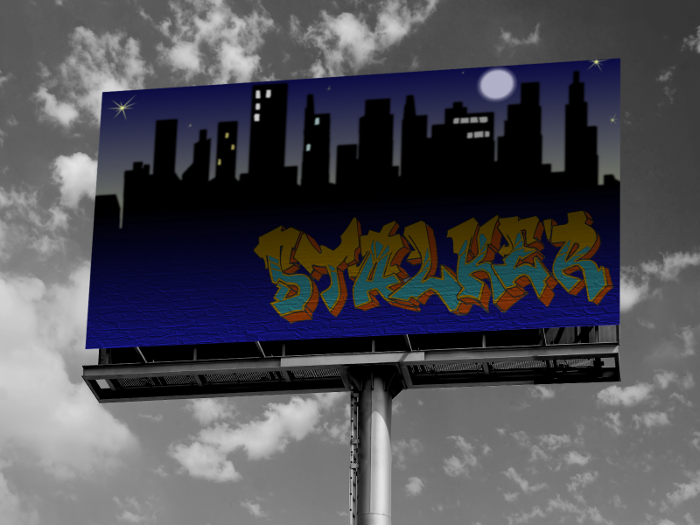
Here's something I did today. I just couldn't find the right photo for the billboard. Even the stock that cost didn't look too great. The best I could do was to desaturate to make it somewhat interesting. I thought about putting a street light to the left. It's kind of bare over there.

Image


Top
 Profile  
 
Display posts from previous:  Sort by  
Post new topic Reply to topic  [ 12 posts ]  Go to page 1, 2  Next

All times are UTC - 5 hours [ DST ]


Who is online

Users browsing this forum: Erisian and 5 guests


You cannot post new topics in this forum
You cannot reply to topics in this forum
You cannot edit your posts in this forum
You cannot delete your posts in this forum
You cannot post attachments in this forum

Search for:
Jump to:  
cron

* Login   * Subscribe to RSS Feed


Powered by phpBB © 2000, 2002, 2005, 2007 phpBB Group