It is currently Fri Aug 14, 2026 2:41 pm


All times are UTC - 5 hours [ DST ]


Post new topic Reply to topic  [ 78 posts ]  Go to page Previous  1, 2, 3, 4  Next
Author Message
 Post subject: Re: Combining two images
PostPosted: Tue Oct 10, 2017 2:25 pm  (#21) 
Offline
GimpChat Member

Joined: Jun 21, 2016
Posts: 60
Yeah. I found out it didn't work when I got back to the boat and fired up the big laptop with GIMP installed. So I'm still stuck here. GIMP is not saving my files and is useless as it stands. And I still don't know where to manually type in .jpg. You screen shot doesn't look like anything I see on my computer. May be if you walked me through the process, step by step, I could get it to work. This is a recent problem, the last week. There must be a simple solution. Maybe by converting my jpeg's to something else before loading them into GIMP?
Thanks, Wallace, I know I'm a pain...
Bry


Top
 Post subject: Re: Combining two images
PostPosted: Tue Oct 10, 2017 2:28 pm  (#22) 
Offline
GimpChat Member
User avatar

Joined: Mar 23, 2012
Posts: 7388
Location: Göteborg at last!
bcripps wrote:
And I still don't know where to manually type in .jpg.

Directly after the filename (Filename.jpg)


Top
 Post subject: Re: Combining two images
PostPosted: Tue Oct 10, 2017 5:44 pm  (#23) 
Offline
GimpChat Member

Joined: May 12, 2015
Posts: 4693
What operating system is on your computer and what version of Gimp 2.8 are you using?


Top
 Post subject: Re: Combining two images
PostPosted: Tue Oct 10, 2017 9:50 pm  (#24) 
Offline
Administrator
User avatar

Joined: Aug 10, 2012
Posts: 14155
Location: Native to NYC living in Arizona, Gimp 2.8 - 3.0, Win 11 PC.
Here's a video.

www.youtube.com Video from : www.youtube.com

_________________
Image
"A wise man learns more from a foolish question than a fool can learn from a wise answer"
Image


Top
 Post subject: Re: Combining two images
PostPosted: Wed Oct 11, 2017 2:01 pm  (#25) 
Offline
GimpChat Member

Joined: Jun 21, 2016
Posts: 60
Thanks Erisian, as far as I can tell, that's exactly what I'm doing and it doesn't work.
Pat 625: Not sure. When I open it just says 2.8.
And Wallace: I can't see any detail on my notebook, it's very fuzzy, but thanks for the video. I tried downloading it but after 2 hours, I only have about half of it. Welcome to my (third) world experience. Is this so complicated you can't write it out for me in a few lines? I have downloaded the latest version of GIMP. Would installing it make a difference?
Thanks all. I know this is frustrating and I really appreciate the input.
Bry


Top
 Post subject: Re: Combining two images
PostPosted: Wed Oct 11, 2017 2:08 pm  (#26) 
Offline
Administrator
User avatar

Joined: Aug 10, 2012
Posts: 14155
Location: Native to NYC living in Arizona, Gimp 2.8 - 3.0, Win 11 PC.
bcripps wrote:
Thanks Erisian, as far as I can tell, that's exactly what I'm doing and it doesn't work.
Pat 625: Not sure. When I open it just says 2.8.
And Wallace: I can't see any detail on my notebook, it's very fuzzy, but thanks for the video. I tried downloading it but after 2 hours, I only have about half of it. Welcome to my (third) world experience. Is this so complicated you can't write it out for me in a few lines? I have downloaded the latest version of GIMP. Would installing it make a difference?
Thanks all. I know this is frustrating and I really appreciate the input.
Bry

No problem.
However,
I attempted to explain this in previous posts,
how to go about doing it.

You simply need to highlight the files's name and extension,
when exporting and type in what is required,
then hit enter to complete the export process.

_________________
Image
"A wise man learns more from a foolish question than a fool can learn from a wise answer"
Image


Top
 Post subject: Re: Combining two images
PostPosted: Thu Oct 12, 2017 1:39 pm  (#27) 
Offline
GimpChat Member

Joined: Jun 21, 2016
Posts: 60
Okay. The good news: After several failed attempts, i think I was able to download the video. I'll put it on a stick and take it back to the boat with me and run it later tonight with the audio. That should tell the tale.
Be back tomorrow, don't shudder, and let you know how I made out.
Thanks,
Bry


Top
 Post subject: Re: Combining two images
PostPosted: Thu Oct 12, 2017 1:43 pm  (#28) 
Offline
Administrator
User avatar

Joined: Aug 10, 2012
Posts: 14155
Location: Native to NYC living in Arizona, Gimp 2.8 - 3.0, Win 11 PC.
bcripps wrote:
Okay. The good news: After several failed attempts, i think I was able to download the video. I'll put it on a stick and take it back to the boat with me and run it later tonight with the audio. That should tell the tale.
Be back tomorrow, don't shudder, and let you know how I made out.
Thanks,
Bry

Okay,
good luck.
The video was made in 1080p and will not look good at lower resolutions.

_________________
Image
"A wise man learns more from a foolish question than a fool can learn from a wise answer"
Image


Top
 Post subject: Re: Combining two images
PostPosted: Fri Oct 13, 2017 1:33 pm  (#29) 
Offline
GimpChat Member

Joined: Jun 21, 2016
Posts: 60
Sorry Wallace, my Asus computer couldn’t play the video. So following your written instructions, to the letter… once again, step by step:

My photo is on the desktop as a .jpeg and named “test.” (All quotes are mine and not used in file names.) I open GIMP and open the file, now listed as a .jpg, and it opens in GIMP. I make a test adjustment to the photo; resizing it slightly then hit “Export As.” In the top line I have “test” (highlighted in blue), followed by .jpg
I highlight all of it and type over it: “test.jpg”
I hit enter.
A window appears: “A file named test.jpg already exists. Do you want to replace it?”
I hit replace.
I get a window: “Export image as JPEG
I hit export.
I get a window: JPEG image plug-in could not save image.

Okay. I am open for all suggestions. Please.
Bry


Top
 Post subject: Re: Combining two images
PostPosted: Fri Oct 13, 2017 1:55 pm  (#30) 
Offline
Administrator
User avatar

Joined: Aug 10, 2012
Posts: 14155
Location: Native to NYC living in Arizona, Gimp 2.8 - 3.0, Win 11 PC.
bcripps wrote:
Sorry Wallace,
my Asus computer couldn’t play the video.
So following your written instructions,
to the letter… once again, step by step:

My photo is on the desktop as a .jpeg and named “test.”
(All quotes are mine and not used in file names.)
I open GIMP and open the file,
now listed as a .jpg, and it opens in GIMP.
I make a test adjustment to the photo;
resizing it slightly then hit “Export As.”
In the top line I have “test” (highlighted in blue), followed by .jpg
I highlight all of it and type over it: “test.jpg”
I hit enter.
A window appears: “A file named test.jpg already exists. Do you want to replace it?”
I hit replace.
I get a window: “Export image as JPEG
I hit export.
I get a window: JPEG image plug-in could not save image.

Okay. I am open for all suggestions. Please.
Bry

It could be that the image is very large and there isn't enough disk space on your machine.
Do you know the image size in terms of it's kilobytes,
megabytes or gigabytes?

Perhaps you can post the image?


Also,
there could be something wrong with your GIMP User Profile.

Does this occur ever time you try to export an image,
or is this only happening with this specific image?


You can create a new GIMP User Profile,
by renaming the current profile.

In my case,
if I were to rename my current profile.
I would rename it to something like,
.gimp-2.8_old.

Once you rename your current profile.
Launch GIMP and it will create a new Gimp User profile.

You can then see if this behavior continues with the newly created GIMP User Profile.
If it doesn't,
then it was something within the Old profile,
which was causing the issue.

Most often,
by creating a new GIMP User Profile.
This can correct many issues within GIMP's interface,
default plugins and other default User Profile items/files.

_________________
Image
"A wise man learns more from a foolish question than a fool can learn from a wise answer"
Image


Top
 Post subject: Re: Combining two images
PostPosted: Fri Oct 13, 2017 2:33 pm  (#31) 
Offline
GimpChat Member

Joined: Jun 21, 2016
Posts: 60
Thanks Wallace. the pix is the downed plane in post #9, but the problem isn't exclusive to that photo. I'll muck with this other stuff when I get back to the boat. And I do have the latest version of GIMP on a stick. Maybe I should just delete my present version and upgrade.
Bry


Top
 Post subject: Re: Combining two images
PostPosted: Fri Oct 13, 2017 2:39 pm  (#32) 
Offline
Administrator
User avatar

Joined: Aug 10, 2012
Posts: 14155
Location: Native to NYC living in Arizona, Gimp 2.8 - 3.0, Win 11 PC.
bcripps wrote:
Thanks Wallace. the pix is the downed plane in post #9,
but the problem isn't exclusive to that photo. I'll muck with this other stuff when I get back to the boat. And I do have the latest version of GIMP on a stick. Maybe I should just delete my present version and upgrade.
Bry

The most current stable release of GIMP as of 2017-05-11 is 2.8.22.
This is the full version,
not to be confuse with any portable version.

Be sure to post back,
with any of your findings.

_________________
Image
"A wise man learns more from a foolish question than a fool can learn from a wise answer"
Image


Top
 Post subject: Re: Combining two images
PostPosted: Sat Oct 14, 2017 1:24 pm  (#33) 
Offline
GimpChat Member

Joined: Jun 21, 2016
Posts: 60
Sorry. Couldn't figure it out. How do you rename the profile?


Top
 Post subject: Re: Combining two images
PostPosted: Sat Oct 14, 2017 1:42 pm  (#34) 
Offline
Administrator
User avatar

Joined: Aug 10, 2012
Posts: 14155
Location: Native to NYC living in Arizona, Gimp 2.8 - 3.0, Win 11 PC.
bcripps wrote:
Sorry. Couldn't figure it out. How do you rename the profile?

I explained how to go about creating a new GIMP User profile in this thread:
viewtopic.php?f=10&t=15928&start=20#p221230


Question: How do you rename the profile?
Answer: You go to where your GIMP User Profile is located,
and change the folder's name.

_________________
Image
"A wise man learns more from a foolish question than a fool can learn from a wise answer"
Image


Top
 Post subject: Re: Combining two images
PostPosted: Sat Oct 14, 2017 2:21 pm  (#35) 
Offline
Administrator
User avatar

Joined: Aug 10, 2012
Posts: 14155
Location: Native to NYC living in Arizona, Gimp 2.8 - 3.0, Win 11 PC.
I'm sorry bcripps,
but I mistakenly deleted your most recent post.

You had asked about where to find the GIMP User Profile.


Are you using portable GIMP?

If so,
portable GIMP works differently from the installed version.
There isn't a "GIMP User Profile" within the portable version.
So you won't be able to do this in portable GIMP.

_________________
Image
"A wise man learns more from a foolish question than a fool can learn from a wise answer"
Image


Top
 Post subject: Re: Combining two images
PostPosted: Sat Oct 14, 2017 2:55 pm  (#36) 
Offline
GimpChat Member

Joined: Jun 21, 2016
Posts: 60
I'm not sure what Portable Gimp is. I downloaded and installed Gimp on my laptop with Win 7 installed. And it's worked fine for the last year or more.

Yes, was wondering where to find the Gimp User Profile. I opened my "Search Program and Files" in Win 7 and pasted in C:\Users\{your_id}\.gimp-2.8 ...but nothing came up. I inserted my computer id {BC} in the slot but not sure about the underscore. If I knew how to delete the folder, I would just reinstall the new Gimp I have on a memory stick and start fresh.

As always, appreciate your help.
Brty


Top
 Post subject: Re: Combining two images
PostPosted: Sat Oct 14, 2017 3:10 pm  (#37) 
Offline
Administrator
User avatar

Joined: Aug 10, 2012
Posts: 14155
Location: Native to NYC living in Arizona, Gimp 2.8 - 3.0, Win 11 PC.
bcripps wrote:
I'm not sure what Portable Gimp is. I downloaded and installed Gimp on my laptop with Win 7 installed. And it's worked fine for the last year or more.

Yes, was wondering where to find the Gimp User Profile. I opened my "Search Program and Files" in Win 7 and pasted in C:\Users\{your_id}\.gimp-2.8 ...but nothing came up. I inserted my computer id {BC} in the slot but not sure about the underscore. If I knew how to delete the folder, I would just reinstall the new Gimp I have on a memory stick and start fresh.

As always, appreciate your help.
Brty

You don't want to delete the Gimp User Profile folder.
All that is required,
is to change it's name.

*_*_*

If you did the usual GIMP for Windows installation.
The Gimp User Profile should be located at:
C:\Users\Your User Name\.gimp-2.8

Note: In the location shown above.
Replace "Your User Name",
with the user name of your computer.


For Example:
My GIMP User Profile folder.
Would be located at: C:\Users\Wallace\.gimp-2.8
Your GIMP User Profile folder.
If your User Name were bcripps.
It would be located at: C:\Users\bcripps\.gimp-2.8

*_*_*

What you need to do is,
locate this folder and name it something different.

As an example:
if I were to rename my current profile.
I would rename it something like,
.gimp-2.8_old
.


*_*_*

The GIMP User Profile folder will be named,
.gimp-2.8

You can name it whatever you like.
Once you rename your current profile.
Launch Gimp and it will create a new Gimp User profile.
In the same location named .gimp-2.8.

_________________
Image
"A wise man learns more from a foolish question than a fool can learn from a wise answer"
Image


Top
 Post subject: Re: Combining two images
PostPosted: Sat Oct 14, 2017 3:49 pm  (#38) 
Offline
GimpChat Member

Joined: Jun 21, 2016
Posts: 60
Nope. Windows could not fine folder C:\Users\BC\.gimp-2.8
Bry


Top
 Post subject: Re: Combining two images
PostPosted: Sat Oct 14, 2017 4:08 pm  (#39) 
Offline
Administrator
User avatar

Joined: Aug 10, 2012
Posts: 14155
Location: Native to NYC living in Arizona, Gimp 2.8 - 3.0, Win 11 PC.
bcripps wrote:
Nope. Windows could not fine folder C:\Users\BC\.gimp-2.8
Bry


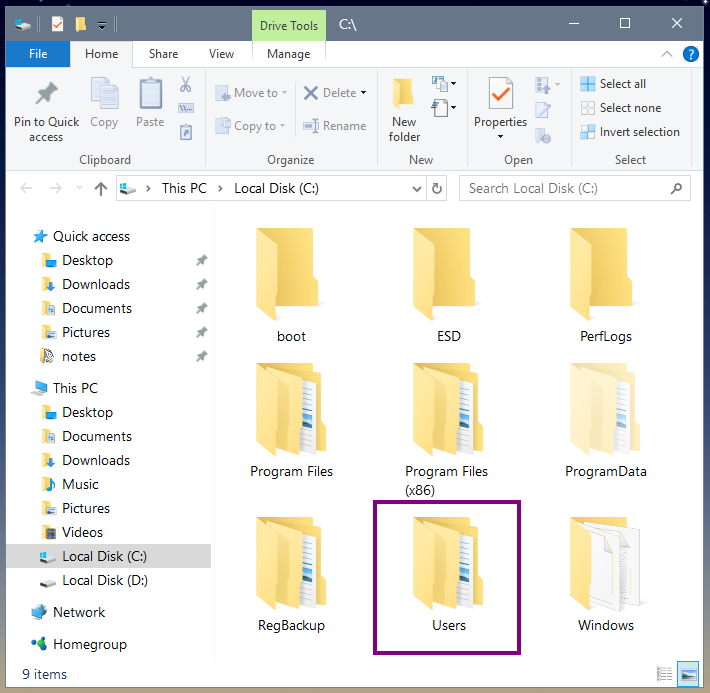
Open you C Drive.
There should be a folder named Users located there.

Image

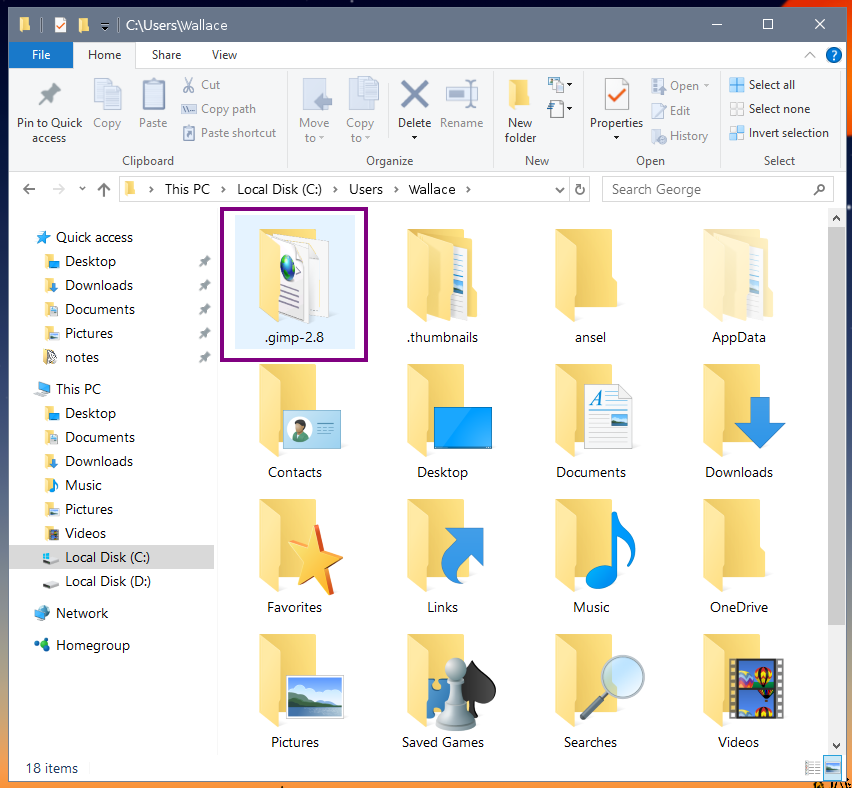
Open the Users folder.
Inside this folder you should see a folder that has your user name on it.

Image

Inside your user named folder.
You should find the GIMP User Profile folder named
.gimp-2.8.

Image

This folder is your GIMP User Profile folder.

_________________
Image
"A wise man learns more from a foolish question than a fool can learn from a wise answer"
Image


Top
 Post subject: Re: Combining two images
PostPosted: Sat Oct 14, 2017 4:11 pm  (#40) 
Offline
GimpChat Member
User avatar

Joined: Jan 06, 2017
Posts: 204
Funny thing is, when I search for my .gimp-2.8 folder, Windows can't find it (though everything's typed correctly...)

However, as Wallace explained^.. quickly looking for it using Windows Explorer (the file system) I can easily locate it...


Last edited by Zero01 on Sun Oct 15, 2017 2:31 pm, edited 1 time in total.

Top
Post new topic Reply to topic  [ 78 posts ]  Go to page Previous  1, 2, 3, 4  Next

All times are UTC - 5 hours [ DST ]


* Login  


Powered by phpBB3 © phpBB Group