It is currently Thu Sep 24, 2026 5:04 am


All times are UTC - 5 hours [ DST ]


Post new topic Reply to topic  [ 30 posts ]  Go to page 1, 2  Next
Author Message
 Post subject: Christmas Holly
PostPosted: Tue Nov 18, 2014 4:11 pm  (#1) 
Offline
Administrator
User avatar

Joined: Aug 10, 2012
Posts: 14207
Location: Native to NYC living in Arizona, Gimp 2.8 - 3.0, Win 11 PC.
I made some Christmas Holly. Using BRL on the berries and leaves.
Image

_________________
Image
"A wise man learns more from a foolish question than a fool can learn from a wise answer"
Image


Share on Facebook Share on Twitter Share on Orkut Share on Digg Share on MySpace Share on Delicious Share on Technorati
Top
 Post subject: Re: Christmas Holly
PostPosted: Tue Nov 18, 2014 4:19 pm  (#2) 
Offline
GimpChat Member

Joined: Jan 11, 2012
Posts: 62
Location: Gainesville, Florida
thank you Wallace and happy holidays


Top
 Post subject: Re: Christmas Holly
PostPosted: Tue Nov 18, 2014 4:45 pm  (#3) 
Offline
GimpChat Member
User avatar

Joined: Apr 07, 2010
Posts: 14182
Very nice wallace, how did you make those ribbons? They are cool.

_________________
Image


Top
 Post subject: Re: Christmas Holly
PostPosted: Tue Nov 18, 2014 4:49 pm  (#4) 
Offline
Administrator
User avatar

Joined: Aug 10, 2012
Posts: 14207
Location: Native to NYC living in Arizona, Gimp 2.8 - 3.0, Win 11 PC.
astevn816 wrote:
thank you Wallace and happy holidays

Yes and Happy Holiday to you as well.

molly wrote:
Very nice wallace, how did you make those ribbons? They are cool.


Thanks Molly.
I made the ribbons using paths. Once all the paths were made, I used them to create a selection and filled it with yellow. Then stroked the paths to make the ribbons outline.

_________________
Image
"A wise man learns more from a foolish question than a fool can learn from a wise answer"
Image


Top
 Post subject: Re: Christmas Holly
PostPosted: Tue Nov 18, 2014 5:52 pm  (#5) 
Offline
GimpChat Member
User avatar

Joined: Apr 07, 2010
Posts: 14182
using the bezier tool?

_________________
Image


Top
 Post subject: Re: Christmas Holly
PostPosted: Tue Nov 18, 2014 6:43 pm  (#6) 
Offline
GimpChat Member
User avatar

Joined: Nov 16, 2011
Posts: 5127
Location: Metro Vancouver, BC
Wallace that's amazing, the color combo and detail are very impressive. :2thup
I think a tutorial would be a great idea.

_________________
Image
Gimp 2.8.18, Linux, median user
Gimp Chat Tutorials Index
Spirit Bear (Kermode)


Top
 Post subject: Re: Christmas Holly
PostPosted: Tue Nov 18, 2014 6:48 pm  (#7) 
Offline
GimpChat Member
User avatar

Joined: Aug 28, 2012
Posts: 3060
Location: Idk where I am.
That looks really good! :D

_________________
Image
Reality is a lovely place...But I wouldn't wanna live there.


Top
 Post subject: Re: Christmas Holly
PostPosted: Tue Nov 18, 2014 6:55 pm  (#8) 
Offline
GimpChat Member
User avatar

Joined: Jun 02, 2013
Posts: 2090
Very nice Wallace.

_________________
Image


Top
 Post subject: Re: Christmas Holly
PostPosted: Tue Nov 18, 2014 7:07 pm  (#9) 
Offline
Global Moderator
User avatar

Joined: Apr 01, 2012
Posts: 8471
Location: On the other side of your screen
very nice indeed

_________________
Image
Free Fun Photo Editing & resources
Poems from the Lord
Gimp Newby
Gimp version 3.2.4 and GMIC-Qt 4.0.2 OS :- Windows 10 Home 64


Top
 Post subject: Re: Christmas Holly
PostPosted: Tue Nov 18, 2014 8:20 pm  (#10) 
Offline
GimpChat Member
User avatar

Joined: Apr 08, 2010
Posts: 5420
Location: Northwest Ohio
I also would like a tutorial in order to learn how to use BRL on pics.


Top
 Post subject: Re: Christmas Holly
PostPosted: Tue Nov 18, 2014 8:38 pm  (#11) 
Offline
GimpChat Member
User avatar

Joined: Apr 07, 2010
Posts: 14182
2-ton, you use the same method as you do with the text. Use the wand and select the inside of an image, grow it by one, fill it will a color, white or any color, then run the BRL, experiment until you get it the way you like.
Yes, I guess you would probably need a bit of a tutorial on this,

_________________
Image


Top
 Post subject: Re: Christmas Holy
PostPosted: Tue Nov 18, 2014 9:30 pm  (#12) 
Offline
Administrator
User avatar

Joined: Aug 10, 2012
Posts: 14207
Location: Native to NYC living in Arizona, Gimp 2.8 - 3.0, Win 11 PC.
molly wrote:
using the bezier tool?

Yes the Path tool (previously known as Bezier Selection).

Odinbc wrote:
Wallace that's amazing, the color combo and detail are very impressive. :2thup
I think a tutorial would be a great idea.

I owe it all to the BRL script and paths.
I'll work on a video tutorial of how I made the holly. To bad I didn't save my xcf file of the holy image I posted.
Ho well...

2-ton wrote:
I also would like a tutorial in order to learn how to use BRL on pics.

I'll also work on making a video tutorial about how I go about using the BRL with Line art.
Oh wait I did make a short video on this, but it's doesn't go into every detail.
www.youtube.com Video from : www.youtube.com


Thanks for liking my work you guys. :bigthup

_________________
Image
"A wise man learns more from a foolish question than a fool can learn from a wise answer"
Image


Last edited by Wallace on Tue Nov 18, 2014 9:39 pm, edited 2 times in total.

Top
 Post subject: Re: Christmas Holly
PostPosted: Tue Nov 18, 2014 9:32 pm  (#13) 
Offline
GimpChat Member
User avatar

Joined: Apr 08, 2010
Posts: 5420
Location: Northwest Ohio
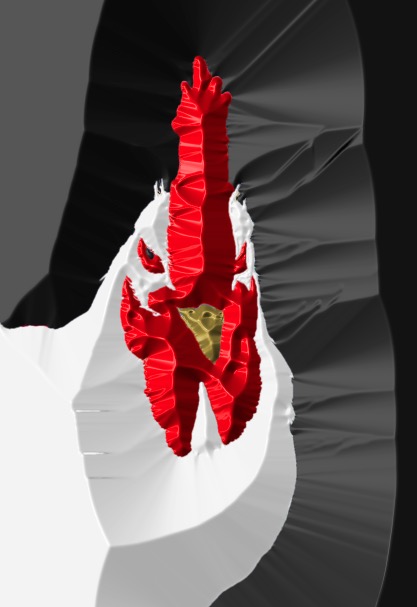
Well, here goes! I used all default settings as I am not really sure what all the sliders do and it takes too long to try out all different ways. I am not really sure what I am doing color-wise. Is there any way to get the colors you want? Mine kept coming out blue and I had to recolor manually. But it's a start!
Image


Top
 Post subject: Re: Christmas Holly
PostPosted: Tue Nov 18, 2014 9:41 pm  (#14) 
Offline
Administrator
User avatar

Joined: Aug 10, 2012
Posts: 14207
Location: Native to NYC living in Arizona, Gimp 2.8 - 3.0, Win 11 PC.
2-ton wrote:
Well, here goes! I used all default settings as I am not really sure what all the sliders do and it takes too long to try out all different ways. I am not really sure what I am doing color-wise. Is there any way to get the colors you want? Mine kept coming out blue and I had to recolor manually. But it's a start!
[ Image ]

What's that supposed to be 2-ton? It looks like some kind of fish to me.

_________________
Image
"A wise man learns more from a foolish question than a fool can learn from a wise answer"
Image


Top
 Post subject: Re: Christmas Holly
PostPosted: Tue Nov 18, 2014 9:44 pm  (#15) 
Offline
GimpChat Member
User avatar

Joined: Apr 08, 2010
Posts: 5420
Location: Northwest Ohio
Image
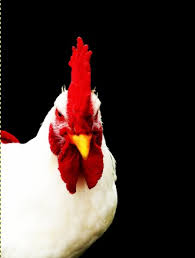
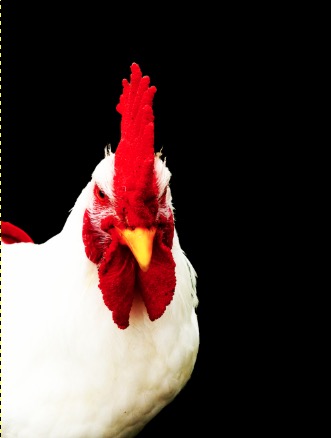
Rooster.


Top
 Post subject: Re: Christmas Holly
PostPosted: Tue Nov 18, 2014 9:47 pm  (#16) 
Offline
Administrator
User avatar

Joined: Aug 10, 2012
Posts: 14207
Location: Native to NYC living in Arizona, Gimp 2.8 - 3.0, Win 11 PC.
2-ton wrote:
[ Image ]Rooster.

Oh my sorry 2-ton, I didn't recognize it as a chicken roster. I was wondering what all the white was in your image.
I do see a chicken roster now when I look at your image. :hehe

_________________
Image
"A wise man learns more from a foolish question than a fool can learn from a wise answer"
Image


Top
 Post subject: Re: Christmas Holly
PostPosted: Tue Nov 18, 2014 9:52 pm  (#17) 
Offline
GimpChat Member
User avatar

Joined: Apr 08, 2010
Posts: 5420
Location: Northwest Ohio
Lol, a head-on view of a chicken looks a bit odd. And it is not the best choice to take a photograph, isolate colors, recolor, and etc. Line art would be much easier, but this was on my desktop, so it's what I used.


Top
 Post subject: Re: Christmas Holly
PostPosted: Tue Nov 18, 2014 11:22 pm  (#18) 
Offline
Administrator
User avatar

Joined: Aug 10, 2012
Posts: 14207
Location: Native to NYC living in Arizona, Gimp 2.8 - 3.0, Win 11 PC.
2-ton wrote:
Lol, a head-on view of a chicken looks a bit odd. And it is not the best choice to take a photograph, isolate colors, recolor, and etc. Line art would be much easier, but this was on my desktop, so it's what I used.

:coolthup

_________________
Image
"A wise man learns more from a foolish question than a fool can learn from a wise answer"
Image


Top
 Post subject: Re: Christmas Holly
PostPosted: Wed Nov 19, 2014 5:19 am  (#19) 
Offline
GimpChat Member

Joined: Feb 28, 2014
Posts: 137
They look beautiful :).

I second the request for a tutorial, especially since I've seen mention of BRL twice today and I still don't know what it is.

_________________
Margaret McGaffey Fisk
steampunk, fantasy, science fiction, and romance author
Tales to Tide You Over


Top
 Post subject: Re: Christmas Holly
PostPosted: Wed Nov 19, 2014 5:26 am  (#20) 
Offline
GimpChat Member
User avatar

Joined: Mar 23, 2012
Posts: 7388
Location: Göteborg at last!
Nice holly Wallace.


Top
Post new topic Reply to topic  [ 30 posts ]  Go to page 1, 2  Next

All times are UTC - 5 hours [ DST ]


* Login  


Powered by phpBB3 © phpBB Group