It is currently Tue Nov 17, 2026 2:36 pm


All times are UTC - 5 hours [ DST ]


Post new topic Reply to topic  [ 17 posts ] 
Author Message
 Post subject: Re: menus and dropdowns too small
PostPosted: Sun Feb 14, 2021 5:51 am  (#11) 
Offline
GimpChat Member
User avatar

Joined: Jan 13, 2011
Posts: 2648
Location: Poland
You don't need to edit a specific theme individually.
The solution was different and it's gtkrc in the home directory.
For your convenience, a simple plugin that will do this and allow you to further edit the size of all other icons.
In menu: Windows/Change menu letters & other icons...
Only tested for Windows and Gimp-2.10.22 (gimp.org and portable Samj).


Attachments:
Change Other Icons.png
Change Other Icons.png [ 53.82 KiB | Viewed 16074 times ]
Reload.png
Reload.png [ 18.6 KiB | Viewed 16074 times ]
Change menu & icons.zip [996 Bytes]
Downloaded 1245 times

_________________
Image
Top
 Post subject: Re: menus and dropdowns too small
PostPosted: Sun Feb 14, 2021 6:03 am  (#12) 
Offline
GimpChat Member
User avatar

Joined: Jan 20, 2013
Posts: 14835
Location: roma, italy
Thanks!

_________________
"Where am I ?"


Top
 Post subject: Re: menus and dropdowns too small
PostPosted: Sun Feb 14, 2021 9:05 am  (#13) 
Offline
GimpChat Member
User avatar

Joined: Jun 02, 2013
Posts: 2090
Awesome MareroQ! Perfect! Works on my GIMP 2.8.10 as well. Thanks! Makes a world of difference for these old eyes.

_________________
Image


Top
 Post subject: Re: menus and dropdowns too small
PostPosted: Sun Feb 14, 2021 9:35 am  (#14) 
Offline
GimpChat Member

Joined: Mar 06, 2015
Posts: 308
Hi Gimp users

I add the "Change menu & icons" plugins to my GIMP AppImage on Linux O.S Inside ChromeBook !!
And it is working very good.

Thanks Thanks Thanks .....

Doron


Top
 Post subject: Re: menus and dropdowns too small
PostPosted: Sun Jan 28, 2024 7:01 am  (#15) 
Offline
GimpChat Member
User avatar

Joined: Jul 06, 2013
Posts: 2667
Location: California
It works with windows 10 64 Bit in Gimp 2.10.36.


Top
 Post subject: Re: menus and dropdowns too small
PostPosted: Tue Apr 02, 2024 3:26 pm  (#16) 
Offline
GimpChat Member
User avatar

Joined: Jul 06, 2013
Posts: 2667
Location: California
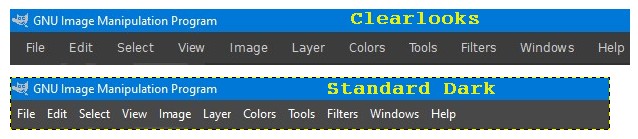
Not all themes work with this plugin. The themes that don't work are the Clearlooks Gimp 2.10 Color Hinted Themes. They throw an error when trying to load them and the font size doesn't fit the navigation bar.


Top
 Post subject: Re: menus and dropdowns too small
PostPosted: Thu Apr 04, 2024 10:06 am  (#17) 
Offline
GimpChat Member
User avatar

Joined: Jan 13, 2011
Posts: 2648
Location: Poland
Unfortunately, Clearlooks themes no longer work well for the latest versions of Gimp 2.10 - you can report this to the author (migf1).
Clearlooks also stretches the menu a lot.

Image

Using the 'Change menu & icons.py' plugin will not change this.

_________________
Image


Top
Post new topic Reply to topic  [ 17 posts ] 

All times are UTC - 5 hours [ DST ]


* Login  


Powered by phpBB3 © phpBB Group