It is currently Thu Nov 12, 2026 5:42 am


All times are UTC - 5 hours [ DST ]


Post new topic Reply to topic  [ 309 posts ]  Go to page Previous  1 ... 3, 4, 5, 6, 7, 8, 9 ... 16  Next
Author Message
 Post subject: Re: Learning MyPaint Projects
PostPosted: Mon May 13, 2013 6:21 pm  (#101) 
Offline
Retired Staff
User avatar

Joined: May 22, 2008
Posts: 6946
Location: Somewhere in GIMP
Molly, her eyes are extraordinary. Love them. Her face is very nice and I do agree with you about her chin. It looks like it is receding a bit. Don't know what you can do about that.

Very pretty mouth.

_________________
Image
World War IV will be fought with sticks and stones. - Albert Einstein


Top
 Post subject: Re: Learning MyPaint Projects
PostPosted: Mon May 13, 2013 6:37 pm  (#102) 
Offline
GimpChat Member
User avatar

Joined: Apr 07, 2010
Posts: 14182
Thank you very much O. Maybe someone can tell me how to fix the chin but as far as the eyes go, they are the most fun part. I am not too keen on doing hair cuz I haven't a clue how to go about it.
Anyway, I am having fun with it.

_________________
Image


Top
 Post subject: Re: Learning MyPaint Projects
PostPosted: Mon May 13, 2013 7:23 pm  (#103) 
Offline
GimpChat Member
User avatar

Joined: Apr 08, 2010
Posts: 5420
Location: Northwest Ohio
It is soooo good! I do think her hair could be less blurry, with fine line hairs, like her eyelashes. Surely there is some kind of hair brush out there to use on top of the base color to give it a more lifelike look. Angelina's face is very realistic looking.


Top
 Post subject: Re: Learning MyPaint Projects
PostPosted: Mon May 13, 2013 7:25 pm  (#104) 
Offline
GimpChat Member
User avatar

Joined: Apr 07, 2010
Posts: 14182
Thank you 2-ton. I feel the same about the hair. If I could just find a tutorial on the steps I would try it. I can't put them in the way I did the eyelashes. I don't have enough control to do that. Griatch is so good at it. I am jealous. I love doing eyes and lips the best. lol

_________________
Image


Top
 Post subject: Re: Learning MyPaint Projects
PostPosted: Mon May 13, 2013 9:29 pm  (#105) 
Offline
GimpChat Member

Joined: Mar 04, 2013
Posts: 105
:jumpclap :clap

That is really good, Molly! I agree with everyone that the eyes are the best feature, but it's all good.

I'm not qualified to give advice on the chin, but maybe if it went lighter at the highest point rather than darker (in other words, make the shadow on her left side of the chin smaller) it might give more depth.

All in all, it is really outstanding.


Top
 Post subject: Re: Learning MyPaint Projects
PostPosted: Mon May 13, 2013 11:14 pm  (#106) 
Offline
GimpChat Member
User avatar

Joined: Aug 16, 2012
Posts: 4271
Location: Göteborg, Sweden
molly: i'm getting tired of repeating it over and over: you're an excellent painter! this looks great, you must be happy with the blending and shading now, right? the eyes are fantastic, beautifully made and they catch you at once. i didn't see anything wrong with her chin, but that's because i just looked at the contour, which wasw right. jas45 has a point about the shadow, though, (well spotted of him!), if you make sure to highlight her chin a bit even on her darker side the chin will look better. i also think the contour of her nose tip should be outlined more, on the right side it sort of blends into her cheek too much. about the hair - i'm certainly no expert, but how about painting in some "clumps" of hair here and there?
i'm a big fan of jewellery in general and this jewellery is lovely. if it was my picture i'd definitely keep it. but you should be aware that it gives a sort of collage feel to your painting since the jewellery is in an entirely different style than the rest of the painting. that was the first thing i noticed after the eyes. since i'm a fan of collage style and i don't mind much if bling steals attention from angelina jolie i think that makes the picture better and more interesting as a whole, but maybe you don't want it like that?

_________________


Top
 Post subject: Re: Learning MyPaint Projects
PostPosted: Tue May 14, 2013 3:19 am  (#107) 
Offline
GimpChat Member
User avatar

Joined: Apr 07, 2010
Posts: 14182
Thank you AnMal. Every little bit helps, I will see if I can do some work around the nose and chin. I still have my XCF. As far as the hair goes, I haven't a clue as to the best way to conquor that.
Keep critiquing and maybe I will get better as I go.
Thank you Jas and Gram, I missed the two posts above AnMals, I appreciate the feedback a lot.

_________________
Image


Top
 Post subject: Re: Learning MyPaint Projects
PostPosted: Tue May 14, 2013 3:28 am  (#108) 
Offline
GimpChat Member
User avatar

Joined: Apr 27, 2010
Posts: 1510
Location: Sweden
This is, as others already mentioned, a very good Angelina study - there is no problem with the likeness and even a touch of her personality comes through here, which is not easy to achieve. Good work on that! Onto some feedback:

The chin does indeed require a slightly brighter shading to avoid looking sunken in - this only a matter of lighting, not shape and should be a simple fix.

The jewelry looks good on their own, but as AnMal points out they look a bit pasted in at the moment. The reason for this is that the pearls show having a different light source than her skin. I think her skin could do with a bit more highlights and contrast to bring forth the face more and avoid a powedered look (I don't know how the original image looks though, maybe that's the lighting in the original?).

As for hair, this has a good base, all you need now is to refine it further, add hard-edged strands. I would not use a "hair brush" for this since that would produce much higher detail than you would see at this distance from her. Most of her hairs SHOULD merge into large single masses just as you have depicted here, it's just that the edges between those masses are a bit too blurry at the moment.
When working on hair I usually first apply the large blocks of shade to outline the haircut, ten pull long, wide "strands" (much thicker than actual hairs) along the direction of the hair's fall. Next I make a few singular strands in slightly off-shades to up the resolution, and finally I add highlights (which often actually move perpendicular to the direction of the hairs). If there is interest I might venture to put together a tutorial on this at some point, but you are really well underway already as it is here.
.
Griatch

_________________


Top
 Post subject: Re: Learning MyPaint Projects
PostPosted: Tue May 14, 2013 3:37 am  (#109) 
Offline
GimpChat Member
User avatar

Joined: Apr 07, 2010
Posts: 14182
O wow, thank you Griatch. The hair is a big problem. When you say drag the pieces, do you mean with the smudge tool?
On the small strands, I don't have too many problems with eyelashes but to do long hi-lited strands, I don't have the control to get the long ones without getting them crooked. A small basic tutorial on hair would be greatly appreciated.
Keep feeding me the critiques, they are of great value to me. :oops:
Edit: I am going to remove the jewellery and try to fix the hair.

_________________
Image


Top
 Post subject: Re: Learning MyPaint Projects
PostPosted: Tue May 14, 2013 5:58 am  (#110) 
Offline
GimpChat Member
User avatar

Joined: Mar 23, 2012
Posts: 7388
Location: Göteborg at last!
WOW Molly - You've impressed me yet again. That is definitely Angelina. I have never been able to get a likeness of a real person, that's a heck of a talent.


Top
 Post subject: Re: Learning MyPaint Projects
PostPosted: Tue May 14, 2013 6:41 am  (#111) 
Offline
GimpChat Member
User avatar

Joined: Apr 07, 2010
Posts: 14182
Thank you Eris. I am still working on the cheek and chin and nose. I think noses are the hardest to do after the hair.

_________________
Image


Top
 Post subject: Re: Learning MyPaint Projects
PostPosted: Tue May 14, 2013 9:49 am  (#112) 
Offline
GimpChat Member
User avatar

Joined: Apr 07, 2010
Posts: 14182
I removed the jewellery and just used a cabbage brush made by gram to go with her hair coloring and eyes.
I messed around with the nose and chin and added more blush. I then played more with the hair and the more I do the messier it gets so I will go on to another project for now and try the hair again very soon.

Image

_________________
Image


Top
 Post subject: Re: Learning MyPaint Projects
PostPosted: Tue May 14, 2013 1:28 pm  (#113) 
Offline
GimpChat Member
User avatar

Joined: Aug 16, 2012
Posts: 4271
Location: Göteborg, Sweden
molly: probably a good thing to let her rest for a while. but the hair is definitely looking better! i think you could make each strand of hair sharper, though. maybe paint in the strands with a harder brush and then if it got too jagged just smudge them a tiny bit?
the chin looks great now and you can see the nose better. you're doing such an impressive job here, molly!

_________________


Top
 Post subject: Re: Learning MyPaint Projects
PostPosted: Tue May 14, 2013 1:45 pm  (#114) 
Offline
GimpChat Member
User avatar

Joined: Apr 07, 2010
Posts: 14182
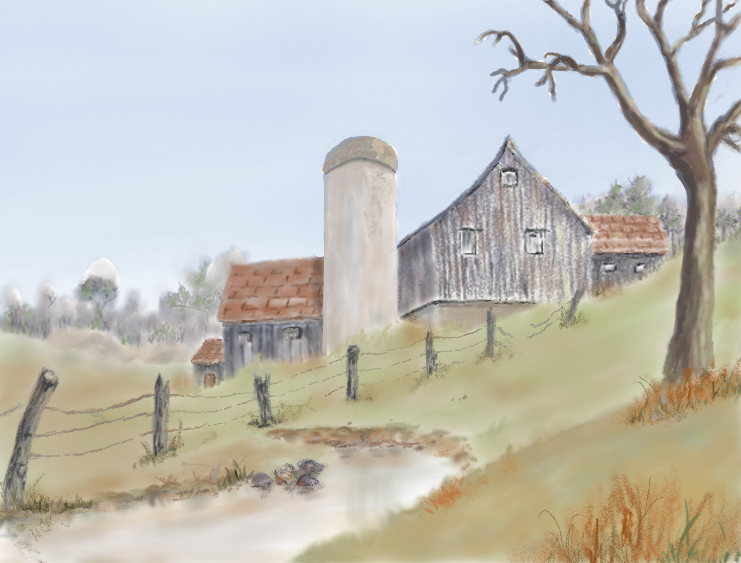
Thank you so much AnMal. Maybe there is a magic brush I could use, just haven't run into it yet. I am working on another barn right now. This is a barn where we used to start out cross country skiing and then on into the Blue Mountain area. Those days are long past.
I am using a water color I painted over 20 yrs ago as the model, except I am trying to make it into a summer scene and it is harder to paint than snow. lol

_________________
Image


Top
 Post subject: Re: Learning MyPaint Projects
PostPosted: Tue May 21, 2013 6:16 pm  (#115) 
Offline
GimpChat Member
User avatar

Joined: Apr 07, 2010
Posts: 14182
Well, I finally got as far as I can go with this barn. I would appreciate some feedback, good or bad. Grass is going to big a problem for me unless there is something that can hit me on the head to get me in the right direction. I still have the watercolor I did of this barn on my wall but it was a snow scene, so no grass. :teeth

Image

_________________
Image


Top
 Post subject: Re: Learning MyPaint Projects
PostPosted: Tue May 21, 2013 6:26 pm  (#116) 
Offline
GimpChat Member
User avatar

Joined: Apr 08, 2010
Posts: 5420
Location: Northwest Ohio
grass is like hair...just need some hard lines painted over the already colored areas to give the illusion of detail....say I who cannot draw anything recognizable.


Top
 Post subject: Re: Learning MyPaint Projects
PostPosted: Wed May 22, 2013 6:41 am  (#117) 
Offline
GimpChat Member
User avatar

Joined: Apr 07, 2010
Posts: 14182
gramg wrote:
You really got fed up to put a cabbage on her ear...lol
Put that other pretty jewlery back on her!

I guess she was a bit over dressed gram. That jewellery might look better with some clothes on... :lol

_________________
Image


Top
 Post subject: Re: Learning MyPaint Projects
PostPosted: Wed May 22, 2013 8:44 am  (#118) 
Offline
Retired Staff
User avatar

Joined: May 22, 2008
Posts: 6946
Location: Somewhere in GIMP
molly wrote:
Well, I finally got as far as I can go with this barn. I would appreciate some feedback, good or bad. Grass is going to big a problem for me unless there is something that can hit me on the head to get me in the right direction. I still have the watercolor I did of this barn on my wall but it was a snow scene, so no grass. :teeth
Molly, your barn is looking really good. Nice job! I love that barn. It is enchanting.

_________________
Image
World War IV will be fought with sticks and stones. - Albert Einstein


Top
 Post subject: Re: Learning MyPaint Projects
PostPosted: Wed May 22, 2013 8:55 am  (#119) 
Offline
GimpChat Member
User avatar

Joined: Apr 07, 2010
Posts: 14182
Thank you very much for the feedback O. Do you see anything I can change to make the grass or water better?

_________________
Image


Top
 Post subject: Re: Learning MyPaint Projects
PostPosted: Wed May 22, 2013 9:05 am  (#120) 
Offline
GimpChat Member
User avatar

Joined: Nov 16, 2011
Posts: 5127
Location: Metro Vancouver, BC
I love the farm scene, Molly :bigthup
It reminds me of my childhood.

_________________
Image
Gimp 2.8.18, Linux, median user
Gimp Chat Tutorials Index
Spirit Bear (Kermode)


Top
Post new topic Reply to topic  [ 309 posts ]  Go to page Previous  1 ... 3, 4, 5, 6, 7, 8, 9 ... 16  Next

All times are UTC - 5 hours [ DST ]


* Login  


Powered by phpBB3 © phpBB Group