It is currently Thu Nov 12, 2026 10:29 pm


All times are UTC - 5 hours [ DST ]


Post new topic Reply to topic  [ 309 posts ]  Go to page Previous  1 ... 5, 6, 7, 8, 9, 10, 11 ... 16  Next
Author Message
 Post subject: Re: Learning MyPaint Projects
PostPosted: Mon Jul 22, 2013 1:27 pm  (#141) 
Offline
GimpChat Member
User avatar

Joined: Apr 07, 2010
Posts: 14182
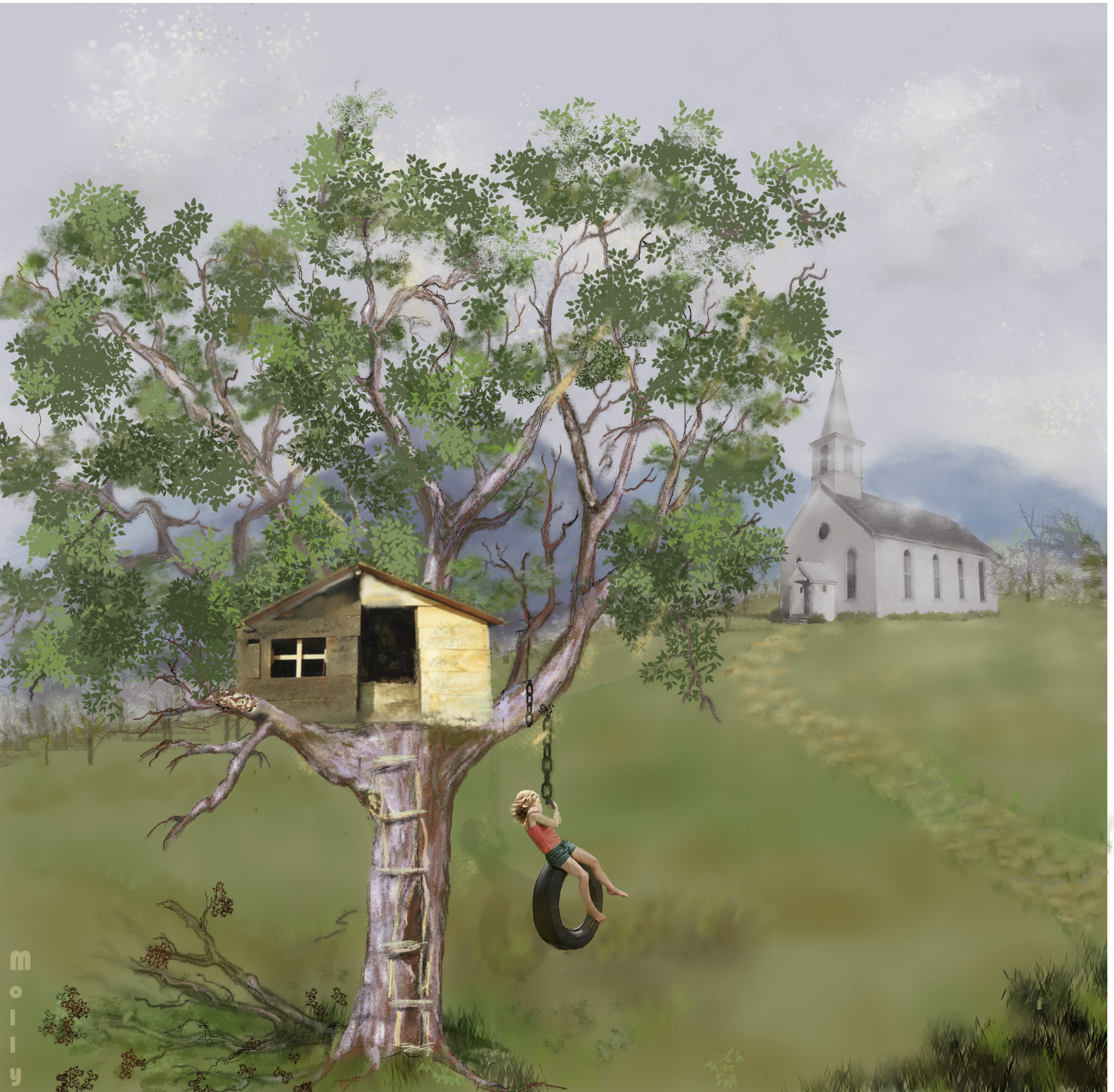
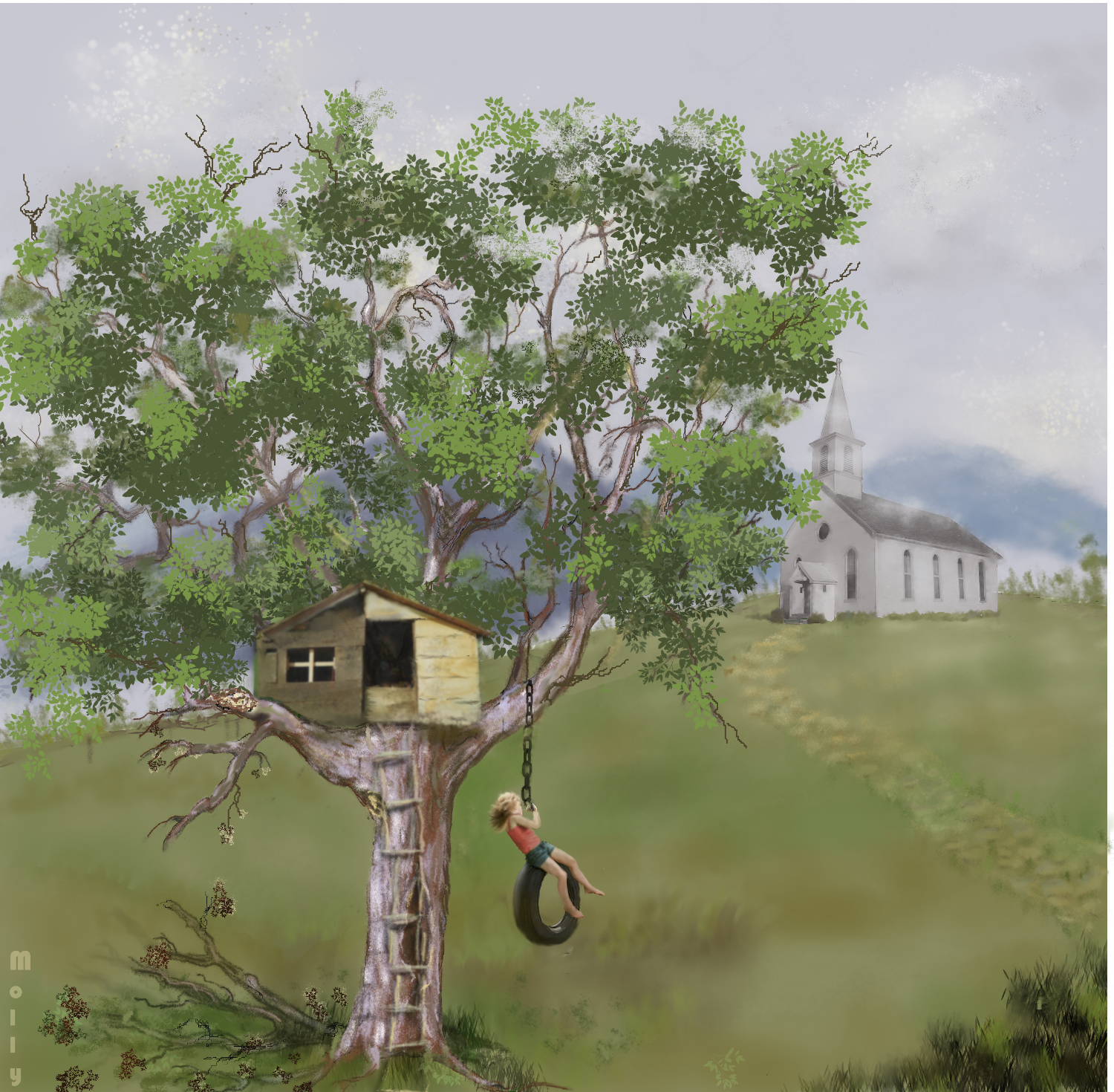
I have been working on this picture for weeks now and I have taken the leaves out, put them back in, changed the brushes, made the house larger and messed on and off with it for weeks so now I think I need some construvtive criticism.
I don't think I am very happy with the leaves but maybe some of you could point me in the right direction as whether they are too thick, not enough, whatever. I would appreciate it.
OR, anything else you think I could improve on.

Image

_________________
Image


Top
 Post subject: Re: Learning MyPaint Projects
PostPosted: Mon Jul 22, 2013 2:37 pm  (#142) 
Offline
GimpChat Member
User avatar

Joined: Jun 25, 2011
Posts: 914
Location: Mount Olive, North Carolina
Looks great to me! The texture of the wood is really good. I like the leaves, but they seem a bit too flat - maybe adding some shadows would puff them up a bit.

I like the church, and the whole background looks good.

There seems to be some sort of layer offset problem. It's most visible on the tire swing. Should be easy enough to fix.

Awesome work all around, though!


Top
 Post subject: Re: Learning MyPaint Projects
PostPosted: Mon Jul 22, 2013 2:42 pm  (#143) 
Offline
GimpChat Member
User avatar

Joined: Apr 07, 2010
Posts: 14182
Thank you a lot Merrak. I will see if I can add something to puff up the leaves. I don't know what you mean about the offset problem. I will try to fix that if you point out exactly.

_________________
Image


Top
 Post subject: Re: Learning MyPaint Projects
PostPosted: Mon Jul 22, 2013 3:08 pm  (#144) 
Offline
GimpChat Member
User avatar

Joined: Jun 25, 2011
Posts: 914
Location: Mount Olive, North Carolina
I realized it may be a shadow. There's a darker version of the girl and swing shifted a bit. At first I thought it was a burn or multiply layer that got shifted down and left. If it is a shadow, I don't think it is in perspective.


Top
 Post subject: Re: Learning MyPaint Projects
PostPosted: Mon Jul 22, 2013 4:05 pm  (#145) 
Offline
GimpChat Member
User avatar

Joined: Mar 23, 2012
Posts: 7388
Location: Göteborg at last!
That's amazing Molly. I like everything about it and wouldn't correct a thing.


Top
 Post subject: Re: Learning MyPaint Projects
PostPosted: Mon Jul 22, 2013 4:17 pm  (#146) 
Offline
GimpChat Member

Joined: Apr 12, 2010
Posts: 5870
Molly , what a lovely idea

Quote:
so now I think I need some construvtive criticism.
I don't think I am very happy with the leaves but maybe some of you could point me in the right direction as whether they are too thick, not enough, whatever.


As i just say i love the composition, and i can't see nothing wrong with the leaves

instead the girl , chain and tire are much oversized, OR the house on the tree much too little

Well is not little for a tree house but a fantasy tree house may be big as you may dream of, ...or the girl should be scaled down if not seems something wrong with proportion .

Last for a final touch i would now left the brush aside and use a filter , maybe Gmic photoillustration or even Anisotropic Smoothing or one of mine :

the remaining problem is the style of the brush work and of the photo, they are too different styles so the photo looks paste
A passage with a artistic filter with soft setting should assure a softer merging

Differences will remain BUT if more softly merged the effect of the differences should become positive,
to make her pop out but more naturally

_________________
My 3D Gallery on Deviantart http://photocomix2.deviantart.com/
Main gallery http://www.flickriver.com/photos/photocomix-mandala/
Mandala and simmetry http://www.flickriver.com/photos/photocomix_mandala/

Image

Mrs Wilbress


Last edited by PhotoComix on Mon Jul 22, 2013 4:18 pm, edited 1 time in total.

Top
 Post subject: Re: Learning MyPaint Projects
PostPosted: Mon Jul 22, 2013 4:18 pm  (#147) 
Offline
GimpChat Member
User avatar

Joined: Aug 16, 2012
Posts: 4271
Location: Göteborg, Sweden
molly: :jumpclap :clap :jumpclap :clap :jumpclap :clap :jumpclap :clap :jumpclap :clap :jumpclap :clap :jumpclap :clap
- i think you deserved the full fourteen smilies for that one, really. it's so impressive, i've just sat looking at it for a long time. i think the texture of the wood is really great, the girl and the swing are excellently painted and it's a well composed picture too - i like the way you weighted the information.
i thought of the shadow too, just like merrak. then i think the chain looks a bit weird, both where it's wrapped around the tree and where the girl is holding it.
you've made a really fantastic progress since you first started posting your mypaint projects!

_________________


Top
 Post subject: Re: Learning MyPaint Projects
PostPosted: Mon Jul 22, 2013 4:53 pm  (#148) 
Offline
GimpChat Member
User avatar

Joined: Apr 07, 2010
Posts: 14182
Wow, thankt you so much AnMal.
That kind of fanfare makes me want to go right out and find another notion in my head. I was going to put a barn up on the hill but I thought a church might suit this pic. I will work on the chain and the leaves.

_________________
Image


Top
 Post subject: Re: Learning MyPaint Projects
PostPosted: Mon Jul 22, 2013 6:24 pm  (#149) 
Great work Molly you truly have talent. Love the details and use of colour. Like the drying leaves on the fallen branches and missing ladder steps :) :bigthup
The tree house looks a little flat (2D) to me. Maybe some more shadow underneath or perhaps rotated slightly from dead center showing one side ever so slightly to give it some more depth?
The girl is very pretty and she looks as though she loves her tree house! :)


Top
 Post subject: Re: Learning MyPaint Projects
PostPosted: Mon Jul 22, 2013 8:02 pm  (#150) 
Offline
GimpChat Member
User avatar

Joined: Aug 28, 2012
Posts: 3060
Location: Idk where I am.
I think I see where your eye gets confused, Molly.
The Tree-house looks much harder than the rest of the soft items in the picture (tree, church etc..), also did you draw the little girl and swing or is that a stock? O.O...If that's drawn that's very impressive! But she looks too real for the soft style you have going in this. - Also the tree, it looks very good, but it has another style, it looks real but yet a bit like an 8-bit video game.
Everything looks real, but you know, there are different styles to go about that effect, I think there is a mix that can be confusing.

That could be a style signature so I won't call any of it wrong, just maybe and explanation to what you are trying to figure out why you haven't felt like you're getting it right. :>

Very nice work! Keep it up! :D

_________________
Image
Reality is a lovely place...But I wouldn't wanna live there.


Top
 Post subject: Re: Learning MyPaint Projects
PostPosted: Mon Jul 22, 2013 9:02 pm  (#151) 
Offline
GimpChat Member
User avatar

Joined: Apr 07, 2010
Posts: 14182
Yes I agree Moko, I am what you call a realist painter. I want everything to look real, too real and then it doesn't work out. I end up with a mixture. I do love your feedback though and it is a learning experience for me to have those things pointed out.

thank you so much.

_________________
Image


Top
 Post subject: Re: Learning MyPaint Projects
PostPosted: Mon Jul 22, 2013 9:10 pm  (#152) 
Offline
GimpChat Member
User avatar

Joined: Apr 07, 2010
Posts: 14182
PhotoComix wrote:
Molly , what a lovely idea

Quote:
so now I think I need some construvtive criticism.
I don't think I am very happy with the leaves but maybe some of you could point me in the right direction as whether they are too thick, not enough, whatever.


As i just say i love the composition, and i can't see nothing wrong with the leaves

instead the girl , chain and tire are much oversized, OR the house on the tree much too little

Well is not little for a tree house but a fantasy tree house may be big as you may dream of, ...or the girl should be scaled down if not seems something wrong with proportion .

Last for a final touch i would now left the brush aside and use a filter , maybe Gmic photoillustration or even Anisotropic Smoothing or one of mine :

the remaining problem is the style of the brush work and of the photo, they are too different styles so the photo looks paste
A passage with a artistic filter with soft setting should assure a softer merging

Differences will remain BUT if more softly merged the effect of the differences should become positive,
to make her pop out but more naturally


I wlill take all that into consideration PC, I did scale the girl down a lot and made the house larger but I guess not large enough. By the time I made all these alterations, I was ruining the pic so thought I better get it posted so I can get some feedback as to wat I am doing wrong so I can fix it. I really appreciate this PC, thank you

_________________
Image


Top
 Post subject: Re: Learning MyPaint Projects
PostPosted: Tue Jul 23, 2013 10:50 am  (#153) 
Offline
GimpChat Member

Joined: Apr 12, 2010
Posts: 5870
Hy Molly
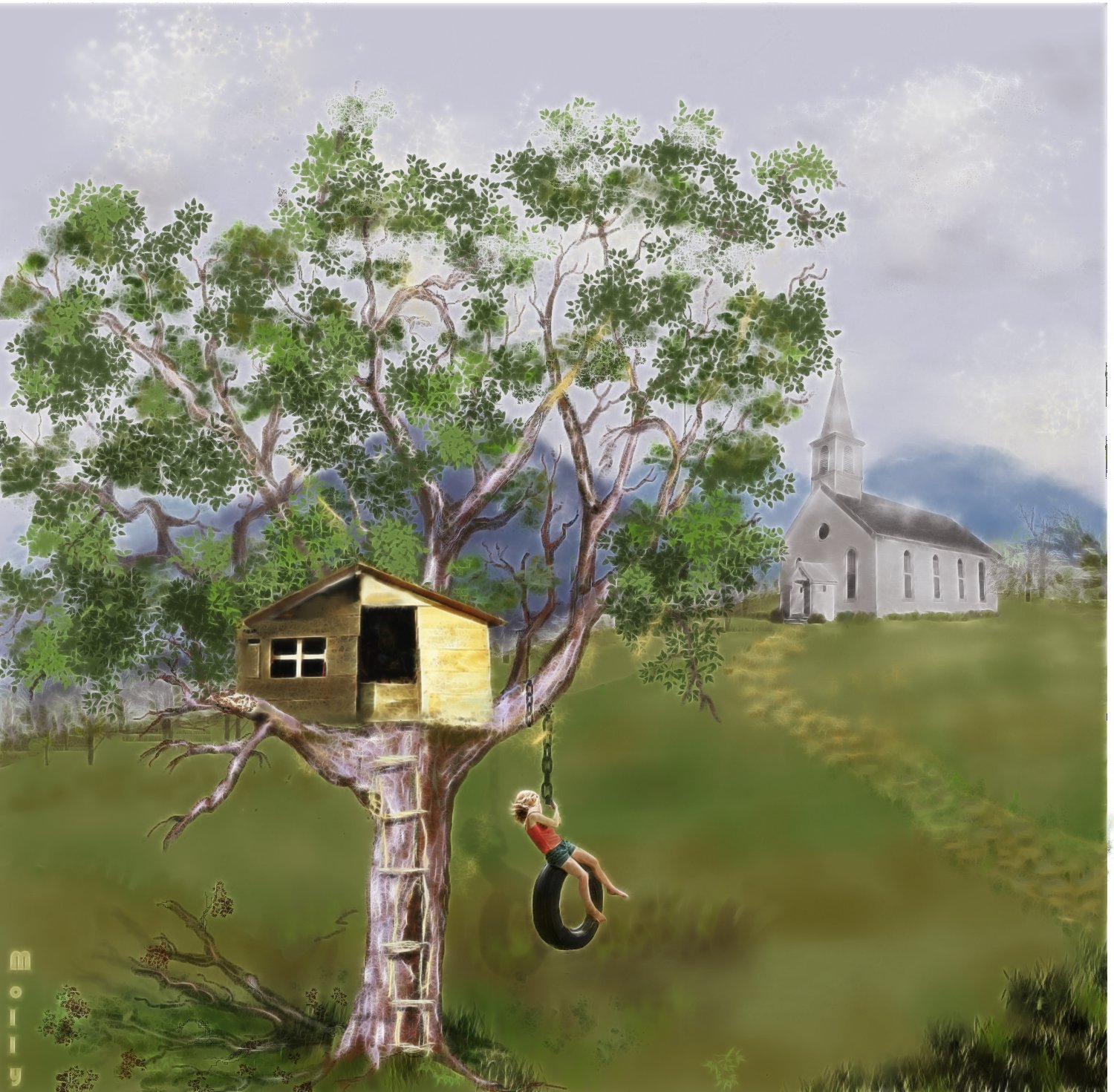
i still had the idea that a quick little gimp editing to merge the different styles (even if you did everything there are different styles ).
So testing gimp (finally work on 7 ! was 8 the problem..) i could not resit to try ... not a refined work i didn't used selection or mask, i just applied gmic on duplicated layers changing layer mode

Image

i include also the xcf

OOPSS the xcf is too big for attachment , i should find some other place to upload

_________________
My 3D Gallery on Deviantart http://photocomix2.deviantart.com/
Main gallery http://www.flickriver.com/photos/photocomix-mandala/
Mandala and simmetry http://www.flickriver.com/photos/photocomix_mandala/

Image

Mrs Wilbress


Top
 Post subject: Re: Learning MyPaint Projects
PostPosted: Tue Jul 23, 2013 11:07 am  (#154) 
Offline
GimpChat Member
User avatar

Joined: Apr 07, 2010
Posts: 14182
That is really cool PC, I really like what you did. I have been working on it too, I made the girl smaller and the house larger. I blurred the house by 5 and added a shadow. I now want to work on the tree leaves but can't until I get my brush manager working again.
I will download you attachment if you send it to my email
email in pm

_________________
Image


Top
 Post subject: Re: Learning MyPaint Projects
PostPosted: Tue Jul 23, 2013 11:20 am  (#155) 
Offline
GimpChat Member
User avatar

Joined: Apr 07, 2010
Posts: 14182
fluffybunny wrote:
Great work Molly you truly have talent. Love the details and use of colour. Like the drying leaves on the fallen branches and missing ladder steps :) :bigthup
The tree house looks a little flat (2D) to me. Maybe some more shadow underneath or perhaps rotated slightly from dead center showing one side ever so slightly to give it some more depth?
The girl is very pretty and she looks as though she loves her tree house! :)


Sorry, fluffy, I missed your post. Thanks very much for a positive feedback. I am working now on some of the things that were pointed out to me.

_________________
Image


Top
 Post subject: Re: Learning MyPaint Projects
PostPosted: Tue Jul 23, 2013 12:38 pm  (#156) 
Offline
GimpChat Member

Joined: Apr 12, 2010
Posts: 5870
molly wrote:
That is really cool PC, I really like what you did. I have been working on it too, I made the girl smaller and the house larger. I blurred the house by 5 and added a shadow. I now want to work on the tree leaves but can't until I get my brush manager working again.


If you have as separate layer the girl shadow i would suggest to try switch off layer visibility:
that shadow look unnatural , but i believe not to correct but remove :
a diffuse light doesn't create much shadows on a greenery so would be not the feeling of a missed shadow , a correct shadow would be much more vague and soft, but i believe in case the best shadows is none ... since not needed it automatically become a distracting element , in any case distracting and if not perfectly done even disturbing

Hey Molly i comment only because i like, don't take me wrong

I will download you attachment if you send it to my email
email in pm[/quote]

uploaded on my google drive, i may delete at soon you dl
https://docs.google.com/file/d/0B3PfZ2rTmImEZk1WMUZROGR5Q3c/edit?usp=sharing

about the xcf from top

1)Top layer = Original Normal mode , about 40% opacity
FUNCTION : soften the effect

2)Middle Layer = Clone of Original +GMIC_ Rodilus , SOFT LIGHT (Dose down opacity at taste)
FUNCTION add Rodilus highlight, increase contrast , boost colours intensity

3) BackGround Layer = Clone of Original +Gmic Anisotropic Smoothing (setting in XCF as layer name ) Normal Mode 100%

_________________
My 3D Gallery on Deviantart http://photocomix2.deviantart.com/
Main gallery http://www.flickriver.com/photos/photocomix-mandala/
Mandala and simmetry http://www.flickriver.com/photos/photocomix_mandala/

Image

Mrs Wilbress


Top
 Post subject: Re: Learning MyPaint Projects
PostPosted: Tue Jul 23, 2013 12:43 pm  (#157) 
Offline
GimpChat Member
User avatar

Joined: Apr 07, 2010
Posts: 14182
Thank you PC. As I have stated many times, I appreciate feedback. To me it is like going back to art school, there is always some one around to point things out you could improve on.
I got your XCF so I will take a look at your layers.

_________________
Image


Top
 Post subject: Re: Learning MyPaint Projects
PostPosted: Tue Jul 23, 2013 1:49 pm  (#158) 
Offline
GimpChat Member

Joined: Apr 12, 2010
Posts: 5870
ok i removed the file now
Google drive is really handy

_________________
My 3D Gallery on Deviantart http://photocomix2.deviantart.com/
Main gallery http://www.flickriver.com/photos/photocomix-mandala/
Mandala and simmetry http://www.flickriver.com/photos/photocomix_mandala/

Image

Mrs Wilbress


Top
 Post subject: Re: Learning MyPaint Projects
PostPosted: Tue Jul 23, 2013 2:23 pm  (#159) 
Offline
GimpChat Member
User avatar

Joined: Apr 07, 2010
Posts: 14182
I did some modifications on my painting. I made the house larger, blurred it a bit, added some shadow.made the girls hair blow a bit more. took out the shadow of the swing, added more leaves and tried to add more shadow, I don't know it that looks any better though. I added a few hilights to the dead leaves and darkened the other limb at bit.
Sorry, I didn't add any scripts to this cuz I was trying not to rely on them.

Image

_________________
Image


Top
 Post subject: Re: Learning MyPaint Projects
PostPosted: Tue Jul 23, 2013 3:06 pm  (#160) 
Offline
GimpChat Member
User avatar

Joined: Jun 25, 2011
Posts: 914
Location: Mount Olive, North Carolina
I think the house looks just fine. In fact, I thought the original did, too - but both are good. I wouldn't expect a child to build a full-size house in a tree. They could be happy enough with a roof, even if they had to crawl inside.


Top
Post new topic Reply to topic  [ 309 posts ]  Go to page Previous  1 ... 5, 6, 7, 8, 9, 10, 11 ... 16  Next

All times are UTC - 5 hours [ DST ]


* Login  


Powered by phpBB3 © phpBB Group