It is currently Wed Nov 25, 2026 12:05 pm


All times are UTC - 5 hours [ DST ]


Post new topic Reply to topic  [ 142 posts ]  Go to page Previous  1, 2, 3, 4, 5 ... 8  Next
Author Message
 Post subject: Re: Another try at Circlism.
PostPosted: Wed Mar 23, 2011 10:40 pm  (#35) 
Offline
GimpChat Member
User avatar

Joined: Sep 24, 2010
Posts: 12870
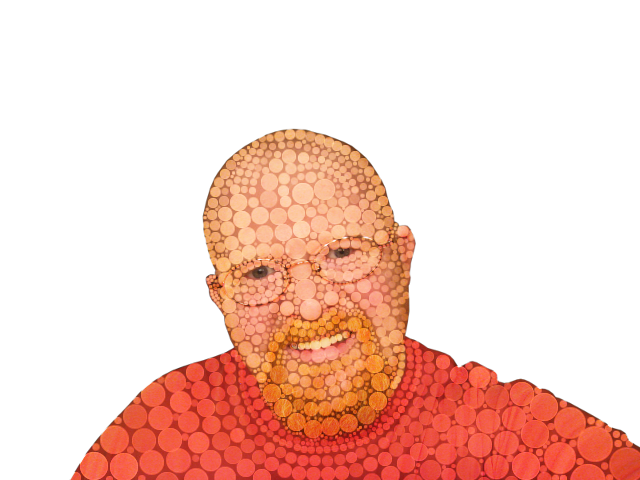
Just taking my favorite Doll model for another spin as I continue to inch closer to the look I'm trying to achieve. Used a reverse aniso (dup, run G'MIC Bilateral filter on Top layer set to Grain Extract) technique with result autoleveled for the target for the Voronoi stipple program with 500 dots then I open the result invert and make the white dots bigger (on black background of course) and rerun the Voronoi Stipple program with 1500 dots, then use Inkskape to individually size the dots in such a way and to try to eliminate overlap, then use the result as a mask for Sauls Mean Fill Script-fu. :)

ref: http://www.fontplay.com/freephotos/seve ... 107-03.jpg


Attachments:
fp021107-03.png
fp021107-03.png [ 665.66 KiB | Viewed 4206 times ]

_________________
Lyle

Psalm 109:8

Image
Top
 Post subject: Re: Another try at Circlism.
PostPosted: Wed Mar 23, 2011 11:56 pm  (#36) 
Offline
GimpChat Member

Joined: Apr 12, 2010
Posts: 5870
I like it !!

_________________
My 3D Gallery on Deviantart http://photocomix2.deviantart.com/
Main gallery http://www.flickriver.com/photos/photocomix-mandala/
Mandala and simmetry http://www.flickriver.com/photos/photocomix_mandala/

Image

Mrs Wilbress


Top
 Post subject: Re: Another try at Circlism.
PostPosted: Thu Mar 24, 2011 12:04 am  (#37) 
Offline
GimpChat Member
User avatar

Joined: Sep 24, 2010
Posts: 12870
Thanks PC; I think you might even like this one better. I got another brain phart to use G'MIC's Stencil (lyle's preset; thanks David) to guide the dots better. Two passes per my previous outline otherwise. :)


Attachments:
Anotherinch.png
Anotherinch.png [ 666.73 KiB | Viewed 4199 times ]

_________________
Lyle

Psalm 109:8

Image
Top
 Post subject: Re: Another try at Circlism.
PostPosted: Thu Mar 24, 2011 12:14 am  (#38) 
Offline
GimpChat Member
User avatar

Joined: Oct 06, 2010
Posts: 4050
Much better result!

_________________
"In order to attain the impossible, one must attempt the absurd."
~ Miguel de Cervantes


Top
 Post subject: Re: Another try at Circlism.
PostPosted: Thu Mar 24, 2011 12:21 am  (#39) 
Offline
GimpChat Member
User avatar

Joined: Sep 24, 2010
Posts: 12870
Thanks Mahvin. Still not anywhere near Ben's quality, but I never give up, even if it takes years. This whole process took 2 (or is it 3) years of my fiddling (on and off of course) already. Getting happier now. The biggest help is the Voronoi Stippling program. Just with someone would look at the ImagemagicK script and update it using current commands (since it's much faster then this plugin as I recall; can't get the gpu to work unfortunately with this program). Still, faster then me trying to place the dots by hand. lol

:)

_________________
Lyle

Psalm 109:8

Image


Top
 Post subject: Re: Another try at Circlism.
PostPosted: Thu Mar 24, 2011 1:53 am  (#40) 
Offline
GimpChat Member
User avatar

Joined: Oct 06, 2010
Posts: 4050
Faked it with a Bokeh brush.
Image

_________________
"In order to attain the impossible, one must attempt the absurd."
~ Miguel de Cervantes


Top
 Post subject: Re: Another try at Circlism.
PostPosted: Thu Mar 24, 2011 2:17 am  (#41) 
Offline
GimpChat Member
User avatar

Joined: Sep 24, 2010
Posts: 12870
What's a bokeh brush? Looks like too much work for a filter guy like me. Like what you did though Mahvin. :)

_________________
Lyle

Psalm 109:8

Image


Top
 Post subject: Re: Another try at Circlism.
PostPosted: Thu Mar 24, 2011 8:49 am  (#42) 
Offline
Global Moderator
User avatar

Joined: May 16, 2010
Posts: 16309
I'm afraid its probably going to come down to having a few circle brushes dif sizes and going at it by hand Lyle.
I assumed you were after the random look, i posted the MagicMesh images to show you the color effects from the Value setting in it. :)
Then you can just select the circles and move them around where you want them.making them random sizes i believe is also possible with MagicMesh.never really played with it that much though.

But it does grab the colors into the individual dots quite nicely.

It doesn't seem like it would be too hard to create a script that would go by selection and lay individual colored (value) dots in another layer over that selection.Or for that matter just lay in individual dots without color at dif sizes for each of your selections.
I bet David could add something to the dot filter in GMIC for this effect.


PM - that is an awesome looking image! Even in black and white his work is great.

_________________
Image


Top
 Post subject: Re: Another try at Circlism.
PostPosted: Thu Mar 24, 2011 9:51 am  (#43) 
Offline
GimpChat Member
User avatar

Joined: Jul 04, 2010
Posts: 2253
Location: Retired Moderator Slowly Returning to the Living.
mahvin wrote:
Faked it with a Bokeh brush.
Image


I would love more information on how you did this! This is awesome!

_________________
Artists aren't crazy! We're eccentric! ~G.M. Ross

Image

My Sigs = My Photos
Check out my work at http://www.flickr.com/photos/photomastergreg.


Top
 Post subject: Re: Another try at Circlism.
PostPosted: Thu Mar 24, 2011 1:58 pm  (#44) 
Offline
GimpChat Member
User avatar

Joined: Oct 06, 2010
Posts: 4050
@PM - Why do people mistake me for you? You ever wonder that? Anyway, I'll post again later on how I did that, but first... for Lyle:

http://en.wikipedia.org/wiki/Bokeh

I made my own bokeh brushes using varying degrees of transparency. Use varying degrees of grays (dark to light) and add a solid black border that's about 1/10th the thickness. I have 25% transparent, 50% transparent, and 75% transparent brushes. You make them just like any other grayscale brush, white background, flattened, saved as greyscale - brushes. You can even find bokeh brushes on DeviantArt.

The reason I made 3 different brushes is to mimic shades within the image, to differentiate between them. If you make your own brushes, create them as big as possible, and then rescale the image size smaller. I started out with 800 x 800 and scaled the finished result to 200 x 200.

Also, in regards to Rod's suggestion on Magicmesh, those can be saved to SVG files and used in Inkscape.

_________________
"In order to attain the impossible, one must attempt the absurd."
~ Miguel de Cervantes


Top
 Post subject: Re: Another try at Circlism.
PostPosted: Thu Mar 24, 2011 4:35 pm  (#45) 
Offline
GimpChat Member
User avatar

Joined: Jul 04, 2010
Posts: 2253
Location: Retired Moderator Slowly Returning to the Living.
mahvin wrote:
@PM - Why do people mistake me for you? You ever wonder that?

I don't know, but I take it as a compliment!

Also, I think Rod was commenting on the image of Freddie Mercury that I posted.

I need to play with the bokeh brushes! (hint, hint)

_________________
Artists aren't crazy! We're eccentric! ~G.M. Ross

Image

My Sigs = My Photos
Check out my work at http://www.flickr.com/photos/photomastergreg.


Top
 Post subject: Re: Another try at Circlism.
PostPosted: Thu Mar 24, 2011 5:31 pm  (#46) 
Offline
Script Coder
User avatar

Joined: Jul 14, 2010
Posts: 697
mahvin wrote:
Rob's example does look rather random. It would be interesting to see an outline he used, I agree.


I used the default inkscape tiled clones with a 140% translation and also added a random of 20% to the translation, then ran declump a few times to spead them away from each other.

-Rob A>

_________________
Image
Fantasy Cartography and Mapping by RobA


Top
 Post subject: Re: Another try at Circlism.
PostPosted: Thu Mar 24, 2011 5:36 pm  (#47) 
Offline
GimpChat Member
User avatar

Joined: Oct 06, 2010
Posts: 4050
PM: Did you make some bokeh brushes or download a pack?

Here's a tutorial I used to make mine. Just using GIMP instead of PS.

http://free-web-design.co.cc/light-bubb ... orial.html

_________________
"In order to attain the impossible, one must attempt the absurd."
~ Miguel de Cervantes


Top
 Post subject: Re: Another try at Circlism.
PostPosted: Thu Mar 24, 2011 7:53 pm  (#48) 
Offline
GimpChat Member
User avatar

Joined: Jul 04, 2010
Posts: 2253
Location: Retired Moderator Slowly Returning to the Living.
I'll have to try that out when I feel a little better. Maybe someone could share their bokeh brushes?

_________________
Artists aren't crazy! We're eccentric! ~G.M. Ross

Image

My Sigs = My Photos
Check out my work at http://www.flickr.com/photos/photomastergreg.


Top
 Post subject: Re: Another try at Circlism.
PostPosted: Thu Mar 24, 2011 10:48 pm  (#49) 
Offline
GimpChat Member
User avatar

Joined: Oct 06, 2010
Posts: 4050
Try this again.

Here is the bokeh set I made. You can give them a try.


Attachments:
bokeh.zip [9.06 KiB]
Downloaded 164 times

_________________
"In order to attain the impossible, one must attempt the absurd."
~ Miguel de Cervantes
Top
 Post subject: Re: Another try at Circlism.
PostPosted: Fri Mar 25, 2011 12:58 am  (#50) 
Offline
GimpChat Member
User avatar

Joined: Sep 24, 2010
Posts: 12870
Looked at your brushes Mahvin (like I said; looked at them; too lazy to use them; lol). Hate to keep this topic open (SSP time again; lol), but I think I am getting at step closer. I first just do an outline of the image and run the Voronoi program (5000 pts), then I use the result as a white out over the image (set to lighten) and then widen the dots some before merging. I then copy a neutral grey on top layer set to lighten and flatten, then run the same Voronoi program (5000 pts). Then, with the result, I invert (white dots), widen the white dots and save the result for the 3rd pass of the Voronoi program (5000 pts). I then merge all 3 SVG files in GIMP and use the result as a mask for Saul's Mean Fill Script-fu (man, I wish I had a newer PC; lol. Had to invert the result of the mask of course). What you think of this one? As a side note, I can almost get away with just blurring the selection for the dots, but still it's too noticeable, so Saul's Script-fu I used (semi-perfetctionist (intentially mispelled) that I am; lol). :)


Attachments:
0036.png
0036.png [ 713.13 KiB | Viewed 2981 times ]

_________________
Lyle

Psalm 109:8

Image
Top
 Post subject: Re: Another try at Circlism.
PostPosted: Fri Mar 25, 2011 1:29 am  (#51) 
Offline
GimpChat Member
User avatar

Joined: Oct 06, 2010
Posts: 4050
Better each time. You realize, once you "perfect" this (semi-perfectedly, of course) I am going to want an outline of the steps. Hehehe... :)

_________________
"In order to attain the impossible, one must attempt the absurd."
~ Miguel de Cervantes


Top
 Post subject: Re: Another try at Circlism.
PostPosted: Fri Mar 25, 2011 7:00 am  (#52) 
Offline
Global Moderator
User avatar

Joined: May 16, 2010
Posts: 16309
Looking better Lyle!
Mahvin i was talking about the image PM was showing us :lol
Your image is pretty cool too.
I also am going to try your brushes thanks for sharing. :)

_________________
Image


Top
 Post subject: Re: Another try at Circlism.
PostPosted: Fri Mar 25, 2011 1:54 pm  (#53) 
Offline
GimpChat Member

Joined: Apr 12, 2010
Posts: 5870
I experimented my idea.
So i did steal last from Lylejk... paste as layer and then i placed below the original

then i remove all black BG from Lylayk layer, applied 1px blur, doplicated and merged down in multiply mode

then on the BG, i used Graphic Novel, duplicated the layer and again merged down in multiply mode

Here the changes come only from different setting of Graphic novel on the original BG layer while the circle layer is always the same (that ripped to lylejk :mrgreen:)


Attachment:
2.jpg
2.jpg [ 178.9 KiB | Viewed 2672 times ]


Attachment:
3.png
3.png [ 1.38 MiB | Viewed 2672 times ]


Attachment:
5.png
5.png [ 1.38 MiB | Viewed 2671 times ]

_________________
My 3D Gallery on Deviantart http://photocomix2.deviantart.com/
Main gallery http://www.flickriver.com/photos/photocomix-mandala/
Mandala and simmetry http://www.flickriver.com/photos/photocomix_mandala/

Image

Mrs Wilbress


Top
 Post subject: Re: Another try at Circlism.
PostPosted: Fri Mar 25, 2011 2:21 pm  (#54) 
Offline
GimpChat Member

Joined: Apr 12, 2010
Posts: 5870
the different may be subtle here : i just added another dup of the circles layer this time in soft light mode

Attachment:
6.jpg
6.jpg [ 404.28 KiB | Viewed 2668 times ]


Below why i duplicated the BG and used multiply, if not darkened the result is much softer and circles less visible

Attachment:
4.jpg
4.jpg [ 201.34 KiB | Viewed 2668 times ]


Attachment:
1,png.jpg
1,png.jpg [ 297.44 KiB | Viewed 2668 times ]

_________________
My 3D Gallery on Deviantart http://photocomix2.deviantart.com/
Main gallery http://www.flickriver.com/photos/photocomix-mandala/
Mandala and simmetry http://www.flickriver.com/photos/photocomix_mandala/

Image

Mrs Wilbress


Last edited by PhotoComix on Fri Mar 25, 2011 4:22 pm, edited 1 time in total.

Top
Post new topic Reply to topic  [ 142 posts ]  Go to page Previous  1, 2, 3, 4, 5 ... 8  Next

All times are UTC - 5 hours [ DST ]


cron

* Login  


Powered by phpBB3 © phpBB Group