It is currently Thu Oct 22, 2026 2:12 pm


All times are UTC - 5 hours [ DST ]


Post new topic Reply to topic  [ 66 posts ]  Go to page Previous  1, 2, 3, 4  Next
Author Message
 Post subject: Re: Graphic Boost Preset Gallery
PostPosted: Tue Feb 15, 2011 5:30 pm  (#41) 
Offline
GimpChat Member
User avatar

Joined: Oct 06, 2010
Posts: 4050
PC:

I would like to keep the first stages of presets you created for PC Graphic Boost 2, by somehow using them in a more current filter, I've tried to do this manually but failed (they don't show up) even though the naming conventions are correct. I'm thinking its because of the additional parameters, the old presets had like 15 instances of { } calls, whereas the new Graphic Boost has 17.

Is there a way to resolve this more easily? Outside of attempting to manually select each setting in G'MIC?

_________________
"In order to attain the impossible, one must attempt the absurd."
~ Miguel de Cervantes


Top
 Post subject: Re: Graphic Boost Preset Gallery
PostPosted: Tue Feb 15, 2011 5:48 pm  (#42) 
Offline
GimpChat Member

Joined: Feb 06, 2011
Posts: 342
@ O,

Actually I did take the photo and those were my chickens I raised a few summers ago in mobile chicken pens at least until they are big enough to scare off my cats and smart enough to know when to hide. lol

I took this photo of my chicken house in 2003. I built it myself and it is still in use today. :)


Attachments:
File comment: before pic of chickens in mobile pen
P1010023.jpg
P1010023.jpg [ 162.13 KiB | Viewed 1810 times ]
File comment: before pic
chicken house 2003.jpg
chicken house 2003.jpg [ 75.11 KiB | Viewed 1810 times ]
File comment: graphic boost
chicken house 2003graphic boost.png
chicken house 2003graphic boost.png [ 452.9 KiB | Viewed 1810 times ]
Top
 Post subject: Re: Graphic Boost Preset Gallery
PostPosted: Tue Feb 15, 2011 6:27 pm  (#43) 
Offline
Retired Staff
User avatar

Joined: May 22, 2008
Posts: 6946
Location: Somewhere in GIMP
I love your pictures. Great job on the chicken house.

_________________
Image
World War IV will be fought with sticks and stones. - Albert Einstein


Top
 Post subject: Re: Graphic Boost Preset Gallery
PostPosted: Tue Feb 15, 2011 6:57 pm  (#44) 
Offline
Retired Staff
User avatar

Joined: May 22, 2008
Posts: 6946
Location: Somewhere in GIMP
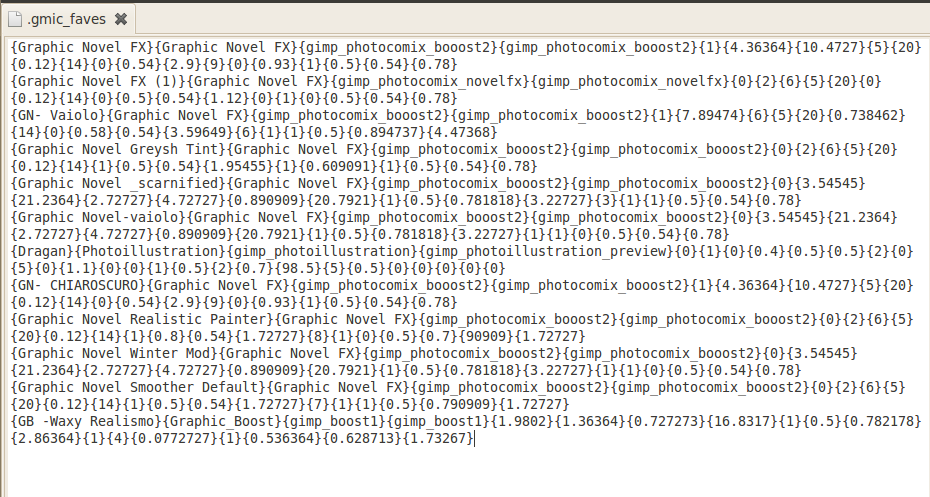
OK. All my presets are in my .gmic_faves file. GIMP has been restarted twice to make sure. But they don't show under Faves in G'MIC. The total .gmic_faves file is in the screenshot plus a shot of the GMIC Faves menu.

Image

_________________
Image
World War IV will be fought with sticks and stones. - Albert Einstein


Top
 Post subject: Re: Graphic Boost Preset Gallery
PostPosted: Tue Feb 15, 2011 7:00 pm  (#45) 
Offline
GimpChat Member
User avatar

Joined: Oct 06, 2010
Posts: 4050
Image

O:

You can't have spaces on the preset file, it will break it. No spaces between lines.

And no spaces at the bottom. Make sure the mouse cursor ends at the very last preset line. I do this by clicking below the last line, if the cursor jumps below, I backspace it to the very end of the last line.

_________________
"In order to attain the impossible, one must attempt the absurd."
~ Miguel de Cervantes


Top
 Post subject: Re: Graphic Boost Preset Gallery
PostPosted: Tue Feb 15, 2011 7:13 pm  (#46) 
Offline
GimpChat Member

Joined: Apr 12, 2010
Posts: 5870
@ O

as mahvin wrote , no empty lines

mahvin wrote:
PC:

I would like to keep the first stages of presets you created for PC Graphic Boost 2, by somehow using them in a more current filter, I've tried to do this manually but failed (they don't show up) even though the naming conventions are correct. I'm thinking its because of the additional parameters, the old presets had like 15 instances of { } calls, whereas the new Graphic Boost has 17.

Is there a way to resolve this more easily? Outside of attempting to manually select each setting in G'MIC?


15 vs 17 ? should be only 1 added paramether (for "Swap Layer") and some change to the choice of merging mode so should be simple the only problem is that i don't have the old version at hand now so i can't check now ( simple operation as trace a link for the old code and for a old preset become missions impossible with a crappy connection )

but i may suggest a workaround


1 temporary reinstall also the old version of the filter, will not conflict with the newer )
2 load 1 of the old preset and take a screenshoot
3 call the new version of the filter ,using the screenshoot copy the setting used

the only thing to change may be the combination of "merging mode" and "swap layer" option

All the old combinations are still possible with the new filter , just see the merging mode used in the old preset ,

use the same value for everything

FOR THE MERGING MODE modulo
use the same merging mode (i added more but all the old are still included )then always try check and uncheck " swapping layers" , one of the 2 will give you the equivalent of what used in the old preset


once done save as new fave, double click on the fav to change its name.

i believe once done twice would become easier, by confronting the old and new presets, find how to speed up

Thinking better should be a copy of the old code and fav also here on GC, but i really have problem to browse, so if you could browse for me and post as reply a copy of the old code and that of the preset you want updated i may do quickly

_________________
My 3D Gallery on Deviantart http://photocomix2.deviantart.com/
Main gallery http://www.flickriver.com/photos/photocomix-mandala/
Mandala and simmetry http://www.flickriver.com/photos/photocomix_mandala/

Image

Mrs Wilbress


Top
 Post subject: Re: Graphic Boost Preset Gallery
PostPosted: Tue Feb 15, 2011 7:28 pm  (#47) 
Offline
Retired Staff
User avatar

Joined: May 22, 2008
Posts: 6946
Location: Somewhere in GIMP
OK, got rid of the spaces between the presets and made sure there were no spaces at the bottom. Thanks, mahvin.

I added the chiaroscuro preset. It's the only one that shows in Faves in G'MIC.

Here's a screen shot of my .gmic_faves file now. Can you see anything wrong with it?

Image

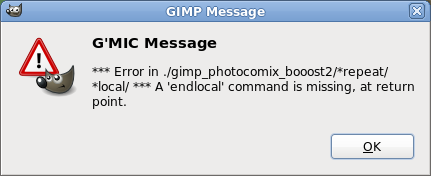
Later edit: I tried chiaroscuro and got an error message so deleted it from the file. I think I'm doomed to being .gmic_faves-less.

_________________
Image
World War IV will be fought with sticks and stones. - Albert Einstein


Top
 Post subject: Re: Graphic Boost Preset Gallery
PostPosted: Tue Feb 15, 2011 7:39 pm  (#48) 
Offline
GimpChat Member
User avatar

Joined: Oct 06, 2010
Posts: 4050
I see the entry of the top 3 as being "not uniform" in appearance. They should all be the same starting out, but each line differs.

_________________
"In order to attain the impossible, one must attempt the absurd."
~ Miguel de Cervantes


Top
 Post subject: Re: Graphic Boost Preset Gallery
PostPosted: Tue Feb 15, 2011 7:44 pm  (#49) 
Offline
Retired Staff
User avatar

Joined: May 22, 2008
Posts: 6946
Location: Somewhere in GIMP
Do I have to have all of the ones that you do for the file to work? I don't understand what you are saying.

Your waxy real looks just like the one in mine.

_________________
Image
World War IV will be fought with sticks and stones. - Albert Einstein


Top
 Post subject: Re: Graphic Boost Preset Gallery
PostPosted: Tue Feb 15, 2011 8:00 pm  (#50) 
Offline
GimpChat Member

Joined: Apr 12, 2010
Posts: 5870
Oregonian

maybe you have blank spaces after the end of last preset ?

You may try to select , copy taking care to not include additional blank lines, clear ,paste, and resave

_________________
My 3D Gallery on Deviantart http://photocomix2.deviantart.com/
Main gallery http://www.flickriver.com/photos/photocomix-mandala/
Mandala and simmetry http://www.flickriver.com/photos/photocomix_mandala/

Image

Mrs Wilbress


Top
 Post subject: Re: Graphic Boost Preset Gallery
PostPosted: Tue Feb 15, 2011 8:03 pm  (#51) 
Offline
GimpChat Member
User avatar

Joined: Oct 06, 2010
Posts: 4050
Who are you talking to? Me or PC?

Example: Your top three presets aren't uniform (see example of your own screenshot)

They all start out differently than the others.

Like:
{GB -Waxy Realismo}{Graphic_Boost}{gimp_boost1}{gimp_boost1}{1.9802}{1.36364}{0.727273}{16.8317}{1}{0.5}{0.782178}{2.86364}{1}{4}{0.0772727}{1}{0.536364}{0.628713}{1.73267}
{GB -Urban realism}{Graphic Boost}{gimp_boost1}{1.9802{1.36364}{0.727273}{16.8317}{1}{0.5}{0.782178}{2.86364}{1}{4}{0.0772727}{1}{0.536364}{0.628713}{1.73267}

Shouldn't those be uniform?

_________________
"In order to attain the impossible, one must attempt the absurd."
~ Miguel de Cervantes


Top
 Post subject: Re: Graphic Boost Preset Gallery
PostPosted: Tue Feb 15, 2011 8:07 pm  (#52) 
Offline
Retired Staff
User avatar

Joined: May 22, 2008
Posts: 6946
Location: Somewhere in GIMP
@ PhotoComix: I checked. There are absolutely no spaces.

@ mahvin: Look at your own waxy realismo preset and look at the one in mine. They are identical.

_________________
Image
World War IV will be fought with sticks and stones. - Albert Einstein


Top
 Post subject: Re: Graphic Boost Preset Gallery
PostPosted: Tue Feb 15, 2011 8:25 pm  (#53) 
Offline
GimpChat Member
User avatar

Joined: Oct 06, 2010
Posts: 4050
Yours looks fine, O. No idea why they aren't showing, unless you don't have the filter loaded for them. I have no idea.

All I know is blank lines will break the .gmic_faves file. Like I said earlier, if your cursor escapes below the last entry on the file, you need to backspace it to the end of the last line. But you say one does work, so, I am suspecting its missing the filter in the .gmic file, which is Graphic Boost, not Graphic Novel.

Found here:

viewtopic.php?f=9&t=981&hilit=Graphic+Boost

_________________
"In order to attain the impossible, one must attempt the absurd."
~ Miguel de Cervantes


Top
 Post subject: Re: Graphic Boost Preset Gallery
PostPosted: Tue Feb 15, 2011 8:56 pm  (#54) 
Offline
Retired Staff
User avatar

Joined: May 22, 2008
Posts: 6946
Location: Somewhere in GIMP
mahvin wrote:
I am suspecting its missing the filter in the .gmic file, which is Graphic Boost, not Graphic Novel.

That's exactly what was wrong. I added it to my .gmic file. I had no idea one was dependent upon the other. I should look at those presets more carefully.

:tyspin mahvin.

They all show in Faves now. The chiaroscuro still doesn't work. When I click it I see Preview Error, then when I try to run it I get an error message.
Image

_________________
Image
World War IV will be fought with sticks and stones. - Albert Einstein


Top
 Post subject: Re: Graphic Boost Preset Gallery
PostPosted: Tue Feb 15, 2011 9:01 pm  (#55) 
Offline
GimpChat Member
User avatar

Joined: Oct 06, 2010
Posts: 4050
Yes, some newer versions of G'MIC broke earlier versions of filters. I had to remove a bunch of presets and the filter, they no longer work in the new G'MIC, but I am trying to salvage the presets using the newer filter. I was asking PC about this earlier.

_________________
"In order to attain the impossible, one must attempt the absurd."
~ Miguel de Cervantes


Top
 Post subject: Re: Graphic Boost Preset Gallery
PostPosted: Tue Feb 15, 2011 9:14 pm  (#56) 
Offline
Retired Staff
User avatar

Joined: May 22, 2008
Posts: 6946
Location: Somewhere in GIMP
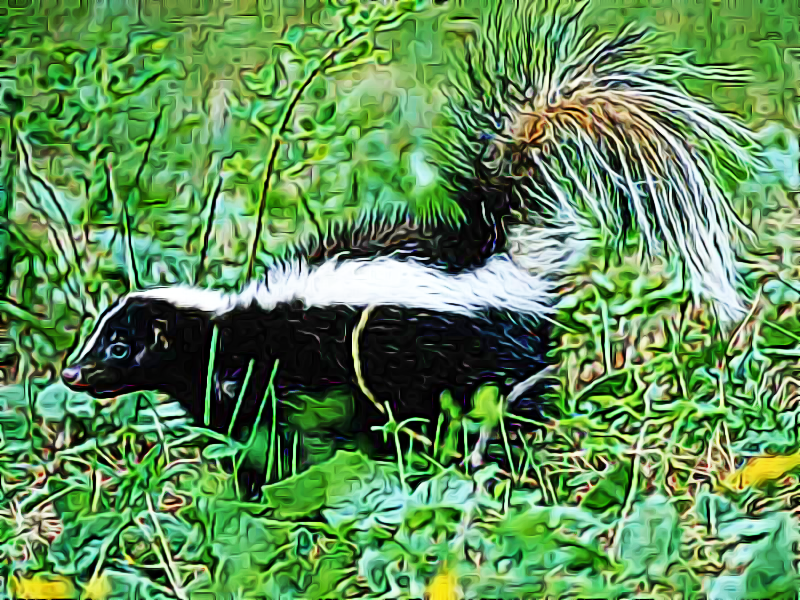
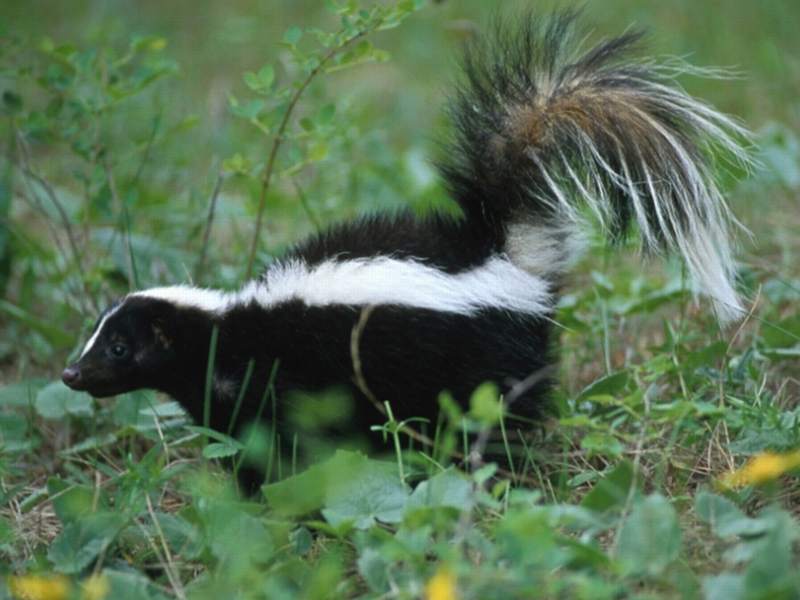
Original image here.

Finally, I get to use a preset. This one was done with the wildlife preset and that layer set to hard light over the original. I liked it that way better than just the raw wildlife preset layer.

Image

_________________
Image
World War IV will be fought with sticks and stones. - Albert Einstein


Top
 Post subject: Re: Graphic Boost Preset Gallery
PostPosted: Tue Feb 15, 2011 9:27 pm  (#57) 
Offline
GimpChat Member

Joined: Apr 12, 2010
Posts: 5870
@ O nice one i like the vivid colors

@mahvin
my first reply (at the end of the previous page )was for you not for O.

_________________
My 3D Gallery on Deviantart http://photocomix2.deviantart.com/
Main gallery http://www.flickriver.com/photos/photocomix-mandala/
Mandala and simmetry http://www.flickriver.com/photos/photocomix_mandala/

Image

Mrs Wilbress


Top
 Post subject: Re: Graphic Boost Preset Gallery
PostPosted: Tue Feb 15, 2011 9:49 pm  (#58) 
Offline
GimpChat Member
User avatar

Joined: Oct 06, 2010
Posts: 4050
PC, these are the presets that no longer worked, including the filter I had in .gmic, you're saying the old filter should still work?

{PC-GB2_Dark Boost}{PhotoComiX_Graphic Boost II}{graphic_booost}{graphic_booost}{0}{2}{6}{5}{20}{0.12}{14}{1}{0.5}{0.54}{1.12}{1}{1}{0}{0.5}{0.54}{0.78}
{PC_GB2-Dark Sharp Boost}{PhotoComiX_Graphic Boost II}{graphic_booost}{graphic_booost}{0}{2}{6}{5}{20}{0.12}{14}{0}{0.5}{0.54}{1.12}{1}{1}{0}{0.5}{0.54}{0.78}
{PC_GB2 - Xtrem boost}{PhotoComiX_Graphic Boost II}{graphic_booost}{graphic_booost}{0}{2}{6}{5}{9.34579}{0.971963}{7.47664}{0}{0.5}{0.54}{1.12}{3}{1}{0}{0.5}{0.54}{0.78}
{PC_GB2- Xtrem Melted}{PhotoComiX_Graphic Boost II}{graphic_booost}{graphic_booost}{0}{2}{6}{5}{9.34579}{0.971963}{7.47664}{1}{0.5}{0.54}{1.12}{3}{1}{0}{0.5}{0.54}{0.78}
{PC_GB BW Ink Wash}{PhotoComiX_Graphic Boost II}{graphic_booost}{graphic_booost}{0}{4.48598}{10.1682}{6.35514}{9.34579}{0.598131}{44.8598}{1}{0.5}{0.54}{1.12}{7}{1}{0}{0.5}{0.54}{0.78}
{PC_GB2- BW sharp}{PhotoComiX_Graphic Boost II}{graphic_booost}{graphic_booost}{0}{4.48598}{10.1682}{6.35514}{9.34579}{0.598131}{44.8598}{0}{0.5}{0.54}{1.12}{7}{1}{0}{0.5}{0.54}{0.78}
{PC_GB2- Cold Boost}{PhotoComiX_Graphic Boost II}{graphic_booost}{graphic_booost}{0}{4.48598}{10.1682}{6.35514}{9.34579}{0.598131}{44.8598}{1}{0.5}{0.54}{1.12}{8}{1}{1}{0.5}{0.54}{0.78}
{PC_GB2 - cold simplify}{PhotoComiX_Graphic Boost II}{graphic_booost}{graphic_booost}{1}{4.48598}{10.1682}{6.35514}{9.34579}{0.598131}{44.8598}{1}{0.5}{0.54}{0.654206}{5}{0.514019}{0}{0.5}{0.54}{0.78}


I fixed them to work with Graphic Novel FX, one by one, using G'MIC. So they all now work. I forgot what the last one was named, so if you can tell me what it is, I'll change the name back.
{GN Dark Boost}{Graphic Novel FX}{gimp_photocomix_booost2}{gimp_photocomix_booost2}{0}{2}{6}{5}{20}{0.12}{14}{1}{0.5}{.54}{1.12}{1}{1}{0}{0.5}{0.54}{0.78}
{GN Sharp Boost}{Graphic Novel FX}{gimp_photocomix_booost2}{gimp_photocomix_booost2}{0}{2}{6}{5}{20}{0.12}{14}{0}{0.5}{0.54}{1.12}{1}{1}{0}{0.5}{0.54}{0.78}
{GN Extreme Boost}{Graphic Novel FX}{gimp_photocomix_booost2}{gimp_photocomix_booost2}{0}{2}{6}{5}{9.34579}{0.971963}{7.47664}{0}{0.5}{0.54}{1.12}{3}{1}{0}{0.5}{0.54}{0.78}
{GN Extreme Melted}{Graphic Novel FX}{gimp_photocomix_booost2}{gimp_photocomix_booost2}{0}{2}{6}{5}{9.34579}{0.971963}{7.47664}{1}{0.5}{0.54}{1.12}{3}{1}{0}{0.5}{0.54}{0.78}
{GN BW Ink Wash}{Graphic Novel FX}{gimp_photocomix_booost2}{gimp_photocomix_booost2}{0}{4.48598}{10.1682}{6.35514}{9.34579}{0.598131}{44.8598}{1}{0.5}{0.54}{1.12}{7}{1}{0}{0.5}{0.54}{0.78}
{GN BW Sharp}{Graphic Novel FX}{gimp_photocomix_booost2}{gimp_photocomix_booost2}{0}{4.48598}{10.1682}{6.35514}{9.34579}{0.598131}{44.8598}{0}{0.5}{0.54}{1.12}{7}{1}{0}{0.5}{0.54}{0.78}
{GN Cold Boost}{Graphic Novel FX}{gimp_photocomix_booost2}{gimp_photocomix_booost2}{0}{4.48598}{10.1682}{6.35514}{9.34579}{0.598131}{44.8598}{1}{0.5}{0.54}{1.12}{8}{1}{1}{0.5}{0.54}{0.78}
{GN Cold Simplify}{Graphic Novel FX}{gimp_photocomix_booost2}{gimp_photocomix_booost2}{1}{4.48598}{10.1682}{6.35514}{9.34579}{0.598131}{44.8598}{1}{0.5}{0.54}{.654206}{5{.514019}{0}{0.5}{0.54}{0.78}
{GN WTF!}{Graphic Novel FX}{gimp_photocomix_booost2}{gimp_photocomix_booost2}{0}{2}{6}{5}{20}{0.12}{14}{1}{0.5}{0.54}{1.12}{0}{1}{0}{0.5}{0.54}{0.78}

_________________
"In order to attain the impossible, one must attempt the absurd."
~ Miguel de Cervantes


Top
 Post subject: Re: Graphic Boost Preset Gallery
PostPosted: Wed Feb 16, 2011 9:56 am  (#59) 
Offline
GimpChat Member

Joined: Apr 12, 2010
Posts: 5870
wow you already converted all !

the name is for the last in the second group ?

_________________
My 3D Gallery on Deviantart http://photocomix2.deviantart.com/
Main gallery http://www.flickriver.com/photos/photocomix-mandala/
Mandala and simmetry http://www.flickriver.com/photos/photocomix_mandala/

Image

Mrs Wilbress


Top
 Post subject: Re: Graphic Boost Preset Gallery
PostPosted: Wed Feb 16, 2011 2:26 pm  (#60) 
Offline
GimpChat Member
User avatar

Joined: Oct 06, 2010
Posts: 4050
Yes, the last in second group. I changed it as an example, and forgot what the original name was. It's different than the rest so I know it's not a duplicate.

_________________
"In order to attain the impossible, one must attempt the absurd."
~ Miguel de Cervantes


Top
Post new topic Reply to topic  [ 66 posts ]  Go to page Previous  1, 2, 3, 4  Next

All times are UTC - 5 hours [ DST ]


* Login  


Powered by phpBB3 © phpBB Group