It is currently Sun Sep 06, 2026 9:25 am


All times are UTC - 5 hours [ DST ]


Post new topic Reply to topic  [ 550 posts ]  Go to page Previous  1, 2, 3, 4, 5, 6 ... 28  Next
Author Message
 Post subject: Re: Portraits using GIMP
PostPosted: Sun Oct 04, 2020 3:04 pm  (#41) 
Offline
GimpChat Member
User avatar

Joined: Oct 06, 2010
Posts: 4050
Ella Louise wrote:
Oldmangrumpy, as I said before, I'm truly surprised by the evolution of your portrait works.
From rather flat faces they have evolved to 3D images with speaking eyes, depth in the face,
a beautiful complexion with light and shadow, hair that is more real, and so much more ...
They evoke emotions. The faces themselves and to the viewer.

Painting portraits in Gimp is something I will never be able to do.
I admire you for it.

Whether you should go for perfection with the skin texture is up to you.
But even if you stick to the more "plastic" skin. Your portraits remain refined.
And I love them :heart


Ella, thank you for commenting. OMG, my suggestion wasn't a critique of the painting, itself. I needed to clarify that.

_________________
"In order to attain the impossible, one must attempt the absurd."
~ Miguel de Cervantes


Top
 Post subject: Re: Portraits using GIMP
PostPosted: Sun Oct 04, 2020 3:24 pm  (#42) 
Offline
Global Moderator
User avatar

Joined: Oct 02, 2014
Posts: 5035
Location: Sydney Australia
Mahvin and Ella Louise - thank you both for your comments.

Mahvin - it is quite OK to offer advice/suggestions; I've been here Gimping for 6 years now and never thought that I would venture into portrait painting. But I have now and I accept the challenge of needing to improve my knowledge, technique and my understanding of what brushes and their dynamics can do for me.

_________________
Image

Respect should be offered freely but hard earned


Top
 Post subject: Re: Portraits using GIMP
PostPosted: Sun Oct 04, 2020 4:26 pm  (#43) 
Offline
GimpChat Member
User avatar

Joined: May 17, 2014
Posts: 1568
Mahvin, I didn't read your remarks as a (negative) critique on oldmangrumpy's work, nor Diego's reaction.
I just wanted to express my admiration for the evolution on oldmangrumpy's portraits in such a short time.
With or without the right skin texture :)

_________________
Ella's gallery - YouTube


Top
 Post subject: Re: Portraits using GIMP
PostPosted: Sun Oct 04, 2020 4:55 pm  (#44) 
Offline
GimpChat Member
User avatar

Joined: Oct 06, 2010
Posts: 4050
Ella Louise wrote:
Mahvin, I didn't read your remarks as a (negative) critique on oldmangrumpy's work, nor Diego's reaction.
I just wanted to express my admiration for the evolution on oldmangrumpy's portraits in such a short time.
With or without the right skin texture :)


Nor did I think you did, but it did make me think that I didn't even remark about the portrait in any way, and my comment was, on it's own, lacking clarity about it. Your comment made me realized that, in short, I should have said something about the portrait, as well.

However, now that we're all clearing the air on this and OMG is apparently unhampered. I look forward to any future portrait he creates and will watch for potential experimentation.

<wink>

_________________
"In order to attain the impossible, one must attempt the absurd."
~ Miguel de Cervantes


Top
 Post subject: Re: Portraits using GIMP
PostPosted: Mon Oct 05, 2020 10:41 am  (#45) 
Offline
GimpChat Member
User avatar

Joined: Mar 01, 2014
Posts: 14170
Location: Spain, Aragón
OMG, I admire your progress in this project you have started. I'm sure you will continue to much better because you have talent and creativity. Congrats and go on, please. :yes :paint

_________________
Image

Gimp 2.10.30(samj) portable _ OS Windows 10 Home_ 64bits
Don’t be afraid to start over. It’s a new chance to rebuild what you want.


Top
 Post subject: Re: Portraits using GIMP
PostPosted: Mon Oct 05, 2020 7:05 pm  (#46) 
Offline
Global Moderator
User avatar

Joined: Oct 02, 2014
Posts: 5035
Location: Sydney Australia
Issabella - thank you as always. I never thought this topic would generate so much posting activity, but my thanks to you all for your interest and support. Now please bear with me while I go away and do some study on portraits, skin texture, skin brushes et al :roll:

_________________
Image

Respect should be offered freely but hard earned


Top
 Post subject: Re: Portraits using GIMP
PostPosted: Sat Oct 10, 2020 8:10 am  (#47) 
Offline
GimpChat Member
User avatar

Joined: Mar 23, 2012
Posts: 7388
Location: Göteborg at last!
Hi OMG. Skin texture is advanced stuff and many artists don't bother too much. The main thing is to keep contrasts toned down (apart from the main light/shadow contrast) so that the skin doesn't look shiny and it's also a good idea to some subtle randomness to the overall skin tone. I'm starting to explore gradient painting together with reduced force on the brush with a BG/FG gradient and weo similar colours set. It just makes the skin look less flat.

You are improving really really fast and you have inspired me. There may be a mysterious portrait coming soon. (Cue X-Files theme music)


Top
 Post subject: Re: Portraits using GIMP
PostPosted: Mon Oct 26, 2020 9:04 pm  (#48) 
Offline
Global Moderator
User avatar

Joined: Oct 02, 2014
Posts: 5035
Location: Sydney Australia
Sandy Shaw the (barefoot) English pop singer from the swinging sixties, just happens to be the same age as me. She was the first Brit to win the Eurovision Song Contest with 'Puppet on a String' in 1967. So here is my portrait of her from that time; I have also started one of her as she is today ... patience required here :hehe


Attachments:
portrait_sandy_shaw.png
portrait_sandy_shaw.png [ 1.05 MiB | Viewed 26805 times ]

_________________
Image

Respect should be offered freely but hard earned
Top
 Post subject: Re: Portraits using GIMP
PostPosted: Mon Oct 26, 2020 9:29 pm  (#49) 
Offline
GimpChat Member
User avatar

Joined: Oct 06, 2010
Posts: 4050
Great job integrating texture into the skin and hair. Before you know it, you'll be mastering the technique!

_________________
"In order to attain the impossible, one must attempt the absurd."
~ Miguel de Cervantes


Top
 Post subject: Re: Portraits using GIMP
PostPosted: Wed Oct 28, 2020 2:39 pm  (#50) 
Offline
Global Moderator
User avatar

Joined: Oct 02, 2014
Posts: 5035
Location: Sydney Australia
Mahvin - thank you for your comments. Yes the learning continues but has a long way to go yet I feel.

_________________
Image

Respect should be offered freely but hard earned


Top
 Post subject: Re: Portraits using GIMP
PostPosted: Wed Oct 28, 2020 2:55 pm  (#51) 
Offline
GimpChat Member
User avatar

Joined: Jan 20, 2013
Posts: 14831
Location: roma, italy
Fantastic, OMG, really fantastic.
Eyes are "speaking" to the observer.
BG is properly blurred to let the figure stand out.
Skin natural.
Only one little little comment: the lips have not enough "consistency" (flesh is a bit too "transparent").
Warm congratulations !!!

_________________
"Where am I ?"


Top
 Post subject: Re: Portraits using GIMP
PostPosted: Thu Oct 29, 2020 12:45 am  (#52) 
Offline
Global Moderator
User avatar

Joined: Oct 02, 2014
Posts: 5035
Location: Sydney Australia
Diego - thank you for your comments, much appeciated.

_________________
Image

Respect should be offered freely but hard earned


Top
 Post subject: Re: Portraits using GIMP
PostPosted: Fri Oct 30, 2020 9:09 am  (#53) 
Offline
GimpChat Member
User avatar

Joined: Mar 01, 2014
Posts: 14170
Location: Spain, Aragón
OMG; I am a person without qualified artistic criteria to give an opinion in that sense. But I admire your art and I find your results really good. You are self-taught and that has even more merit. Congratulations! :clap

_________________
Image

Gimp 2.10.30(samj) portable _ OS Windows 10 Home_ 64bits
Don’t be afraid to start over. It’s a new chance to rebuild what you want.


Top
 Post subject: Re: Portraits using GIMP
PostPosted: Mon Nov 30, 2020 8:18 am  (#54) 
Offline
GimpChat Member
User avatar

Joined: Apr 27, 2010
Posts: 1510
Location: Sweden
@oldmangrumpy

Not bad, portrait painting is challenging but rewarding! I like that you are mixing up the subjects - different complexions, skin colors etc. Painting dark skin is quite different from pale/white skin due to how the blood capillaries appear through the top layer of skin.

Since you are looking for constructive feedback: One thing to try (taking the latest image as an example) is to mix in some 'unexpected' colors in your skin. Skin is not beige, sticking to that hue tends to give a less-lively feel to the skin. Think of skin as a thin, semi-transparent sheet on top of something that is essentially different hues of red. In multiple places on the face, the skull is closer or further away from the skin, with more muscle and blood in between. This changes the hues.

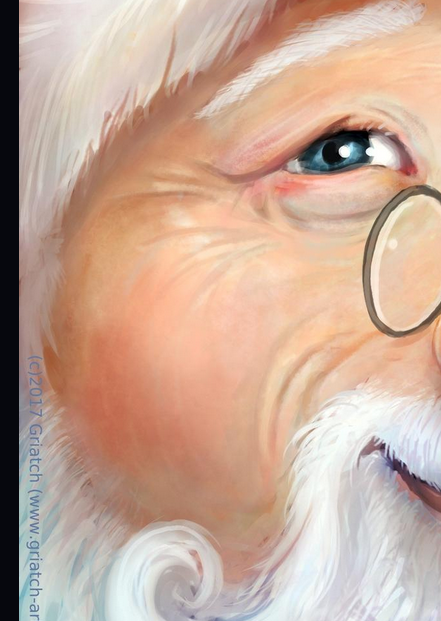
Here is an example of pale skin - the cheek of a jolly Santa:
Image

Note how the skin has red undertones (a little extra since it's Santa) but also other non-beige colours, like hints of blue, purple and even hints of green. After laying out the base structure of the skin, it can be useful to take a pass with these 'weird' colors using a low-opacity brush and then use smudgel/blend to work them into the skin. Even without being overly careful about the anatomic details you can make the skin feel more 'lively' by just breaking up the colors a bit.

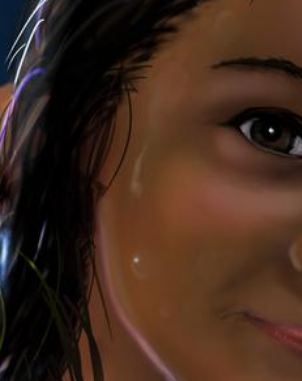
Dark skin modifies the hues quite differently, and there are of course also different 'darkness' to consider. Here is an example of dark skin without much of an external light source:
Image

Note that even though the skin itself is dark, there is still red/pink underneath it, especially at the cheeks (this person has high cheek-bones). Also here are nuances of purple and green mixed into the skin, even though less obviously so. This is also an example of skin that is 'smooth' and with few blemishes (which is also possible for younger people) although most people will have more irregularities in their skin.

Keep up your portrait-painting, always good to see people trying out new things. :)
.
Griatch

_________________


Top
 Post subject: Re: Portraits using GIMP
PostPosted: Mon Nov 30, 2020 3:50 pm  (#55) 
Offline
Global Moderator
User avatar

Joined: Oct 02, 2014
Posts: 5035
Location: Sydney Australia
Griatch - thank you; comments from somebody with your esteemed experience/reputation are very much appreciated.

_________________
Image

Respect should be offered freely but hard earned


Top
 Post subject: Re: Portraits using GIMP
PostPosted: Thu Dec 10, 2020 11:38 am  (#56) 
Offline
GimpChat Member
User avatar

Joined: May 26, 2015
Posts: 410
Location: United Kingdom
Hey Old Man Grumpy - fantastic portraits - I'm loving your work :).

One suggestion for you to try with the hair (and maybe ignore if it doesn't work for you) is to begin by painting the hair as a solid shape rather than individual strands. That will help you think about light and shadow around the 3D form of the hair mass. Then add medium shapes and finally add the detailed strands.

Hope that helps, if not please ignore and keep going :)

_________________
“Today, give a stranger one of your smiles. It might be the only sunshine he sees all day.” -- H. Jackson Brown Jr.


Top
 Post subject: Re: Portraits using GIMP
PostPosted: Sat Dec 12, 2020 4:59 pm  (#57) 
Offline
Global Moderator
User avatar

Joined: Oct 02, 2014
Posts: 5035
Location: Sydney Australia
Artloader - my thanks again to a member with both knowledge and a quality reputation. Your comments are welcome and useful in my portrait learning path.

Well this 'learning path' is interesting; it had a signpost that said 'END in 1 month' and after that month has elapsed there is a new signpost that says 'END in 2 months' ... I think that refers to fingers :roll:

Here is my portrait of a Norse vampire wearing her Thor's hammer jewellery.


Attachments:
portrait_vampire.png
portrait_vampire.png [ 1.77 MiB | Viewed 26939 times ]

_________________
Image

Respect should be offered freely but hard earned
Top
 Post subject: Re: Portraits using GIMP
PostPosted: Mon Jan 11, 2021 8:56 pm  (#58) 
Offline
Global Moderator
User avatar

Joined: Oct 02, 2014
Posts: 5035
Location: Sydney Australia
Started this one pre Xmas; so much learning every time with so much trial and error and all done with Gimp using my humongous Hippus mouse :hehe

Anyway here is my attempt at a portrait of Dame Judi Dench, one of my favourite people.


Attachments:
portrait_judi_dench.png
portrait_judi_dench.png [ 1.84 MiB | Viewed 26409 times ]

_________________
Image

Respect should be offered freely but hard earned
Top
 Post subject: Re: Portraits using GIMP
PostPosted: Tue Jan 12, 2021 1:24 am  (#59) 
Offline
GimpChat Member
User avatar

Joined: Jan 20, 2013
Posts: 14831
Location: roma, italy
Very very nice OMG.

_________________
"Where am I ?"


Top
 Post subject: Re: Portraits using GIMP
PostPosted: Tue Jan 12, 2021 3:53 am  (#60) 
Offline
Administrator
User avatar

Joined: Aug 10, 2012
Posts: 14193
Location: Native to NYC living in Arizona, Gimp 2.8 - 3.0, Win 11 PC.
dinasset wrote:
Very very nice OMG.

I agree!
Wonderful work OMG!

:paint

_________________
Image
"A wise man learns more from a foolish question than a fool can learn from a wise answer"
Image


Top
Post new topic Reply to topic  [ 550 posts ]  Go to page Previous  1, 2, 3, 4, 5, 6 ... 28  Next

All times are UTC - 5 hours [ DST ]


* Login  


Powered by phpBB3 © phpBB Group









