It is currently Tue Sep 15, 2026 8:30 am


All times are UTC - 5 hours [ DST ]


Post new topic Reply to topic  [ 15 posts ] 
Author Message
 Post subject: Pointillistic.
PostPosted: Thu May 12, 2016 7:54 pm  (#1) 
Offline
GimpChat Member
User avatar

Joined: Sep 24, 2010
Posts: 12845
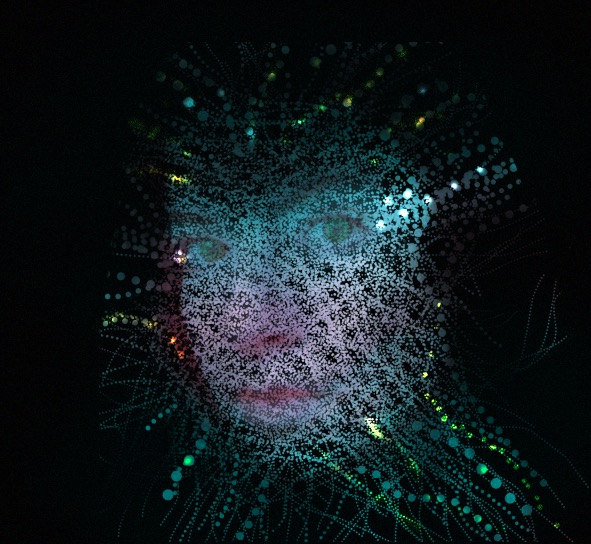
Tried to automate this, but I failed. Did the result below instead. lol

:)

ref: https://pixabay.com/en/girl-eyes-makeup ... or-237871/

https://www.flickr.com/photos/34520999@ ... 3/sizes/o/

Image

_________________
Lyle

Psalm 109:8

Image


Share on Facebook Share on Twitter Share on Orkut Share on Digg Share on MySpace Share on Delicious Share on Technorati
Top
 Post subject: Re: Pointillistic.
PostPosted: Thu May 12, 2016 11:37 pm  (#2) 
Offline
Global Moderator
User avatar

Joined: Apr 01, 2012
Posts: 8471
Location: On the other side of your screen
Almost looks like a small bubble brush in gimppressionist.
Well done, any way :)

_________________
Image
Free Fun Photo Editing & resources
Poems from the Lord
Gimp Newby
Gimp version 3.2.4 and GMIC-Qt 4.0.2 OS :- Windows 10 Home 64


Top
 Post subject: Re: Pointillistic.
PostPosted: Thu May 12, 2016 11:46 pm  (#3) 
Offline
GimpChat Member
User avatar

Joined: Sep 24, 2010
Posts: 12845
Thanks Sallyanne. Used G'MIC engrave for the template which I fed into Voronoi stippler. :)

_________________
Lyle

Psalm 109:8

Image


Top
 Post subject: Re: Pointillistic.
PostPosted: Fri May 13, 2016 12:08 am  (#4) 
Offline
GimpChat Member

Joined: May 12, 2015
Posts: 4693
That's nifty, Lyle. Will we be treated to another binge?


Top
 Post subject: Re: Pointillistic.
PostPosted: Fri May 13, 2016 1:04 am  (#5) 
Offline
GimpChat Member
User avatar

Joined: Mar 01, 2014
Posts: 14192
Location: Spain, Aragón
I like it Lyle. It's very interesting the result. Well done! :) :bigthup

_________________
Image

Gimp 2.10.36 (samj) portable _ OS Windows 10 Home_ 64bits
Don’t be afraid to start over. It’s a new chance to rebuild what you want.


Top
 Post subject: Re: Pointillistic.
PostPosted: Fri May 13, 2016 1:30 am  (#6) 
Offline
Global Moderator
User avatar

Joined: Oct 02, 2014
Posts: 5044
Location: Sydney Australia
Lyle - I really like that one :clap

_________________
Image

Respect should be offered freely but hard earned


Top
 Post subject: Re: Pointillistic.
PostPosted: Fri May 13, 2016 6:57 am  (#7) 
Offline
GimpChat Member
User avatar

Joined: Sep 24, 2010
Posts: 12845
Appreciate the feedback, folks. :)

_________________
Lyle

Psalm 109:8

Image


Top
 Post subject: Re: Pointillistic.
PostPosted: Fri May 13, 2016 7:37 am  (#8) 
Offline
GimpChat Member
User avatar

Joined: May 26, 2015
Posts: 410
Location: United Kingdom
That's a really cool result Lyle! Nice work :).

_________________
“Today, give a stranger one of your smiles. It might be the only sunshine he sees all day.” -- H. Jackson Brown Jr.


Top
 Post subject: Re: Pointillistic.
PostPosted: Fri May 13, 2016 7:51 am  (#9) 
Offline
GimpChat Member
User avatar

Joined: Apr 08, 2010
Posts: 5420
Location: Northwest Ohio
Love it, it's an awesome look! now for someone to make a script for this effect!!!!


Top
 Post subject: Re: Pointillistic.
PostPosted: Fri May 13, 2016 9:09 am  (#10) 
Offline
GimpChat Member
User avatar

Joined: Apr 09, 2016
Posts: 580
Location: Sheffield UK
Awesome - thanx.

_________________
Image


Top
 Post subject: Re: Pointillistic.
PostPosted: Sat May 14, 2016 12:22 am  (#11) 
Offline
GimpChat Member
User avatar

Joined: Sep 24, 2010
Posts: 12845
Appreciate the additional comments, folks. Made a few more strides in getting a better result (at least to my mind's eye anyway). :)

ref: https://pixabay.com/en/studio-portrait- ... el-660806/

https://www.flickr.com/photos/34520999@ ... 5/sizes/o/

Image

_________________
Lyle

Psalm 109:8

Image


Top
 Post subject: Re: Pointillistic.
PostPosted: Sat May 14, 2016 10:55 am  (#12) 
Offline
GimpChat Member
User avatar

Joined: Apr 08, 2010
Posts: 5420
Location: Northwest Ohio
Ack, I tried and sort of got the idea... sort of, lol. I guess picking the right photo would help, this one was cropped much to close to the subject to allow for all the sparkles way out in the black areas. I love the general idea but I need lots of practice! Also, could not use paths, so just did brush strokes on a layer mask.
Image


Top
 Post subject: Re: Pointillistic.
PostPosted: Sat May 14, 2016 12:47 pm  (#13) 
Offline
GimpChat Member
User avatar

Joined: Sep 24, 2010
Posts: 12845
Looks cool to me, 2-ton. Just cannot mimic the human hand which, imo, gives a whole lot more artistic look. :)

_________________
Lyle

Psalm 109:8

Image


Top
 Post subject: Re: Pointillistic.
PostPosted: Sat May 14, 2016 3:13 pm  (#14) 
Offline
GimpChat Member
User avatar

Joined: Feb 21, 2015
Posts: 22
I really like your result 2-ton! Especially in the areas around the edges of the face. Would you mind outlining the steps you took to get that?


Top
 Post subject: Re: Pointillistic.
PostPosted: Sat May 14, 2016 8:49 pm  (#15) 
Offline
GimpChat Member
User avatar

Joined: Apr 08, 2010
Posts: 5420
Location: Northwest Ohio
I just followed the tutorial, basically. Since I could not figure out how to do freehand paths, I just pained the dot strings on a layer mask, that was pretty much the only change I made. It's a ps tutorial, so you just have to figure out the gimp way to accomplish the similar effects. They used a clipping mask but I forgot exactly what that was, and a layer mask seemed to be similar.


Top
Post new topic Reply to topic  [ 15 posts ] 

All times are UTC - 5 hours [ DST ]


* Login  


Powered by phpBB3 © phpBB Group