It is currently Wed Jun 03, 2026 11:37 pm


All times are UTC - 5 hours [ DST ]


Post new topic Reply to topic  [ 4 posts ] 
Author Message
 Post subject: LAYER
PostPosted: Mon May 03, 2021 12:25 pm  (#1) 
Offline
GimpChat Member
User avatar

Joined: Apr 26, 2014
Posts: 3785
Location: belgium
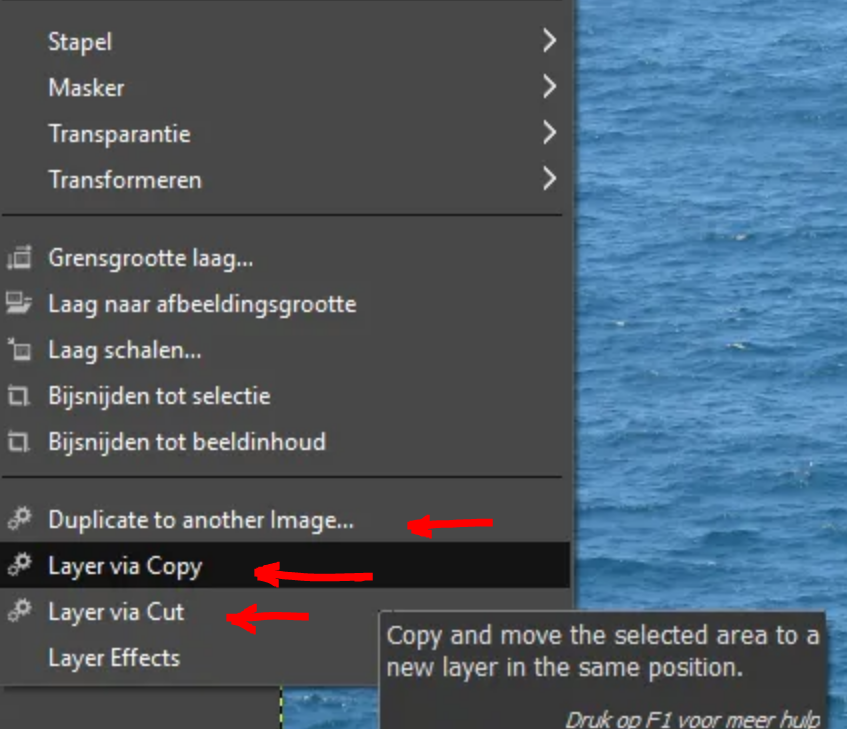
can anyone help me with these three items in layers

1-duplicate to another image
2-layer via copy
3-layer via cut


as seen in the image below it is in layers

Image

thanks in advance, gimper66


Share on Facebook Share on Twitter Share on Orkut Share on Digg Share on MySpace Share on Delicious Share on Technorati
Top
 Post subject: Re: LAYER
PostPosted: Mon May 03, 2021 1:11 pm  (#2) 
Offline
GimpChat Member

Joined: Mar 04, 2011
Posts: 2599
For those who do not know, these are slybug plugins. The plugins work as their name suggests.

https://www.deviantart.com/slybug/art/D ... -341012566
Duplicate to another Image -> Copies an image (with groups and masks if there are any) into another image or makes a new image.
and
https://www.deviantart.com/slybug/art/L ... -305728401
Layer via Copy -> Copies a selection to a new layer
Layer via Cut -> Cuts a selection and makes a new layer of the selected area.

example: https://i.imgur.com/brKvk0v.mp4


Top
 Post subject: Re: LAYER
PostPosted: Tue May 04, 2021 6:11 am  (#3) 
Offline
GimpChat Member
User avatar

Joined: Apr 26, 2014
Posts: 3785
Location: belgium
rich2005 wrote:
For those who do not know, these are slybug plugins. The plugins work as their name suggests.

https://www.deviantart.com/slybug/art/D ... -341012566
Duplicate to another Image -> Copies an image (with groups and masks if there are any) into another image or makes a new image.
and
https://www.deviantart.com/slybug/art/L ... -305728401
Layer via Copy -> Copies a selection to a new layer
Layer via Cut -> Cuts a selection and makes a new layer of the selected area.

example: https://i.imgur.com/brKvk0v.mp4


thanks rich2005 for your comment and explanation,
I'm not going to install it anyway, I can do the edit I want to make in a different way.
thanks again,gimper66


Top
 Post subject: Re: LAYER
PostPosted: Tue May 04, 2021 6:27 am  (#4) 
Offline
GimpChat Member

Joined: Mar 04, 2011
Posts: 2599
Quote:
I'm not going to install it anyway, I can do the edit I want to make in a different way.


That is a sensible decision, nothing you cannot do with regular Gimp 2.10 tools. The slybug plugin(s) are really for Gimp 2.8 and Gimp 2.10 has more copy/paste options that the older version. The only very slight advantage with the slybug plugin is no need to copy the selection before pasting.


Top
Post new topic Reply to topic  [ 4 posts ] 

All times are UTC - 5 hours [ DST ]


* Login  


Powered by phpBB3 © phpBB Group