It is currently Tue Sep 08, 2026 9:55 pm


All times are UTC - 5 hours [ DST ]


Post new topic Reply to topic  [ 5 posts ] 
Author Message
 Post subject: Glass Balls
PostPosted: Sat Jun 11, 2011 1:07 pm  (#1) 
Offline
GimpChat Member

Joined: Jun 07, 2011
Posts: 46
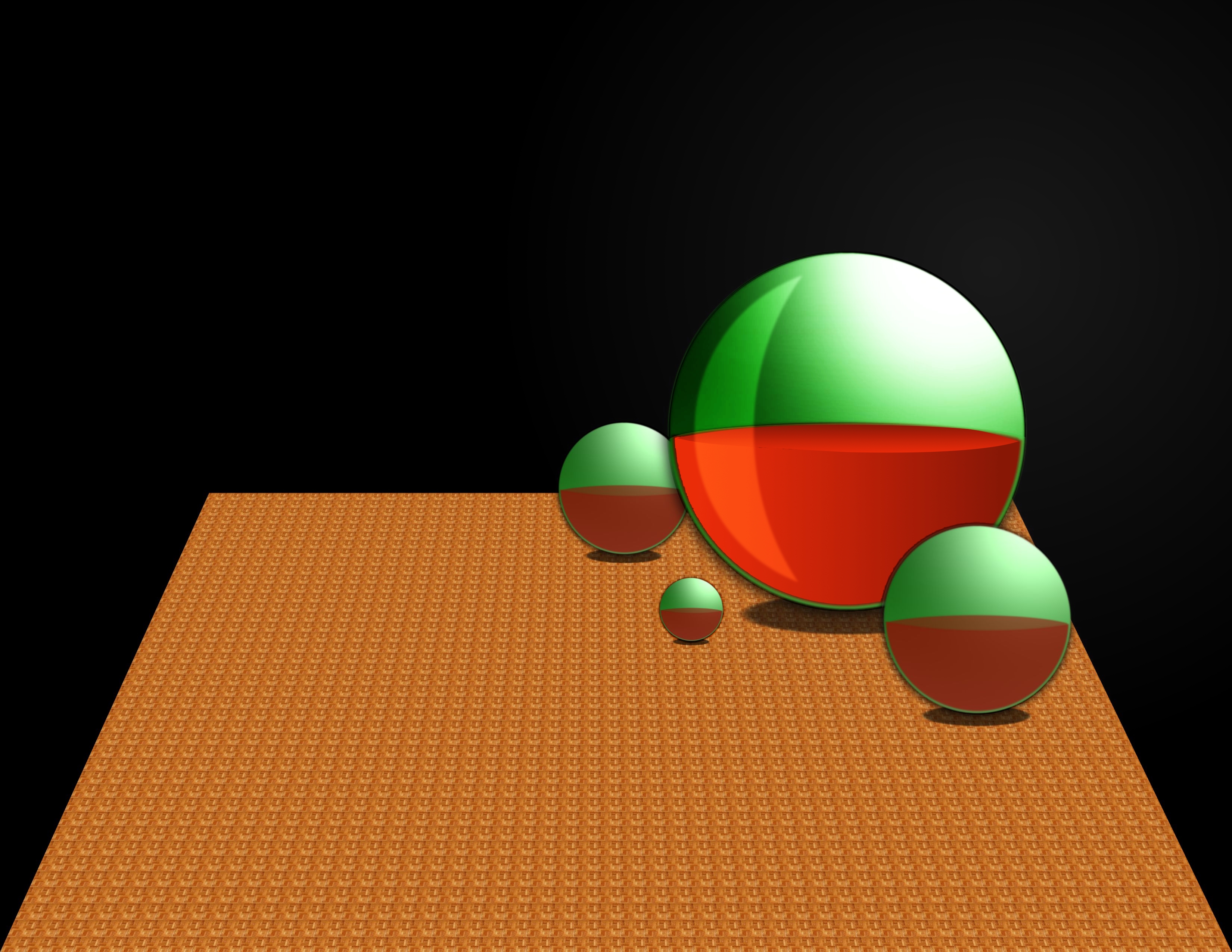
This isn't the best work but im learning so yeah. LOL :)
If you have any suggestions for me to make this look better then im all ears!


Attachments:
COOL GLASS BALLS.jpg
COOL GLASS BALLS.jpg [ 702.53 KiB | Viewed 2187 times ]
Share on Facebook Share on Twitter Share on Orkut Share on Digg Share on MySpace Share on Delicious Share on Technorati
Top
 Post subject: Re: Glass Balls
PostPosted: Sat Jun 11, 2011 1:11 pm  (#2) 
Offline
GimpChat Member
User avatar

Joined: Jun 04, 2011
Posts: 254
that's so cool! how did you do it?

_________________
Image


Top
 Post subject: Re: Glass Balls
PostPosted: Sat Jun 11, 2011 1:15 pm  (#3) 
Offline
GimpChat Member

Joined: Jun 07, 2011
Posts: 46
Thanks, i'll post a tutorial real soon. :tyspin


Top
 Post subject: Re: Glass Balls
PostPosted: Sun Jun 12, 2011 12:14 pm  (#4) 
Offline
GimpChat Member
User avatar

Joined: Feb 13, 2011
Posts: 83
Location: It's Cold in Wisco!
ive worked with glass in my glass tomatoes post and i see a few things that can help bring out the effect! give the glass and the liquid inside it a little more color, you wanna make it look dramatic! The way i did it was copied the liquid area of the ball and covered it with a more drastic gradient (very light color to very dark color) then i set the mode to overlay. The only other thing i would say is that glass is see through so take the other balls and background that is behind it and make it look like theyre visible through the ball (in my image i didnt do this step) and finally add some shiny streaks! very good start though and i hope you find this helpful

Image

_________________
Image


Top
 Post subject: Re: Glass Balls
PostPosted: Sun Jun 12, 2011 12:34 pm  (#5) 
Offline
Script Coder
User avatar

Joined: Jul 14, 2010
Posts: 697
wyatt wrote:
This isn't the best work but im learning so yeah. LOL :)
If you have any suggestions for me to make this look better then im all ears!


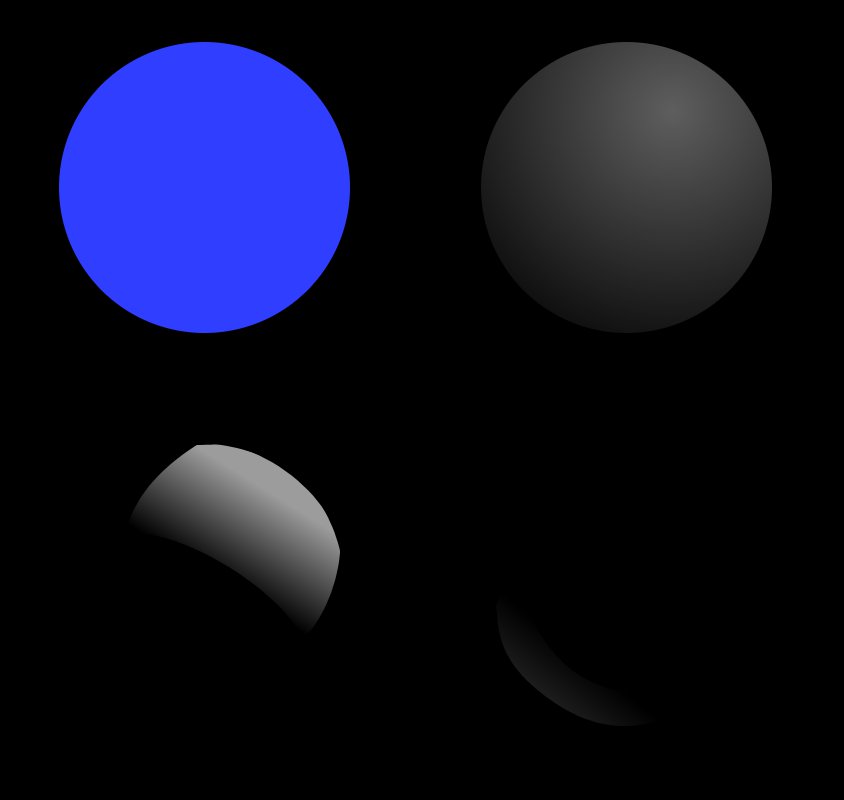
There are four kinds of lighting: ambient (colour), diffuse (shadows and highlights), specular (glossy reflections), and emissive (glowing).

For glassy/shiny objects you need the first 3, but your drawing only has the first 2.

Also, to make a hollow glass ball, you will have these reflections on both the inside and outside.

Here is an example showing the missing specular lighting:
Attachment:
glass ball.jpg
glass ball.jpg [ 8.54 KiB | Viewed 2099 times ]


and the same with the layers spread apart to show the different lighting:
Attachment:
glass ball_apart.jpg
glass ball_apart.jpg [ 14.78 KiB | Viewed 2099 times ]


The last thing glass needs to look realistic is refraction (distortion because of bending light).

I took a quick photo of liquid in a wineglass since I don't have any glass balls handy ;)
Attachment:
glass.jpg
glass.jpg [ 216.31 KiB | Viewed 2099 times ]


-Rob A>

_________________
Image
Fantasy Cartography and Mapping by RobA


Top
Post new topic Reply to topic  [ 5 posts ] 

All times are UTC - 5 hours [ DST ]


* Login  


Powered by phpBB3 © phpBB Group