It is currently Mon Sep 07, 2026 5:00 pm


All times are UTC - 5 hours [ DST ]


Post new topic Reply to topic  [ 23 posts ]  Go to page 1, 2  Next
Author Message
 Post subject: Ice Effect (Photoshop tutorial done in Gimp)
PostPosted: Sun Jun 26, 2011 12:03 am  (#1) 
Offline
GimpChat Member

Joined: Jun 21, 2011
Posts: 5
http://psd.tutsplus.com/tutorials/text- ... photoshop/

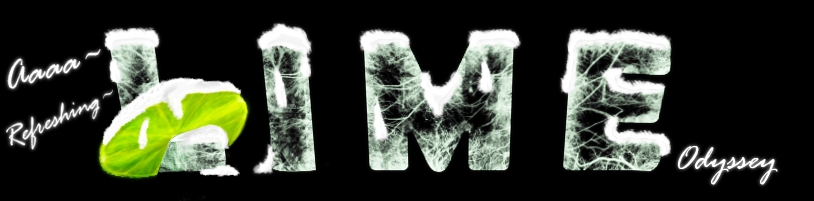
I followed this but did the tutorial with the Gimp program O=

It was really tough to get the icy effects with the tree brushes in this since I don't have a way to tilt the brushes while using it (I don't know if Gimp has that).

^^ I did the effect with the name of a game I want to play when it comes out in CB (closed beta).


Image


I assumed this is where I should post since I'm just posting something I did. I wanna try something else with the ice effect.
Sorry if this is the wrong spot :oops:


Share on Facebook Share on Twitter Share on Orkut Share on Digg Share on MySpace Share on Delicious Share on Technorati
Top
 Post subject: Re: Ice Effect (Photoshop tutorial done in Gimp)
PostPosted: Sun Jun 26, 2011 1:09 am  (#2) 
Offline
Retired Staff
User avatar

Joined: May 22, 2008
Posts: 6946
Location: Somewhere in GIMP
Ohhhhh! That is most awesome! Blocks of ice with cracks in them.

_________________
Image
World War IV will be fought with sticks and stones. - Albert Einstein


Top
 Post subject: Re: Ice Effect (Photoshop tutorial done in Gimp)
PostPosted: Sun Jun 26, 2011 1:19 am  (#3) 
Offline
GimpChat Founder
User avatar

Joined: May 22, 2008
Posts: 5241
Location: Gimpville
Good one!! :coolthup

_________________
“If you reach for the stars, you just might land on a decently sized hill.” - Stuart Hill


Top
 Post subject: Re: Ice Effect (Photoshop tutorial done in Gimp)
PostPosted: Sun Jun 26, 2011 2:50 am  (#4) 
Offline
GimpChat Member

Joined: Mar 08, 2011
Posts: 155
It looks great! Excellent use of tree brushes lol.

I think GIMP 2.8 is going to have rotatable brushes, I thought I read that somewhere... Maybe it was just a suggestion that sounded good to me. :P


Top
 Post subject: Re: Ice Effect (Photoshop tutorial done in Gimp)
PostPosted: Sun Jun 26, 2011 5:45 am  (#5) 
Offline
GimpChat Member
User avatar

Joined: Apr 09, 2011
Posts: 1764
great job there!! thats the kind of thing I like to do...tutorials from other programs using GIMP


Top
 Post subject: Re: Ice Effect (Photoshop tutorial done in Gimp)
PostPosted: Sun Jun 26, 2011 6:07 am  (#6) 
Offline
GimpChat Member
User avatar

Joined: Apr 07, 2010
Posts: 14182
iDerz, that is very nice.

_________________
Image


Top
 Post subject: Re: Ice Effect (Photoshop tutorial done in Gimp)
PostPosted: Sun Jun 26, 2011 6:53 am  (#7) 
Offline
Global Moderator
User avatar

Joined: May 16, 2010
Posts: 16170
Very nice! :)

_________________
Image


Top
 Post subject: Re: Ice Effect (Photoshop tutorial done in Gimp)
PostPosted: Sun Jun 26, 2011 1:51 pm  (#8) 
Offline
GimpChat Member

Joined: Jun 21, 2011
Posts: 5
^-^ Thanks for the comments guys :D

I love that I did this with a photoshop tutorial~ Just means that Gimp isn't bad like people tend to think.
I love Gimp~ :D

I found other tutorials on that site O= And thought about doing the effects on the text and pictures with Gimp.


Top
 Post subject: Re: Ice Effect (Photoshop tutorial done in Gimp)
PostPosted: Sun Jun 26, 2011 6:28 pm  (#9) 
Offline
GimpChat Member
User avatar

Joined: Apr 18, 2011
Posts: 620
Location: New York
That is Quite lovely!

_________________
Ubuntu 24.04.1, Kernel i686, 6.8.0-52-generic
python3 v3.12.3 ----- GIMP - ver 2.10.38


Top
 Post subject: Re: Ice Effect (Photoshop tutorial done in Gimp)
PostPosted: Sun Jun 26, 2011 6:29 pm  (#10) 
Offline
GimpChat Member
User avatar

Joined: Apr 18, 2011
Posts: 620
Location: New York
I know GIMP can have animated brushes so maybe this is a way to get that Rotation you need ????

_________________
Ubuntu 24.04.1, Kernel i686, 6.8.0-52-generic
python3 v3.12.3 ----- GIMP - ver 2.10.38


Top
 Post subject: Re: Ice Effect (Photoshop tutorial done in Gimp)
PostPosted: Sun Jun 26, 2011 9:07 pm  (#11) 
Offline
GimpChat Member
User avatar

Joined: Apr 08, 2010
Posts: 5420
Location: Northwest Ohio
Oy, spent hours trying to figure this out, but it just didn't look anywhere as nice as the tut.


Top
 Post subject: Re: Ice Effect (Photoshop tutorial done in Gimp)
PostPosted: Sun Jun 26, 2011 10:00 pm  (#12) 
Offline
GimpChat Member
User avatar

Joined: Jul 04, 2010
Posts: 2253
Location: Retired Moderator Slowly Returning to the Living.
That is absolutely awesome!!! I need to add that to my list of tutorials to try! I too, love the look of the ice blocks! Amazing!

_________________
Artists aren't crazy! We're eccentric! ~G.M. Ross

Image

My Sigs = My Photos
Check out my work at http://www.flickr.com/photos/photomastergreg.


Top
 Post subject: Re: Ice Effect (Photoshop tutorial done in Gimp)
PostPosted: Sun Jun 26, 2011 11:25 pm  (#13) 
Offline
GimpChat Member

Joined: Jun 21, 2011
Posts: 5
Yeah it took forever for me to get it to work entirely right with the tree brushes not being able to tilt and change.

I don't know about the animated brushes o.o
I could look up that and give some research to it.

I wanna try this tutorial again now that I know what I'm doing with the effects.

:D Thanks for the comments guys~


Top
 Post subject: Re: Ice Effect (Photoshop tutorial done in Gimp)
PostPosted: Mon Jun 27, 2011 6:38 am  (#14) 
Offline
GimpChat Member
User avatar

Joined: Apr 18, 2011
Posts: 620
Location: New York
iDerz wrote:
Yeah it took forever for me to get it to work entirely right with the tree brushes not being able to tilt and change.

I don't know about the animated brushes o.o
I could look up that and give some research to it.
...............
I could be hallucinating but I thought some default brushes that come with a standard GIMP are animated. It's been so long since I paid attention to what a basic GIMP install looks like I can's say for sure. When I have time I'll look for them and list them.

_________________
Ubuntu 24.04.1, Kernel i686, 6.8.0-52-generic
python3 v3.12.3 ----- GIMP - ver 2.10.38


Top
 Post subject: Re: Ice Effect (Photoshop tutorial done in Gimp)
PostPosted: Mon Jun 27, 2011 4:55 pm  (#15) 
Offline
New Member

Joined: May 20, 2010
Posts: 2
Just a thought.... You could always rotate the layer you are applying the brush to in order to change the angle. Several different angles with the free rotate ought to do the trick.


Top
 Post subject: Re: Ice Effect (Photoshop tutorial done in Gimp)
PostPosted: Mon Jun 27, 2011 5:17 pm  (#16) 
Offline
GimpChat Member
User avatar

Joined: Apr 07, 2010
Posts: 14182
http://silent9.com/blog/archiv ... ushes.html

There are several tutorials on how to make animated brushes on link below.
http://www.google.ca/#hl=en&xhr=t&q=how ... 97&bih=837

_________________
Image


Top
 Post subject: Re: Ice Effect (Photoshop tutorial done in Gimp)
PostPosted: Mon Jun 27, 2011 7:25 pm  (#17) 
Offline
GimpChat Member
User avatar

Joined: Apr 18, 2011
Posts: 620
Location: New York
well Those links are useful! I just got imported the "Translucent Colored Orb Tubes" brushes from Paint Shop Pro and now have them in my GIMP

whoopie! :hi5

gotta try that rotating brush script!

_________________
Ubuntu 24.04.1, Kernel i686, 6.8.0-52-generic
python3 v3.12.3 ----- GIMP - ver 2.10.38


Top
 Post subject: Re: Ice Effect (Photoshop tutorial done in Gimp)
PostPosted: Tue Jun 28, 2011 5:51 pm  (#18) 
Offline
GimpChat Member
User avatar

Joined: Apr 18, 2011
Posts: 620
Location: New York
I just tried making a rotating brush using the photoshop branches

http://www.mediafire.com/?b9ggz4pi2gx4s

it rotates all right but I'm not sure it's "perfect"...does it need transparency? etc....

anyway, there it is to play with. frankly, using that script it's easy to make.

_________________
Ubuntu 24.04.1, Kernel i686, 6.8.0-52-generic
python3 v3.12.3 ----- GIMP - ver 2.10.38


Top
 Post subject: Re: Ice Effect (Photoshop tutorial done in Gimp)
PostPosted: Tue Jun 28, 2011 7:13 pm  (#19) 
Offline
GimpChat Member
User avatar

Joined: Apr 18, 2011
Posts: 620
Location: New York
Same brush with transparent background

http://www.mediafire.com/?b9ggz4pi2gx4s

_________________
Ubuntu 24.04.1, Kernel i686, 6.8.0-52-generic
python3 v3.12.3 ----- GIMP - ver 2.10.38


Top
 Post subject: Re: Ice Effect (Photoshop tutorial done in Gimp)
PostPosted: Tue Jun 28, 2011 7:59 pm  (#20) 
Offline
GimpChat Member
User avatar

Joined: Apr 08, 2010
Posts: 5420
Location: Northwest Ohio
Thanks for making that brush, Celilia. I just snagged it!


Top
Post new topic Reply to topic  [ 23 posts ]  Go to page 1, 2  Next

All times are UTC - 5 hours [ DST ]


* Login  


Powered by phpBB3 © phpBB Group