It is currently Sat Sep 05, 2026 4:39 pm


All times are UTC - 5 hours [ DST ]


Post new topic Reply to topic  [ 8 posts ] 
Author Message
 Post subject: Enter Gimp Space Button
PostPosted: Thu Jul 14, 2011 1:07 am  (#1) 
Offline
Global Moderator
User avatar

Joined: May 16, 2010
Posts: 16169
Image

_________________
Image


Share on Facebook Share on Twitter Share on Orkut Share on Digg Share on MySpace Share on Delicious Share on Technorati
Top
 Post subject: Re: Enter Gimp Space Button
PostPosted: Thu Jul 14, 2011 1:23 am  (#2) 
Offline
GimpChat Member
User avatar

Joined: Oct 06, 2010
Posts: 4050
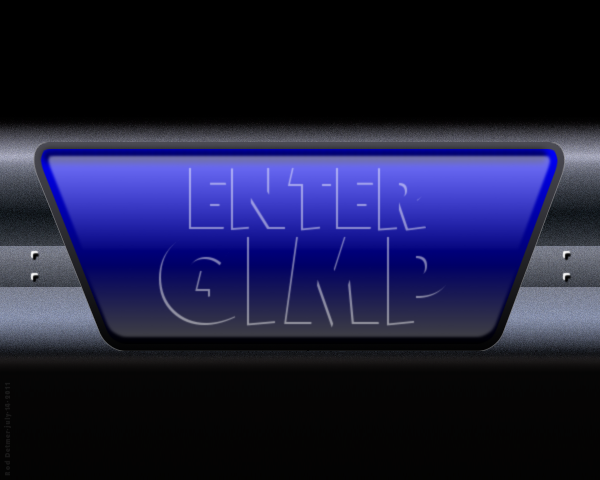
Love the metal gradient texture, Rod. Are you going to bevel the text anymore or leave it as is?

_________________
"In order to attain the impossible, one must attempt the absurd."
~ Miguel de Cervantes


Top
 Post subject: Re: Enter Gimp Space Button
PostPosted: Thu Jul 14, 2011 6:13 am  (#3) 
Offline
GimpChat Member
User avatar

Joined: Mar 02, 2011
Posts: 1850
Location: Michigan
Great new Shortcut Icon for GIMP :D

_________________
Image
I'm back I think


Top
 Post subject: Re: Enter Gimp Space Button
PostPosted: Thu Jul 14, 2011 10:28 am  (#4) 
Offline
Global Moderator
User avatar

Joined: May 16, 2010
Posts: 16169
mahvin wrote:
Love the metal gradient texture, Rod. Are you going to bevel the text anymore or leave it as is?

The gradient i created myself and added some noise.The indent can be created by selecting the area you want copy/paste ... layer flip vertical. :)
The small screw looking areas are just two inverted L shapes blurred by 1-2 then copy it and merge those together then copy those two and slide them over.
I am probably going to experiment some with dd's beveler to see if i can get a good looking icon text.Crisp, and clear.

Great idea to make it a shortcut to Gimp Willy. :)

_________________
Image


Top
 Post subject: Re: Enter Gimp Space Button
PostPosted: Thu Jul 14, 2011 11:19 am  (#5) 
Offline
Retired Staff
User avatar

Joined: May 22, 2008
Posts: 6946
Location: Somewhere in GIMP
That is really cool. I love all the metal details in it. Nice work, Rod!

_________________
Image
World War IV will be fought with sticks and stones. - Albert Einstein


Top
 Post subject: Re: Enter Gimp Space Button
PostPosted: Thu Jul 14, 2011 3:15 pm  (#6) 
Offline
Global Moderator
User avatar

Joined: May 16, 2010
Posts: 16169
Thanks O. :)
Here is one i created a while back.This one is actually on my website in Image gallery #4.

Image

_________________
Image


Top
 Post subject: Re: Enter Gimp Space Button
PostPosted: Thu Jul 14, 2011 3:48 pm  (#7) 
Offline
GimpChat Member
User avatar

Joined: Apr 08, 2010
Posts: 5420
Location: Northwest Ohio
so you can make this to use as your gimp desktop icon?


Top
 Post subject: Re: Enter Gimp Space Button
PostPosted: Thu Jul 14, 2011 5:50 pm  (#8) 
Offline
Global Moderator
User avatar

Joined: May 16, 2010
Posts: 16169
Sure just create it in Gimp and save as your icon extension...mine is ico on Windows.
But i use RocketDock and PNG images because it auto sizes the PNG image to the correct size.Which i like because i can make it huge and at a small size its nice and crisp.Especially if it is made in Inkscape. :)

_________________
Image


Top
Post new topic Reply to topic  [ 8 posts ] 

All times are UTC - 5 hours [ DST ]


* Login  


Powered by phpBB3 © phpBB Group