It is currently Thu Jul 23, 2026 11:37 am


All times are UTC - 5 hours [ DST ]


Post new topic Reply to topic  [ 9 posts ] 
Author Message
 Post subject: Three Point Perspective Mountains WIP
PostPosted: Wed Nov 23, 2011 12:25 am  (#1) 
Offline
GimpChat Member
User avatar

Joined: Jun 25, 2011
Posts: 914
Location: Mount Olive, North Carolina
I've been experimenting with some geometry. Three-point perspective is fun to play with. Despite being a mathematician, I've yet to work out the exact relationship between the three vanishing points and the corresponding angles produced in various regions of the drawing.

Perhaps I'll give this task to my Pre-calculus students. Their test scores haven't been good, so I know they'll be wanting some extra credit. :mrgreen:

In any case, I think this would be a fun GIMP tutorial to write up: Creating Three-Point Perspective mountain ranges. Here's an example from the project I'm still working on.

"Construction Phase"
Image

The process is to construct basic polygons, then sculpt out the details. I actually learned this trick from one of Griatch's tutorials (drawing a futuristic city).

"Sculpting Phase"
Image

Then add color, etc. Essentially, I'll "paint" the sculpted forms.

"Texture Phase"
Image

There's more to do... but I thought it might be neat to illustrate the technique.


Share on Facebook Share on Twitter Share on Orkut Share on Digg Share on MySpace Share on Delicious Share on Technorati
Top
 Post subject: Re: Three Point Perspective Mountains WIP
PostPosted: Wed Nov 23, 2011 1:23 am  (#2) 
Offline
GimpChat Member
User avatar

Joined: Sep 24, 2010
Posts: 12811
Looks cool Merrak. Looks like way too much work for a simpleton like me though. Hope to see more of your creations too. :)

_________________
Lyle

Psalm 109:8

Image


Top
 Post subject: Re: Three Point Perspective Mountains WIP
PostPosted: Wed Nov 23, 2011 2:02 am  (#3) 
Offline
GimpChat Member

Joined: Mar 08, 2011
Posts: 155
Love the "texture phase" image, very cool!


Top
 Post subject: Re: Three Point Perspective Mountains WIP
PostPosted: Wed Nov 23, 2011 4:22 am  (#4) 
Offline
Global Moderator
User avatar

Joined: May 16, 2010
Posts: 16127
Pretty neat looking results. :)

_________________
Image


Top
 Post subject: Re: Three Point Perspective Mountains WIP
PostPosted: Wed Nov 23, 2011 7:14 am  (#5) 
Offline
GimpChat Member

Joined: Apr 12, 2010
Posts: 5870
Looks very interesting with the added texture
And i did not know you are a mathematician i hope you would not mind help with some question
(not now it took me too time just find the right terminology to explain the question, but i will try next time i stumble over)

well if you forgive the OT i may try:
i know the function to draw a circle of radius N at the center of a image

what i need is find know is how fill the image with concentric circles till filling up also the corners spaces

i want be able to set the first circle radius,
the number of circles i wish OR their Radius Increase "RI" (i.e each larger of 3 px ) and be able to fill the image (the largest circle should have radius = image diagonal - "RI" ) i mean fill any image so image W and H are variables

(wow explaining made it much more clear in my mind..not yet so clear to be able to find a solution

_________________
My 3D Gallery on Deviantart http://photocomix2.deviantart.com/
Main gallery http://www.flickriver.com/photos/photocomix-mandala/
Mandala and simmetry http://www.flickriver.com/photos/photocomix_mandala/

Image

Mrs Wilbress


Top
 Post subject: Re: Three Point Perspective Mountains WIP
PostPosted: Wed Nov 23, 2011 4:42 pm  (#6) 
Offline
GimpChat Member
User avatar

Joined: Jun 25, 2011
Posts: 914
Location: Mount Olive, North Carolina
lylejk wrote:
Looks cool Merrak. oo. :) /quote

Rod wrote:
Pretty neat looking results. :)


Amanda47 wrote:
Love the "texture phase" image, very cool!


Thanks! :)

PhotoComix wrote:
Looks very interesting with the added texture
And i did not know you are a mathematician i hope you would not mind help with some question
(not now it took me too time just find the right terminology to explain the question, but i will try next time i stumble over)

well if you forgive the OT i may try:
i know the function to draw a circle of radius N at the center of a image

what i need is find know is how fill the image with concentric circles till filling up also the corners spaces

i want be able to set the first circle radius,
the number of circles i wish OR their Radius Increase "RI" (i.e each larger of 3 px ) and be able to fill the image (the largest circle should have radius = image diagonal - "RI" ) i mean fill any image so image W and H are variables

(wow explaining made it much more clear in my mind..not yet so clear to be able to find a solution


Is this what you're trying to accomplish? (i.e. the upper right corner)

Image


Top
 Post subject: Re: Three Point Perspective Mountains WIP
PostPosted: Wed Nov 23, 2011 6:01 pm  (#7) 
Offline
GimpChat Member

Joined: Apr 12, 2010
Posts: 5870
that is cool but i look for something more simple.

let say that if the image would be a square that square will be inscribed in the larger circle...this a poor mock up

Image

but the image are usually rectangle so would be something as

Image

again i want be able to set the the number of circles OR their Radius Increase
and have the rest automatically computed

Here i simplify to give you the whole picture i would also need to manage center off-set
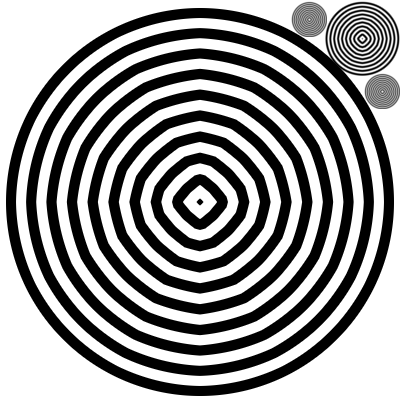
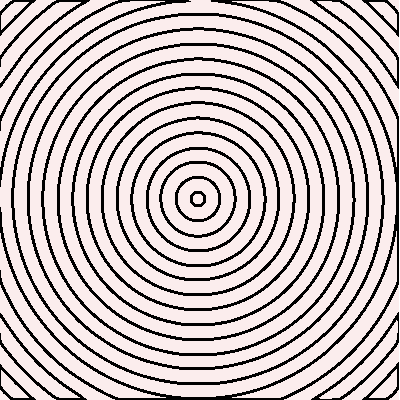
i want to make a pattern filter to create interference patterns as in the examples

Image

Image

where the effect come by offsetting 2 or more identical layers filled with concentric circles

But the math is baffling and if i already felt confused to solve with the circles center in the image center i really feel lost to figure out how to manage circles center off set

_________________
My 3D Gallery on Deviantart http://photocomix2.deviantart.com/
Main gallery http://www.flickriver.com/photos/photocomix-mandala/
Mandala and simmetry http://www.flickriver.com/photos/photocomix_mandala/

Image

Mrs Wilbress


Top
 Post subject: Re: Three Point Perspective Mountains WIP
PostPosted: Wed Nov 23, 2011 6:54 pm  (#8) 
Offline
GimpChat Member
User avatar

Joined: Jun 25, 2011
Posts: 914
Location: Mount Olive, North Carolina
This sounds more like a programming problem to me. I'm not sure what language you're using. Does it not have a simple draw_circle type function that takes the radius and center coordinates as arguments?

If you have to calculate the coordinates of every pixel, you'll need to use some trig functions. Make sure whatever libraries you need to do that are loaded.

Here's one way to do it. Let A be an angle. On a circle of radius 1, centered at the origin (0,0), the coordinates of every point on the edge are (cos(A), sin(A)) for some angle A. For a circle of radius R, the coordinates are (R*cos(A), R*sin(A)).

Finally, to shift the circle to some arbitrary location, let (x,y) be the coordinates of the center. Then the edges lie on (R*cos(A) + x, R*sin(A) + y).

What you'll probably want to do is set up a routine that calculates (R*cos(A) + x, R*sin(A) + y) for every angle A between 0 and 360 deg. The step size is up to you. Too small and your code will be slow. Too fast might leave you with a dotted line for an edge instead of a solid line. You'll have to repeat this procedure for increasing values of R until you get the number of circles desired.


Top
 Post subject: Re: Three Point Perspective Mountains WIP
PostPosted: Thu Nov 24, 2011 4:02 am  (#9) 
Offline
GimpChat Member
User avatar

Joined: Sep 12, 2011
Posts: 377
Location: UK
That's smart can you put the link up as I wonna try with that pls


Top
Post new topic Reply to topic  [ 9 posts ] 

All times are UTC - 5 hours [ DST ]


* Login  


Powered by phpBB3 © phpBB Group