It is currently Fri Sep 04, 2026 3:26 pm


All times are UTC - 5 hours [ DST ]


Post new topic Reply to topic  [ 18 posts ] 
Author Message
 Post subject: I fixed my flannel shirt
PostPosted: Thu Mar 22, 2012 8:22 pm  (#1) 
Offline
Global Moderator
User avatar

Joined: May 16, 2010
Posts: 16169
Do you suppose this patch will ever fall off? :)

Image

_________________
Image


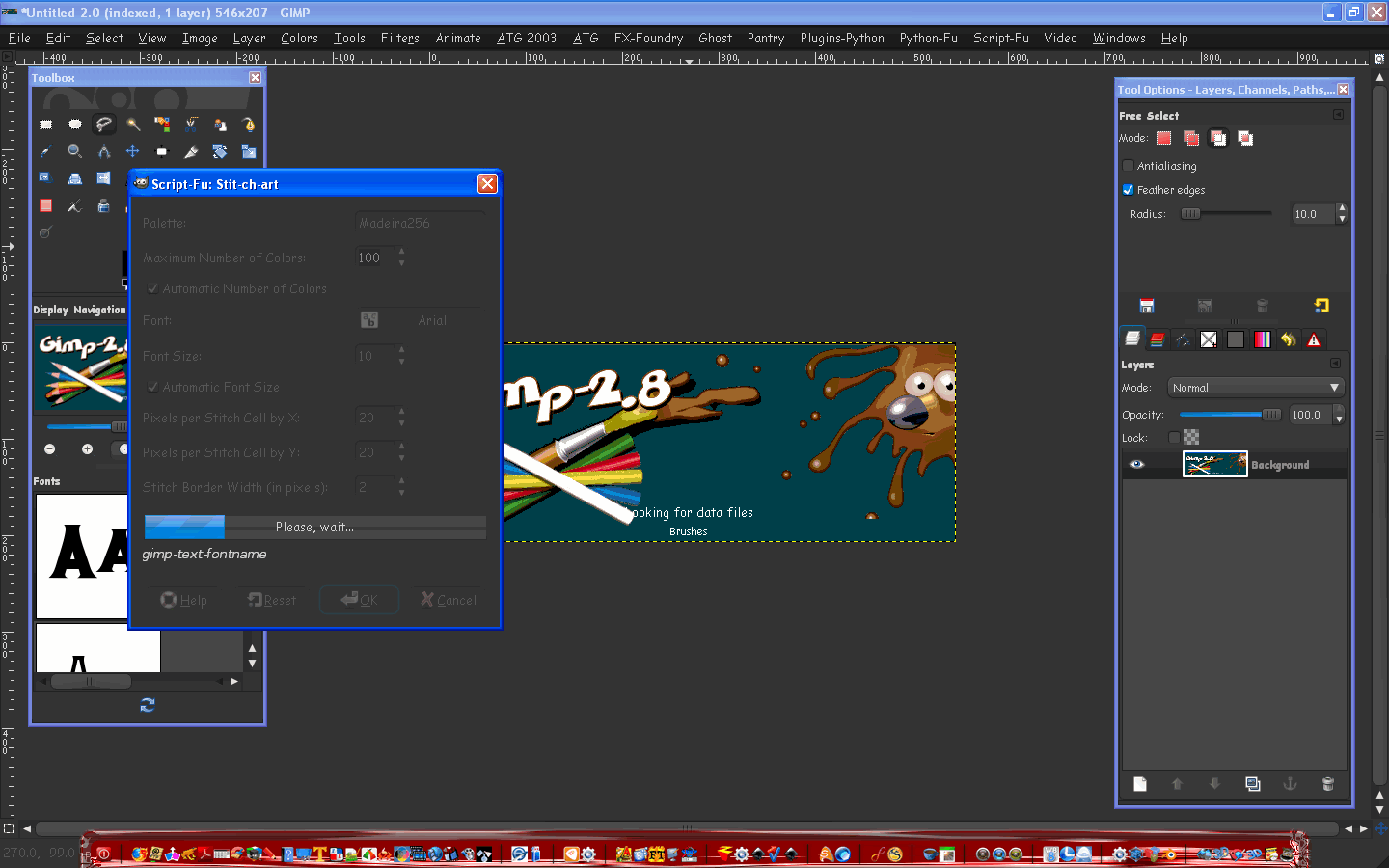
Share on Facebook Share on Twitter Share on Orkut Share on Digg Share on MySpace Share on Delicious Share on Technorati
Top
 Post subject: Re: I fixed my flannel shirt
PostPosted: Thu Mar 22, 2012 8:31 pm  (#2) 
Offline
GimpChat Member
User avatar

Joined: Sep 24, 2010
Posts: 12844
You really sowed that patch on tight Rod. lol

:)

_________________
Lyle

Psalm 109:8

Image


Top
 Post subject: Re: I fixed my flannel shirt
PostPosted: Thu Mar 22, 2012 8:35 pm  (#3) 
Offline
GimpChat Member
User avatar

Joined: Jan 20, 2012
Posts: 583
Cool, would look a little more realistic if you bump mapped the flannel section to the R layer, that way it looks like the R has some weight on the shirt, but I love that flannel color though.

_________________


"In the face of adversity, there's three things: fly, freeze or fight; We're choosing to fight..."- Guy Boucher, Tampa Bay Lighting Head Coach


Top
 Post subject: Re: I fixed my flannel shirt
PostPosted: Thu Mar 22, 2012 8:58 pm  (#4) 
Offline
Global Moderator
User avatar

Joined: May 16, 2010
Posts: 16169
This a little better? :)
I gave it a gradient overlay and some displacement with a shadow to give it a little more depth.
I also did a alpha to selection on the stitching and deleted it from the flannel shirt area to give it a look as if the thread is actually going into a hole.
Image

_________________
Image


Top
 Post subject: Re: I fixed my flannel shirt
PostPosted: Thu Mar 22, 2012 9:10 pm  (#5) 
Offline
GimpChat Member
User avatar

Joined: Jan 20, 2012
Posts: 583
Ya, see how the shirt lines look like they are angling down (as if the patch has weight, and gravity applies), looks really good either way! Nice Job Rod!

_________________


"In the face of adversity, there's three things: fly, freeze or fight; We're choosing to fight..."- Guy Boucher, Tampa Bay Lighting Head Coach


Top
 Post subject: Re: I fixed my flannel shirt
PostPosted: Fri Mar 23, 2012 6:55 am  (#6) 
Offline
GimpChat Member

Joined: Apr 12, 2010
Posts: 5870
Perfect patch !

_________________
My 3D Gallery on Deviantart http://photocomix2.deviantart.com/
Main gallery http://www.flickriver.com/photos/photocomix-mandala/
Mandala and simmetry http://www.flickriver.com/photos/photocomix_mandala/

Image

Mrs Wilbress


Top
 Post subject: Re: I fixed my flannel shirt
PostPosted: Fri Mar 23, 2012 6:58 am  (#7) 
Offline
GimpChat Member
User avatar

Joined: Aug 24, 2011
Posts: 1785
Location: Dallas, TX
Beautimus!

Just had a thought (I know it's in a strange place so I'll treat it gently) Make the stitch into a cross and marry it with something like the Viaroni Stipple to produce a cross-stitch image that looks like it was sewn into the fabric with a little bump/shadow effect like you did here. Between you and Lyle, I know you guys will come up with something that might actually become a really cool "cross-stitch" filter.

Here's the cross-stitch brush

Whenever I stroke a text path it always gives me like an outline stroke or doubles up, even if I mke it 1 pixel. What' up with that?


Attachments:
Cross-Stitch.jpg
Cross-Stitch.jpg [ 129.67 KiB | Viewed 2671 times ]
Cross-Stitch.gih [39.22 KiB]
Downloaded 106 times

_________________
Image
Top
 Post subject: Re: I fixed my flannel shirt
PostPosted: Fri Mar 23, 2012 12:31 pm  (#8) 
Offline
Script Coder
User avatar

Joined: Jul 14, 2010
Posts: 697
Draconian wrote:
Whenever I stroke a text path it always gives me like an outline stroke or doubles up, even if I mke it 1 pixel. What' up with that?


Cause they are closed stroke paths (i.e. outlines) not single stroke paths. There was a thread on those types of fonts here, I believe they were called "engraving fonts"

-Rob A>

_________________
Image
Fantasy Cartography and Mapping by RobA


Top
 Post subject: Re: I fixed my flannel shirt
PostPosted: Fri Mar 23, 2012 1:55 pm  (#9) 
Offline
GimpChat Founder
User avatar

Joined: May 22, 2008
Posts: 5241
Location: Gimpville
Nice work, Rod. Looks great!

That kind of stitching might also be useful to some of the members here who make medals. I guess the medal would have to be large enough to see the stitching, but it could make some of the embroidery and bordering more realistic.

_________________
“If you reach for the stars, you just might land on a decently sized hill.” - Stuart Hill


Top
 Post subject: Re: I fixed my flannel shirt
PostPosted: Fri Mar 23, 2012 5:45 pm  (#10) 
Offline
GimpChat Member
User avatar

Joined: Aug 24, 2011
Posts: 1785
Location: Dallas, TX
RobA wrote:
Draconian wrote:
Whenever I stroke a text path it always gives me like an outline stroke or doubles up, even if I mke it 1 pixel. What' up with that?


Cause they are closed stroke paths (i.e. outlines) not single stroke paths. There was a thread on those types of fonts here, I believe they were called "engraving fonts"

-Rob A>


Interesting. Not being a real path guru, I wouldn't know closed path from an open one if it bit me. In fact I don't even know what that means. I gather that is what Ofnut's scripts are for is to somehow alter these paths for various effects. I would like to explore this a bit more. I downloaded a couple of his scripts plus the one Rod mentioned recently but I don't know where they show up and can't find 'em.

_________________
Image


Top
 Post subject: Re: I fixed my flannel shirt
PostPosted: Sat Mar 24, 2012 7:28 am  (#11) 
Offline
Global Moderator
User avatar

Joined: May 16, 2010
Posts: 16169
Quote:
I gather that is what Ofnut's scripts are for is to somehow alter these paths for various effects. I would like to explore this a bit more. I downloaded a couple of his scripts plus the one Rod mentioned recently but I don't know where they show up and can't find 'em.

Most of Ofnuts path tools are listed after right clicking an existing path layer. :)

_________________
Image


Top
 Post subject: Re: I fixed my flannel shirt
PostPosted: Sat Mar 24, 2012 7:41 am  (#12) 
Offline
Global Moderator
User avatar

Joined: May 16, 2010
Posts: 16169
Try using your cross stitch image hose on a selection instead at 55 or more (75) for spacing. :)

Image

XCF attached also
Attachment:
CrossStitch_RD.xcf [912.39 KiB]
Downloaded 80 times

_________________
Image


Top
 Post subject: Re: I fixed my flannel shirt
PostPosted: Sat Mar 24, 2012 7:57 am  (#13) 
Offline
Global Moderator
User avatar

Joined: May 16, 2010
Posts: 16169
Here is your GIH at a spacing of 75 with various shapes.It still doubles up a little bit but i think it adds to the realism of real stitches myself. :)

Image

_________________
Image


Top
 Post subject: Re: I fixed my flannel shirt
PostPosted: Sun Mar 25, 2012 7:40 am  (#14) 
Offline
GimpChat Member
User avatar

Joined: Aug 24, 2011
Posts: 1785
Location: Dallas, TX
Thanks for the info on the path scripts Rod. I'll try it this afternoon. I was already playing around with the spacing like you suggested. The technique you used does look a lot better and as far as the doubling up, I guess you could manually erase unwanted areas or otherwise tweak the result.

What I also wanted to try and do was take a picture and use some of Lyle's methods for making it look like the whole image was made with cross-stiching and not just the border. Not sure what method to use.

_________________
Image


Top
 Post subject: Re: I fixed my flannel shirt
PostPosted: Sun Mar 25, 2012 12:30 pm  (#15) 
Offline
Global Moderator
User avatar

Joined: May 16, 2010
Posts: 16169
I would go with grids or patterns.
There is a script "Stitch-Art", that takes an image and creates sort of a stitch grid.That might work for you. :)
http://registry.gimp.org/node/24421 (VERY CPU intensive!)

This is the way i would do it...
Open the image
Use the color picker to select the exact colors in the image
Create different pat files for each color consisting of a stitch pattern IN that color
Use each different color pat file to fill in each color on a separate layer (use color select tool)
That would be the easiest way i think. :)

_________________
Image


Top
 Post subject: Re: I fixed my flannel shirt
PostPosted: Sun Mar 25, 2012 1:02 pm  (#16) 
Offline
Global Moderator
User avatar

Joined: May 16, 2010
Posts: 16169
This one has been running for 15 minutes and isn't even half done yet (using the stitchart filter) :)

Image

This is a small image too.

_________________
Image


Top
 Post subject: Re: I fixed my flannel shirt
PostPosted: Sun Mar 25, 2012 1:19 pm  (#17) 
Offline
Global Moderator
User avatar

Joined: May 16, 2010
Posts: 16169
I tried this website and got these results.
http://www.myphotostitch.com/Make_Patte ... ttern.html
Image

_________________
Image


Top
 Post subject: Re: I fixed my flannel shirt
PostPosted: Sun Mar 25, 2012 2:21 pm  (#18) 
Offline
Global Moderator
User avatar

Joined: May 16, 2010
Posts: 16169
Now i know why the script took so long ...geesh!

Image

_________________
Image


Top
Post new topic Reply to topic  [ 18 posts ] 

All times are UTC - 5 hours [ DST ]


* Login  


Powered by phpBB3 © phpBB Group