It is currently Wed Sep 09, 2026 11:56 pm


All times are UTC - 5 hours [ DST ]


Post new topic Reply to topic  [ 10 posts ] 
Author Message
 Post subject: Gimp Chat Dock Icon...
PostPosted: Sat Apr 20, 2013 1:23 pm  (#1) 
Offline
Administrator
User avatar

Joined: Aug 10, 2012
Posts: 14197
Location: Native to NYC living in Arizona, Gimp 2.8 - 3.0, Win 11 PC.
Here's the dock icon that I made and use for GC.

Image

_________________
Image
"A wise man learns more from a foolish question than a fool can learn from a wise answer"
Image


Share on Facebook Share on Twitter Share on Orkut Share on Digg Share on MySpace Share on Delicious Share on Technorati
Top
 Post subject: Re: Gimp Chat Dock Icon...
PostPosted: Sat Apr 20, 2013 3:41 pm  (#2) 
Offline
GimpChat Member
User avatar

Joined: Apr 07, 2010
Posts: 14182
cool wallace, I didn't know you could edit those icons.

_________________
Image


Top
 Post subject: Re: Gimp Chat Dock Icon...
PostPosted: Sat Apr 20, 2013 9:21 pm  (#3) 
Offline
GimpChat Member
User avatar

Joined: Apr 08, 2010
Posts: 5420
Location: Northwest Ohio
How do you use your own icon?


Top
 Post subject: Re: Gimp Chat Dock Icon...
PostPosted: Sat Apr 20, 2013 10:05 pm  (#4) 
Offline
Retired Staff
User avatar

Joined: May 22, 2008
Posts: 6946
Location: Somewhere in GIMP
What is a dock icon? I love what you made but would like more information about its intended use. :hehe

_________________
Image
World War IV will be fought with sticks and stones. - Albert Einstein


Top
 Post subject: Re: Gimp Chat Dock Icon...
PostPosted: Sat Apr 20, 2013 10:10 pm  (#5) 
Offline
Global Moderator
User avatar

Joined: May 16, 2010
Posts: 16170
Normally (in windows anyways) you can right click any application and select change to select a different icon.Then just link to the custom one and select apply or ok.
I am not sure about Mac or Linux distros.

I am assuming Wallace created this one for RocketDock or a similar app?

_________________
Image


Top
 Post subject: Re: Gimp Chat Dock Icon...
PostPosted: Sat Apr 20, 2013 10:12 pm  (#6) 
Offline
Retired Staff
User avatar

Joined: May 22, 2008
Posts: 6946
Location: Somewhere in GIMP
Thanks Rod. Yes, there is a similar application in Linux for using custom icons.

_________________
Image
World War IV will be fought with sticks and stones. - Albert Einstein


Top
 Post subject: Re: Gimp Chat Dock Icon...
PostPosted: Sun Apr 21, 2013 4:42 am  (#7) 
Offline
GimpChat Member
User avatar

Joined: Apr 07, 2010
Posts: 14182
Here is one to try in GIMP...Creating your custom Icon

_________________
Image


Top
 Post subject: Re: Gimp Chat Dock Icon...
PostPosted: Sun Apr 21, 2013 5:24 am  (#8) 
Offline
GimpChat Founder
User avatar

Joined: May 22, 2008
Posts: 5241
Location: Gimpville
Rod wrote:
Normally (in windows anyways) you can right click any application and select change to select a different icon.Then just link to the custom one and select apply or ok.
I am not sure about Mac or Linux distros.

Yes, it's basically the same in Linux, depending on the Desktop Environment you use.

Cario Dock is one of the more popular docking apps in Linux, allowing the user to specify a custom icon for any application launcher on the dock. There is really no need for a reflection in the icon, as a reflection is normally an option generated by the docking app itself.

Due to scalability, I prefer to use svg images as custom icons.

_________________
“If you reach for the stars, you just might land on a decently sized hill.” - Stuart Hill


Top
 Post subject: Re: Gimp Chat Dock Icon...
PostPosted: Sun Apr 21, 2013 5:48 am  (#9) 
Offline
GimpChat Member
User avatar

Joined: Apr 07, 2010
Posts: 14182
Thank you Tux.

_________________
Image


Top
 Post subject: Re: Gimp Chat Dock Icon...
PostPosted: Sun Apr 21, 2013 3:28 pm  (#10) 
Offline
Administrator
User avatar

Joined: Aug 10, 2012
Posts: 14197
Location: Native to NYC living in Arizona, Gimp 2.8 - 3.0, Win 11 PC.
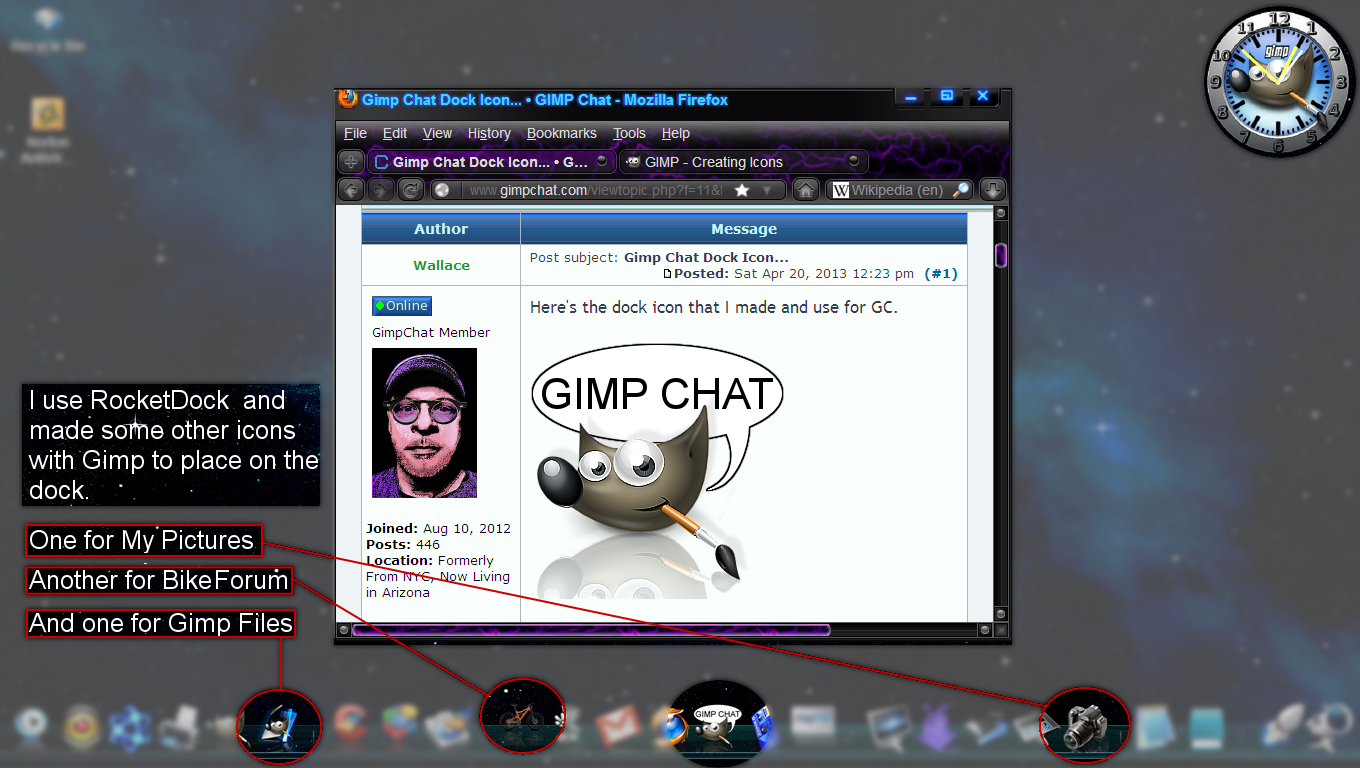
Here's a screen shot of my desktop, with some of the icon that I made with Gimp highlighted.

Image

_________________
Image
"A wise man learns more from a foolish question than a fool can learn from a wise answer"
Image


Top
Post new topic Reply to topic  [ 10 posts ] 

All times are UTC - 5 hours [ DST ]


cron

* Login  


Powered by phpBB3 © phpBB Group