It is currently Thu Sep 17, 2026 4:24 pm


All times are UTC - 5 hours [ DST ]


Post new topic Reply to topic  [ 13 posts ] 
Author Message
 Post subject: GIMP CHAT, with Blender text...
PostPosted: Wed Jul 03, 2013 8:52 pm  (#1) 
Offline
Administrator
User avatar

Joined: Aug 10, 2012
Posts: 14206
Location: Native to NYC living in Arizona, Gimp 2.8 - 3.0, Win 11 PC.
It's in my color. :hehe
Image

_________________
Image
"A wise man learns more from a foolish question than a fool can learn from a wise answer"
Image


Share on Facebook Share on Twitter Share on Orkut Share on Digg Share on MySpace Share on Delicious Share on Technorati
Top
 Post subject: Re: GIMP CHAT, with Blender text...
PostPosted: Wed Jul 03, 2013 9:28 pm  (#2) 
Offline
GimpChat Member
User avatar

Joined: Jun 02, 2013
Posts: 2090
Awesome Wallace.

_________________
Image


Top
 Post subject: Re: GIMP CHAT, with Blender text...
PostPosted: Wed Jul 03, 2013 9:54 pm  (#3) 
Offline
Administrator
User avatar

Joined: Aug 10, 2012
Posts: 14206
Location: Native to NYC living in Arizona, Gimp 2.8 - 3.0, Win 11 PC.
The Warrior wrote:
Awesome Wallace.

Thanks Warrior, I only just began working with Blender.

_________________
Image
"A wise man learns more from a foolish question than a fool can learn from a wise answer"
Image


Top
 Post subject: Re: GIMP CHAT, with Blender text...
PostPosted: Wed Jul 03, 2013 11:21 pm  (#4) 
Offline
GimpChat Member
User avatar

Joined: Aug 16, 2012
Posts: 4271
Location: Göteborg, Sweden
wallace: nice colour - not as nice as pink, but nice :hehe . the text looks good, but in some parts it's a bit strange - like the reflection in the "c".

_________________


Top
 Post subject: Re: GIMP CHAT, with Blender text...
PostPosted: Thu Jul 04, 2013 3:29 am  (#5) 
Offline
Administrator
User avatar

Joined: Aug 10, 2012
Posts: 14206
Location: Native to NYC living in Arizona, Gimp 2.8 - 3.0, Win 11 PC.
AnMal wrote:
wallace: nice colour - not as nice as pink, but nice :hehe . the text looks good, but in some parts it's a bit strange - like the reflection in the "c".

Yeah, Blender does some crazy stuff with shadows. It all depends on where you place the light sources. I had 2 light behind the text and one above. The text was also placed in an odd position, on it back facing upward, (see image).
Image

_________________
Image
"A wise man learns more from a foolish question than a fool can learn from a wise answer"
Image


Top
 Post subject: Re: GIMP CHAT, with Blender text...
PostPosted: Thu Jul 04, 2013 12:58 pm  (#6) 
Offline
GimpChat Member
User avatar

Joined: Aug 28, 2012
Posts: 3060
Location: Idk where I am.
Like I always say, I opened blender...Then I closed it! :D
Nice work, I think the c looks a but odd though too. xD
We can just blame the program for that! :P

_________________
Image
Reality is a lovely place...But I wouldn't wanna live there.


Top
 Post subject: Re: GIMP CHAT, with Blender text...
PostPosted: Thu Jul 04, 2013 1:07 pm  (#7) 
Offline
Administrator
User avatar

Joined: Aug 10, 2012
Posts: 14206
Location: Native to NYC living in Arizona, Gimp 2.8 - 3.0, Win 11 PC.
Mokonafan wrote:
Like I always say, I opened blender...Then I closed it! :D
Nice work, I think the c looks a but odd though too. xD
We can just blame the program for that! :P


I'm a newbie with Blender and placing the lights took me a very long time. I kept moving them all over the place, trying to change the shadows being cast. In the end I just settled for what I thought looked the best and called it a day. Otherwise, I'd probably still be moving those light around. :hehe
Everything seems to take forever in Blender, that is for me anyway.

_________________
Image
"A wise man learns more from a foolish question than a fool can learn from a wise answer"
Image


Last edited by Wallace on Thu Jul 04, 2013 1:09 pm, edited 1 time in total.

Top
 Post subject: Re: GIMP CHAT, with Blender text...
PostPosted: Thu Jul 04, 2013 1:09 pm  (#8) 
Offline
GimpChat Member
User avatar

Joined: Aug 28, 2012
Posts: 3060
Location: Idk where I am.
Takes even longer for me because I don't do anything in blender! :lol

_________________
Image
Reality is a lovely place...But I wouldn't wanna live there.


Top
 Post subject: Re: GIMP CHAT, with Blender text...
PostPosted: Thu Jul 04, 2013 1:10 pm  (#9) 
Offline
Administrator
User avatar

Joined: Aug 10, 2012
Posts: 14206
Location: Native to NYC living in Arizona, Gimp 2.8 - 3.0, Win 11 PC.
Mokonafan wrote:
Takes even longer for me because I don't do anything in blender! :lol

:rofl

_________________
Image
"A wise man learns more from a foolish question than a fool can learn from a wise answer"
Image


Top
 Post subject: Re: GIMP CHAT, with Blender text...
PostPosted: Thu Jul 04, 2013 4:44 pm  (#10) 
Offline
GimpChat Member
User avatar

Joined: Feb 14, 2013
Posts: 462
Location: Stockholm
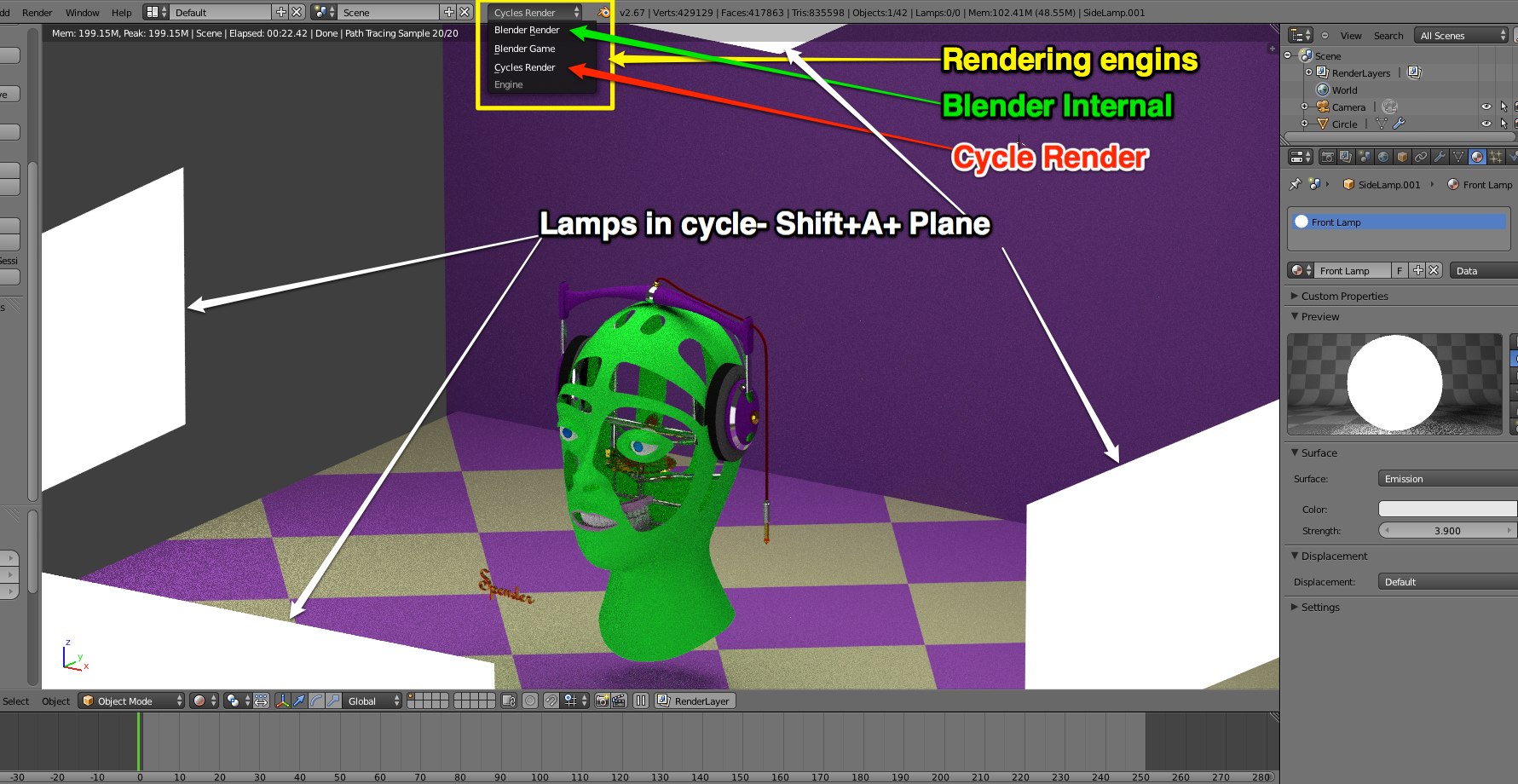
Welcome to Blender.
There are two different lamp settings in Blender.
Blender Internal: 3-4-5 lamps Front/top and 2 side lamps. Shift+A.

Blender Cycle use emitted plans. Shift+A+Plane

To change from Internal to Cycle render you do that at the menubar.
Image

_________________
Late 2017 iMac Retina 4K 21,5 inch Mac OS High Sierra version 10.13.4
3,6 GHz Intel Core i7
16 GB Ram 2400 MHz DDR4
Graphic card Radeon Pro 560 4096 MB
Affinity Photo and Affinity Designers.


Top
 Post subject: Re: GIMP CHAT, with Blender text...
PostPosted: Thu Jul 04, 2013 5:20 pm  (#11) 
Offline
GimpChat Member
User avatar

Joined: Aug 30, 2012
Posts: 2174
Nice work Wallace, can't have enough purple.

_________________
Image


Top
 Post subject: Re: GIMP CHAT, with Blender text...
PostPosted: Thu Jul 04, 2013 6:04 pm  (#12) 
Offline
Administrator
User avatar

Joined: Aug 10, 2012
Posts: 14206
Location: Native to NYC living in Arizona, Gimp 2.8 - 3.0, Win 11 PC.
he4rty wrote:
Nice work Wallace, can't have enough purple.

Thanks and yes I agree. :hehe

_________________
Image
"A wise man learns more from a foolish question than a fool can learn from a wise answer"
Image


Top
 Post subject: Re: GIMP CHAT, with Blender text...
PostPosted: Thu Jul 04, 2013 6:42 pm  (#13) 
Offline
GimpChat Member

Joined: Apr 12, 2010
Posts: 5870
Very nice ... yes some lights seems off but maybe because in some points (i.e. lower part of the "A") is expected the reflected colour of the BG and not of a white light

But is really a detail the composition is cool

_________________
My 3D Gallery on Deviantart http://photocomix2.deviantart.com/
Main gallery http://www.flickriver.com/photos/photocomix-mandala/
Mandala and simmetry http://www.flickriver.com/photos/photocomix_mandala/

Image

Mrs Wilbress


Top
Post new topic Reply to topic  [ 13 posts ] 

All times are UTC - 5 hours [ DST ]


* Login  


Powered by phpBB3 © phpBB Group