It is currently Mon Aug 17, 2026 7:45 am


All times are UTC - 5 hours [ DST ]


Post new topic Reply to topic  [ 15 posts ] 
Author Message
 Post subject: 1st effort
PostPosted: Mon Dec 23, 2013 5:43 pm  (#1) 
Offline
GimpChat Member

Joined: Dec 16, 2013
Posts: 33
Hi there. I managed to do a whole tutorial, without getting stuck on something :)
Thanks to Odinbc for posting these to help folks like me x

Image


Share on Facebook Share on Twitter Share on Orkut Share on Digg Share on MySpace Share on Delicious Share on Technorati
Top
 Post subject: Re: 1st effort
PostPosted: Mon Dec 23, 2013 5:46 pm  (#2) 
Offline
GimpChat Member
User avatar

Joined: Mar 23, 2012
Posts: 7388
Location: Göteborg at last!
Great start jess. The more tutorials you do, the more you will learn about Gimp's functions and how they can be applied. Merry Christmas!


Top
 Post subject: Re: 1st effort
PostPosted: Mon Dec 23, 2013 5:47 pm  (#3) 
Offline
GimpChat Member
User avatar

Joined: Apr 07, 2010
Posts: 14182
:ninja by Eris. :roll: That is very nice Jess, just in time for Christmas.

_________________
Image


Top
 Post subject: Re: 1st effort
PostPosted: Mon Dec 23, 2013 5:49 pm  (#4) 
Offline
GimpChat Member
User avatar

Joined: Mar 23, 2012
Posts: 7388
Location: Göteborg at last!
molly wrote:
:ninja by Eris. :roll: That is very nice Jess, just in time for Christmas.

GOTCHA MO! :hehe


Top
 Post subject: Re: 1st effort
PostPosted: Mon Dec 23, 2013 5:55 pm  (#5) 
Offline
GimpChat Member
User avatar

Joined: Apr 07, 2010
Posts: 14182
3 times within 3 hrs is a record. 4 more days woo hoo

_________________
Image


Top
 Post subject: Re: 1st effort
PostPosted: Mon Dec 23, 2013 6:30 pm  (#6) 
Offline
GimpChat Member

Joined: Dec 16, 2013
Posts: 33
Thanks Molly and Erisian. Could this be how to start a bauble? I did look at the chrome tutorial you left for me the other day Molly. I was getting along ok and when it came to colour curves. It said to pick "intermediate crome" from the drop down. I didn't have that, so saved it and just went back to it now and had another look, I put the curves in as the pic shows... BUT, I think cos I saved it I might have lost the background layer a bit, still it looks fun I think.
So As I didn't have that bit in my drop down, is there something I need to get?

Image


Top
 Post subject: Re: 1st effort
PostPosted: Mon Dec 23, 2013 6:32 pm  (#7) 
Offline
GimpChat Member
User avatar

Joined: Mar 23, 2012
Posts: 7388
Location: Göteborg at last!
I think this is one of draconian's curves. I will have a look through his tutorials for the curves for you.


Top
 Post subject: Re: 1st effort
PostPosted: Mon Dec 23, 2013 6:43 pm  (#8) 
Offline
GimpChat Member
User avatar

Joined: Mar 23, 2012
Posts: 7388
Location: Göteborg at last!
At the bottom of Drac's tutorial viewtopic.php?f=23&t=4150 is a 7zip file attachment called chrome resources. That has the curves you need.


Top
 Post subject: Re: 1st effort
PostPosted: Mon Dec 23, 2013 6:44 pm  (#9) 
Offline
GimpChat Member
User avatar

Joined: Nov 16, 2011
Posts: 5127
Location: Metro Vancouver, BC
Good going, jess!
The best part about tutorials is not the image result it's the learning of and practising with different procedures.

_________________
Image
Gimp 2.8.18, Linux, median user
Gimp Chat Tutorials Index
Spirit Bear (Kermode)


Top
 Post subject: Re: 1st effort
PostPosted: Mon Dec 23, 2013 6:58 pm  (#10) 
Offline
GimpChat Member

Joined: Dec 16, 2013
Posts: 33
OK thank you for helping me. I have the .7z file downloaded. Hmm.. I have put it in scripts and in plug-ins and neither work. Have also tried importing it from the colour/curves bit. To no avail... I'm I missing something?

Thanks for your patience with my questioning!


Top
 Post subject: Re: 1st effort
PostPosted: Mon Dec 23, 2013 7:02 pm  (#11) 
Offline
GimpChat Member
User avatar

Joined: Mar 23, 2012
Posts: 7388
Location: Göteborg at last!
Firstly you need to unzip this with 7zip. It's a free and excellent archiver. http://www.7-zip.org/ The resulting files need to be placed in your curves folder.


Top
 Post subject: Re: 1st effort
PostPosted: Mon Dec 23, 2013 7:20 pm  (#12) 
Offline
GimpChat Member
User avatar

Joined: Mar 23, 2012
Posts: 7388
Location: Göteborg at last!
I need help with this too. I have put the files from the curves folder into my curves folder and the others into environ (which is probably wrong ) but there is no dropdown list and I found out that the curves file type is "file" and I don't think it is supposed to be.


Top
 Post subject: Re: 1st effort
PostPosted: Mon Dec 23, 2013 7:31 pm  (#13) 
Offline
GimpChat Member

Joined: Dec 16, 2013
Posts: 33
Thank you Erisian. mission accomplished!

Oh have you got issues with it? I just extracted them, as you said, into a new folder, then imported them whilst having gimp open and pulled them in one at a time (thro curves), naming them along the way.


Top
 Post subject: Re: 1st effort
PostPosted: Mon Dec 23, 2013 7:37 pm  (#14) 
Offline
GimpChat Member
User avatar

Joined: Mar 23, 2012
Posts: 7388
Location: Göteborg at last!
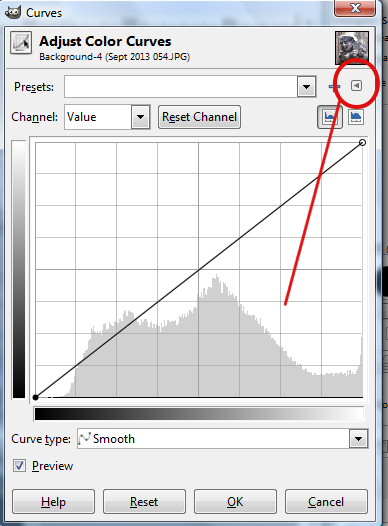
No issues. I extracted the files to my curves folder and I have just found out that when you click on the icon shown below, you can import the files and it opens your curves folder by default.

Image


Top
 Post subject: Re: 1st effort
PostPosted: Tue Dec 24, 2013 12:09 am  (#15) 
Offline
GimpChat Member
User avatar

Joined: Aug 30, 2012
Posts: 2174
Nice work on the tutorials Jess, I like the Gold one with the muted background.

_________________
Image


Top
Post new topic Reply to topic  [ 15 posts ] 

All times are UTC - 5 hours [ DST ]


* Login  


Powered by phpBB3 © phpBB Group