It is currently Thu Jun 04, 2026 6:05 am


All times are UTC - 5 hours [ DST ]


Post new topic Reply to topic  [ 4 posts ] 
Author Message
 Post subject: Rotating Color Wheel for color scheme ideals
PostPosted: Mon Jan 05, 2026 3:33 pm  (#1) 
Offline
GimpChat Member
User avatar

Joined: Jan 01, 2026
Posts: 434
Attachment:
color-wheel-03.jpg
color-wheel-03.jpg [ 224.7 KiB | Viewed 1780 times ]

It was one of my projects, maybe you could use it.
Simple to use. Select the layer (wheel) you want to use by making visible and hide the other layer wheel.

Press Shift + R to rotate the Wheel, keep holding down the Shift key while turn the layer. Pretty simple
to work. Then you can use your eye dropper to change your colors. The chart is on a 10"x10" image.
The blending modes is a 10% stepping curve for dark and light tone.
Attachment:
color-wheel-02.zip [1.69 MiB]
Downloaded 56 times

_________________
Image
Gimp 3.2.4 with Nik Collection and G'mic-QT
Windows 11 Pro with 32 Gigs of RAM
Intel(R) Core(TM) Ultra 7
Previous Paint Shop Pro User v9 - 2023


Share on Facebook Share on Twitter Share on Orkut Share on Digg Share on MySpace Share on Delicious Share on Technorati
Top
 Post subject: Re: Rotating Color Wheel for color scheme ideals
PostPosted: Mon Jan 05, 2026 10:10 pm  (#2) 
Offline
Global Moderator
User avatar

Joined: Apr 01, 2012
Posts: 8358
Location: On the other side of your screen
Very clever. :) Is it any different to this though, which gimp already has?
Image
The straight line takes you to the colour your after and the circle to the lightness or darkness of that colour - both of which can be moved by your cursor. Your foreground colour will change automatically to where you have your circle set. However if you want a different colour in this triangle you can use the colour picker provided in the tool options for this to change your foreground colour.

_________________
Image
Free Fun Photo Editing & resources
Poems from the Lord
Gimp Newby
Gimp version 3.2.0 and GMIC-Qt 3.7.5 OS :- Windows 10 Home 64


Top
 Post subject: Re: Rotating Color Wheel for color scheme ideals
PostPosted: Tue Jan 06, 2026 12:31 am  (#3) 
Offline
GimpChat Member
User avatar

Joined: Jan 01, 2026
Posts: 434
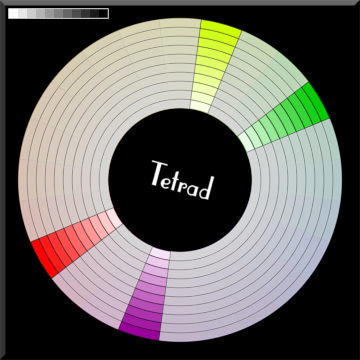
You get to select from 1 to four colors at a time in the proper color style; but the colors are fixed.
see the names of each color wheel. It was meant so I wouldn't have to guest about what color
idea I wanted to use before going a website and getting better tones and colors.
Attachment:
color-wheel-02.png
color-wheel-02.png [ 92.22 KiB | Viewed 1752 times ]


1st row
A tetrad color scheme is a color palette that consists of four colors arranged in two complementary pairs. This scheme is created by selecting colors that are evenly spaced around the color wheel, resulting in a vibrant and dynamic palette. Tetrad color schemes can add visual interest and balance to designs, making them effective for various applications in art and design.

2nd & 3rd row
A triad color scheme is a color harmony that uses three colors positioned at equal distances from each other on the color wheel, forming an equilateral triangle. This arrangement creates a dynamic and visually appealing combination that maintains balance while providing high contrast. The most common examples of triadic color schemes include:
Primary Colors: Red, Yellow, Blue
or
Secondary Colors: Orange, Green, Purple
Attachment:
color-scheme-01.png
color-scheme-01.png [ 5.31 KiB | Viewed 1752 times ]

_________________
Image
Gimp 3.2.4 with Nik Collection and G'mic-QT
Windows 11 Pro with 32 Gigs of RAM
Intel(R) Core(TM) Ultra 7
Previous Paint Shop Pro User v9 - 2023


Top
 Post subject: Re: Rotating Color Wheel for color scheme ideals
PostPosted: Tue Jan 06, 2026 10:52 am  (#4) 
Offline
GimpChat Member

Joined: Apr 11, 2024
Posts: 290
Nice one.
Thank you.


Top
Post new topic Reply to topic  [ 4 posts ] 

All times are UTC - 5 hours [ DST ]


* Login  


Powered by phpBB3 © phpBB Group
