It is currently Sun Jun 07, 2026 12:24 pm


All times are UTC - 5 hours [ DST ]


Post new topic Reply to topic  [ 4 posts ] 
Author Message
 Post subject: Google Nik Collection and Gimp 3.2 Error
PostPosted: Sat Mar 21, 2026 9:20 pm  (#1) 
Offline
GimpChat Member
User avatar

Joined: Jan 01, 2026
Posts: 452
Attachment:
Error Nik.jpg
Error Nik.jpg [ 946.51 KiB | Viewed 4681 times ]

The HDR Efex Pro 2, not working with Gimp 3.2, I'm using
windows 11 pro for the first time. I'm also in the process of moving from my old
windows 11 laptop to a new one. I was using Gimp 3.0.6, and believe it work
okay. All the other ones in the collection work like they should, with no problem.

Once you save the effect you want, it saves it to your documents and
the plug-ins fails to load it in gimp. Anybody know if there is a fix for it?

_________________
Image
Gimp 3.2.4 with Nik Collection and G'mic-QT
Windows 11 Pro with 32 Gigs of RAM
Intel(R) Core(TM) Ultra 7
Previous Paint Shop Pro User v9 - 2023


Share on Facebook Share on Twitter Share on Orkut Share on Digg Share on MySpace Share on Delicious Share on Technorati
Top
 Post subject: Re: Google Nik Collection and Gimp 3.2 Error
PostPosted: Sun Jun 07, 2026 6:52 am  (#2) 
Offline
GimpChat Member
User avatar

Joined: Jan 01, 2026
Posts: 452
.....

_________________
Image
Gimp 3.2.4 with Nik Collection and G'mic-QT
Windows 11 Pro with 32 Gigs of RAM
Intel(R) Core(TM) Ultra 7
Previous Paint Shop Pro User v9 - 2023


Top
 Post subject: Re: Google Nik Collection and Gimp 3.2 Error
PostPosted: Sun Jun 07, 2026 8:44 am  (#3) 
Offline
Global Moderator
User avatar

Joined: Apr 01, 2012
Posts: 8361
Location: On the other side of your screen
Check out this post and see if it helps. viewtopic.php?f=33&t=21597&p=296105&hilit=+Google+Nik+#p296105

_________________
Image
Free Fun Photo Editing & resources
Poems from the Lord
Gimp Newby
Gimp version 3.2.0 and GMIC-Qt 3.7.5 OS :- Windows 10 Home 64


Top
 Post subject: Re: Google Nik Collection and Gimp 3.2 Error
PostPosted: Sun Jun 07, 2026 9:52 am  (#4) 
Offline
GimpChat Member
User avatar

Joined: Jan 13, 2011
Posts: 2638
Location: Poland
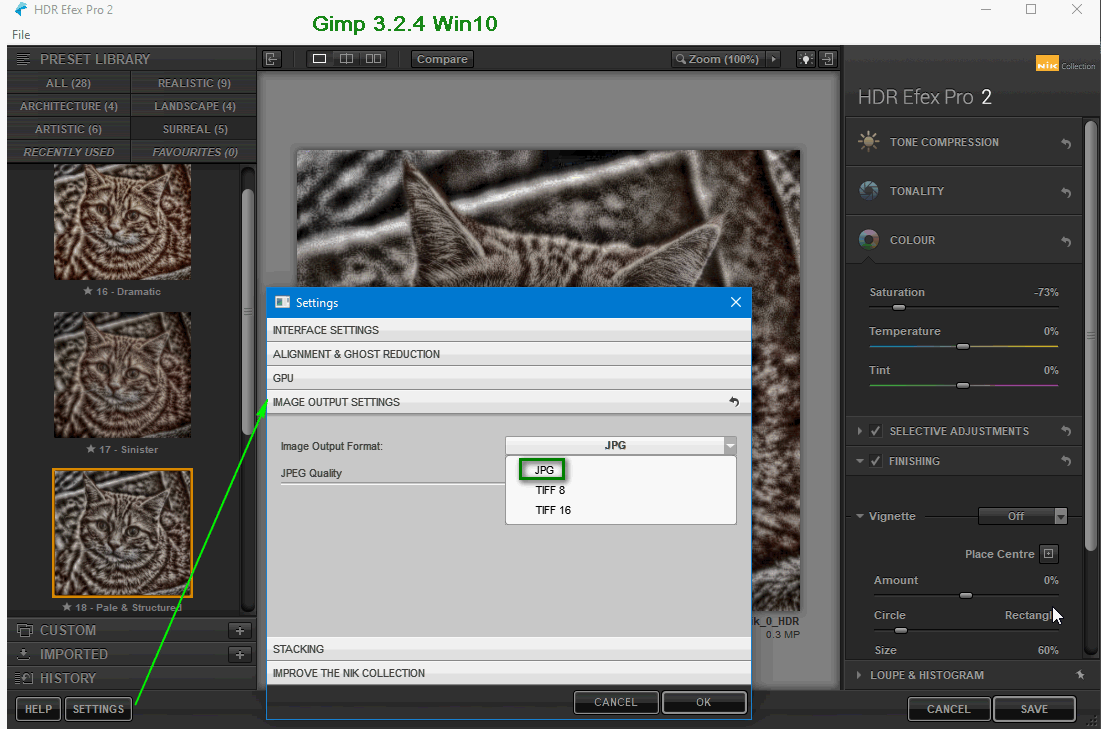
First of all, have you checked your settings?

Image

_________________
Image


Top
Post new topic Reply to topic  [ 4 posts ] 

All times are UTC - 5 hours [ DST ]


* Login  


Powered by phpBB3 © phpBB Group