It is currently Thu Jun 04, 2026 8:32 am


All times are UTC - 5 hours [ DST ]


Post new topic Reply to topic  [ 14 posts ] 
Author Message
 Post subject: 400x 400 steampunk sepia pattern
PostPosted: Sun Nov 27, 2011 7:04 am  (#1) 
Offline
GimpChat Member

Joined: Apr 12, 2010
Posts: 5870

_________________
My 3D Gallery on Deviantart http://photocomix2.deviantart.com/
Main gallery http://www.flickriver.com/photos/photocomix-mandala/
Mandala and simmetry http://www.flickriver.com/photos/photocomix_mandala/

Image

Mrs Wilbress


Last edited by PhotoComix on Sun Nov 27, 2011 9:59 am, edited 2 times in total.

Share on Facebook Share on Twitter Share on Orkut Share on Digg Share on MySpace Share on Delicious Share on Technorati
Top
 Post subject: Re: 400x 400 steampunk sepia pattern
PostPosted: Sun Nov 27, 2011 7:11 am  (#2) 
Offline
GimpChat Member
User avatar

Joined: Apr 07, 2010
Posts: 14182
I love the sepia PC, think I will steal that one. :teeth thanks for sharing

_________________
Image


Top
 Post subject: Re: 400x 400 steampunk sepia pattern
PostPosted: Sun Nov 27, 2011 7:17 am  (#3) 
Offline
Global Moderator
User avatar

Joined: May 16, 2010
Posts: 16009
Nice! :)
Thanks PC.
Is this a new GMIC filter setting in one of your filters?
If so where do i locate it?

Thanks again.

_________________
Image


Top
 Post subject: Re: 400x 400 steampunk sepia pattern
PostPosted: Sun Nov 27, 2011 9:56 am  (#4) 
Offline
GimpChat Member

Joined: Apr 12, 2010
Posts: 5870
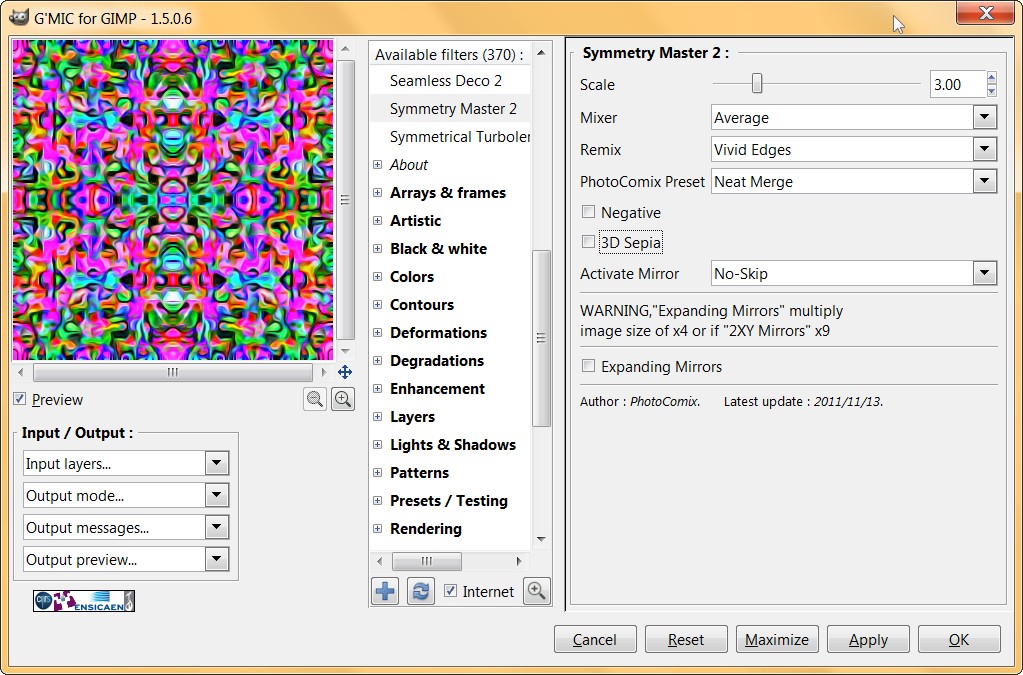
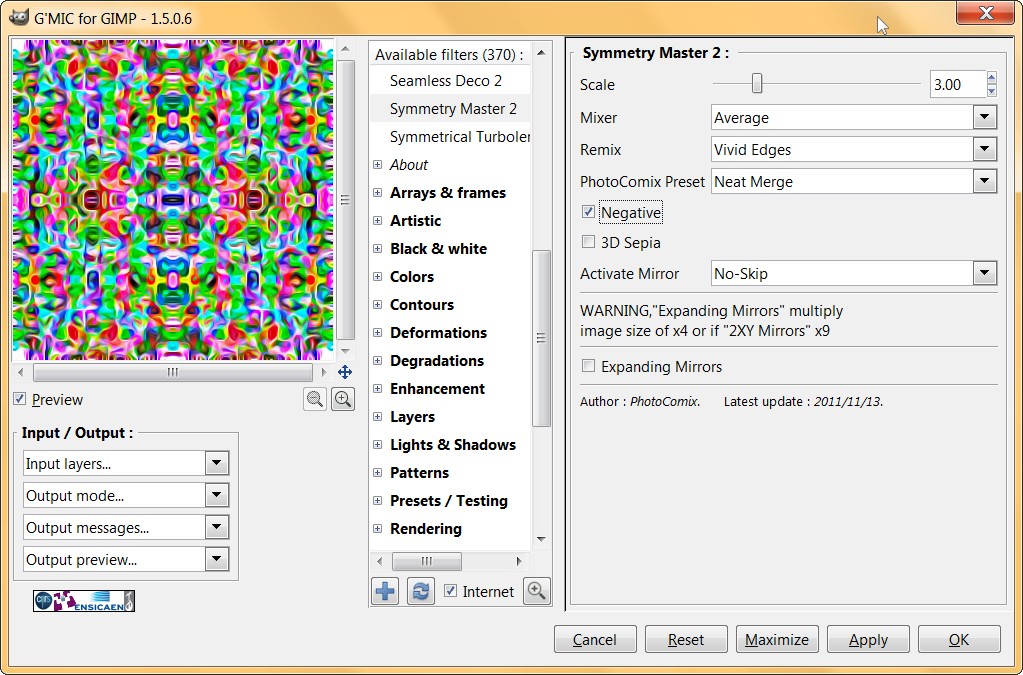
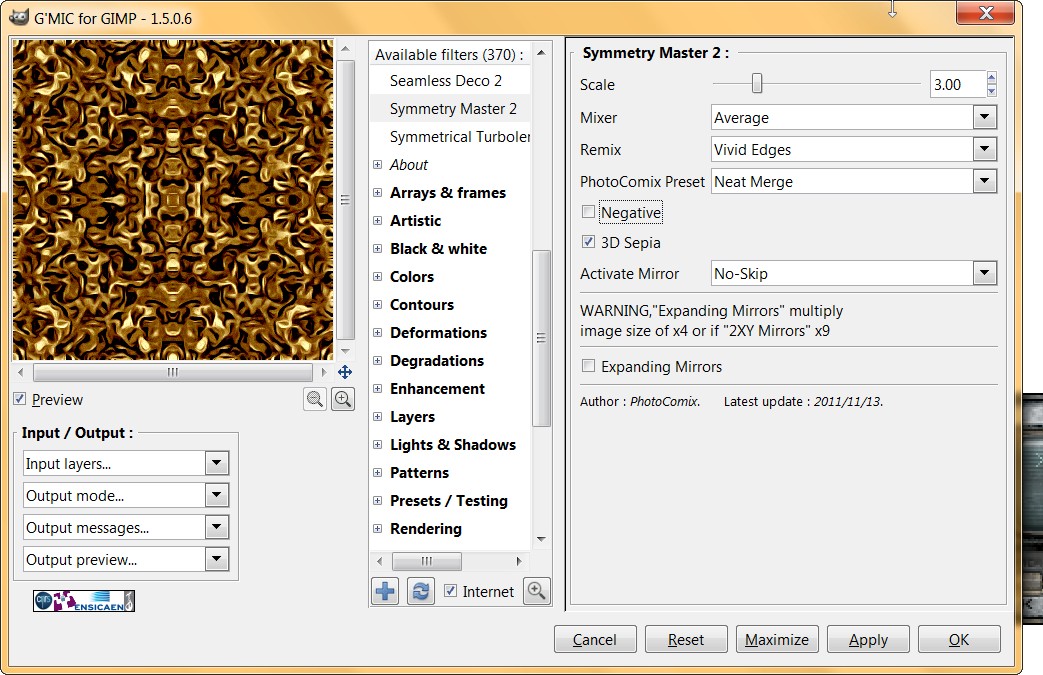
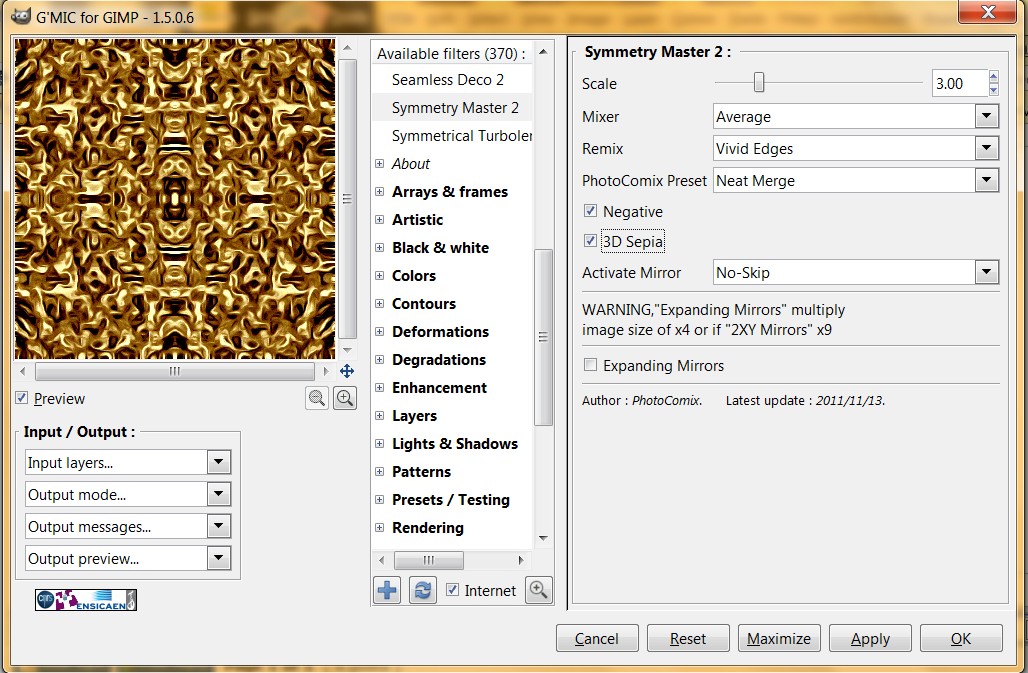
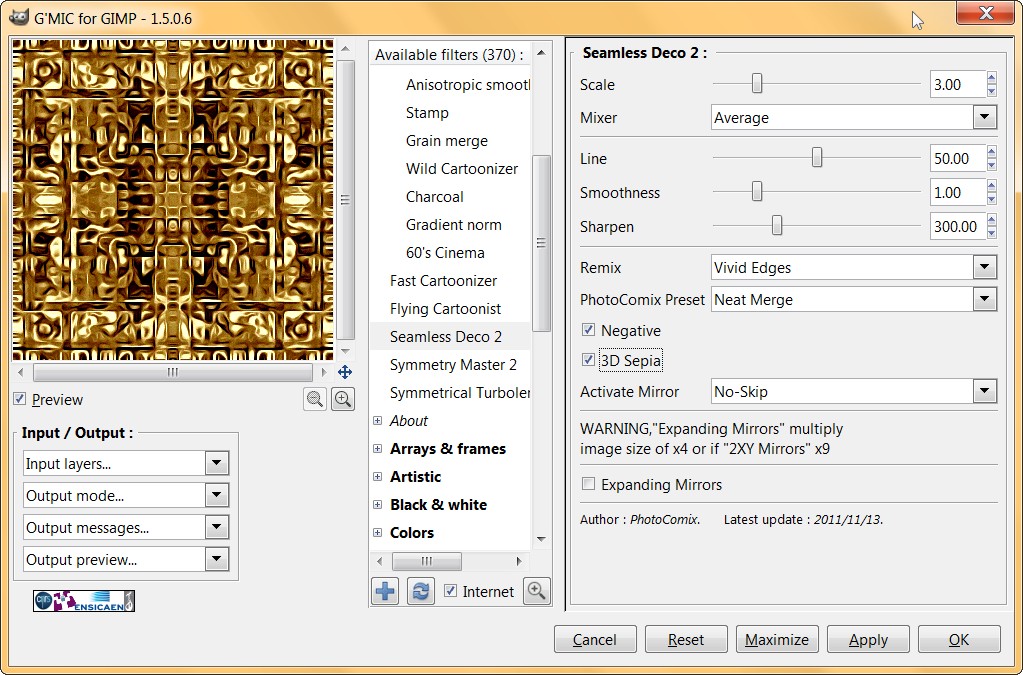
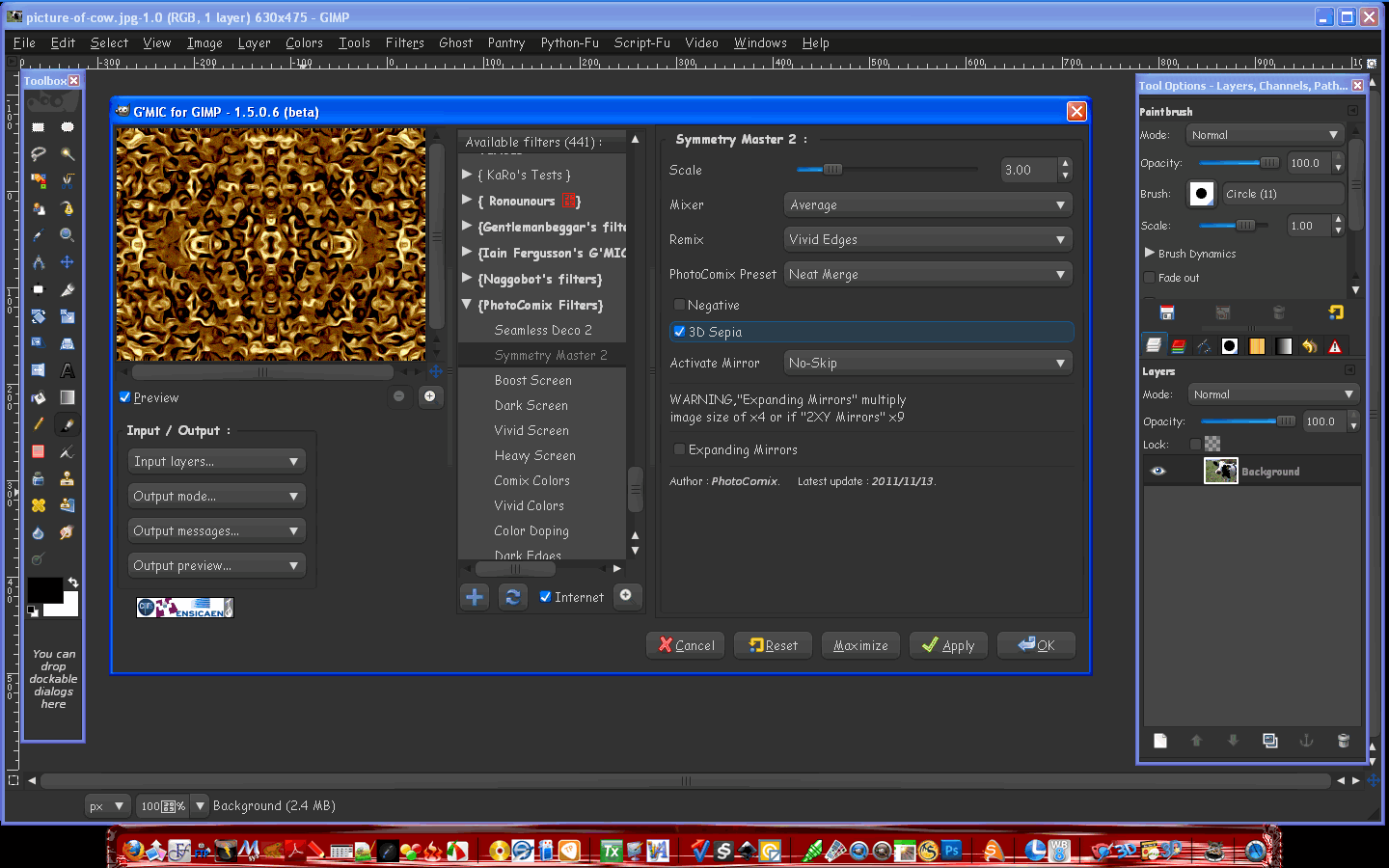
yes Rod i added 2 new options "Negative" and "3D sepia" to "Seamless Deco" and "Symmetry Masters"

here the effect of the new option

NORMAL

Image

NEGATIVE

Image

3D Sepia

Image

NEGATIVE + 3D Sepia

Image

That was Symmetry Master but is the same for Seamless Deco

Image

BUT I DIDN?T UPLOAD YET i want check if all the presets works (in the option "PhotoComix preset" )

Humm.. that is a bit difficult to test because i already know they work on my PC the point is be sure they will work on the others,,,anyway if somebody want to try now i may paste the code
I changed function name so it would not conflict with the older version (i think it will replace the older version but i want leave a bit of time ,in case someone as presets to adapt to the new version.
(in case adapt preset it is very easy...but too lazy now to write a not requested how to )

_________________
My 3D Gallery on Deviantart http://photocomix2.deviantart.com/
Main gallery http://www.flickriver.com/photos/photocomix-mandala/
Mandala and simmetry http://www.flickriver.com/photos/photocomix_mandala/

Image

Mrs Wilbress


Top
 Post subject: Re: 400x 400 steampunk sepia pattern
PostPosted: Sun Nov 27, 2011 10:02 am  (#5) 
Offline
GimpChat Member

Joined: Apr 12, 2010
Posts: 5870
For the impatient here the code


###############################################################
#@gimp  Seamless Deco 2 : gimp_mad_rorscharchp2,gimp_mad_rorscharchp2
#@gimp : Scale = float(3,0,15)
#@gimp : Mixer = choice ("Average","Grain Extract","Vivid Edges","Difference", "Exclusion"," Negation")
#@gimp : sep = separator()
#@gimp : Line = float(50,0,100)
#@gimp : Smoothness = float(1,0,5)
#@gimp : Sharpen = float(300,0,1000)
#@gimp : sep = separator()
#
#@gimp : Remix = choice ( "Vivid Edges", "Average", "Difference","Negation","Dark Edges")
#@gimp : PhotoComix Preset = choice( "Neat Merge","Lighty Smooth","Dream","Moody" "Soft","Naif","Dark Boost","Whitening"," None- Skip" )
#@gimp : Negative = bool(0)
#@gimp : 3D Sepia = bool(0)

#@gimp : Activate Mirror = choice ("No-Skip","XY Mirror","2XY Mirror")

#@gimp : sep = separator()
#@gimp : note = note("WARNING,"Expanding Mirrors" multiply image size of x4 or if "2XY Mirrors" x9")
#@gimp : sep = separator()
#@gimp : Expanding Mirrors = bool(0)
#@gimp : sep = separator(), note = note("<small>Author : <i>PhotoComix</i>.      Latest update : <i>2011/11/13</i>.</small>")

gimp_mad_rorscharchp2 :
-gimp_rorschach $1,1,1
--mirror y
-if {$2==0} -gimp_compose_average 1,0
-elif {$2==1} -gimp_compose_grainextract 1,0
-elif {$2==1} -gimp_compose_vividedges 1,1,0.5,1 -endif

--gimp_plaid_texture $3,2,0,90,$4,$5
-if {$6==0} -gimp_compose_vividedges 1,1,0.5,1
-elif {$6==1} -gimp_compose_average 1,0
-elif {$6==2} -gimp_compose_difference 1,0
-elif {$6==3} -gimp_compose_negation 1,0
-elif {$6==4} -gimp_compose_negation 1,0
-elif {$6==5} -gimp_compose_darkedges 1,1,0.8,1 -endif

-if {$7==0} -gimp_graphic_novelfxl 0,2,6,5,20,0,0.62,14,0,1,0.5,0.78,1.92,0,0,12,1,1,1,0.5,0.8,1.28,1.25,2,0,0.15,14,0,1,0.5,0.45,2,0,1,0,1,1,1,0.5,0.45,1
-elif {$7==1}-gimp_graphic_novelfxl 0,7.2,14.65,5,20,0,1.06,36.14,0,1,0.5,0.85,1.93,0,0,8,1,1,1,0.5,0.95,2.89,1.25,2,0,0.15,14,0,1,0.5,0.45,2,0,1,0,1,1,1,0.5,0.45,1
-elif {$7==2} -gimp_graphic_novelfxl 0,7.22892,14.6506,5,20,0,1.6,36.1,0,1,0.5,0.6,3.6,0,0,11,1,1,1,0.5,0.8,2.16,1.25,2,0,0.15,14,0,1,0.5,0.45,2,0,1,7,1,1,1,0.5,0.45,1
-elif {$7==3}  -gimp_graphic_novelfxl 0,7.22892,14.6506,5,20,0,1.59036,36.1446,0,1,0.5,0.590361,3.61446,0,1,17,1,1,1,0.5,0.795181,2.16867,1.25,2,0,0.15,14,0,1,0.5,0.45,2,0,1,7,1,1,1,0.5,0.45,1
-elif {$7==4} -gimp_graphic_novelfxl 0,7.22892,14.6506,5,20,0,1.59036,36.1446,0,1,0.5,0.855422,1.92771,0,0,8,1,1,1,0.5,0.373494,2.89157,1.25,2,0,0.15,14,0,1,0.5,0.45,2,0,1,0,1,1,1,0.5,0.45,1
-elif {$7==5} -gimp_graphic_novelfxl 1,7.22892,14.6506,5,20,0,1.06024,14,0,1,0.5,0.855422,1.3253,0,0,12,1,1,1,0.5,0.8,1.28,1.25,2,0,0.15,14,0,1,0.5,0.45,2,0,1,0,1,1,1,0.5,0.45,1
-elif {$7==6} -gimp_graphic_novelfxl 1,7.22892,14.6506,5,20,0,1.06024,36.1446,0,1,0.5,0.855422,1.92771,0,0,7,1,1,1,0.5,0.951807,1.92771,1.25,2,0,0.15,14,0,1,0.5,0.45,2,0,1,0,1,1,1,0.5,0.45,1
-elif {$7==7} -gimp_graphic_novelfxl 1,7.22892,14.6506,5,20,0,1.59036,36.1446,0,1,0.5,0.590361,3.61446,0,1,18,1,1,1,0.5,0.795181,2.16867,1.25,2,0,0.15,14,0,1,0.5,0.45,2,0,1,0,1,1,1,0.5,0.45,1 -endif
-if {$8==1} -negative -endif
-if {$9==1} -gimp_cfx 10,0,0,0,0,0 -endif

-if {$10==1} -gimp_array_mirror 1,0,0,2,0,$11
-elif {$10==2} -gimp_array_mirror 1,0,0,3,0,$11 -endif

##########################################################################
####################    SYMMETRY MASTER    ###############################
##########################################################################

#@gimp  Symmetry Master 2: gimp_viralx,gimp_viralx
#@gimp : Scale = float(3,0,15)
#@gimp : Mixer = choice ("Average","Grain Extract","Vivid Edges","Difference", "Exclusion"," Negation")

#
#@gimp : Remix = choice ( "Vivid Edges", "Average", "Difference","Negation","Dark Edges")
#@gimp : PhotoComix Preset = choice( "Neat Merge","Lighty Smooth","Dream","Moody","Soft","Naif","Dark Boost","Whitening"," None- Skip" )
#@gimp : Negative = bool(0)
#@gimp : 3D Sepia = bool(0)
#@gimp : Activate Mirror = choice ("No-Skip", XY Mirror"," 2XY Mirror")

#@gimp : sep = separator()
#@gimp : note = note("WARNING,"Expanding Mirrors" multiply image size of x4 or if "2XY Mirrors" x9")
#@gimp : sep = separator()
#@gimp : Expanding Mirrors = bool(0)
#@gimp : sep = separator(), note = note("<small>Author : <i>PhotoComix</i>.      Latest update : <i>2011/11/13</i>.</small>")


gimp_viralx :
-gimp_rorschach $1,1,1
--mirror y
-if {$2==0} -gimp_compose_average 1,0
-elif {$2==1} -gimp_compose_grainextract 1,0
-elif {$2==1} -gimp_compose_vividedges 1,1,0.5,1 -endif

--gimp_array_mirror 1,0,0,2,0,0
-if {$3==0} -gimp_compose_vividedges 1,1,0.5,1
-elif {$3==1} -gimp_compose_average 1,0
-elif {$3==2} -gimp_compose_difference 1,0
-elif {$3==3} -gimp_compose_negation 1,0
-elif {$3==4} -gimp_compose_negation 1,0
-elif {$3==5} -gimp_compose_darkedges 1,1,0.8,1 -endif

-if {$4==0} -gimp_graphic_novelfxl 0,2,6,5,20,0,0.62,14,0,1,0.5,0.78,1.92,0,0,12,1,1,1,0.5,0.8,1.28,1.25,2,0,0.15,14,0,1,0.5,0.45,2,0,1,0,1,1,1,0.5,0.45,1
-elif {$4==1}-gimp_graphic_novelfxl 0,7.2,14.65,5,20,0,1.06,36.14,0,1,0.5,0.85,1.93,0,0,8,1,1,1,0.5,0.95,2.89,1.25,2,0,0.15,14,0,1,0.5,0.45,2,0,1,0,1,1,1,0.5,0.45,1
-elif {$4==2} -gimp_graphic_novelfxl 0,7.22892,14.6506,5,20,0,1.6,36.1,0,1,0.5,0.6,3.6,0,0,11,1,1,1,0.5,0.8,2.16,1.25,2,0,0.15,14,0,1,0.5,0.45,2,0,1,7,1,1,1,0.5,0.45,1
-elif {$4==3}  -gimp_graphic_novelfxl 0,7.22892,14.6506,5,20,0,1.59036,36.1446,0,1,0.5,0.590361,3.61446,0,1,17,1,1,1,0.5,0.795181,2.16867,1.25,2,0,0.15,14,0,1,0.5,0.45,2,0,1,7,1,1,1,0.5,0.45,1
-elif {$4==4} -gimp_graphic_novelfxl 0,7.22892,14.6506,5,20,0,1.59036,36.1446,0,1,0.5,0.855422,1.92771,0,0,8,1,1,1,0.5,0.373494,2.89157,1.25,2,0,0.15,14,0,1,0.5,0.45,2,0,1,0,1,1,1,0.5,0.45,1
-elif {$4==5} -gimp_graphic_novelfxl 1,7.22892,14.6506,5,20,0,1.06024,14,0,1,0.5,0.855422,1.3253,0,0,12,1,1,1,0.5,0.8,1.28,1.25,2,0,0.15,14,0,1,0.5,0.45,2,0,1,0,1,1,1,0.5,0.45,1
-elif {$4==6} -gimp_graphic_novelfxl 1,7.22892,14.6506,5,20,0,1.06024,36.1446,0,1,0.5,0.855422,1.92771,0,0,7,1,1,1,0.5,0.951807,1.92771,1.25,2,0,0.15,14,0,1,0.5,0.45,2,0,1,0,1,1,1,0.5,0.45,1
-elif {$4==7} -gimp_graphic_novelfxl 1,7.22892,14.6506,5,20,0,1.59036,36.1446,0,1,0.5,0.590361,3.61446,0,1,18,1,1,1,0.5,0.795181,2.16867,1.25,2,0,0.15,14,0,1,0.5,0.45,2,0,1,0,1,1,1,0.5,0.45,1 -endif

-if {$5==1} -negative -endif
-if {$6==1} -gimp_cfx 10,0,0,0,0,0 -endif

-if {$7==1} -gimp_array_mirror 1,0,0,2,0,$6
-elif {$6==2} -gimp_array_mirror 1,0,0,3,0,$6 -endif


_________________
My 3D Gallery on Deviantart http://photocomix2.deviantart.com/
Main gallery http://www.flickriver.com/photos/photocomix-mandala/
Mandala and simmetry http://www.flickriver.com/photos/photocomix_mandala/

Image

Mrs Wilbress


Top
 Post subject: Re: 400x 400 steampunk sepia pattern
PostPosted: Sun Nov 27, 2011 2:04 pm  (#6) 
Offline
GimpChat Member
User avatar

Joined: Apr 08, 2010
Posts: 5420
Location: Northwest Ohio
where do I put the code? And is gmic 1.5.0.6. going to work on a mac...and perhaps someone like Akky would know how to download and install and what to do about earlier versions?


Top
 Post subject: Re: 400x 400 steampunk sepia pattern
PostPosted: Sun Nov 27, 2011 2:12 pm  (#7) 
Offline
GimpChat Member
User avatar

Joined: Oct 06, 2010
Posts: 4050
That is a filter and it goes in the .gmic file.

_________________
"In order to attain the impossible, one must attempt the absurd."
~ Miguel de Cervantes


Top
 Post subject: Re: 400x 400 steampunk sepia pattern
PostPosted: Sun Nov 27, 2011 2:57 pm  (#8) 
Offline
GimpChat Member
User avatar

Joined: Apr 08, 2010
Posts: 5420
Location: Northwest Ohio
I have never put anything into the >plugin>gmic_gimp file...I am not yet knowledgeable about my mac files system.


Top
 Post subject: Re: 400x 400 steampunk sepia pattern
PostPosted: Sun Nov 27, 2011 7:46 pm  (#9) 
Offline
GimpChat Member

Joined: Apr 12, 2010
Posts: 5870
sorry i can't help for mac but Rod wrote a tut for all OS must be in the tutorial board

is quite simple but you must NOT add a file to a folder, the only thing to see is how save a file with a dot before the name ("should be just ".gmic" ) and were exactly

..but both are covered

anyway i will upload soon i just want be sure about the presets

_________________
My 3D Gallery on Deviantart http://photocomix2.deviantart.com/
Main gallery http://www.flickriver.com/photos/photocomix-mandala/
Mandala and simmetry http://www.flickriver.com/photos/photocomix_mandala/

Image

Mrs Wilbress


Top
 Post subject: Re: 400x 400 steampunk sepia pattern
PostPosted: Mon Nov 28, 2011 4:58 am  (#10) 
Offline
Global Moderator
User avatar

Joined: May 16, 2010
Posts: 16009
I put it in the photoComix file.
looks good in Windows xp PC.(Gimp-2.6.11)

Image

_________________
Image


Top
 Post subject: Re: 400x 400 steampunk sepia pattern
PostPosted: Mon Nov 28, 2011 5:49 am  (#11) 
Offline
GimpChat Member
User avatar

Joined: Apr 09, 2011
Posts: 1764
2 ton I have it working on my Mac OS X 10.6.8

(GMIC 1.5.0.6 that is)


Top
 Post subject: Re: 400x 400 steampunk sepia pattern
PostPosted: Mon Nov 28, 2011 6:23 am  (#12) 
Offline
GimpChat Member

Joined: Apr 12, 2010
Posts: 5870
@Rod
that is a temporary solution if your PC is connected to the net, all ".gmic" files (except .,gmic) are overwritten during filters updates

_________________
My 3D Gallery on Deviantart http://photocomix2.deviantart.com/
Main gallery http://www.flickriver.com/photos/photocomix-mandala/
Mandala and simmetry http://www.flickriver.com/photos/photocomix_mandala/

Image

Mrs Wilbress


Top
 Post subject: Re: 400x 400 steampunk sepia pattern
PostPosted: Wed Nov 30, 2011 10:09 pm  (#13) 
Offline
GimpChat Member
User avatar

Joined: Apr 08, 2010
Posts: 5420
Location: Northwest Ohio
Akky, is your version new enough to do those updates where the new filters add themselves? Mine is just old enough to not do them. And I do not know where to put the new version...if it will just overwrite the old version or not. Does the mac need a special compiled version? I forgot how I installed the gmic that I have now, I also do not know where to put .gmic files. If you know any of these answers, that would be awesome.


Top
 Post subject: Re: 400x 400 steampunk sepia pattern
PostPosted: Thu Dec 01, 2011 3:42 am  (#14) 
Offline
GimpChat Member

Joined: Apr 12, 2010
Posts: 5870
it is more simple of what you fear
you may overwrite the old files
and you have not to worry for the .gmic files they are created automatically by the first filter refresh

except the gmic file (now WITHOUT dot) that is your own , that is optional and is to handle filters that are not in the sources

_________________
My 3D Gallery on Deviantart http://photocomix2.deviantart.com/
Main gallery http://www.flickriver.com/photos/photocomix-mandala/
Mandala and simmetry http://www.flickriver.com/photos/photocomix_mandala/

Image

Mrs Wilbress


Top
Post new topic Reply to topic  [ 14 posts ] 

All times are UTC - 5 hours [ DST ]


* Login  


Powered by phpBB3 © phpBB Group