It is currently Thu Jun 04, 2026 8:31 am


All times are UTC - 5 hours [ DST ]


Post new topic Reply to topic  [ 32 posts ]  Go to page Previous  1, 2
Author Message
 Post subject: Re: FONTS
PostPosted: Wed Jun 30, 2010 6:11 am  (#21) 
Offline
GimpChat Member

Joined: Jun 28, 2010
Posts: 61
NVM guys found it ^^

_________________
Image


Top
 Post subject: Re: FONTS
PostPosted: Wed Jun 30, 2010 9:09 pm  (#22) 
Offline
GimpChat Member
User avatar

Joined: Apr 08, 2010
Posts: 5420
Location: Northwest Ohio
O!!!! how did you make the current 'o'? It's quite awesome.


Top
 Post subject: Re: FONTS
PostPosted: Wed Jun 30, 2010 10:37 pm  (#23) 
Offline
Retired Staff
User avatar

Joined: May 22, 2008
Posts: 6946
Location: Somewhere in GIMP
2-ton wrote:
O!!!! how did you make the current 'o'? It's quite awesome.
This tutorial in Gimpology.

Link

_________________
Image
World War IV will be fought with sticks and stones. - Albert Einstein


Top
 Post subject: Re: FONTS
PostPosted: Wed Jun 30, 2010 10:48 pm  (#24) 
Offline
Global Moderator
User avatar

Joined: May 16, 2010
Posts: 16009
WINDOWS XP BUNDLE ONLY...
2.6.9 is supposed to be stable, but is still a little buggy with the combo boxes,
You can use the wheel mouse to select, gradients,font types,brushes, and ect...just dont use the scroll arrows or it will crash.
i am still waiting on a follow up email from bugzilla on a change in the dl bundle.
you may want to wait until they fix it in the master or you can dl it here.
http://downloads.sourceforge.net/gimp-w ... -setup.exe
remember to place it in a new program directory (not in 2.0 where 2.6.8 is).
i placed mine in its own directory (2.6.9) and everything works great except the selector scrollbars.
just dont click on the up or down arrows in the selector windows,
and youll be ok.however with 2.6.9 if your working on something critical, id save quite often just to be safe.

_________________
Image


Top
 Post subject: Re: FONTS
PostPosted: Thu Jul 01, 2010 9:55 pm  (#25) 
Offline
GimpChat Member
User avatar

Joined: Apr 08, 2010
Posts: 5420
Location: Northwest Ohio
Thanks for the link.


Top
 Post subject: Re: FONTS
PostPosted: Mon Jan 23, 2012 1:34 pm  (#26) 
Offline
GimpChat Member
User avatar

Joined: Sep 24, 2010
Posts: 12775
Just noticed this cool font at Sourceforge called Dark Garden. Thought it was cool enough to share. And, yes, I added my own tweaks to the result of this font. lol

:)


Attachments:
dg.png
dg.png [ 189.39 KiB | Viewed 1947 times ]

_________________
Lyle

Psalm 109:8

Image
Top
 Post subject: Re: FONTS
PostPosted: Mon Jan 23, 2012 1:44 pm  (#27) 
Offline
GimpChat Member
User avatar

Joined: Aug 24, 2011
Posts: 1785
Location: Dallas, TX
That is a really cool looking font Lyle. I like what you did with it.


(just what I need.....another font.......sigh)

_________________
Image


Top
 Post subject: Re: FONTS
PostPosted: Mon Jan 23, 2012 1:48 pm  (#28) 
Offline
GimpChat Member
User avatar

Joined: Sep 24, 2010
Posts: 12775
I can see a cool flame result with this font in future renders. I normally don't really care about fonts and have few additional ones (other then the ones that get installed by Adobe, Windows, or Word). I do have the stroke fonts that Ofnuts shared with us a while back too. :)

_________________
Lyle

Psalm 109:8

Image


Top
 Post subject: Re: FONTS
PostPosted: Mon Jan 23, 2012 2:10 pm  (#29) 
Offline
GimpChat Member
User avatar

Joined: Jul 04, 2010
Posts: 2253
Location: Retired Moderator Slowly Returning to the Living.
I love the Dark Garden! I also love the Queen banner!

_________________
Artists aren't crazy! We're eccentric! ~G.M. Ross

Image

My Sigs = My Photos
Check out my work at http://www.flickr.com/photos/photomastergreg.


Top
 Post subject: Re: FONTS
PostPosted: Tue Jan 24, 2012 8:12 am  (#30) 
Offline
GimpChat Member
User avatar

Joined: Aug 24, 2011
Posts: 1785
Location: Dallas, TX
I have so many fonts I get really tired of searching for the one I want or can't remember the exact name so As I began to acquire more and more I realized I needed some way to view them easily so I just made a jpeg with a bunch of them and used the font name as the text. Here's a collection of jpegs for most of the non-standard ones I have. Some are quite large so I zipped 'em up for ya.

I do the same for dingbats so I can tell at a glance which one I need. Great for viewing all the brushes in a brush pack as well.


Attachments:
Kitra A brushes.jpg
Kitra A brushes.jpg [ 459.95 KiB | Viewed 1927 times ]
Cool Fonts.7z [1.51 MiB]
Downloaded 362 times

_________________
Image
Top
 Post subject: Re: FONTS
PostPosted: Tue Jan 24, 2012 7:09 pm  (#31) 
Offline
GimpChat Member

Joined: Mar 29, 2011
Posts: 346
Location: Wisconsin
I made crib sheets like that for a while, then I found some good font viewers/organizers.
The one I currently use is NexusFont (Windows only).
http://xiles.net/nexusfont/

_________________
Image


Top
 Post subject: Re: FONTS
PostPosted: Wed Jan 25, 2012 6:02 pm  (#32) 
Offline
Global Moderator
User avatar

Joined: May 16, 2010
Posts: 16009
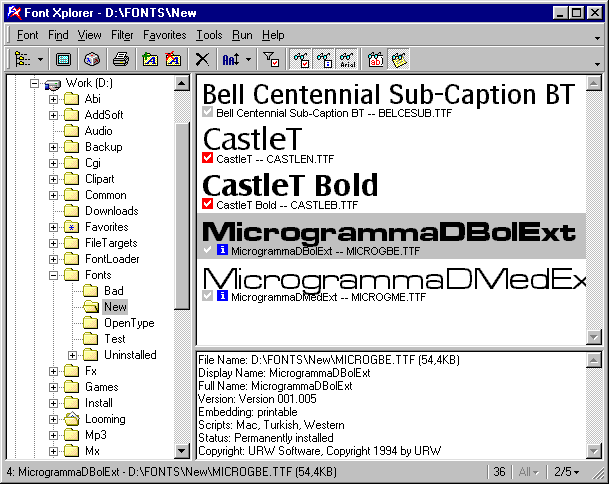
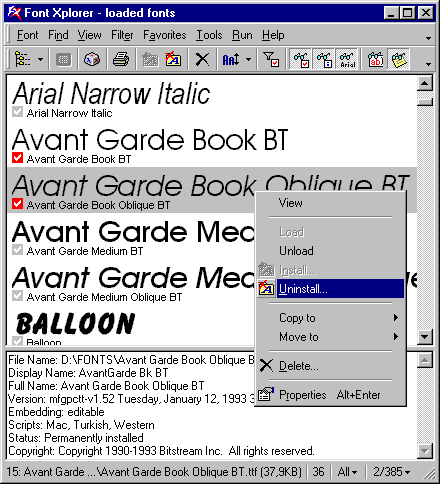
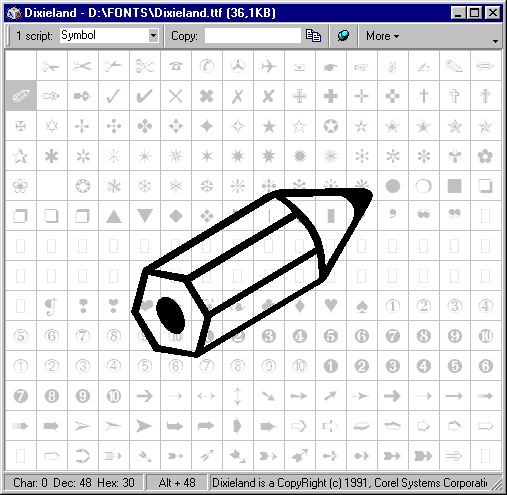
The one i use - freeware and also for windows only.Windows Vista and 7 not supported.
http://www.moonsoftware.com/fxplorer.asp

Image

Image

Image

Direct download link
http://www.moonsoftware.com/getfile.asp?fxfull

_________________
Image


Top
Post new topic Reply to topic  [ 32 posts ]  Go to page Previous  1, 2

All times are UTC - 5 hours [ DST ]


* Login  


Powered by phpBB3 © phpBB Group