It is currently Thu Jun 04, 2026 10:01 am


All times are UTC - 5 hours [ DST ]


Post new topic Reply to topic  [ 13 posts ] 
Author Message
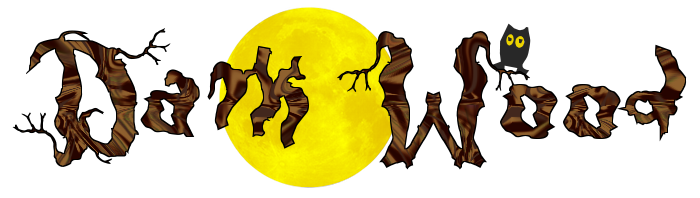
 Post subject: Darkwood - a cool Halloween font
PostPosted: Mon Oct 24, 2011 11:16 pm  (#1) 
Offline
Retired Staff
User avatar

Joined: May 22, 2008
Posts: 6946
Location: Somewhere in GIMP
Image

http://www.dafont.com/darkwood.font


________________
Image


Share on Facebook Share on Twitter Share on Orkut Share on Digg Share on MySpace Share on Delicious Share on Technorati
Top
 Post subject: Re: Darkwood - a cool Halloween font
PostPosted: Mon Oct 24, 2011 11:20 pm  (#2) 
Offline
Global Moderator
User avatar

Joined: May 16, 2010
Posts: 16009
Now that's a nice creepy Halloween type font face! :)

Thanks O!

_________________
Image


Top
 Post subject: Re: Darkwood - a cool Halloween font
PostPosted: Tue Oct 25, 2011 6:35 am  (#3) 
Offline
GimpChat Member

Joined: Apr 12, 2010
Posts: 5870
Nice found !

_________________
My 3D Gallery on Deviantart http://photocomix2.deviantart.com/
Main gallery http://www.flickriver.com/photos/photocomix-mandala/
Mandala and simmetry http://www.flickriver.com/photos/photocomix_mandala/

Image

Mrs Wilbress


Top
 Post subject: Re: Darkwood - a cool Halloween font
PostPosted: Tue Oct 25, 2011 7:20 am  (#4) 
Offline
GimpChat Member
User avatar

Joined: Apr 07, 2010
Posts: 14182
As PC says...nice found...love the owl on the branch too.

_________________
Image


Top
 Post subject: Re: Darkwood - a cool Halloween font
PostPosted: Tue Oct 25, 2011 7:56 am  (#5) 
Offline
Retired Staff
User avatar

Joined: May 22, 2008
Posts: 6946
Location: Somewhere in GIMP
molly wrote:
love the owl on the branch too.
Glad you all like the font.

Molly, that owl is from the sbhading font - the lower case "k."

http://www.fontpark.net/en/font/sbhading/

________________
Image


Top
 Post subject: Re: Darkwood - a cool Halloween font
PostPosted: Tue Oct 25, 2011 9:59 am  (#6) 
Offline
GimpChat Founder
User avatar

Joined: May 22, 2008
Posts: 5241
Location: Gimpville
Perfect Halloween font!!

_________________
“If you reach for the stars, you just might land on a decently sized hill.” - Stuart Hill


Top
 Post subject: Re: Darkwood - a cool Halloween font
PostPosted: Wed Oct 26, 2011 8:57 am  (#7) 
Offline
GimpChat Member
User avatar

Joined: Aug 24, 2011
Posts: 1785
Location: Dallas, TX
Perfect Halloween font O. Here's a good tree bark pattern I think goes with it well. (of course you can scale it now)

I did a little bump and sharpen to make it stand out a bit better.


Attachments:
darkwood.png
darkwood.png [ 125.19 KiB | Viewed 5340 times ]
tree bark.pat [358.92 KiB]
Downloaded 154 times

_________________
Image
Top
 Post subject: Re: Darkwood - a cool Halloween font
PostPosted: Wed Oct 26, 2011 8:59 am  (#8) 
Offline
Retired Staff
User avatar

Joined: May 22, 2008
Posts: 6946
Location: Somewhere in GIMP
Draconian wrote:
Here's a good tree bark pattern I think goes with it well. (of course you can scale it now)
Very nice, Drraco. Don't you just love that pattern shrinking script? Have found several uses for it already. :hi5

_________________
Image
World War IV will be fought with sticks and stones. - Albert Einstein


Top
 Post subject: Re: Darkwood - a cool Halloween font
PostPosted: Wed Oct 26, 2011 9:02 am  (#9) 
Offline
GimpChat Member
User avatar

Joined: Aug 24, 2011
Posts: 1785
Location: Dallas, TX
Alex?

BTW...where does scale-pattern.scm show up? I couldn't find it even when I looked in plug-in browser under help.

_________________
Image


Top
 Post subject: Re: Darkwood - a cool Halloween font
PostPosted: Wed Oct 26, 2011 9:08 am  (#10) 
Offline
Retired Staff
User avatar

Joined: May 22, 2008
Posts: 6946
Location: Somewhere in GIMP
Draconian wrote:
Alex?

BTW...where does scale-pattern.scm show up? I couldn't find it even when I looked in plug-in browser under help.
:oops: Sorry. Changed your name in my post. Was daydreaming I guess.
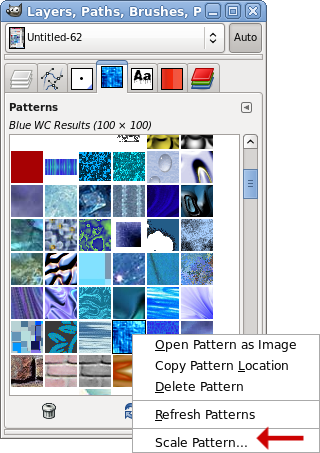
The scale pattern shows up in the patterns dialog. Right-click on a pattern and it's in the dropdown list. I have patterns docked in my layers window but if you don't, go to Windows > Dockable Dialogs and choose the Patterns dialog. You can operate the script from that.

Image

_________________
Image
World War IV will be fought with sticks and stones. - Albert Einstein


Top
 Post subject: Re: Darkwood - a cool Halloween font
PostPosted: Wed Oct 26, 2011 9:26 am  (#11) 
Offline
GimpChat Member
User avatar

Joined: Aug 24, 2011
Posts: 1785
Location: Dallas, TX
LOL - no problem. Thanks for the info.

Maybe we should start a thread where everyone could share their favorite/unusual patterns/textures that are not native to gimp. I've seen several screenshots on different threads that show some patterns I would like to have. Yours and Mahvin's in particular. I see a lot of people grabbing them everytime they get posted.

_________________
Image


Top
 Post subject: Re: Darkwood - a cool Halloween font
PostPosted: Wed Oct 26, 2011 9:31 am  (#12) 
Offline
Retired Staff
User avatar

Joined: May 22, 2008
Posts: 6946
Location: Somewhere in GIMP
Draconian wrote:
LOL - no problem. Thanks for the info.

Maybe we should start a thread where everyone could share their favorite/unusual patterns/textures that are not native to gimp. I've seen several screenshots on different threads that show some patterns I would like to have. Yours and Mahvin's in particular. I see a lot of people grabbing them everytime they get posted.
Sounds like a good idea. We could sticky it and the patterns could be posted.

Your dragon scales would be a good start. Love those dragon scales. :hehe

_________________
Image
World War IV will be fought with sticks and stones. - Albert Einstein


Top
 Post subject: Re: Darkwood - a cool Halloween font
PostPosted: Wed Oct 26, 2011 9:43 am  (#13) 
Offline
GimpChat Member
User avatar

Joined: Aug 24, 2011
Posts: 1785
Location: Dallas, TX
Thanks and good idea. If you'll get that puppy going, I'll put my 2 cents worth of stuff in there. What do you think about asking that posters inclue a jpeg with thumbnails of each pattern or texture posted if there are several? Kinda like what I did with the dragonscales post.

_________________
Image


Top
Post new topic Reply to topic  [ 13 posts ] 

All times are UTC - 5 hours [ DST ]


* Login  


Powered by phpBB3 © phpBB Group