It is currently Wed Oct 07, 2026 3:51 pm


All times are UTC - 5 hours [ DST ]


Post new topic Reply to topic  [ 33 posts ]  Go to page 1, 2  Next
Author Message
 Post subject: layerfx Contours chart
PostPosted: Thu Nov 01, 2012 10:35 pm  (#1) 
Offline
GimpChat Member
User avatar

Joined: Jul 17, 2012
Posts: 2769
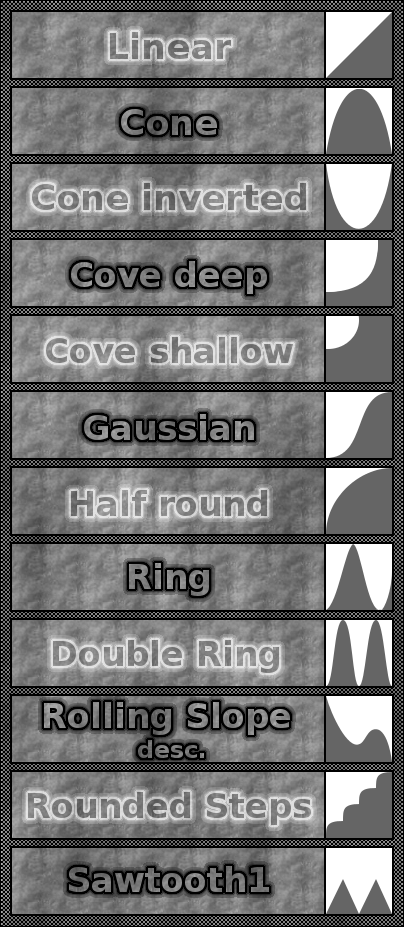
i made a little chart for the Contours of layerfx (Outer Glow for example), helps with understanding what each Contourmode does

Image


Share on Facebook Share on Twitter Share on Orkut Share on Digg Share on MySpace Share on Delicious Share on Technorati
Top
 Post subject: Re: layerfx Contours chart
PostPosted: Fri Nov 02, 2012 12:45 am  (#2) 
Offline
Script Coder
User avatar

Joined: Feb 18, 2011
Posts: 4826
Location: Bendigo Vic. Australia
Thank you Esper a very informative chart

_________________
Image
No matter how much you push the envelope, it'll still be stationery.


Top
 Post subject: Re: layerfx Contours chart
PostPosted: Fri Nov 02, 2012 4:39 am  (#3) 
Offline
GimpChat Member
User avatar

Joined: Aug 24, 2011
Posts: 1785
Location: Dallas, TX
Esper - You beat me to it! :gaah I woke up this morning and saw your post right off. I guess great minds think alike. :rofl I did one yesterday and intended to post it sometime today. Looks like now is a good time, huh.


Attachments:
Layer Effects Contours.jpg
Layer Effects Contours.jpg [ 178.41 KiB | Viewed 4483 times ]

_________________
Image
Top
 Post subject: Re: layerfx Contours chart
PostPosted: Fri Nov 02, 2012 8:25 am  (#4) 
Offline
GimpChat Member
User avatar

Joined: Jul 17, 2012
Posts: 2769
damn Drac, we need to improve on our telepathy

some of your diagrams look more precise to me

for all the people who dont know, these little pictures are a part of photoshop layerstyles
instead of a term, it has these little cross section diagrams for the Contour of your Glow/Shadow
its obviously a lot more intuitive

EDIT: here is an example
you can see how the Contour of the Outer Glow really looks like rounded Steps
Attachment:
rounded Steps.png
rounded Steps.png [ 35.39 KiB | Viewed 4467 times ]

two more:
Cone and inverted Cone
Attachment:
Cone.png
Cone.png [ 32.23 KiB | Viewed 4467 times ]

Attachment:
inverted Cone.png
inverted Cone.png [ 36.49 KiB | Viewed 4467 times ]


Last edited by Esper on Fri Nov 02, 2012 8:59 am, edited 3 times in total.

Top
 Post subject: Re: layerfx Contours chart
PostPosted: Fri Nov 02, 2012 8:45 am  (#5) 
Offline
GimpChat Member
User avatar

Joined: Apr 07, 2010
Posts: 14182
Very informative indeed, nice job.

_________________
Image


Top
 Post subject: Re: layerfx Contours chart
PostPosted: Fri Nov 02, 2012 9:23 am  (#6) 
Offline
Script Coder
User avatar

Joined: Apr 23, 2010
Posts: 1553
Location: not from Guildford after all
It might be nice if the text in the chart employed the associated contour, serving as both a description and an example.

_________________
Any sufficiently primitive technology is indistinguishable from a rock.


Top
 Post subject: Re: layerfx Contours chart
PostPosted: Fri Nov 02, 2012 9:26 am  (#7) 
Offline
GimpChat Member
User avatar

Joined: Jul 17, 2012
Posts: 2769
saulgoode wrote:
It might be nice if the text in the chart employed the associated contour, serving as both a description and an example.
im afraid in a lot of cases the Contour is too small to be recognizable


Top
 Post subject: Re: layerfx Contours chart
PostPosted: Fri Nov 02, 2012 10:16 am  (#8) 
Offline
GimpChat Member
User avatar

Joined: Aug 24, 2011
Posts: 1785
Location: Dallas, TX
Here ya go. These were done with Bevel & Emboss using the same settings and just different curves.

Image

_________________
Image


Top
 Post subject: Re: layerfx Contours chart
PostPosted: Fri Nov 02, 2012 10:37 am  (#9) 
Offline
GimpChat Member
User avatar

Joined: Jul 17, 2012
Posts: 2769
some very cool effects, Drac, i didnt expect that at all
are these Contours all applied with the same mode ?
because sometimes the bevel is white and sometimes black


Top
 Post subject: Re: layerfx Contours chart
PostPosted: Fri Nov 02, 2012 10:44 am  (#10) 
Offline
GimpChat Member
User avatar

Joined: Aug 24, 2011
Posts: 1785
Location: Dallas, TX
To be honest those were done in PS and I just happened to have them ready to go. The problem in emulating PS is figuring out the settings because same settings entered in LE work differently. These were all done with the exact same settings except I changed the Gloss Contour.

It is possible to get he same effects but it takes a WHOLOTTA of trial and error. Some I just said to heck with it and used my curves and a few layers to get the same result. Having said that, I still use LE quite a bit.

_________________
Image


Top
 Post subject: Re: layerfx Contours chart
PostPosted: Fri Nov 02, 2012 10:53 am  (#11) 
Offline
GimpChat Member
User avatar

Joined: Jul 17, 2012
Posts: 2769
it seems your goal is to emulate photoshop tuts as close as possible with layerfx
i wonder if layerfx needs a little workover

include the diagrams into the Contours dropdown menu
and when i used Stroke on my examples i noticed the line is all jaggy, i would get much better results if i stroked the path


Top
 Post subject: Re: layerfx Contours chart
PostPosted: Fri Nov 02, 2012 11:03 am  (#12) 
Offline
GimpChat Member
User avatar

Joined: Sep 22, 2012
Posts: 2089
Location: US
Nice job, guys!
I rarely used some of Outer glow effects, now after seeing your charts I definitely learned a thing or two, and now realize what I've been missing all that time!
Very useful charts. Thanks!


Top
 Post subject: Re: layerfx Contours chart
PostPosted: Fri Nov 02, 2012 11:19 am  (#13) 
Offline
GimpChat Member
User avatar

Joined: Aug 24, 2011
Posts: 1785
Location: Dallas, TX
Kite - You're welcome, at least for my part. It's all Espers fault. He started it. :)

Esper - Yes I agree. LE does need some work to make it easier to use. As long as we're wishing, let's change the whole thing and have it written in Python or better yet, included in GMIC as a separate section. that way you would get a preview window so you don't have to go back and forth twenty times to figure out the exact combination of settings you want. You could then create/assign presets to use. GMIC would be perfect for this cuz the sliders would make it easy to get close then tweak the settings from there.

_________________
Image


Top
 Post subject: Re: layerfx Contours chart
PostPosted: Fri Nov 02, 2012 4:07 pm  (#14) 
Offline
GimpChat Member
User avatar

Joined: Jul 17, 2012
Posts: 2769
Draconian wrote:
*snip*let's change the whole thing and have it written in Python or better yet, included in GMIC as a separate section. that way you would get a preview window so you don't have to go back and forth twenty times to figure out the exact combination of settings you want.

hm i disagree here
in my opinion it would be best to have it as an extra menu because in that way its most easily accessible
also i never felt the need for a preview window, because the preview on/off function works great for me

the advantage of an scm script is that its easily editable
i do this a lot, translating and assigning the location of the script - its a great way to personalize your Gimp
but then again i dont know about the differences and advantages between a scm script and a python script


Top
 Post subject: Re: layerfx Contours chart
PostPosted: Fri Nov 02, 2012 4:43 pm  (#15) 
Offline
GimpChat Member
User avatar

Joined: Aug 24, 2011
Posts: 1785
Location: Dallas, TX
Sounds like for your purposes, a script would be better. Still, it couldn't 'hoit' to have both. I'm not sure which one came first the Python version or the FX Foundry versions. I deleted all those a long time a go but the point is there are always folks trying to make things better and I'm surely grateful for that. I do hope that LE gets some attention in the near future.

_________________
Image


Top
 Post subject: Re: layerfx Contours chart
PostPosted: Mon Feb 04, 2013 9:34 am  (#16) 
Offline
GimpChat Member
User avatar

Joined: Jul 17, 2012
Posts: 2769
im resurrecting this thread because this topic comes up again and again but not all people seem to get it

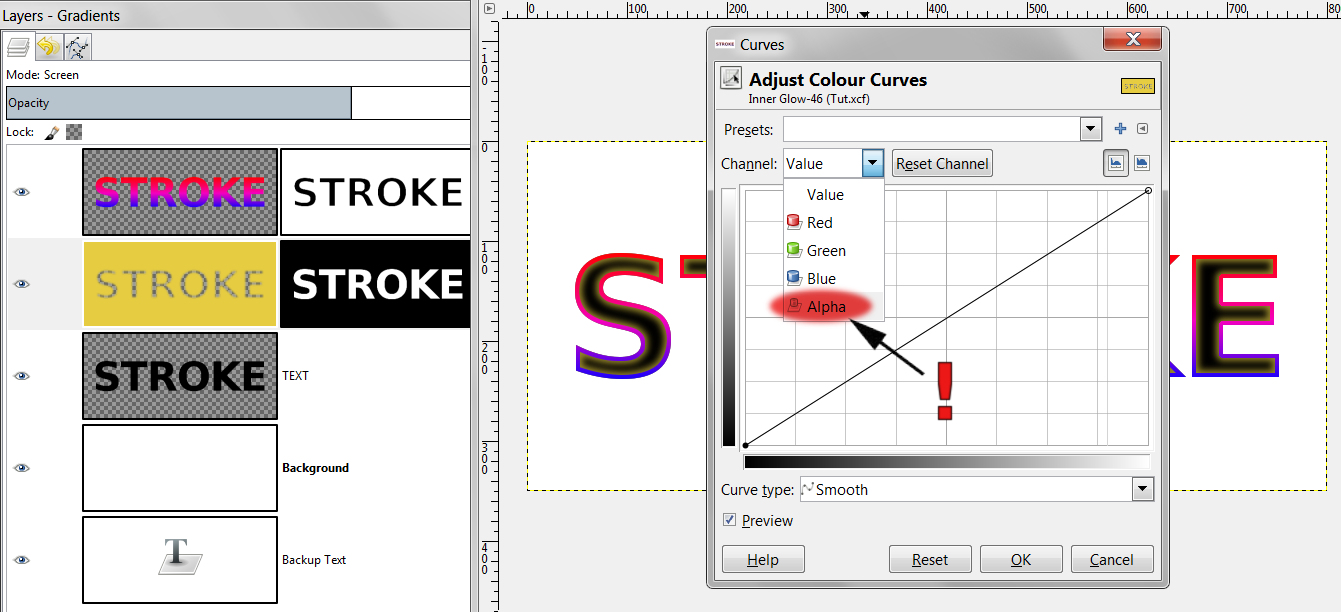
so i made all the contour curves that you can now download and put in your user - curves folder

some of these curves have been made by values from the layerfx-script and some of them i have made on my own - freehand so to speak
in my experience these curves dont have to look exactly like seen on the chart, a crude approach works just as well

to clarify: these curves are applied to the ALPHA CHANNEL of a gaussian blurred object, like an inner glow for example
Image
(picture is from this tutorial: viewtopic.php?f=23&t=6234)


Attachments:
Contour Curves - ESP.zip [22.12 KiB]
Downloaded 216 times
Top
 Post subject: Re: layerfx Contours chart
PostPosted: Mon Feb 04, 2013 9:49 am  (#17) 
Offline
GimpChat Member
User avatar

Joined: Apr 07, 2010
Posts: 14182
Thanks Esper...All these presets come up as dates in my drop down in the curves dialogue. How do I know what they are? Can they be named?

_________________
Image


Top
 Post subject: Re: layerfx Contours chart
PostPosted: Mon Feb 04, 2013 10:04 am  (#18) 
Offline
GimpChat Member
User avatar

Joined: Jul 17, 2012
Posts: 2769
what do you mean with "dates" molly, can you post a screenshot, pls ?

they should all have names...


Top
 Post subject: Re: layerfx Contours chart
PostPosted: Mon Feb 04, 2013 10:19 am  (#19) 
Offline
GimpChat Member
User avatar

Joined: Apr 07, 2010
Posts: 14182
The 2012 ones are the same. They are Dracs metal and they are just dates too.

Image

_________________
Image


Top
 Post subject: Re: layerfx Contours chart
PostPosted: Mon Feb 04, 2013 10:31 am  (#20) 
Offline
GimpChat Member
User avatar

Joined: Jul 17, 2012
Posts: 2769
hm, it doesnt look like that in my Gimp

put the curves in your user-curves-folder
import the curves and then add to your favorites (=Presets)
a menu pops up
here you can enter the description
i recommend: "Contours - contour-name"
Attachment:
Curves installation.png
Curves installation.png [ 101.19 KiB | Viewed 3303 times ]


Last edited by Esper on Mon Feb 04, 2013 1:19 pm, edited 4 times in total.

Top
Post new topic Reply to topic  [ 33 posts ]  Go to page 1, 2  Next

All times are UTC - 5 hours [ DST ]


* Login  


Powered by phpBB3 © phpBB Group