It is currently Thu Jun 04, 2026 10:20 pm


All times are UTC - 5 hours [ DST ]


Post new topic Reply to topic  [ 28 posts ]  Go to page 1, 2  Next
Author Message
 Post subject: Theme
PostPosted: Wed Nov 20, 2019 1:43 am  (#1) 
Offline
GimpChat Member

Joined: Nov 19, 2019
Posts: 209
Hi, I have been using GIMP for some time. I still have a lot to learn. So happy to find this website. If I may, will it be possible to have an alternate theme? Even default phpBB will do. This one is more like vB 3. Gradient bars are taking the attention. Please consider the theme change option through the User Control Panel or similar. Thanks.


Share on Facebook Share on Twitter Share on Orkut Share on Digg Share on MySpace Share on Delicious Share on Technorati
Top
 Post subject: Re: Theme
PostPosted: Sat Nov 23, 2019 6:44 am  (#2) 
Offline
GimpChat Member
User avatar

Joined: Mar 23, 2012
Posts: 7388
Location: Göteborg at last!
Can't help you with the theme but welcome to GC. :)


Top
 Post subject: Re: Theme
PostPosted: Tue Dec 24, 2019 9:00 pm  (#3) 
Offline
GimpChat Member

Joined: Nov 19, 2019
Posts: 209
Erisian wrote:
Can't help you with the theme but welcome to GC. :)


Thank you :)


Top
 Post subject: Re: Theme
PostPosted: Tue Dec 24, 2019 9:31 pm  (#4) 
Offline
Administrator
User avatar

Joined: Aug 10, 2012
Posts: 14011
Location: Native to NYC living in Arizona, Gimp 2.8 - 3.0, Win 11 PC.
Here are all the theme files I have.
Attachment:
Gimp Themes.zip [20.43 MiB]
Downloaded 454 times

_________________
Image
"A wise man learns more from a foolish question than a fool can learn from a wise answer"
Image


Top
 Post subject: Re: Theme
PostPosted: Tue Dec 24, 2019 9:50 pm  (#5) 
Offline
GimpChat Member
User avatar

Joined: Nov 04, 2015
Posts: 1442
I get the feeling he(she) is talking about the Gimp Chat theme rather than Gimp themes.
phpBB is bulletin board/forum software.


Top
 Post subject: Re: Theme
PostPosted: Tue Dec 24, 2019 9:58 pm  (#6) 
Offline
Administrator
User avatar

Joined: Aug 10, 2012
Posts: 14011
Location: Native to NYC living in Arizona, Gimp 2.8 - 3.0, Win 11 PC.
Tas_mania wrote:
I get the feeling he(she) is talking about the Gimp Chat theme rather than Gimp themes.
phpBB is bulletin board/forum software.

Right...
:oops:

_________________
Image
"A wise man learns more from a foolish question than a fool can learn from a wise answer"
Image


Top
 Post subject: Re: Theme
PostPosted: Tue Dec 24, 2019 10:34 pm  (#7) 
Offline
GimpChat Member

Joined: Nov 19, 2019
Posts: 209
Thanks for the GIMP themes. I never knew there are 3rd party themes.

As for the thread, yes, I requested for an alternate forum theme. I can help you find one if you need. :)


Top
 Post subject: Re: Theme
PostPosted: Wed Dec 25, 2019 1:12 am  (#8) 
Offline
Administrator
User avatar

Joined: Aug 10, 2012
Posts: 14011
Location: Native to NYC living in Arizona, Gimp 2.8 - 3.0, Win 11 PC.
meetdilip wrote:
Thanks for the GIMP themes. I never knew there are 3rd party themes.

As for the thread, yes, I requested for an alternate forum theme. I can help you find one if you need. :)

Contact Omega about the site theme.

_________________
Image
"A wise man learns more from a foolish question than a fool can learn from a wise answer"
Image


Top
 Post subject: Re: Theme
PostPosted: Sat Feb 03, 2024 5:21 am  (#9) 
Offline
GimpChat Member
User avatar

Joined: Jul 06, 2013
Posts: 2661
Location: California
Wallace wrote:
Here are all the theme files I have.
Attachment:
Gimp Themes.zip


Wallace, I've tried to use these themes, and they don't seem to work. Is there a way to get them to work? I'm using GIMP 2.10.36 on windows 10 64 bit. Can these themes be used without the theme selector? I also tried using the theme selector and it didn't work properly.


Top
 Post subject: Re: Theme
PostPosted: Sat Feb 03, 2024 11:02 am  (#10) 
Offline
Administrator
User avatar

Joined: Aug 10, 2012
Posts: 14011
Location: Native to NYC living in Arizona, Gimp 2.8 - 3.0, Win 11 PC.
mackenzieh wrote:
Wallace wrote:
Here are all the theme files I have.
Attachment:
Gimp Themes.zip


Wallace, I've tried to use these themes, and they don't seem to work. Is there a way to get them to work? I'm using GIMP 2.10.36 on windows 10 64 bit. Can these themes be used without the theme selector? I also tried using the theme selector and it didn't work properly.

All of the themes files I uploaded were for GIMP 2.8.
Sorry, I don't know how to get them to work.

_________________
Image
"A wise man learns more from a foolish question than a fool can learn from a wise answer"
Image


Top
 Post subject: Re: Theme
PostPosted: Sat Feb 03, 2024 2:46 pm  (#11) 
Offline
GimpChat Member
User avatar

Joined: Jul 06, 2013
Posts: 2661
Location: California
Wallace wrote:
mackenzieh wrote:
Wallace wrote:
Here are all the theme files I have.
Attachment:
Gimp Themes.zip


Wallace, I've tried to use these themes, and they don't seem to work. Is there a way to get them to work? I'm using GIMP 2.10.36 on windows 10 64 bit. Can these themes be used without the theme selector? I also tried using the theme selector and it didn't work properly.

All of the themes files I uploaded were for GIMP 2.8.
Sorry, I don't know how to get them to work.


Oh. That's a bummer.


Top
 Post subject: Re: Theme
PostPosted: Sat Feb 03, 2024 10:16 pm  (#12) 
I managed to test the one I have and all of them work for GIMP 2.10.36. You can download them from my dropbox, here is the link: https://www.dropbox.com/scl/fo/xp9zoato ... pp3o4&dl=0


Top
 Post subject: Re: Theme
PostPosted: Sun Feb 04, 2024 4:46 am  (#13) 
Offline
Global Moderator
User avatar

Joined: Apr 01, 2012
Posts: 8358
Location: On the other side of your screen
Where do they go Pocholo? I think I had the Licorice Blue one before.
I have put it in my theme folder from preferences as well as in the User > Gimp Folder > Themes

EDIT : Got it! I put it in the Gimp 2.10 folder and it worked straight away

_________________
Image
Free Fun Photo Editing & resources
Poems from the Lord
Gimp Newby
Gimp version 3.2.0 and GMIC-Qt 3.7.5 OS :- Windows 10 Home 64


Top
 Post subject: Re: Theme
PostPosted: Sun Feb 04, 2024 12:00 pm  (#14) 
Offline
GimpChat Member
User avatar

Joined: May 24, 2021
Posts: 859
Location: SEA - South East Asia
Pocholo wrote:
I managed to test the one I have and all of them work for GIMP 2.10.36. You can download them from my dropbox, here is the link: https://www.dropbox.com/scl/fo/xp9zoato ... pp3o4&dl=0

Only the "Simple" theme works, all others did not work on my distro

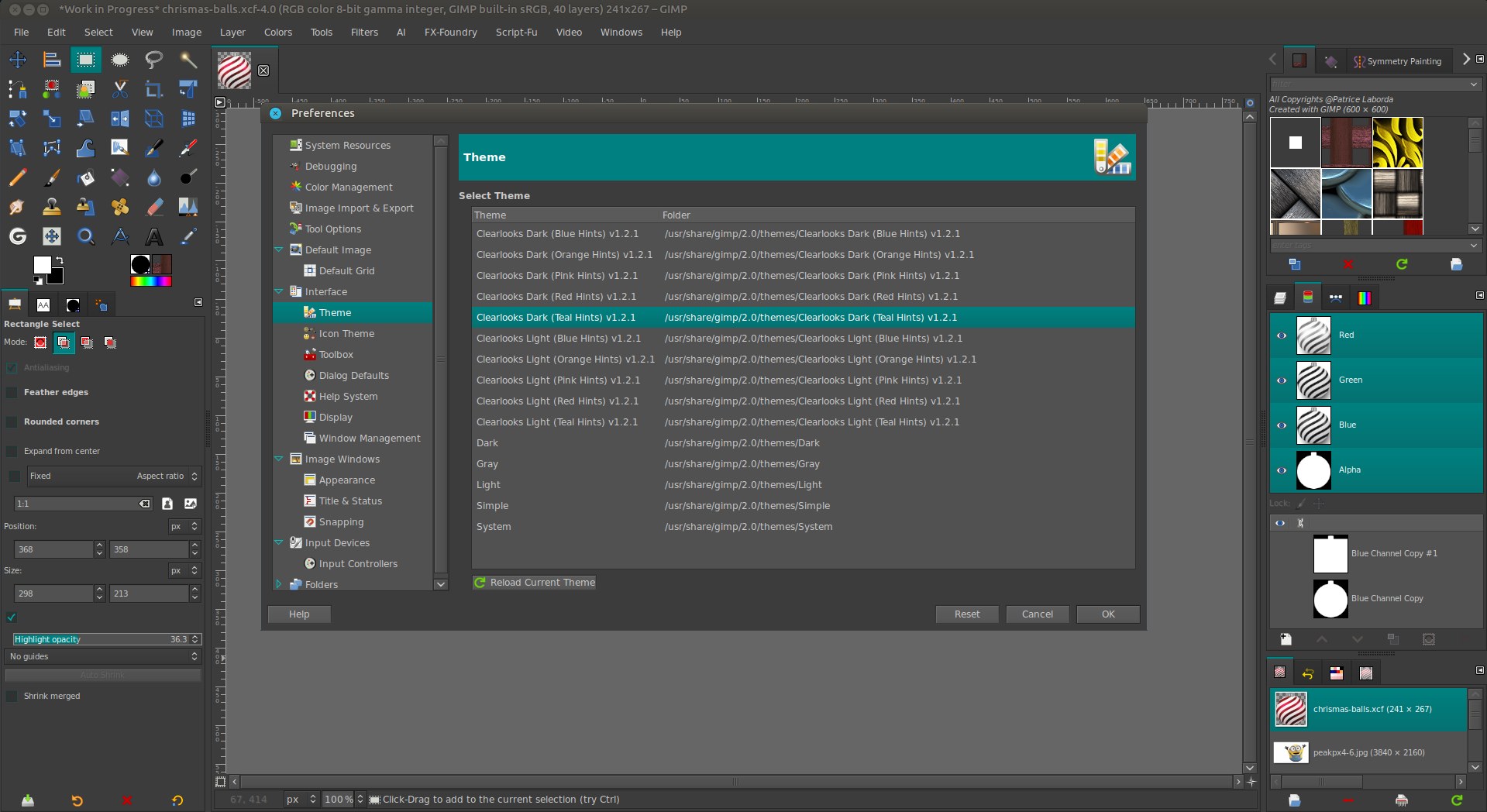
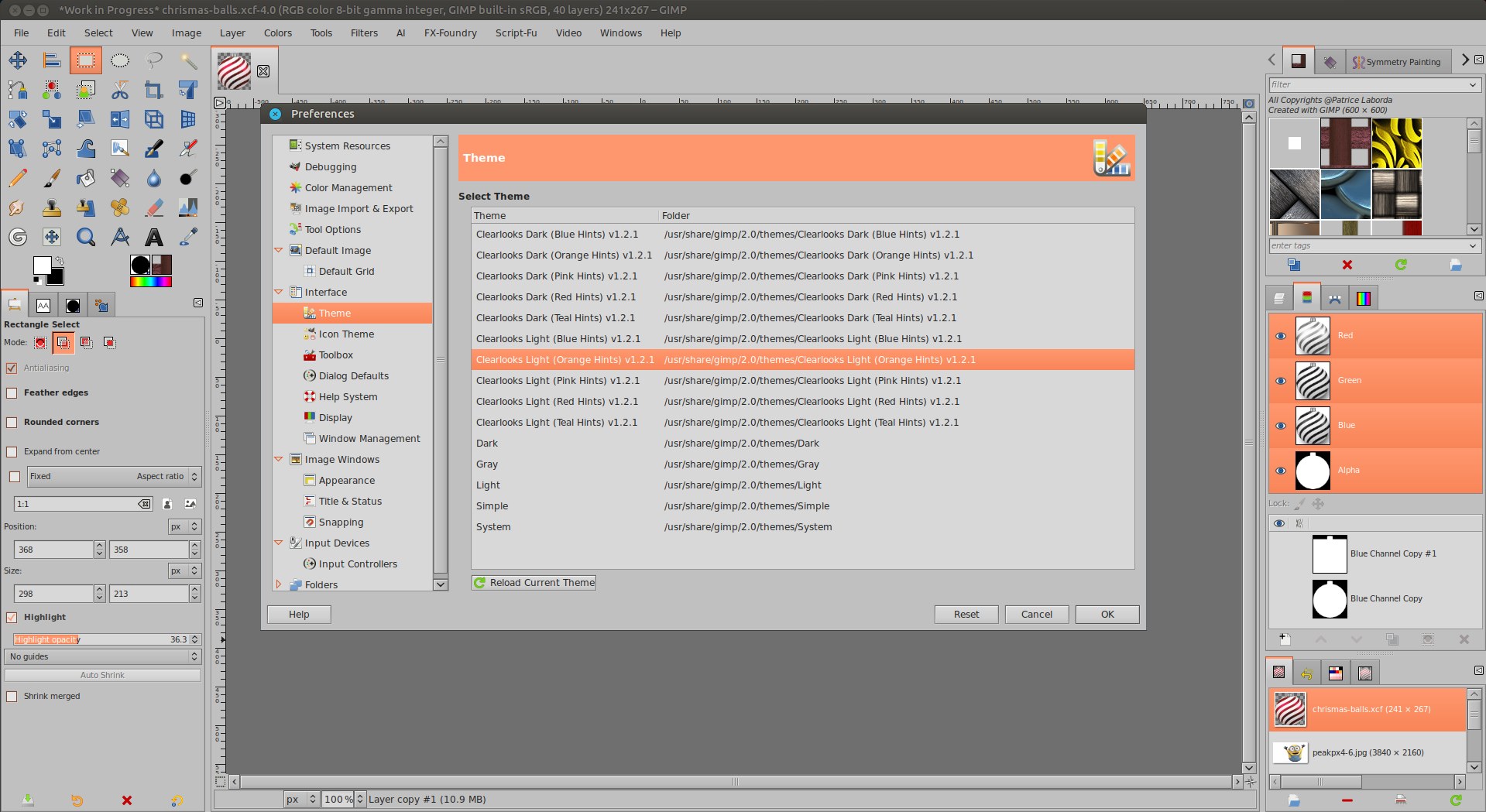
I have those ones if you gals/guys are interested (5 dark - 5 light) with different hint's colors
Attachment:
themes.7z [14.38 KiB]
Downloaded 138 times


Image

Image

_________________
Patrice


Top
 Post subject: Re: Theme
PostPosted: Sun Feb 04, 2024 12:06 pm  (#15) 
PixLab wrote:
Pocholo wrote:
I managed to test the one I have and all of them work for GIMP 2.10.36. You can download them from my dropbox, here is the link: https://www.dropbox.com/scl/fo/xp9zoato ... pp3o4&dl=0

Only the "Simple" theme works, all others did not work on my distro

I have those ones if you gals/guys are interested (5 dark - 5 light) with different hint's colors
Attachment:
themes.7z


[ Image ]

[ Image ]


I'm sorry, Patrice! It's only for Windows users. I don't have another OS.


Top
 Post subject: Re: Theme
PostPosted: Sun Feb 04, 2024 12:14 pm  (#16) 
Offline
GimpChat Member
User avatar

Joined: May 24, 2021
Posts: 859
Location: SEA - South East Asia
Pocholo wrote:
I'm sorry, Patrice! It's only for Windows users. I don't have another OS.

Ohh, OK, I did not know, I thought that themes like script and plugin were working on any OS ;)

EDIT: Um... looking at the gtkrc, they look written the very-same way whatever OS, I'm gonna have a deeper look into those gtkrc... ;)

_________________
Patrice


Top
 Post subject: Re: Theme
PostPosted: Sun Feb 04, 2024 1:01 pm  (#17) 
Offline
GimpChat Member

Joined: Mar 04, 2011
Posts: 2599
Well. I tried one of sallyannes files. Random choice - sepia. The zip unpacks to folders and a gtkrc file.

Using Kubuntu 22.04 / Gimp 2.10.36 (PPA) made a sepia folder in ~/.config/GIMP/2.10/themes for those files.

Seems to work but how ugly do you want ;)

Attachment:
theme.jpg
theme.jpg [ 128.03 KiB | Viewed 5052 times ]


Top
 Post subject: Re: Theme
PostPosted: Sun Feb 04, 2024 11:00 pm  (#18) 
Offline
GimpChat Member
User avatar

Joined: May 24, 2021
Posts: 859
Location: SEA - South East Asia
rich2005 wrote:
Well. I tried one of sallyannes files. Random choice - sepia. The zip unpacks to folders and a gtkrc file.
Using Kubuntu 22.04 / Gimp 2.10.36 (PPA) made a sepia folder in ~/.config/GIMP/2.10/themes for those files.
Attachment:
theme.jpg


I tried your location for the theme Coffee, not working, but I found something in the gtkrc (#fix for caja)
# fix for caja
style "caja-location" {
   bg[NORMAL]  = mix (0.60, shade (1.05, @bg_color), @bg_color)
}
widget "*.caja-extra-view-widget" style : highest "caja-location"

The MATE desktop environement I use, uses Caja as files browser, so there is something with my DE, not with Linux, but with the MATE Desktop Environment.

rich2005 wrote:
Seems to work but how ugly do you want ;)

Indeed :rofl
And by looking at some buttons and images in some folders, it looks like a lot of themes are just distracting from the canvas by their ugliness :shock:

_________________
Patrice


Top
 Post subject: Re: Theme
PostPosted: Mon Feb 05, 2024 4:45 am  (#19) 
Offline
GimpChat Member
User avatar

Joined: Jul 06, 2013
Posts: 2661
Location: California
These themes do not work. I've tried them many times on my machine and they throw an error.


Top
 Post subject: Re: Theme
PostPosted: Mon Feb 05, 2024 5:12 am  (#20) 
Offline
GimpChat Member

Joined: Mar 04, 2011
Posts: 2599
mackenzieh wrote:
These themes do not work. I've tried them many times on my machine and they throw an error.


If you want to try out one of Pocholo's themes from the dropbox collection it might go like this.

https://youtu.be/Gv_tO9g5758 2 minutes

www.youtube.com Video from : www.youtube.com


Top
Post new topic Reply to topic  [ 28 posts ]  Go to page 1, 2  Next

All times are UTC - 5 hours [ DST ]


* Login  


Powered by phpBB3 © phpBB Group