It is currently Sat Sep 05, 2026 6:29 am


All times are UTC - 5 hours [ DST ]


Post new topic Reply to topic  [ 7 posts ] 
Author Message
 Post subject: Is it just me or is the browse button ...
PostPosted: Fri Jul 05, 2013 2:26 am  (#1) 
Offline
Global Moderator
User avatar

Joined: May 16, 2010
Posts: 16169
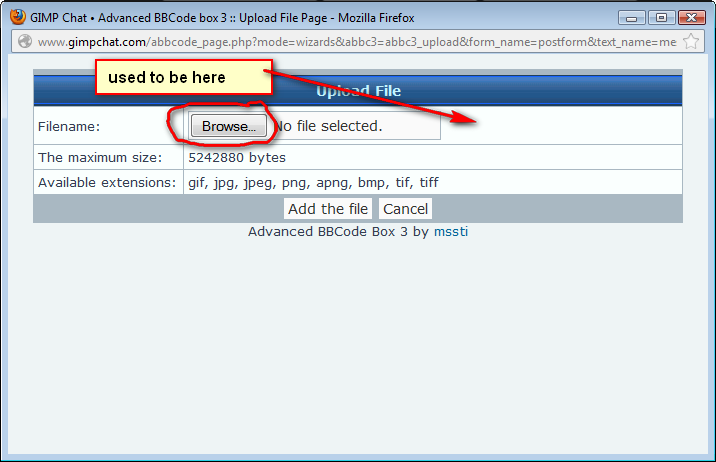
...now on the opposite side of the upload dialog widget? :)

Image

_________________
Image


Share on Facebook Share on Twitter Share on Orkut Share on Digg Share on MySpace Share on Delicious Share on Technorati
Top
 Post subject: Re: Is it just me or is the browse button ...
PostPosted: Fri Jul 05, 2013 6:12 am  (#2) 
Offline
GimpChat Founder
User avatar

Joined: May 22, 2008
Posts: 5241
Location: Gimpville
You're right, Rod (see here). The website code hasn't changed but it looks like the implementation of the code has changed. It appears the functionality is the same so I suppose that is what matters.

Image

_________________
“If you reach for the stars, you just might land on a decently sized hill.” - Stuart Hill


Top
 Post subject: Re: Is it just me or is the browse button ...
PostPosted: Fri Jul 05, 2013 7:11 am  (#3) 
Offline
Global Moderator
User avatar

Joined: Apr 01, 2012
Posts: 8470
Location: On the other side of your screen
I wondered why I had trouble finding it at first. (Was going to the opposite side all the time)

_________________
Image
Free Fun Photo Editing & resources
Poems from the Lord
Gimp Newby
Gimp version 3.2.4 and GMIC-Qt 4.0.2 OS :- Windows 10 Home 64


Top
 Post subject: Re: Is it just me or is the browse button ...
PostPosted: Fri Jul 05, 2013 8:05 am  (#4) 
Offline
Global Moderator
User avatar

Joined: May 16, 2010
Posts: 16169
You can either click the browse button or the text field to get the file browser to come up. It does work fine so it doesn't matter to me either way.
Thanks Tux i thought i was going senile there for a moment. :lol

_________________
Image


Top
 Post subject: Re: Is it just me or is the browse button ...
PostPosted: Fri Jul 05, 2013 8:15 am  (#5) 
Offline
GimpChat Founder
User avatar

Joined: May 22, 2008
Posts: 5241
Location: Gimpville
Here is what it looks like in Opera 12.13

Image

Looks like the latest version of Firefox is giving us the new look.

_________________
“If you reach for the stars, you just might land on a decently sized hill.” - Stuart Hill


Top
 Post subject: Re: Is it just me or is the browse button ...
PostPosted: Fri Jul 05, 2013 8:29 am  (#6) 
Offline
Global Moderator
User avatar

Joined: May 16, 2010
Posts: 16169
GnuTux wrote:
Here is what it looks like in Opera 12.13

[ Image ]

Looks like the latest version of Firefox is giving us the new look.


Yeah that is probably the cause. I just updated FireFox. :)

_________________
Image


Top
 Post subject: Re: Is it just me or is the browse button ...
PostPosted: Sat Jul 06, 2013 1:34 am  (#7) 
Offline
Global Moderator
User avatar

Joined: Apr 01, 2012
Posts: 8470
Location: On the other side of your screen
Mine just updated too Rod so that could be it

_________________
Image
Free Fun Photo Editing & resources
Poems from the Lord
Gimp Newby
Gimp version 3.2.4 and GMIC-Qt 4.0.2 OS :- Windows 10 Home 64


Top
Post new topic Reply to topic  [ 7 posts ] 

All times are UTC - 5 hours [ DST ]


* Login  


Powered by phpBB3 © phpBB Group