It is currently Thu Sep 17, 2026 7:21 pm


All times are UTC - 5 hours [ DST ]


Post new topic Reply to topic  [ 95 posts ]  Go to page 1, 2, 3, 4, 5  Next
Author Message
 Post subject: My monitor is still shutting down every day [hopefully solved]
PostPosted: Tue Aug 12, 2014 6:29 pm  (#1) 
Offline
GimpChat Member
User avatar

Joined: Apr 07, 2010
Posts: 14182
This is on my desktop and I can't get rid of it. I couldn't even take a screen shot, it comes out transparent with no text. I had to take a picture with my camera.
Image

_________________
Image


Share on Facebook Share on Twitter Share on Orkut Share on Digg Share on MySpace Share on Delicious Share on Technorati
Top
 Post subject: Re: I can't get rid of the black auto select (analog) thing
PostPosted: Tue Aug 12, 2014 6:48 pm  (#2) 
Offline
GimpChat Founder
User avatar

Joined: May 22, 2008
Posts: 5241
Location: Gimpville
That looks like an analog video connector for displays.

Perhaps the display cable is loose or a video card has gone bad?

_________________
“If you reach for the stars, you just might land on a decently sized hill.” - Stuart Hill


Top
 Post subject: Re: I can't get rid of the black auto select (analog) thing
PostPosted: Tue Aug 12, 2014 6:58 pm  (#3) 
Offline
GimpChat Member
User avatar

Joined: Apr 07, 2010
Posts: 14182
So, would that be the monitor? I could t turn it off, I had to pull out the plug.

_________________
Image


Top
 Post subject: Re: I can't get rid of the black auto select (analog) thing
PostPosted: Tue Aug 12, 2014 6:59 pm  (#4) 
Offline
GimpChat Founder
User avatar

Joined: May 22, 2008
Posts: 5241
Location: Gimpville
Yes. The monitor is probably telling you what type of connector it found on the computer. Are you normally connected via a digital or HDMI connector?

_________________
“If you reach for the stars, you just might land on a decently sized hill.” - Stuart Hill


Top
 Post subject: Re: I can't get rid of the black auto select (analog) thing
PostPosted: Tue Aug 12, 2014 7:02 pm  (#5) 
Offline
Administrator
User avatar

Joined: Aug 10, 2012
Posts: 14206
Location: Native to NYC living in Arizona, Gimp 2.8 - 3.0, Win 11 PC.
GnuTux wrote:
That looks like an analog video connector for displays. Perhaps the display cable is loose or a video card has gone bad?

I agree with Tux, could be a loose/bad cable. I hope it's not a bad video card.
Also you could check to see if you need any driver updates. Not sure if you even use drivers, this is on Windows right?

_________________
Image
"A wise man learns more from a foolish question than a fool can learn from a wise answer"
Image


Top
 Post subject: Re: I can't get rid of the black auto select (analog) thing
PostPosted: Tue Aug 12, 2014 7:05 pm  (#6) 
Offline
GimpChat Member
User avatar

Joined: Apr 07, 2010
Posts: 14182
I don't know what those are. My monitor is connected to the PC with the cable that came with it, then a plug to the power bar.
No Wallace, I am on fedora.

_________________
Image


Top
 Post subject: Re: I can't get rid of the black auto select (analog) thing
PostPosted: Tue Aug 12, 2014 7:08 pm  (#7) 
Offline
Administrator
User avatar

Joined: Aug 10, 2012
Posts: 14206
Location: Native to NYC living in Arizona, Gimp 2.8 - 3.0, Win 11 PC.
molly wrote:
I don't know what those are. My monitor is connected to the PC with the cable that came with it, then a plug to the power bar.
No Wallace, I am on fedora.

I guess you don't use drivers? Make sure the cable form the PC to the monitor is well seated. You may even want to unplug it for both and replug it back and make sure it in there good.

_________________
Image
"A wise man learns more from a foolish question than a fool can learn from a wise answer"
Image


Top
 Post subject: Re: I can't get rid of the black auto select (analog) thing
PostPosted: Tue Aug 12, 2014 7:15 pm  (#8) 
Offline
GimpChat Member
User avatar

Joined: Apr 07, 2010
Posts: 14182
I will try all that in the morning Wallace. I am in bed with my iPad and I have the monitor unplugged and the PC put to bed.
Last week when I turned my PC on, the monitor wouldn't come on. I unplugged it and tried it in another outlet and it was fine. I plugged it back where it was and it worked okay until tonight.

_________________
Image


Top
 Post subject: Re: I can't get rid of the black auto select (analog) thing
PostPosted: Tue Aug 12, 2014 7:17 pm  (#9) 
Offline
Administrator
User avatar

Joined: Aug 10, 2012
Posts: 14206
Location: Native to NYC living in Arizona, Gimp 2.8 - 3.0, Win 11 PC.
Okay Molly. (fingers crossed) ;)

_________________
Image
"A wise man learns more from a foolish question than a fool can learn from a wise answer"
Image


Top
 Post subject: Re: I can't get rid of the black auto select (analog) thing
PostPosted: Tue Aug 12, 2014 7:20 pm  (#10) 
Offline
GimpChat Founder
User avatar

Joined: May 22, 2008
Posts: 5241
Location: Gimpville
Yes, good suggestion. Trace the cable(s) from your monitor to your PC. There only needs to be one cable connected. However, some monitors can connect in 3 different ways: Analog, Digital and HDMI (digital video & sound). You may have multiple connections.

It's possible that your monitor is connected via analog and digital/HDMI and one of the cables is loose (or bad). It's also possible there are issues with the video card or even the monitor itself. Determining how your monitor is connected to the PC & checking the cables is the 1st step.

When did this start?

_________________
“If you reach for the stars, you just might land on a decently sized hill.” - Stuart Hill


Top
 Post subject: Re: I can't get rid of the black auto select (analog) thing
PostPosted: Tue Aug 12, 2014 7:27 pm  (#11) 
Offline
GimpChat Member
User avatar

Joined: Apr 07, 2010
Posts: 14182
Last week, when I turned the PC on, the monitor didn't come on , read my last post, I explained there. This one finger typing is slow

_________________
Image


Top
 Post subject: Re: I can't get rid of the black auto select (analog) thing
PostPosted: Tue Aug 12, 2014 7:44 pm  (#12) 
Offline
Administrator
User avatar

Joined: Aug 10, 2012
Posts: 14206
Location: Native to NYC living in Arizona, Gimp 2.8 - 3.0, Win 11 PC.
molly wrote:
Last week, when I turned the PC on, the monitor didn't come on , read my last post, I explained there. This one finger typing is slow

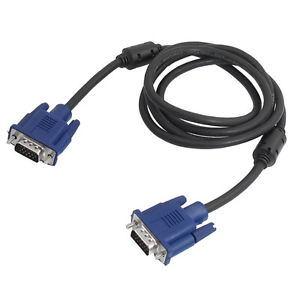
The most common cable going from a desktop PC to monitor looks like this one.
Image
Make sure it has a good connection.
This does not explain why your typing is slow. Try redoing the cable.
Do you know what kind of video card you have?


I found this on a Linux Forum, not sure if this applies to your keyboard issue...

Re: Slow keyboard response time?
I don't think this has anything to do with the keyboard. This may have to do with 'slow keys' a feature similar to windows sticky keys. Hold down your shift button for 8 seconds and then hit deactivate on the dialog that pops up, that should hopefully fix it. Before I realized what was happening I upgraded mint 8 to 9 and that also seemed to fix it. Hope this helps.

_________________
Image
"A wise man learns more from a foolish question than a fool can learn from a wise answer"
Image


Last edited by Wallace on Tue Aug 12, 2014 8:16 pm, edited 1 time in total.

Top
 Post subject: Re: I can't get rid of the black auto select (analog) thing
PostPosted: Tue Aug 12, 2014 8:13 pm  (#13) 
Offline
GimpChat Member
User avatar

Joined: Apr 07, 2010
Posts: 14182
No, I don't even know what they look like. Or where they are.
My typing is slow cuz this is a touch pad, nite
And yes, my cable looks like that

_________________
Image


Top
 Post subject: Re: I can't get rid of the black auto select (analog) thing
PostPosted: Tue Aug 12, 2014 8:18 pm  (#14) 
Offline
Administrator
User avatar

Joined: Aug 10, 2012
Posts: 14206
Location: Native to NYC living in Arizona, Gimp 2.8 - 3.0, Win 11 PC.
molly wrote:
No, I don't even know what they look like. Or where they are.
My typing is slow cuz this is a touch pad, nite
And yes, my cable looks like that


Okay Molly. Let us know what's happening tomorrow. ;)

_________________
Image
"A wise man learns more from a foolish question than a fool can learn from a wise answer"
Image


Top
 Post subject: Re: I can't get rid of the black auto select (analog) thing
PostPosted: Tue Aug 12, 2014 8:21 pm  (#15) 
Offline
GimpChat Member

Joined: Aug 12, 2014
Posts: 29
Molly,
Wallace hit the nail on the head with his advice. Usually, that display info is due to a plug being disconnected, or if your monitor has glitch power. Turn all off, reseat all plugs, and you should be good to go. Worked in electronics many years ago.
Good luck! :bigthup
S
:)


Top
 Post subject: Re: I can't get rid of the black auto select (analog) thing
PostPosted: Wed Aug 13, 2014 1:52 am  (#16) 
Offline
GimpChat Member
User avatar

Joined: Nov 16, 2011
Posts: 5127
Location: Metro Vancouver, BC
If all else fails test your monitor and cable on your hubby's PC. If that doesn't work, try his cable on your monitor.
Your Sherlock will find the right culprit. :pipe

_________________
Image
Gimp 2.8.18, Linux, median user
Gimp Chat Tutorials Index
Spirit Bear (Kermode)


Top
 Post subject: Re: I can't get rid of the black auto select (analog) thing
PostPosted: Wed Aug 13, 2014 2:05 am  (#17) 
Offline
Script Coder
User avatar

Joined: Oct 25, 2010
Posts: 4812
IMHO it's something completely local to the monitor. You may have hit a button. Cut the power on the monitor to reset it.

_________________
Image


Top
 Post subject: Re: I can't get rid of the black auto select (analog) thing
PostPosted: Wed Aug 13, 2014 4:18 am  (#18) 
Offline
GimpChat Member
User avatar

Joined: Apr 07, 2010
Posts: 14182
Yes, I agree ofnuts, Wallace and Tux. Last night I unplugged the monitor and plugged it in this morning and it is fine now so for now everything is fine. I just hope it isn't the beginning of the end for the monitor. There are so many dam plugs back behind it is like a maze.
I will have to check the cable connections later this morning to make sure they are tight.
Thank you guys

_________________
Image


Top
 Post subject: Re: I can't get rid of the black auto select (analog) thing
PostPosted: Wed Aug 13, 2014 12:46 pm  (#19) 
Offline
Administrator
User avatar

Joined: Aug 10, 2012
Posts: 14206
Location: Native to NYC living in Arizona, Gimp 2.8 - 3.0, Win 11 PC.
molly wrote:
Yes, I agree ofnuts, Wallace and Tux. Last night I unplugged the monitor and plugged it in this morning and it is fine now so for now everything is fine. I just hope it isn't the beginning of the end for the monitor. There are so many dam plugs back behind it is like a maze.
I will have to check the cable connections later this morning to make sure they are tight.
Thank you guys


From the very faint buzzing/humming sound produced by electrical current, (often time imperceptible) flowing through a given system. The mechanical connections that are present, can over time be shaken loose or even become totally disconnected from their counter parts.
Loose connections can also arc when the wire or circuit is under a load, most notable in higher voltage systems. Causing heat that over time can expand any metal parts, helping to contribute to the loosening of a physical electrical connection of a device in a system.
There are also other factors that can contribute to the loosening of these kind of connections, ie. physical movement near/adjacent a device or physical movement of the device itself, environmental factors; like temperature/humidity etc.

Keep us informed of this issue.

_________________
Image
"A wise man learns more from a foolish question than a fool can learn from a wise answer"
Image


Top
 Post subject: Re: I can't get rid of the black auto select (analog) thing[SOLVED]
PostPosted: Wed Aug 13, 2014 12:55 pm  (#20) 
Offline
GimpChat Member
User avatar

Joined: Apr 07, 2010
Posts: 14182
Thank you Wallace,I will.

_________________
Image


Top
Post new topic Reply to topic  [ 95 posts ]  Go to page 1, 2, 3, 4, 5  Next

All times are UTC - 5 hours [ DST ]


* Login  


Powered by phpBB3 © phpBB Group