It is currently Sun Sep 06, 2026 2:20 am


All times are UTC - 5 hours [ DST ]


Post new topic Reply to topic  [ 13 posts ] 
Author Message
 Post subject: Got my new tablet
PostPosted: Fri Apr 01, 2011 9:40 am  (#1) 
Offline
Global Moderator
User avatar

Joined: May 16, 2010
Posts: 16169
Oh i love this thing, ill have to post some art soon.
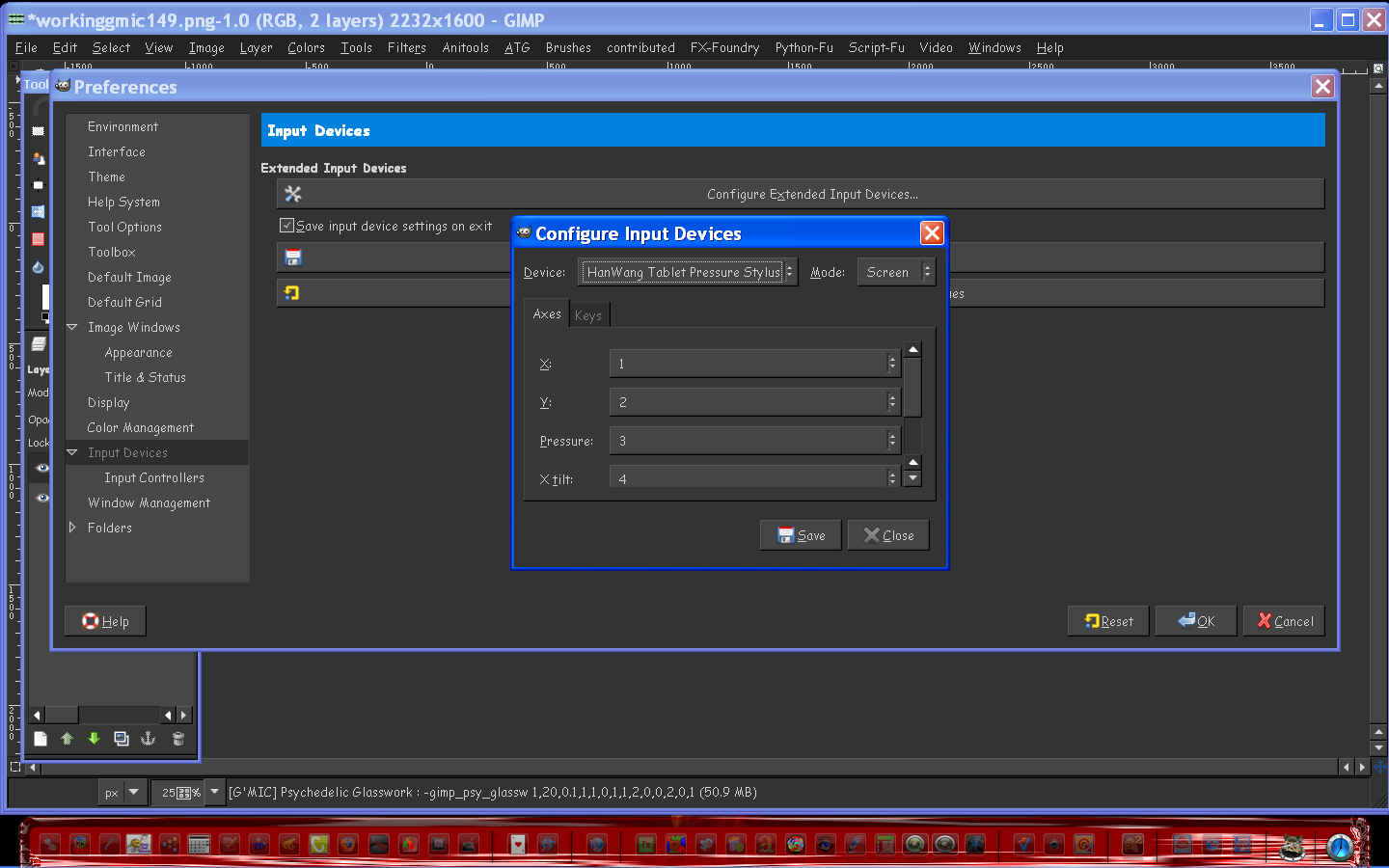
This tablet works great with Gimp.
http://www.telbak.com/Pen-Tablet-Small.php

Very easy to set up also.
I am very happy with it.The pressure sensitivity must have been set before i got it because it is perfect.

Though my CD drive doesn't open i downloaded and installed the driver from the website.
That didn't work for some odd reason so i put the CD disc that comes with the tablet in my
Laptop and browsed the CD directory.Then i created a zip file and placed all those files except manual in it.
Preserving the actual directory tree.
Manual itself was 100 mb :lol - without manual added the zip was about 200 mb.
Then i uploaded the zip to MediaFire.Then i just downloaded my zip to my desktop with the broken CD Drive and ran the flash autorun file.Clicked on install tablet driver and then restarted the computer.

More than one way to skin a tablet. :wh

Worked excellent! :)

_________________
Image


Share on Facebook Share on Twitter Share on Orkut Share on Digg Share on MySpace Share on Delicious Share on Technorati
Top
 Post subject: Re: Got my new tablet
PostPosted: Fri Apr 01, 2011 10:19 am  (#2) 
Offline
Retired Staff
User avatar

Joined: May 22, 2008
Posts: 6946
Location: Somewhere in GIMP
Congrats, Rod. :clap

_________________
Image
World War IV will be fought with sticks and stones. - Albert Einstein


Top
 Post subject: Re: Got my new tablet
PostPosted: Fri Apr 01, 2011 2:25 pm  (#3) 
Offline
Script Coder
User avatar

Joined: Jul 14, 2010
Posts: 697
Welcome to the dark side!

Does gimp support both the angle and pressure from that tablet?

-Rob A>

_________________
Image
Fantasy Cartography and Mapping by RobA


Top
 Post subject: Re: Got my new tablet
PostPosted: Fri Apr 01, 2011 2:57 pm  (#4) 
Offline
GimpChat Member
User avatar

Joined: Mar 02, 2011
Posts: 1850
Location: Michigan
Congrats, and I hope to see some of your work soon :D

_________________
Image
I'm back I think


Top
 Post subject: Re: Got my new tablet
PostPosted: Fri Apr 01, 2011 6:04 pm  (#5) 
Offline
Global Moderator
User avatar

Joined: May 16, 2010
Posts: 16169
RobA wrote:
Welcome to the dark side!

Does gimp support both the angle and pressure from that tablet?

-Rob A>


Seems too :)

_________________
Image


Top
 Post subject: Re: Got my new tablet
PostPosted: Fri Apr 01, 2011 7:55 pm  (#6) 
Offline
GimpChat Member

Joined: Apr 11, 2010
Posts: 545
Location: In the mini-chat, saying silly things
Smart way of getting that software on your computer.
Hopefully you're better at digital painting then I am. We'd like to see your work soon. :)

_________________
Image


Top
 Post subject: Re: Got my new tablet
PostPosted: Fri Apr 01, 2011 7:59 pm  (#7) 
Offline
GimpChat Member

Joined: Mar 07, 2011
Posts: 206
wut does this have to do with gimp?


Top
 Post subject: Re: Got my new tablet
PostPosted: Fri Apr 01, 2011 8:00 pm  (#8) 
Offline
GimpChat Member
User avatar

Joined: Mar 02, 2011
Posts: 1850
Location: Michigan
GIMP Goes on the Tablet, and Probably MyPaint and Inkscape?

_________________
Image
I'm back I think


Top
 Post subject: Re: Got my new tablet
PostPosted: Fri Apr 01, 2011 9:49 pm  (#9) 
Offline
GimpChat Member

Joined: Feb 06, 2011
Posts: 342
Yay! Glad you got your tablet Rod. Are those settings default or need to be changed? Just wondering is all. :) Have fun and will wait patiently for your work. :)


Liana


Top
 Post subject: Re: Got my new tablet
PostPosted: Sat Apr 02, 2011 1:41 am  (#10) 
Offline
GimpChat Member
User avatar

Joined: Jun 24, 2010
Posts: 504
Location: Western Vic Australia
Rod, is that a windows gimp that the tablet is installed on? If so which version?

_________________
Image


Top
 Post subject: Re: Got my new tablet
PostPosted: Sat Apr 02, 2011 4:48 am  (#11) 
Offline
GimpChat Member
User avatar

Joined: Apr 30, 2010
Posts: 1937
Location: Missouri
I quickly fell in love with my bamboo, it opens a whole new area in Gimp and Inkscape, I hope you have a much fun with yours.

_________________
Image
The last time I kept an open mind,
my brain fell out and the dog grabbed it.
Now it's full of dirt, toothmarks, and dog slobber.
No more open minds or dogs for me.


Top
 Post subject: Re: Got my new tablet
PostPosted: Sat Apr 02, 2011 7:27 am  (#12) 
Offline
Global Moderator
User avatar

Joined: May 16, 2010
Posts: 16169
Quote:
Smart way of getting that software on your computer.
Hopefully you're better at digital painting then I am. We'd like to see your work soon. :)


I don't know about that Jolie, but it feels a whole lot better in my hand than the mouse.So much more natural.

Quote:
wut does this have to do with gimp?

With most graphic software you can add a graphics tablet and pen.It is more like actual drawing because you use a pen like tool not the mouse.More control and pressure sensitive like your real hand would be.Many digital artist use a tablet.

Quote:
GIMP Goes on the Tablet, and Probably MyPaint and Inkscape?

Yes that is correct, almost any graphics program can use the same tablet.I have yet to test all mine.Gimp was mainly what i wanted to test with it. :)

Quote:
Yay! Glad you got your tablet Rod. Are those settings default or need to be changed? Just wondering is all. :) Have fun and will wait patiently for your work. :)


Liana


My settings were pretty much exactly the way i needed them when the tablet arrived.I didn't need to set anything.Just install the driver and started drawing. :)
Thanks Liana, this tablet is really awesome.I am so glad you directed me to it.Gimp realized the hardware almost instantly.At first i thought "HanWang" what the heck-- :lol . Until i realized that was the actual product company for the tablet.The settings are default and i haven't found the need to change any of them.I may change the speed not sure yet though.

Quote:
Rod, is that a windows gimp that the tablet is installed on? If so which version?


Yes it is Windows XP with Gimp-2.6.11. :)

Thanks for all the comments guys, and i'll try and get some art work out here soon.Thinking of maybe a forest scene with a log cabin and creek.My dream home. :lol

Quote:
I quickly fell in love with my bamboo, it opens a whole new area in Gimp and Inkscape, I hope you have a much fun with yours.


I have already, i do not understand why computers do not just come with one installed.I love the cordless feel.
A couple of times i tried to draw off the screen, i may have to change the speed and slow it down i guess.Or maybe i was just in a hurry. Either way i love my new tablet! :)

_________________
Image


Top
 Post subject: Re: Got my new tablet
PostPosted: Sat Apr 02, 2011 9:47 pm  (#13) 
Offline
GimpChat Member
User avatar

Joined: May 22, 2010
Posts: 54
lol, glad you like it Rod

it is, indeed, fun to use

_________________
I AM DARK LITE
Image
WELCOME TO NoGo


Top
Post new topic Reply to topic  [ 13 posts ] 

All times are UTC - 5 hours [ DST ]


* Login  


Powered by phpBB3 © phpBB Group